





T_Matz
Members
-
Joined
-
Last visited
-
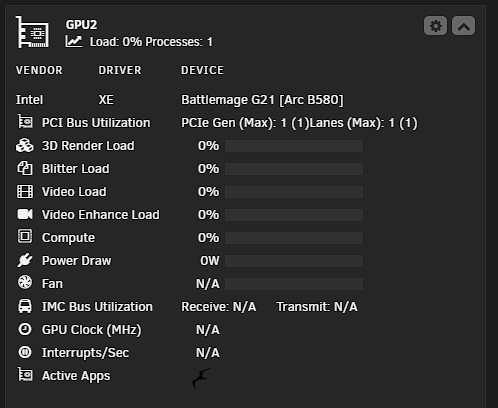
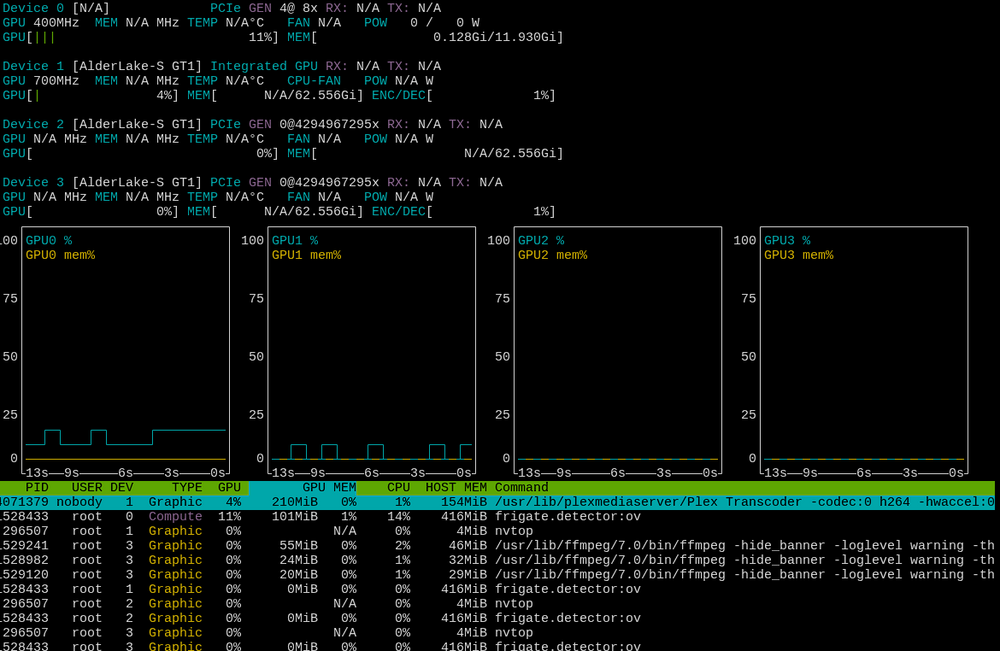
Any info when Battlemage cards will be supported? I can see applications are using the card but no stats. If i use NVTOP inside unraid terminal i can see stats of the card.
-
i have the intel-gpu-top installed and nvtop installed. Maybe im in the wrong area Im just looking for the GPU stats plugin to get the data Ill message over there. When im in terminal and enter NVTOP i see the stats.
-
Oh I wasnt tracking that! I know my battlemage card works i just cant see any details on whats happeneing with it. Ill try and find these other tools you are talkingabout unless you have more details.
-
When will the intel gpu top support battlemage cards?
-
Yes I did as well. Unsure if we need to do that with the upcoming repository releases or what the plan is.
-
Thank you for the response and assistance! From my understanding unraid past 7.1 has the Linux kernal to support battlemage and I can see the driver on my system. I'm using it for my immich docker now (Intel top still doesn't show utilization but can confirm ML and transcoding are using the GPU). I appreciate everything you do! It looks like it's not to far away this is the release the Plex team stated it would be released Plex Media Server 1.43.1.10495-10cfae054.
-
It looks like plex will be supporting battlemage soon do we know when the arch plex distro will be getting this support?
-
I didnt change any of the filesystem locations. root@Tower:~# getfattr --absolute-names --only-values -n system.LOCATION /mnt/user/isos/virtio-win-0.1.262-2.iso cache root@Tower:~# this matches where the file is located.
-
Hi all, Looking for some help with my VMs after updating to Unraid 7.2.2. System info Unraid version: 7.2.2 CPU: Intel i7-12700K VMs: Windows 11 and a couple of test Linux VMs VM storage: /mnt/user/domains ISOs: /mnt/user/isos What I am seeing After the update from 7.1 to 7.2.2 my VMs no longer behave correctly. I had not started them since the upgrade until now. In the GUI I can click Start on a VM and it appears to start. The VM shows as running, but when I click the VNC icon I cannot get a console. I tried with my existing Windows 11 VM and also with a brand new test VM. I also got the “Libvirt service failed to start” banner at one point, so I deleted and recreated libvirt.img from Settings → VM Manager. After that the libvirt service starts, but the VM issues remain. Paths and files My ISO share looks like this: /mnt/user/isos contains: virtio-win-0.1.240.iso virtio-win-0.1.248-1.iso virtio-win-0.1.262-2.iso virtio-win-0.1.266-1.iso virtio-win-0.1.285-1.iso Win10_22H2_English_x64v1.iso Win11_24H2_English_x64.iso Windows.iso (directory) So the VirtIO ISO files absolutely exist at the paths shown. Current Windows 11 VM config (summary) Name: Windows 11 Machine: i440fx-9.2 (I also tried Q35) BIOS: OVMF TPM CPU Mode: Host Passthrough vCPUs: 4, 4 GB RAM Primary vDisk: /mnt/user/domains/Windows 11/vdisk1.img on VirtIO bus, boot order 1 Graphics: Virtual, VNC, QXL video Network: br0, model e1000 USB devices: currently none selected Unraid Share Mode: set to None now I have already set both to as a test: OS Install ISO = None VirtIO Drivers ISO = None I have also tried each of the iSOs no joy. There is nothing that i can see in my logs to explain this either. And I have removed any CD-ROM devices that referenced VirtIO ISOs in the form view. Libvirt log errors Even after clearing the ISO fields, the libvirt log keeps spamming errors like this when I start the VM: 2025-12-08 00:04:17.070+0000: 3485216: warning : qemuDomainObjTaintMsg:5535 : Domain id=2 name='Windows 11' uuid=fe0e40e5-c2bd-0612-999b-2007f1edbdcc is tainted: high-privileges 2025-12-08 00:04:17.987+0000: 3485216: error : qemuDomainGetBlockInfo:10584 : invalid argument: invalid path /mnt/user/isos/virtio-win-0.1.262-2.iso not assigned to domain 2025-12-08 00:04:18.005+0000: 3485216: error : qemuDomainGetBlockInfo:10584 : invalid argument: invalid path /mnt/user/isos/virtio-win-0.1.262-2.iso not assigned to domain 2025-12-08 00:04:28.521+0000: 3485216: error : qemuDomainGetBlockInfo:10584 : invalid argument: invalid path /mnt/user/isos/virtio-win-0.1.262-2.iso not assigned to domain ... The path in the error is valid and the file exists, but libvirt says it is “not assigned to domain”. I assume the GUI is still trying to query block info for that ISO even though I removed it, or there is still something stuck in the domain XML. What I have tried Turned VMs off in Settings → VM Manager, deleted and recreated libvirt.img, then recreated the Windows 11 VM and pointed it at the existing vdisk1.img. Created a brand new simple test VM (Linux, new vdisk, VNC only, no USB, no VirtIO ISO). I still get errors in the libvirt log and cannot get a working VNC console. Changed machine type between i440fx-9.2 and Q35. Removed OS Install ISO and VirtIO Drivers ISO in the form view, and removed USB devices and Virtiofs share. At this point libvirt runs, the VMs say “running” in the UI, but I cannot actually connect over VNC and the libvirt log keeps complaining about qemuDomainGetBlockInfo and the VirtIO ISO path. Questions Is there something that changed between 7.1 and 7.2.2 in how VNC or ISO devices are handled that I should adjust? Happy to provide full diagnostics and the current XML. Just trying to figure out why the VM appears to start but VNC does not work and why libvirt is still tied to this VirtIO ISO path. tower-diagnostics-20251207-1709.zip
-
Is this project still being maintained? Android 14 seems to have broken ADB. Any device that has been updated recently to android 14 does not work on this repository
-
Last update, I just rolled back the version to binhex/arch-plexpass:1.41.6.9685-1-01 and now everything is working as expected again. Not sure what the issue was with the new version but it did not like remote play on a few tvs. I think they are roku TVs
-
Forgot to mention I am transcoding to ram, using a intel iGPU from a 12700k. I looked at my logs and i dont see any errors and if i try and play back the same material both remotely and locally i dont see the same issues. But if they try it always fails, and its multiple users. Is it possible to transfer to the non plex pass version without breaking my plex setup?
-
Im having a strange thing happening for about a week now a few remote managed users are getting a playback error on some material but not all. It states playback has stopped due to multiple playback errors. please check your connection and try again. They are able to watch the episodes if they decrease the playback quality as low as it goes. But outside of these few episodes everything else plays fine no issues
-
Well that really is terrible to hear thank you for the help
-
So i have to start entirely from scratch that is terrible to hear! I am most def moving to trunas or some other solution. Thank you for the help! Unraid has been nice but the flash drives are not ideal and I want to get away from them.

