





wraith1385
Members
-
Joined
-
Last visited
Everything posted by wraith1385
-
The new update seems to have broken the active apps display for me. Now nothing displays active, but the stats show that the card is being used.
-
The Unraid Connect Plugin says that in needs to upgrade, but it's constantly in "pending" status on the plugins tab. This status means that I can neither remove it or upgrade it.
-
I didn't have a gpujson file. I had a gpujson2 file Time = Tue, 06 Jun 2023 14:22:15 -0400 {"clock":"N\/A","fan":"N\/A","memclock":"N\/A","memutil":"N\/A","memused":"N\/A","power":"N\/A","powermax":"N\/A","rxutil":"N\/A","txutil":"N\/A","temp":"N\/A","tempmax":"N\/A","util":"N\/A","error":[{"code":301,"message":"Vendor command returned no data.","extra":""}]}Version - 2023.05.01 Attached the output as a text file. intel_gpu_top -J.txtHello, I recently switched to an intel 12700K. The GPU statistics were working for a little while after I upgraded 6.11.5, but now it's all N/A, however the igpu is still working fine.They're both connected via USBDoes anyone know if this plugin can be used to monitor 2 different UPSs? I'd like to have this monitor both UPS's and then provide that data to Home Assistant.Hello, would it be possible to add sshpass? I want to run a script that needs to connect to a device that does not allow ssh key authorization.Ok, thanks again for all the help and quick support! Really appreciate it.Updated and that did fix the problems I was having. Thanks! I am having a new error now trying to mount one of the targets. I don't think this necessarily has anything to do with your plugin, but have you seen this error before? Mar 17 11:07:02 unraid unassigned.devices: Mount of 'sdh2' failed: '$MFTMirr does not match $MFT (record 24). Failed to mount '/dev/sdh2': Input/output error NTFS is either inconsistent, or there is a hardware fault, or it's a SoftRAID/FakeRAID hardware. In the first case run chkdsk /f on Windows then reboot into Windows twice. The usage of the /f parameter is very important! If the device is a SoftRAID/FakeRAID then first activate it and mount a different device under the /dev/mapper/ directory, (e.g. /dev/mapper/nvidia_eahaabcc1). Please see the 'dmraid' documentation for more details. 'There are 2 different machines, essentially 2 NAS boxes. This is what the plugin shows. There are 2 targets defined, but it seems like whichever one is the second one defined, doesn't get connected to automatically.
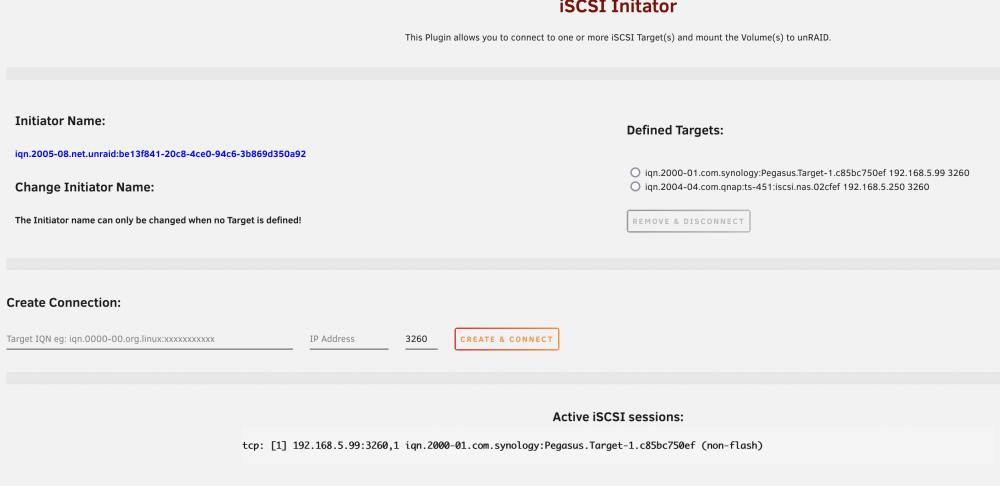 So I didn't know about the unassigned devices plugin and that has fixed the problems with one of the targets. unraid-diagnostics-20220317-0931.zipI have a new unraid install and I'm having a couple of problems with this plugin. I have 2 iscsi targets that I'm trying to connect the server to. First, I'm having the issue that one of the users had earlier in the thread where upon reboot, one of the targets says it's connected, but doesn't show up anywhere and I have to delete it and readd it for it to show up. Second, my iscsi volumes are not being mounted when I connect to them. They just show up as unassigned devices. The instructions seem to indicate that they should be mounted automatically, but that isn't happening. Please let me know what logs you need to provide any help.



