





crankyCowboy
Members
-
Joined
-
Last visited
Everything posted by crankyCowboy
-
Actually your question made me think about something......when I enter the IP address (even locally), it tries to redirect to the unraid.net address used for "connect". I went into "manage access" and removed the unraid connect association, rebooted. And then I could access it from the ip address as expected. But then obviously connect wouldn't work. So, then I signed in to unraid connect again and rebooted one more time. Now everything seems to be doing what it's supposed to again. Maybe through the DNS changes I made with pihole etc.....I broke some connection somehow. In any case, it appears to be sorted now. Thanks again for your help. You may feel like you didn't do much, but your simple question put me on the path. Thanks Jorge!!
-
well @JorgeB my problem has returned this evening. I got home from work and tried to access unraid again, and it's doing the same as earlier. where I can access via unraid connect, but not within my own network. It seems like a dns issue, but I'm not sure where to look to resolve. Any other suggestions? Sorry for the hassle again.
-
Understood. Thank you Jorge. I think I'll just leave it alone as it doesn't seem worth the hassle at this point. I really appreciate you taking the time to help.
-
@JorgeBI think I may have sorted it out finally. I'm embarrassed to say that it appears to have been a cache issue. Seems to be working now. On a separate note, what is the proper way to setup two nics. I want my 10gb to be my primary, but I'd like the onboard 2.5gb to be there as a backup if needed.
-
@JorgeBI posted above some things that I tried....however, I just thought of somethign else that could have contributed to the problem. I have an oboard nic and a 10gb nic via PCIe. I had disabled the onboard nic for a long time, but had been thinking about redundancy and turned it back on via the bios. I've since turned it back off....but not sure if that boogered up something. I did some reading and it looks like I need to delete my network.config file? If so, where do I find that?
-
I've reset my router dns settings bypassing pihole and that didn't help. How do I go about reverting network settings to default? I've tried everything else I can think of. It's so weird that everything works, but I can't connect via the browser on my own lan.
-
I've been running unraid for several years without too many issues. Recently, I started playing with pihole and changed my dns setting on my unifi router. Everythign was working fine for a couple of days. I had to restart my unraid rig and now it doesn't seem to be working as expected. I can access unraid if I connect a monitor to the machine. However, over my network, I can't get to it. All my dockers seem to be running fine and everythign else seems to be working. I tried clearing my browser cache but no matter what I do, I can't seem to get to it from any other computer unless I go through unraid.net. Any ideas what I could check?
-
@JorgeB I just wanted to follow-up. When I got home, I had several errors regarding my flash drive. I initially thought I had something corrupted on the drive. However, I just moved it to another slot (I said above, I had periodic problems with that USB slot). I rebooted and everything came up as expected. I think I'm in good shape now. I appreciate you sticking with me while trying to figure all this out!
-
@JorgeBthank you again. I am indeed using Firefox. I'll post diagnostics when I get home. About every other boot, my MB won't detect my flash device. I have to physically remove it and plug it back in for it to recognize. I suspect that's why it didn't come back up. Thank you very much for your quick responses sir!
-
@JorgeB, thank you...I will. I tried doing a clean reboot because I thought maybe that was necessary and it never came back up, so I'll have to wait to get home (I'm at work). Thank you.
-
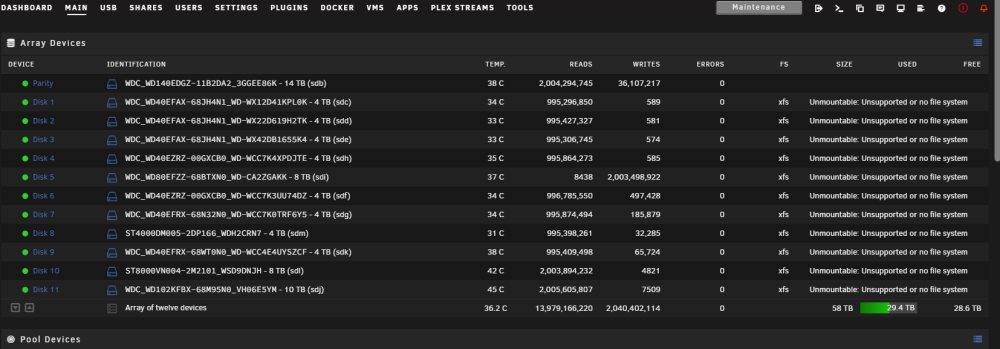
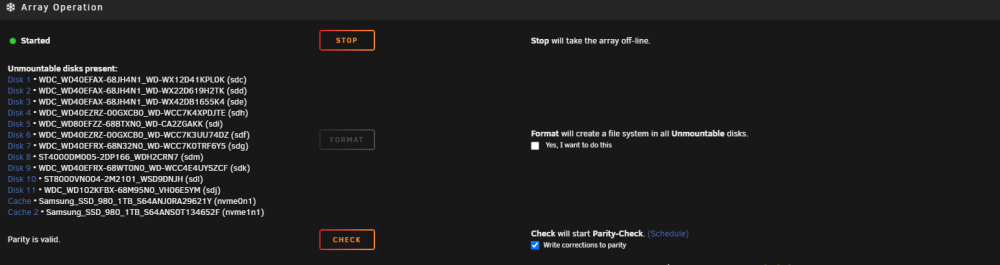
A disk in my array had several errors. It was suggested to replace the disk. I inquired in these forums as the best method to accomplish that and I was told to shut down my computer, remove the faulty disk, replace with the new and boot back up. I had already put the disk in unassigned and went through the preclear. When the system detected the missing disk, I selected the new disk in it's place. It went through a day or so rebuilding the data. Now it finished and all my disks are showing as "unmountable". Ironically the array seems to be started and everythign working. I'm just confused as to what could possibly be wrong and what to do about it? Pictures for reference.r reference.
-
Nobody has any suggestions here?
-
I have about a 60tb array with about 20 tb free. And then I have a 14tb parity disk. I have a disk that has several errors. Is it best to just remove the disk and rebuild from parity or do I want to use the unbalance plugin and move the data to other disks? What's the best route as I haven't had to replace a disk yet. Thanks!
-
@CatDucksmtp is setup, I didn't receive (or request) a password reset initially; however your comment gave me the idea to try that. I reset it via email and I was still locked out. I just left it alone for the night. When I got up this morning and tried again it worked!! Have no idea what happened or why, but it seems to be sorted out now. Thank you for trying to help!
-
I recently migrated from a pre V1 release. I did so by backing up the old version and importing into the new to transfer my recipes. All worked well initially. I went into settings and changed my password and received a "password changed successfully". I then logged out to log back in via the updated password and I'm getting a "account is locked, please try again later" error message. I stopped my container and restarted thinking it may reset any lock behavior but it's still doing it. I've waited for two hours and still same error. Any suggestion of what I can try to rectify? In the logs it is saying: User is locked out from 127.0.0.1 and also "POST /api/auth/token HTTP/1.1" 423 locked
-
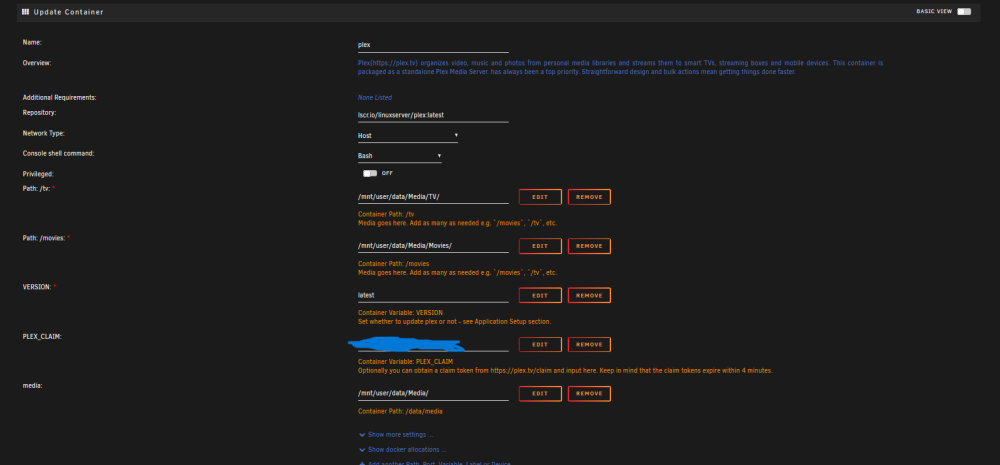
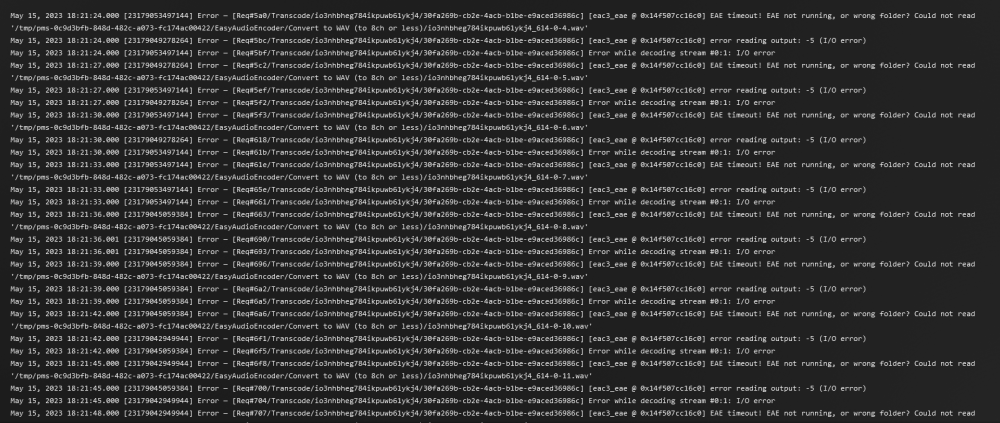
I've been running plex on my unraid server for quite some time. I was one of those folks waiting for a while for quicksync to work with the 12th gen cpus. Everything has been working great for a long time. All of a sudden, I've started having problems with transcoding. Even if I try to force transcoding in my home over a 10g connection, it won't play. It just keeps buffering. I looked in the plex logs and there is a transcoding error, but I'm not sure what it means. I don't have the "extra parameter" added, and havn't configured a device for /dev/dri do I need to do that? Any other ideas of what may be the issue. I've attached a screenshot of errors in the log as well as my container config. Any help is appreciated.
-
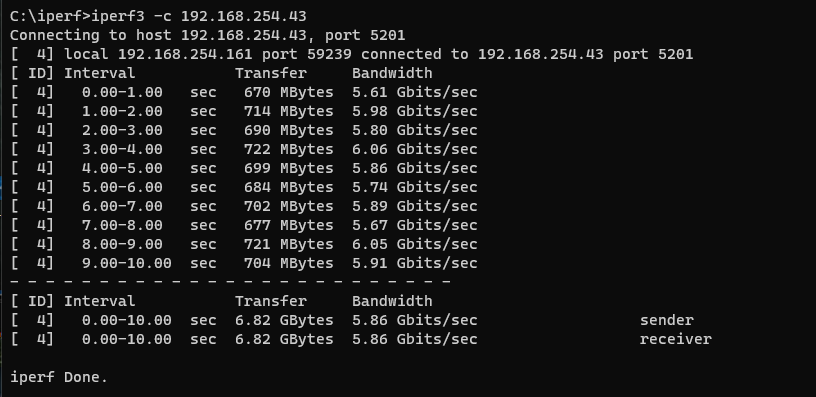
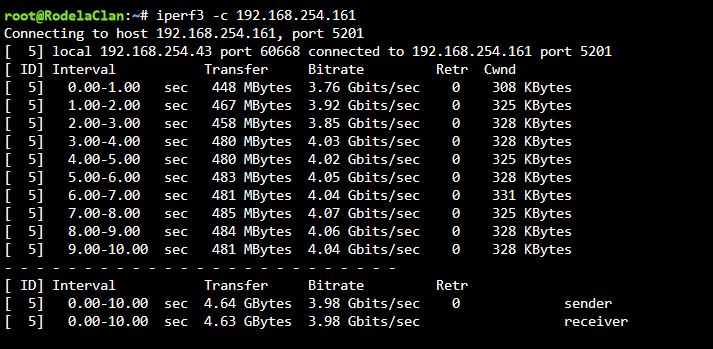
Thank you @JorgeB. I've run iperf in both directions. I'm getting about half the rated throughput; however, I put a movie file on my cache drive (nvme) and when I move it over the network to my windows pc, I cant get over 100 MB/s. Attached are the results from my iperf tests. Any suggestions as to what I can look at to try to rectify?
-
**edit**: I went ahead and disabled the previous nic in the bios. Not sure if that was advised, but it made it easier for me to sort out and re-assign the static IP. Now my problem is I'm only getting about 100mbs between my unraid server and my windows PC which is about the same as before. Here are my setup: Have a unifi 10gb switch Have an asus 10gb nic in both my PC and Unraid Server is in same rack as the switch, but tested cable: good ran a new dedicated cat6a to my windows pc and cable is testing good. Unraid is showing a 10gb connection, windows network adapter is showing 10gb connection, and unifi is showing a 10gb connection to both devices. I'm not certain how to run iperf, I see there is a docker for it now. Should I start there? Thanks @JorgeB. Under "bonding members of bond0" it lists both cards after the change. Is that ok? Also, do I want to leave enable bridging if I'm leaving both cards in there? Sorry for the "dumb" questions, I've just never messed with the network aspects of unraid (never had a reason to)
-
I want to install a 10gbe NIC in my unraid server to speed things up with my other PCs on my network (I have a Unify 10gb switch and 10gb Nics in my windows PCs. My unraid server has a onboard 2.5gb nic. Do I disable the onboard nic in the bios? And then how to I make sure that the new nic is set to the "old" IP address to insure I don't lose any access or functionality? Sorry if this is a dumb question, but I'd like to ask before I've dug a hole I can'tget out of
-
@ingeborgdot I'd leave it at host. I had all my containers tied to custom networks, but plex struggled for whatever reason. Attached are my initial settings. I have a couple more settings under advanced, but let's get you going first......
-
Oh sorry, I should have been more clear. My database is corrupt and going that route doesn't work. I was just going to let Plex rebuild by database and re-add my libraries. All my metadata will still be there so it shouldn't take long. I was just trying to extract the watch history from the database using this article: https://support.plex.tv/articles/201154527-move-viewstate-ratings-from-one-install-to-another/ but as I said, the command above is giving me an error stating that sqlite isn't available.
-
@Kaizac Thanks! That worked, but now I have a separate problem. I guess sqlite isn't in my db directory. I'm trying to run this command: echo ".dump metadata_item_settings" | sqlite3 com.plexapp.plugins.library.db | grep -v TABLE | grep -v INDEX > settings.sql but I'm getting this error: bash: sqlite3: command not found Do I need to go to the location of where sqlite3 is? If so, any idea where that is within the plex folders?
-
@KaizacThanks again! You spent a ton of time helping some goofy stranger.....and I thank you very much for that!
-
whew, that actually makes me feel better. i had used that method a couple months ago and didn't get that error, so i was pretty sure I wasn't doing something wrong. thank you!
-
Yes, that's correct. I'm on the latest version of the Linux Plex server docker. I'm guessing by your response, that you are perplexed as to why I'm getting that error as well? I tried restarting the container and trying again and I'm getting the same error. Any other suggestions? Thanks for the help, by the way.



