





crankyCowboy
Members
-
Joined
-
Last visited
Everything posted by crankyCowboy
-
Sorry @Kaizac, I should have clarified that. Yes, I did.
-
I have a corrupt database and need to stop the service, but not the container. I was told that I could enter this: cd /var/run/s6/services and then enter this: s6-svc -d plex but after that second command, I get this error: My database is not repairable (but plex is still working fine). but nightly I get a "database is corrupt" error when a backup is created. I was going to extract my "watched" data etc and recreate the libraries and database etc. but can't stop the service to use sqlite. any help would be appreciated.
-
@SimonF You are the best man! Thank you very much. That worked and has me back in business. I can't tell you how long I searched for a solution to this. Thank you!
-
@SimonF Thank you again. I uninstalled the beta version and installed the stable version. Entering the data above in terminal did yield the same results as you indicated above. When I start the VM, now the devices connect, but I'm getting a virt error now (on both devices). I have to hover to get the exact error so it's sort of hard to see, but please see the error. any suggestions or fixing it?
.thumb.png.2b6c0605fdec3c923acea5abe74346ea.png)
-
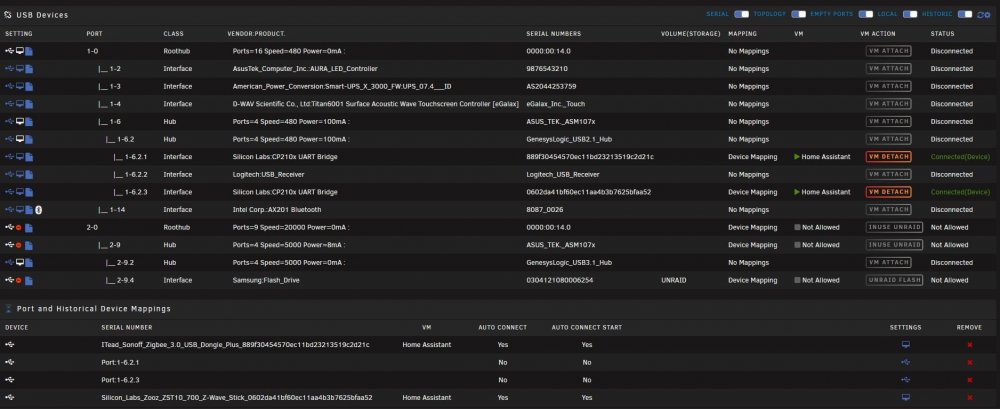
Thank you again @SimonF. I guess I'm about to display my ignorance here. I can navigate to my qemu file via terminal; however, i don't know how to view it. I should possibly also mention that in my /etc directory, I have a /libvert and a /libvert- directory. Both seem to have "hooks" within them. Not sure if that matters. I am on the beta version of the plugin, and also on unraid 6.10.0. Below is the picture that you requested as well as my usb devices (hopefully there isn't anythign in there I should have greyed out). In any case, thank you for the help.
-
@SimonF I installed the plugin, and then on the usb tab, I have changed the device mapping to "auto connect at usb device pluging" and also "auto connect to vm at vm start" and selected HA as my VM. However, when I start the HA VM, the devices don't appear to connect automatically uniess I manually click "VM attach". Am I doing something wrong? If I click VM attach, then they show conntected and everythign appears to work as expected (which is awesome by the way). I just don't understand why they aren't connecting automatically when the VM starts?
-
@SimonFI have confirmed that both devices are showing different serial numbers.
-
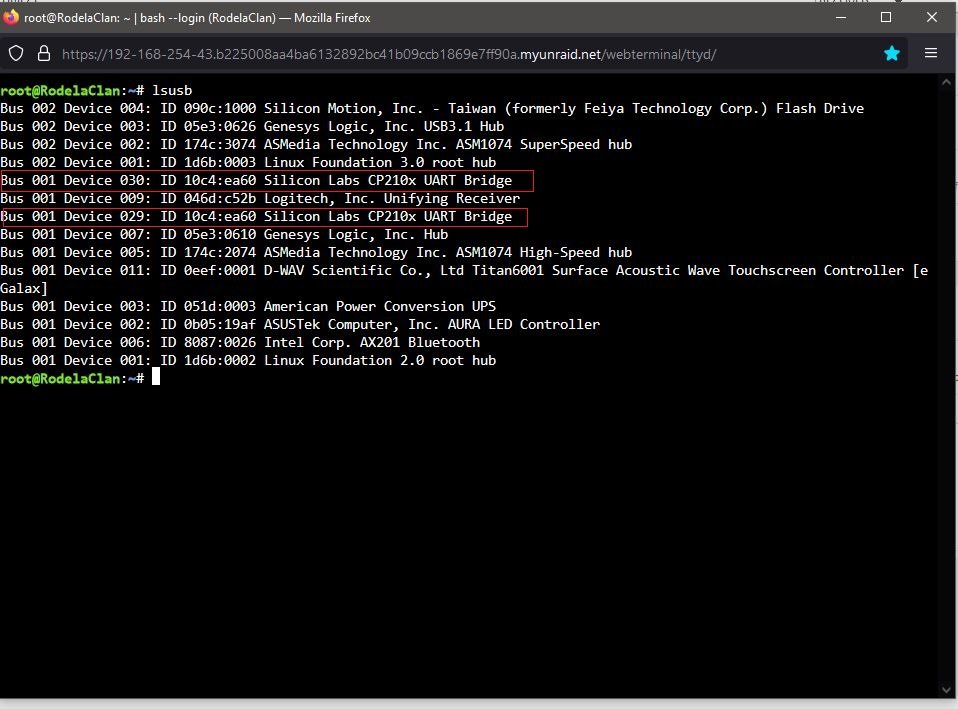
@SimonF Thank you very much for the reply. I haven't installed your plugin yet, but intend to do that. Will the devices just show up like your second picture and I just click "vm attach" or "bind" in order for them to show up in the HA VM? attached are a picture of my usb devices. Thank you for your help, and for the awesome plugin.
-
I have a Home Assistant VM that has a zwave device (zooz 700 stick) and a Zigbee device (sonoff zigbee plus). Both devices have the same info and show up as "silicon labs cp210x uart bridge (10c4:ea60). I can pass one through without issue, but if both are connected both get selected to pass through and I get an error stating that I can't pass duplicate devices through. Would this plugin "fix" this for me? I'm relatively new to unraid and certainly new to VMs, so take it easy on me. What settings would I ideally use if this is a viable solution? Thank you.
-
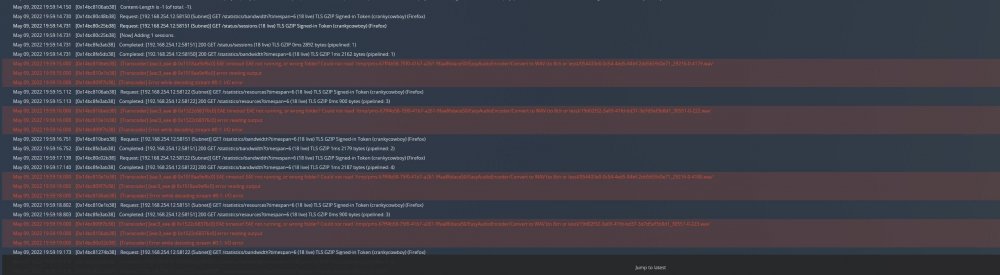
I migrated my windows 10 based Plex server over to Unraid about a month ago. The windows rig was using a 12 year old i5 3rd gen Ivy Bridge CPU with Intel HD 4000 integrated graphics, with 16 gigs of ram. My new Unraid server is using a intel 12th gen (yes, I didn't know at the time that the integrated graphics weren't supported yet), i7 with 64 gb of ram. It took me a little bit to get everything configured and working well....but everything seems great. The only problem is I've had a couple of my users indicate that they either can't play a movie or it buffers really bad. I NEVER had that issue previously. I know I can't use QS yet, but I can't imagine why it would be buffering (oh, and I'm on a 1 Gig up/down fiber connection). Any suggestions of what I can try to attempt to troubleshoot and rectify? **edit** I may have found something related. I went into the plex console and am seeing the attached error. I also found this post where it states that it could be related to my transcode folder (which I didn't specify in the plex container settings as I thought I read it was no longer needed). It also mentions deleting the codecs folder in the Plex appdata folder. Does any of that make sense? Here is the discussion I found:
-
Hello. I just upgraded my router form my Frontier Fios router (Arris) to a Ubiquity UDM Pro. The UDM pro re-assigned a new IP address (was previously 192.168.254.83 and now 192.168.254.43). It looks like Unraid updated the container as was needed and all looks in order. I went into the UDM and forwarded the appropriate port to the new ipaddress of my unraid server. All other docker containers seemed to work fine; but I can't access Plex at all. If I click the webui, nothing, if I go to plex.tv and try that way, nothing. Would it make sense just to change my ip address in unraid to the ip address it previously was? I also went into tools and updated permissions. I've removed the docker and reinstalled via previous apps. Any ideas what else I can try? **edit**: turns out my preferences.xml file somehow became empty. I was able to see a "failed to load preferences.xml" in the logs. I went to my appdata backup and restored and now it's working. I would have deleted this post, but thought it might help someone down the road.
-
That did it squid! Thank you very much!! Looks like we are back in business. I appreciate your help.
-
Thanks, I actually used midnight commander to delete....and it's not showing in that location now....I don't think I disabled the service in setttings though. When you say delete the image (check box) via the GUI, and you please elaborate on this step?
-
Jorge, please see attached. Just for reference, a couple folks suggested deleting the docker.img and that unraid would recreate it. I made a copy of the file, and then deleted it. Stopped the array and restarted. I still get the failed to start message. Any suggestions would be greatly appreciated. I do have the backup/restore appdata plugin. And I took a backup prior to all of this getting too ugly. Not sure if that helps. Attached is my diagnostics file. Thank you! rodelaclan-diagnostics-20220503-0948.zip
-
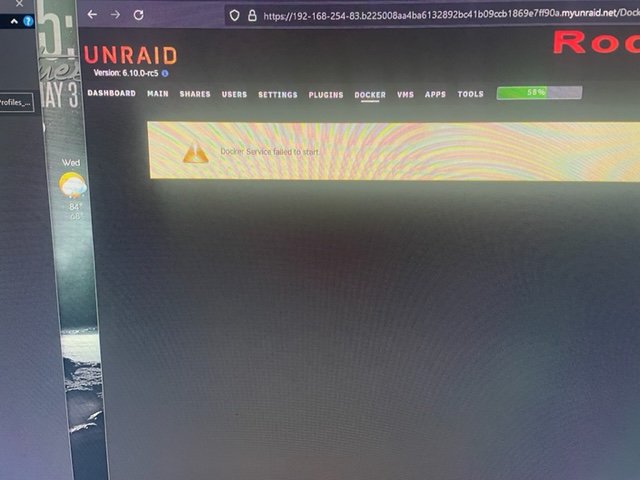
So I had problems with a failing disk in my array. You could almost watch the sectors failing throughout the day. I posted here asking what to do. I ended up ordering another same size/brand disk from Amazon and rebuilding the data (that was surprisingly easy). Everything said it rebuilt the data fine and now everything is in "good" status with no problems found under "fix common problems". However, when I went to my docker tab, I get a "docker service failed to start message". I did notice that on the disk that was corrupted, that there is a system folder and the only thing within that folder is docker.img. Maybe through the rebuild process the docker.img file got corrupted? If it was already rebuilt from parity....does that mean the img in parity was bad? My next question is, doesn't the docker img stay in cache (or isn't it supposed to?). If so, do I have some mover setting wrong? Any help would be greatly appreciated. Picture for reference.
-
Have you gone into your bios and changed the pciE settings? I had a similar issue as you and had to go in and tell my bios that the pci-e slot I was using was "gen2" and then it worked fine. I went through all the CSM stuff as well and in the end, that setting didn't even matter for me (I'm on an Asus 12th gen board).
-
Thanks Frank. I have can't find anywhere to specifically enable AHCI mode in my bios (even doing a search for AHCI in the bios manual yields 0 results). All I can find regarding the sata mode is to enable or disable the sata ports and then also whether to they should be mapped under vmi. I only mentioned the legacy mode and CSM because a couple people mentioned they had success in similar situations. I actually installed an external gpu and turned on legacy boot, but then none of my parity, array, or cache disks were detected anymore (which makes no sense).
-
I apologize frank. I completely misunderstood. I thought it was a bit odd that I needed to start a new post, but gave it a shot anyway. In any case, I have gone all through my motherboard settings. I really think that I need to turn on compatibility mode where it loads legacy drivers; however, I can't do that. I'm using my CPU's GPU for quicksync and Asus has done this rediculous thing that if you use the iGPU, then the legacy boot isn't an option. Others have suggested shifting to an LSI SAS card, but I'm afraid I'd have the same problem with that.
-
Thank you. I posted the diagnostic in a different post as you suggested. It can be found here:
-
@Frank1940 asked that I upload this diagnostic file in hopes of helping me troubleshoot why my drives aren't seen. The original post can be found here: rodelaclan-diagnostics-20220410-1733.zip
-
I'm new to unraid. Through my transition from Windows, I also purchased new equipment. I used to utilize a bunch of external usb 3.0 drive enclosures for my drives. I purchased a new rack mount server case that houses 12 HDs (https://www.amazon.com/Rosewill-RSV-L4500U-Thickness-Rackmount-Server/dp/B097Y25FGK/ref=sr_1_3?crid=3FVJ7R9LUASBZ&keywords=rosewill%2B4u%2Bserver%2Bchassis&qid=1649617742&sprefix=rosewill%2B%2Caps%2C106&sr=8-3&th=1 ) I have an ASUS z690 mb (this one): https://www.asus.com/Motherboards-Components/Motherboards/TUF-Gaming/TUF-GAMING-Z690-PLUS-WIFI-D4/, and I installed this PCI/sata expansion card: https://www.amazon.com/gp/product/B095SJKMC9/ref=ppx_yo_dt_b_asin_title_o05_s00?ie=UTF8&psc=1 The MB only has 4 sata ports, all of those detect the drives no problem. The expansion card lights up to indicate what port drives are connected to, but the MB doesn't "see" the drives. I've tried every bios setting I can think of and nothing seems to get it to see the drives. Any suggestions on what I need to do? That expansion card had great reviews and many claimed it worked great with unraid, but I just can't get the MB to recognize it.
-
Thank you @itimpi. Can you please clarify the difference between a disk share and a user share? I just want to verify I'm not doing what you are suggesting NOT to do.
-
New to unraid. I initially moved all my movies from a windows rig to unraid. I created a share simply called "movies". Well after doing some reading and asking a ton of questions, I decided I wanted to utilize hardlinks. So I created a new share called /data as trash's guide suggests. Initially I opened Krusader and put the source directory in one pane and the destination in the other, highlighted all my files and said "move to other panel". This removed all of them from the source directory, but they never arrived in the destination. I panicked and posted here. I did notice the files seemed to be still taking up space in my array, so I did some digging and found an "undo" button in Krusader. that seemed to get them back into the original directory. Now I'm pretty gun shy. Can someone please explain how I need to go about moving about 2000 movies from one share to the other. some people have said "share to share is a no no", others have said it's fine, while other's say to copy the files instead of move because moving just changes the "link". I'm so confused (and scared), so I need some input please.
-
Ok, whew, that was scary. Not sure what happened, but I found the "undo" in Krusader. I clicked that and all the files are back in the source directory again. I'm not certain what happened, but it scared the poo out of me. I'll start a new post inquiring as how to properly move files between shares. Thanks for the replies guys.
-
I was wanting to move my movie library from one share to another for hardlinking purposes. I asked as to the best way to achieve that. Most suggested using Krusader. I decided to go that route. I basically navigated to the old directory in one panel and then opened the target directory in the other panel. I highlighted all of my movies and right clicked and then selected "move to other panel" assuming this would take the entire hightlighted contents and move them to the other panel on the screen. they all just disappeared. Now, if I navigate to the original directory (either via windows explorer or within raid), both folders are now empty. Ironically, the array is still showing that the space is still occupied from the movies. Did I just delete everything or is there a way to recover?

.png.f5e14a7ddb73fcd18f4bc418685a16f6.png)


