Seriphim
Members
-
Joined
-
Last visited
-
@SimonF Sorry for not seeing your response. Thought I had thread notifications turned on. Either way the update 2025.03.28 update fixed the issue. Much appreciate for all the effort.
-
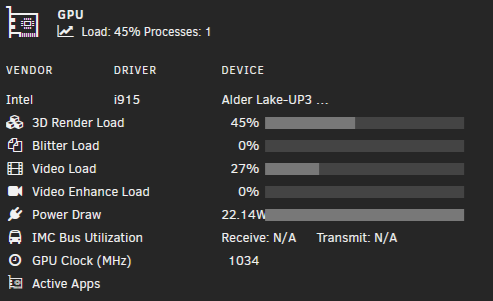
While I can see the stats of the GPU when in use it doesn't show my handbrake docker as the active app when it's going. I keep hoping kernel improvements will snap a fix in place but no joy. It will show plex the few times it needs to transcode though. Unraid version: 7.1.0 beta 1 Processor: Intel I5-1235U Docker: jlesage/handbrake With a handbrake docker transcoding: { "period": { "duration": 10.905801, "unit": "ms" }, "frequency": { "requested": 1100.331833, "actual": 825.248874, "unit": "MHz" }, "interrupts": { "count": 1833.886388, "unit": "irq/s" }, "rc6": { "value": 0.000000, "unit": "%" }, "power": { "GPU": 5.389504, "Package": 23.555993, "unit": "W" }, "engines": { "Render/3D": { "busy": 69.964205, "sema": 0.000000, "wait": 0.000000, "unit": "%" }, "Blitter": { "busy": 0.000000, "sema": 0.000000, "wait": 0.000000, "unit": "%" }, "Video": { "busy": 30.690135, "sema": 0.000000, "wait": 0.000000, "unit": "%" }, "VideoEnhance": { "busy": 0.000000, "sema": 0.000000, "wait": 0.000000, "unit": "%" } }, "clients": { "4294853861": { "name": "ghb", "pid": "113435", "memory": { "system": { "total": "161869824", "shared": "0", "resident": "102342656", "purgeable": "401408", "active": "0" } }, "engine-classes": { "Render/3D": { "busy": "41.794207", "unit": "%" }, "Blitter": { "busy": "0.000000", "unit": "%" }, "Video": { "busy": "73.248987", "unit": "%" }, "VideoEnhance": { "busy": "0.000000", "unit": "%" } } } } }, { "period": { "duration": 259.775057, "unit": "ms" }, "frequency": { "requested": 1201.039097, "actual": 1097.103022, "unit": "MHz" }, "interrupts": { "count": 1278.028783, "unit": "irq/s" }, "rc6": { "value": 0.000000, "unit": "%" }, "power": { "GPU": 3.551563, "Package": 22.275507, "unit": "W" }, "engines": { "Render/3D": { "busy": 47.132083, "sema": 0.000000, "wait": 0.000000, "unit": "%" }, "Blitter": { "busy": 0.000000, "sema": 0.000000, "wait": 0.000000, "unit": "%" }, "Video": { "busy": 26.578173, "sema": 0.000000, "wait": 0.000000, "unit": "%" }, "VideoEnhance": { "busy": 0.000000, "sema": 0.000000, "wait": 0.000000, "unit": "%" } }, "clients": { "4294853861": { "name": "ghb", "pid": "113435", "memory": { "system": { "total": "161869824", "shared": "0", "resident": "102342656", "purgeable": "401408", "active": "0" } }, "engine-classes": { "Render/3D": { "busy": "46.752759", "unit": "%" }, "Blitter": { "busy": "0.000000", "unit": "%" }, "Video": { "busy": "53.247124", "unit": "%" }, "VideoEnhance": { "busy": "0.000000", "unit": "%" } } } }
-
@Elmojo 1) any docker exec commands you will run from the host terminal. In this case the CLI for unraid. 2) /backup_volume/ is a container path with the default being mounted to drive d within the backblaze docker container. If you edit the docker it's labelled as Storage to backup up. If you wanted to add additional volumes you would create another path variable with a different container path such as /backup_volume2/ and mount it to a different drive letter such as E. Then run the command with the new container path and drive letter for example: docker exec --user app backblaze_personal_backup ln -s /backup_volume2/ /config/wine/dosdevices/e: 3) Tying back to question 2 if you have multiple volumes configured in your existing windows server you will need to ensure when you configure backblaze in unraid that the paths exposed to backblaze match EXACTLY. Otherwise yes you can import the config but backblaze will see the files as all new. For example if you have C:\somefiles in windows it will be a problem since the container's first drive letter available is D:\. Additionally if you have D:\somefolder\somefiles and you expose the path to the backblaze container truncated to d:\somefiles\ then backblaze will see them all as new files.
-
@seb_k I have the same issue as you. Even added --device /dev/dri and --device=/dev/dri to the extra parameters, add Device variable with dev/dri, changed permissions to root on the container nothing works to get the automated conversion working. Just figured I'd add another voice to the issue in the hopes that it may get some attention.
-
When I check for the mbuffer version I get the same error. Do you happen to have any other packages installed that may have it included? i.e. AutoSlackPack? And/or any tips on repointing to the correct libcrypto.so.1.1.
-
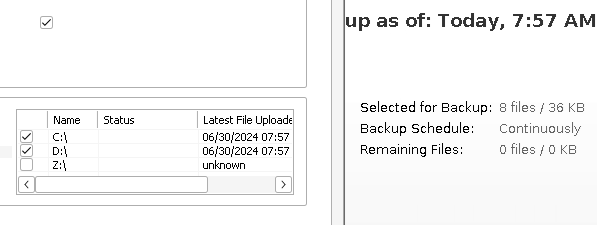
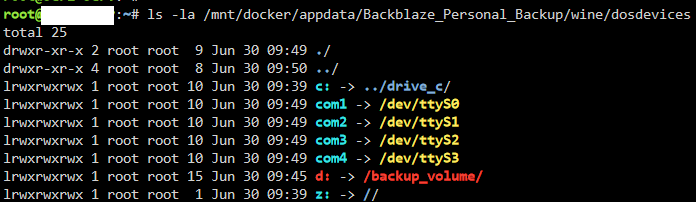
Edit FIXED: This should have been a lightbulb moment way sooner I'm embarrassed to admit. The issue started when I converted my array to ZFS. The docker container will not work when pointed at a ZFS dataset. I had to point it at a subfolder within the dataset, i.e. /mnt/ZFSVOLUME/ZFSDATASET/Folder/. This works ok for my use case as I replicate the volume to another single drive for local backup. Just had to add multiple drives in the docker to point at the top level folders within the zfs backups. I still want to keep digging into this so I can simplify the target. However even using winecfg to manually set the mounted drive as a local drive the BB application still refuses to back it up. _____________________________________________________________________________________ I noticed over the weekend that my Backblaze_Personal_Backup container has not backed anything up for a few weeks. Same symptoms as others d: dropped and showing as z:. Tried restoring the container from backup, reinstalling, installing older versions. d: is mapped just not backing up. No matter if I mount by /mnt/user or /mnt/pool. Privileged and root permissions still nothing. Does anyone have a fix? With the container now forcing BB client updates I feel like the "issue" is BB getting wise to this container's existence. EDIT/UPDATE: looking directly at ls -la /config/wine/dosdevices/ from the unraid terminal, not the dockers terminal, i noticed the symlink for d: was broken. Created a backup_volume folder in config/wine fixed the broken symlink but the container still does not find any files to backup. Navigating the d: within wine I can access the files and modify them. I really am stumped if anyone has an idea. Edit: sharing docker run and SS: docker run -d --name='Backblaze_Personal_Backup' --net='eth0' --ip='192.168.0.6' --privileged=true -e TZ="Europe/Paris" -e HOST_OS="Unraid" -e HOST_HOSTNAME="Seri-Serv" -e HOST_CONTAINERNAME="Backblaze_Personal_Backup" -e 'TCP_PORT_5800'='5800' -e 'TCP_PORT_5900'='5900' -e 'SECURE_CONNECTION'='0' -e 'TZ'='Etc/UTC' -e 'DISPLAY_WIDTH'='900' -e 'DISPLAY_HEIGHT'='700' -e 'VNC_PASSWORD'='' -e 'FORCE_LATEST_UPDATE'='true' -e 'USER_ID'='0' -e 'GROUP_ID'='0' -e 'CLEAN_TMP_DIR'='1' -e 'DISABLE_AUTOUPDATE'='false' -e 'X11VNC_EXTRA_OPTS'='' -e 'ENABLE_CJK_FONT'='' -l net.unraid.docker.managed=dockerman -l net.unraid.docker.webui='http://[IP]:[PORT:5800]/' -l net.unraid.docker.icon='https://raw.githubusercontent.com/selfhosters/unRAID-CA-templates/master/templates/img/backblaze.png' -v '/mnt/pool/':'/backup_volume/':'rw' -v '/mnt/docker/appdata/Backblaze_Personal_Backup':'/config':'rw' --init 'tessypowder/backblaze-personal-wine' 731504560a2e8699e3bbc539b48862df4360316f3ea0896b20915231acec0b94 The command finished successfully!