





hfuhruhurr
Members
-
Joined
-
Last visited
Everything posted by hfuhruhurr
-
That worked perfectly! The pool is balancing now. When it is complete, I will add the new cache_ssd pool. Thank you so much for your kind assistance and patience!
-
I don’t have the option to set slots to 1, the lowest number is 2.
-
One more issue. When I add second nvme drive and try to start the array, I get an error: Wrong Pool State cache - too many missing/wrong devices
-
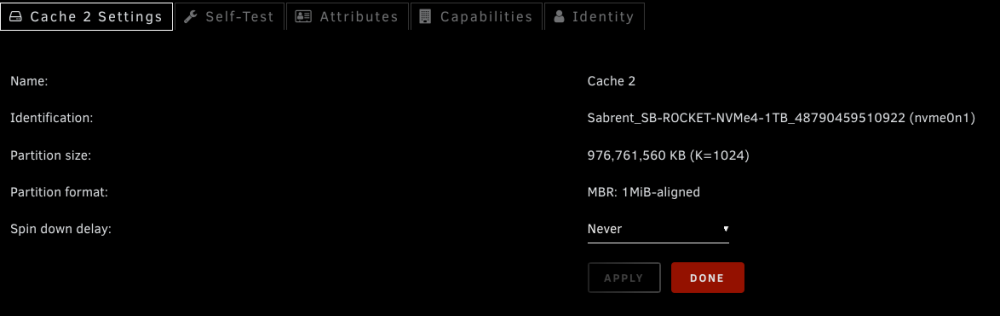
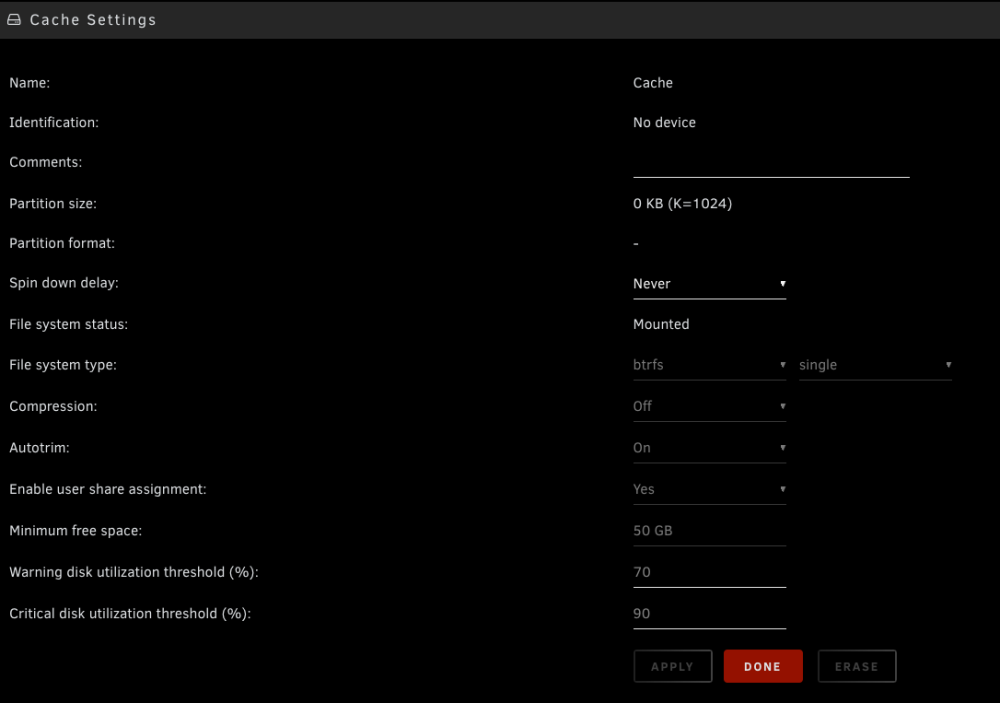
Ok, sounds good. One question, when I add the other nvme device back to the pool, do I need to do anything in pool setup? Right now the pool setup (in slot 1) shows File system type: btrfs single. Would I need to change it to Raid 1? Or will Unraid just handle to change? Also, is there any reason to move /dev/nvme0n1p1 to slot 1 in the pool before adding the second nvme drive?

-
Ok, sdi is still disconnected. I unassign both nvme devices, started array, stopped array, then re-assigned only /dev/nvme0n1p1 to the old pool (in it's original slot 2 of the pool), started array, and it started with no errors. New diags attached. mongo-diagnostics-20240416-0835.zip
-
The /dev/sdi device was just added as a separate pool named cache_ssd. It was never part of the main cache pool. Originally only had one pool with 2 devices in raid 1.
-
Shutdown server and disconnected /dev/sdi. Restarted server and ran below command with array stopped. root@Mongo:~# btrfs fi show warning, device 1 is missing Label: none uuid: d0989cc1-462a-4a25-ac4c-b3fbb1d27a4c Total devices 2 FS bytes used 95.33GiB devid 3 size 931.51GiB used 100.03GiB path /dev/nvme0n1p1 *** Some devices missing
-
root@Mongo:~# btrfs fi show warning, device 1 is missing Label: none uuid: d0989cc1-462a-4a25-ac4c-b3fbb1d27a4c Total devices 2 FS bytes used 95.33GiB devid 3 size 931.51GiB used 100.03GiB path /dev/nvme0n1p1 *** Some devices missing BTW- the array is still stopped.
-
I ran short SMART diagnostics on both drives from the cache pool and have attached them here. mongo-smart-20240415-1527.zip mongo-smart-20240415-1522.zip
-
I shut down my server abd added an SSD. I started the server and created a second pool (cache_ssd) and assigned the ssd to it. I started the array and the original cache pool (dual nvme 1Gb drives in a raid 1 btrfs config) now show "Unmountable: Unsupported or no file system". I stopped the array and removed the cache_ssd pool, then restarted the array. The original cache pool still shows the same Unmountable error. I have attached diagnostics before array restart (1430) and after (1439). mongo-diagnostics-20240415-1430.zip mongo-diagnostics-20240415-1439.zip
-
I added the two lines to UPS.conf as requested. The UOS.conf file now looks like this: [ups] driver = "usbhid-ups" port = "auto" vendorid = "051D" productid = "0002" product = "Back-UPS BGM1500 FW:31316S12-31320S10" serial = "0B2121P12408" vendor = "American Power Conversion" bus = "001" ignorelb onlinedischarge_calibration override.battery.charge.low = 30 ----- To clarify the issue, this is an APC Back-UPS BGM1500 and it apparently runs a test diagnostic every two weeks (I havbe tried to change it but changes have no effect). When this test runs, the Unraid server immediately starts shutdown. I would like the test to run uninterrupted but to not cause the shutdown unless the UPS doesn't come back online within set parameters. Thanks!
-
I believe the relevant log data in the /logs/syslog-previous.txt file of this archive. Thanks for looking into this! Donn
-
mongo-diagnostics-20240326-1444.zip
-
The scheduled test ran last night and the Unraid server shut down again. I installed a NUT update this morning and here are the install messages: Executing install script for nut-plugin-2024.03.26-x86_64-1.txz. Updating permissions for NUT... Package nut-plugin-2024.03.26-x86_64-1.txz installed. Package nut-plugin-2024.03.16-x86_64-1 upgraded with new package /boot/config/plugins/nut-dw/nut-plugin-2024.03.26-x86_64-1.txz. Reading NUT configuration... Determining if NUT services should be started... Starting NUT services... Writing NUT configuration... Updating permissions for NUT... Checking if the NUT Runtime Statistics Module should be enabled... Enabling the NUT Runtime Statistics Module... NUT Runtime Statistics is requesting the first batch of data... NUTSTATS: NUT upsmon is not (yet) running... exiting HIDParse: LogMax is less than LogMin. Vendor HID report descriptor may be incorrect; interpreting LogMax -1 as 255 in ReportID: 0x0c HIDParse: LogMax is less than LogMin. Vendor HID report descriptor may be incorrect; interpreting LogMax -1 as 255 in ReportID: 0x22 HIDParse: LogMax is less than LogMin. Vendor HID report descriptor may be incorrect; interpreting LogMax -1 as 255 in ReportID: 0x40 Using subdriver: APC HID 0.100 Network UPS Tools - Generic HID driver 0.52 (2.8.1) USB communication driver (libusb 1.0) 0.46 ups_status_set: seems that UPS [ups] is in OL+DISCHRG state now. Is it calibrating (perhaps you want to set 'onlinedischarge_calibration' option)? Note that some UPS models (e.g. CyberPower UT series) emit OL+DISCHRG when in fact offline/on-battery (perhaps you want to set 'onlinedischarge' option). Network UPS Tools - UPS driver controller 2.8.1 ----------------------------------------------------------- Network UPS Tools (NUT) for UNRAID has been installed. Version: 2024.03.26 / Plugin Maintainer: desertwitch ----------------------------------------------------------- plugin: nut-dw.plg updated Executing hook script: gui_search_post_hook.sh Executing hook script: post_plugin_checks Also, in my system log I am getting this message repeated every few seconds: Mar 26 06:57:27 Mongo usbhid-ups[3678]: ups_status_set: seems that UPS [ups] is in OL+DISCHRG state now. Is it calibrating (perhaps you want to set 'onlinedischarge_calibration' option)? Note that some UPS models (e.g. CyberPower UT series) emit OL+DISCHRG when in fact offline/on-battery (perhaps you want to set 'onlinedischarge' option).
-
Responding to below post dated 3/18/24, subject: NUT with APC Back-UPS BGM1500 biweekly test shuts down immediately The problem still persists but my current NUT version still shows 2.8.0. I have changed the default to 2.8.1 and rebooted. Ther backend now shows version nut-2.8.1-x86_64-2stable.ssl11, and is running. Will advise if the the issue occurs (based on previous schedule, it should shutdown on 3/26/24 at ~1:00am). Thanks for the message!
-
Yes, thank you for the quick fix FlamongOle.
-
Same here. I updated to Version 2024.03.06 of Disk Location and the Dashboard will no longer load. The settings page of Disk Location does not load either. Removed the plugin and Dashboard works fine.
-
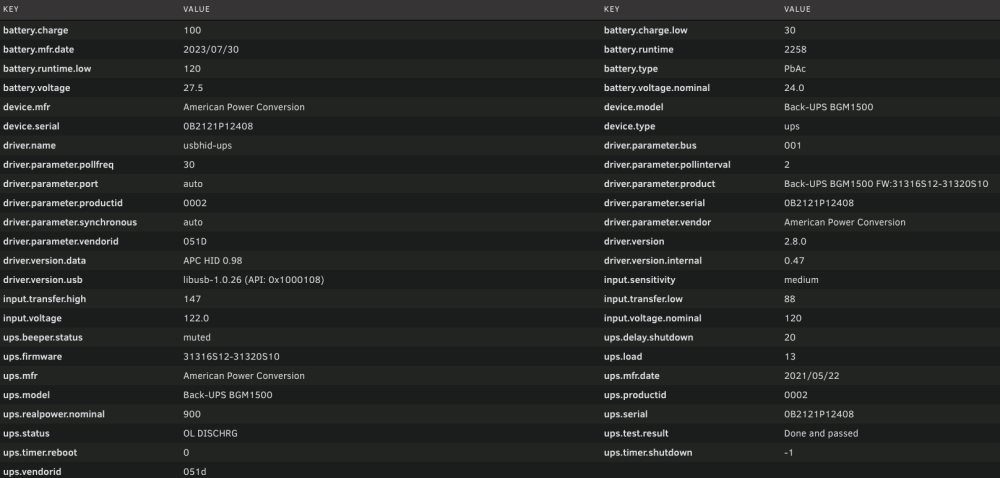
Thanks so much for your reply. I have tried this several times and unraid still shuts down every two weeks. The Details screen now shows "battery.charge.low=30" The log file constantly shows: "Jan 16 07:34:18 Mongo usbhid-ups[4714]: ups_status_set: seems that UPS [ups] is in OL+DISCHRG state now. Is it calibrating or do you perhaps want to set 'onlinedischarge' option? Some UPS models (e.g. CyberPower UT series) emit OL+DISCHRG when offline." How do I set the "onlinedischarge" option?
-
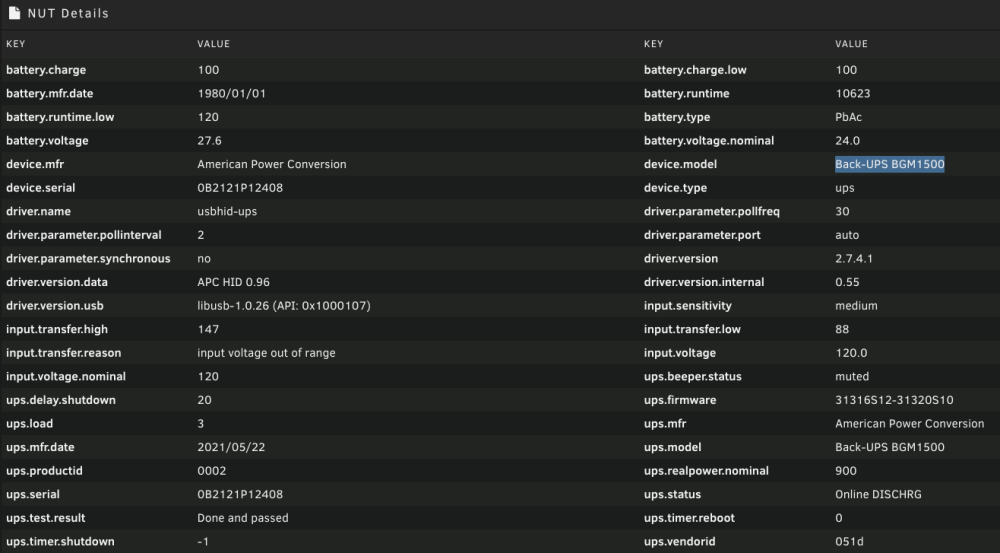
I am running unRaid v 6.12.2 and Nut Plugin "NUT - Network UPS Tools" from SimonFair with an APC Back-UPS BGM1500. All is working well with one exception. Apparently the APC UPSes are set to run a test every two weeks. When this happens, the unRaid server shuts down right away without waiting for the battery level (50%) defined in settings. Since it was a test, the UPS goes right back to online, but the shutdown was already started. How do I fix this so the test will not automatically trigger a shutdown?
-
Thank you. Looks like Unraid.net is back up and so am I. Please consider this request resolved. Donn
-
Update: found suggestion on another thread and I edited 'config/ident.cfg' file off the flashdrive and changed SSL='auto' to SSL='no' and was able to access it locally. Now how do I fix the SSL access?
-
Server has been running great for months, then tonight, I look up and the GUI tab in Firefox will not load - getting error 404 File not found. I tried rebooting and still no GUI through the browser. I rebooted again and accessed the local GUI and it works fine. Logged in through ssh and ran diagnostics and have attached the zip file. Could someone help me to resolve this issue? mongo-diagnostics-20221205-1825.zip
-
Ok, I have changed to IPVLAN ( I tried this a few days ago and the vpntunnel stopped working). This time I set the flag "Host access to custom networks" to Disabled as suggested on another thread. Will update on any effects/changes. Just a question. Is this issue unique to unRaid? I have been using docker macvlans on other servers for years with no issues. It seems I am forfeiting some serious capability by abandoning macvlan functionality and wonder if there is an effort in development to resolve this issue, or if this is purely hardware related. Thanks, Donn
-
Also, the crashes occurred on 5/10 and 5/11.
-
Thank you for the suggestion. I don't have any docker containers with a custom IP address. Is this error relevant if I am not using any custom IP adresses? Thanks, Donn






