





irishjd
Members
-
Joined
-
Last visited
Everything posted by irishjd
-
I have tried that too. I uninstalled Dashy from APPS, open the GUI file manager and deleted user/apppdata/dashy, and I even installed Appdate Cleanup and ran it (it found some leftover Dashy data and deleted it). However, I still get the error when I try to re-install Dashy, I still get therror.
-
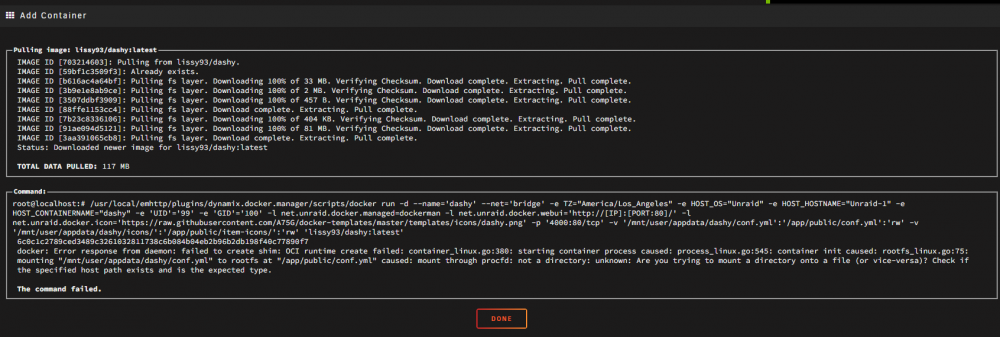
I recently had Dashy installed as a Docker container and all was well. I messed with it for a couple of days until it was all dorked up. I then decided to start over and remove it and the re-install it. Now, every time I try to install it, I get this error: docker: Error response from daemon: failed to create shim: OCI runtime create failed: container_linux.go:380: starting container process caused: process_linux.go:545: container init caused: rootfs_linux.go:75: mounting "/mnt/user/appdata/dashy/conf.yml" to rootfs at "/app/public/conf.yml" caused: mount through procfd: not a directory: unknown: Are you trying to mount a directory onto a file (or vice-versa)? Check if the specified host path exists and is the expected type. I have tried every Google hit I got on this topic to no avail. Can some one please point me in the right direction to fix this? v/r Jon
-
That's entirely possible. I am thinking that I will need to setup some sort of proxy to get this to work.
-
I am not sure if this is the proper place to post this (if not, please let me know). I have SearXNG installed and running fine. Now, I would like to enable https support on it, but I can't figure out how to do that. I did some research, and it appears that SearXNG support https via a LetsEncrypt certificate that is controlled with a ".env" file. I have looked everywhere for this file but couldn't find it, and I created my own. However, even after a reboot, it doesn't appear to have helped. Any suggestions would be greatly appreciated. Jon
-
Thanks Chris, I really appreciate it! BTW... I am an Unraid newby so I am probably overlooking something.
-
Hi Chris, I installed SearXNG via the Community Apps plugin on my Unraid console. I kept all default settings.
-
Hello (unraid noob here), I just installed SearXNG, and it is working fine. I was trying to figure out how to get it to work with https as well. I did some research on the SeraXNG Docker image, and the documentation states that this is controlled via a file name ".env" in the root of the container. I do not see this file in the Unraid SearXNG Docker image, and manually creating it does not appear to help. I am sure that I am overlooking something here and would appreciate a push in the right direction. Jon

