





PeterHS
Members
-
Joined
-
Last visited
-
For future people like me, who forgot about this completely and come back to this topic to read up on what's happened: This script is now "abandoned" and have instead been made into a plugin (Thank you Mainfrezzer!) Go to APPS, search for "ram-disk". Install "RAM-Disk for Docker logs" by Mainfrezzer. If you have the script from this thread in your go file. Go in there and delete it. If you have the script in your UserScripts. Go in there and either disable the schedule or delete the script. Reboot your server and go to SETTINGS / RAM-DISK for Docker logs. Here you can see if it is running as it should and you can edit the backup schedule. This is the new forum thread for the plugin: https://forums.unraid.net/topic/185193-plugin-ram-disk-for-docker-logs/ And this is the GitHub for the plugin: https://github.com/Mainfrezzer/unRAID-RAM-Disk
-
This is great! Finally my fans trigger on temps from the correct drives. Dynamix plugin always used temps from completely unrelated drives. A question.. There is a function to go full blast when doing parity operations. But can we have the same function for a ZFS pool scrub?
-
I would also very much like to be able to monitor more devices. But if it needs too much development, could I instead just add a 2nd instance of the plugin somehow? Just with different name/variables? I see some containers have "container ABC" and then "container ABC extra instance" with some slight changes to be able to run them side by side. Can this be easily achieved with the plugin?
-
2025.02.11-1751 RC2 did the trick for me. All is good and back to normal. EDIT: spelling..
-
I updated from 2025.02.08-1936 to 2025.02.10-2201 RC2 just now. My DASHBOARD page is blank and TOOLS/Disk location is also blank. EDIT: Did uninstall and reinstall plugin. Same result..
-
Is there a way of automatically backing up Vaultwarden, rsync to another server (different location) and import on that one? I have several users and want to have a second instance running if "shit hits the fan" so to speak.
-
Trying the 25 development. Love the hover additions and ability to format dashboard info! And the fact that I can change color for each group and even default background color for each type. Amazing! Great job and improvements! But what does this setting do? Allow editing of Unraid config: No / Yes
-
If possible, I have a minor feature request. In DASHBOARD when "mouse over" on a drive it shows Temp, SMART, Operation, Online... Could we perhaps have a second row (maybe optional with a setting?) with either disc name (disk 12, parity, cache_ssd) and/or the serial number of the drive? i.e: 39° | SMART: PASSED, NORMAL OPERATION, DEVICE IS ACTIVE S/N: K4J7NM0RB14934T | disk 12 It would give another way of easy identification.
-
I don't know if I should make a feature request here or somewhere else. But here goes... When Tailscale tile/card on DASHBOARD page is minimized (show/hide content), can we please have "Online" / "Offline" visible? It is realistically the most important information that I need to have. And if it's going to take up any space while minimized, that should still be visible in my mind. Honestly it doesn't have to be text based either.. Can be a red / green dot just to provide at a glace status. Thank you!
-
You are correct. I have a PCIe to Nvme card for some of my drives. Because of that I had set default in Unraid to Nvme and for whatever reason the SSDs had turned into ATA. Turns out I could just force the 3 SSDs to Automatic and everything is as it should. Thank you! Solved!
-
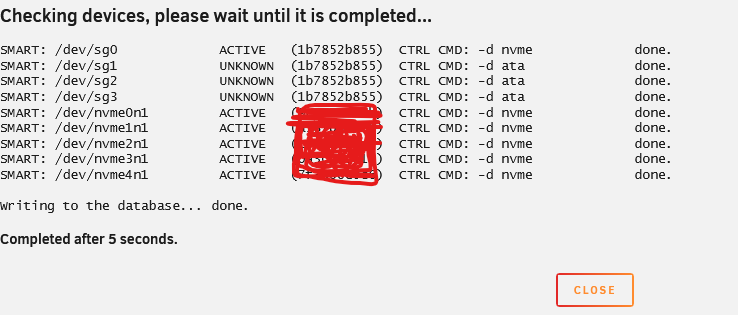
I just installed this plugin for the first time. It finds my 5 Nvme drives. But my 3 SATA SSDs are missing in action. And it seems to add a 6th "ghost" Nvme. When I run "Force Update All" I get the following: So a few things: 1: sg0 doesn't exist in reality. There is no such thing. Yet it shows as ACTIVE? And to top it off, it shows as an Nvme? 2: sg0, sg1, sg2, sg3 all have the same ID? What is that ID btw? (1b7852b855)? 3: sg1, sg2, sg3 show up as UNKNOWN? 4: sg1, sg2, sg3 are the ones that does exist in reality. They're all SATA SSDs connected directly to my motherboard SATA ports. No extra controller or anything. They're all Samsung_SSD_870_EVOs. 2 of them are 2TB and connected in Unraid with "Unassigned Devices plugin" 1 is a 500GB and is connected in Unraid as a normal cache pool. Anything I can do to troubleshoot? Bare with me. I'm a complete noob.
-
That is an entirely different matter. I was happy I could finally see any kind of temperatures. I just looked in my plugin and I have 31 different temperature sensors. I'm pretty sure about the CPU, and then quite a few are from my drives. But for the MoBo? No real clue. I remember playing around with selecting different ones and just watching that sensor behavior for a week at the time. I finally settled on one of them as the "most likely". I know it's not the answer neither of us want. But I've resigned my self to it.
-
How do I change the sync interval ? I tried: $sync_interval_minutes=60;\ and this works. But: $sync_interval_minutes=90;\ or $sync_interval_minutes=120;\ doesn't. It still runs every full hour.
-
I've used the ideas here and I have definitely reduced my disk writes on v.6.11.5 by at least 60%. I'm still trying to catch more of them and minimize/move to RAM. But I'm wondering how many writes people see during idle? I've tracked mine during the last 4 days and I'm seeing between 300k-600k writes per 24h on 6-7 dockers + HomeAssistant VM. I honestly don't know if that's a lot or not? Should I be satisfied or do I need to go deeper?
-
That sounds interesting. Looking forward to hear the results. One question, I noticed my idle on Unraid went from 1-2% to 6-10% when I run this docker. Even if the chromecast devices are "sleeping". It seems a bit excessive to have that kind of load on the server when there is nothing useful happening. Is there perhaps a way of polling the devices to see if something is casting? And if not... well... don't do anything. Trying to be efficient, save electricity and all that.


