





calvados
Members
-
Joined
-
Last visited
Everything posted by calvados
-
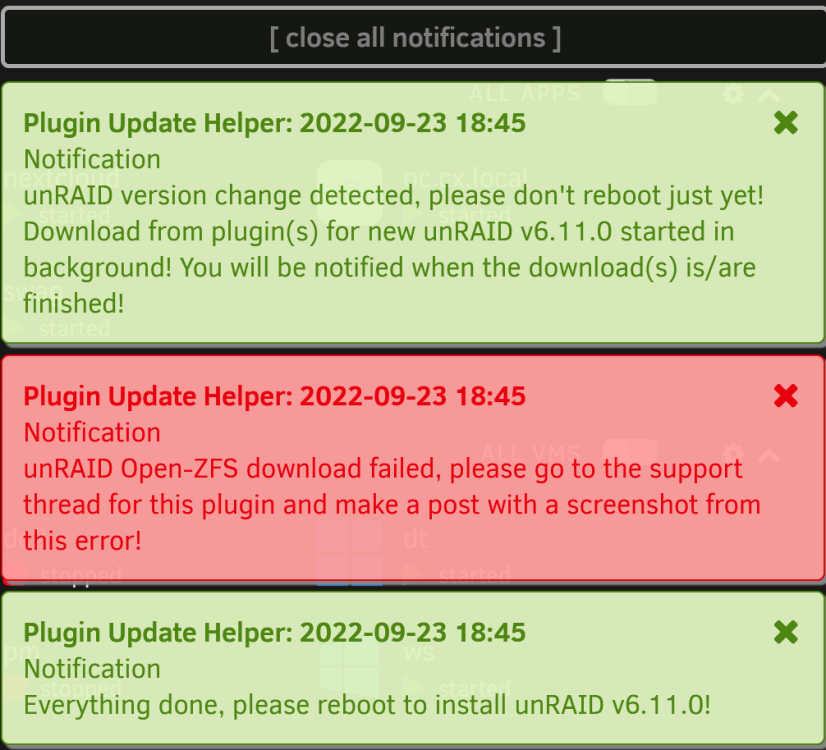
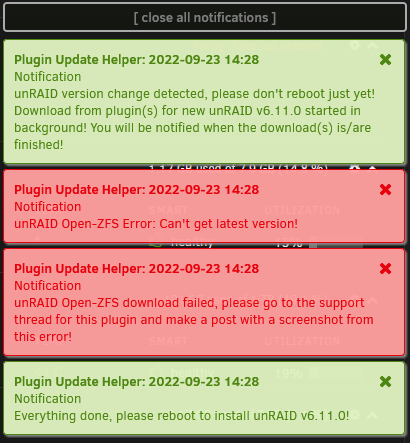
Hi everyone, Upon updating to the latest unRAID verson 6.11.0, I received the following errors on my two unRAID servers. It appears that my ZFS pools are still up and running. Is this an issue?
-
Thank-you @gyto6! Very much appreciated. Cal.
-
Fantastic work @Iker! In a future version would it be possible to automate/schedule scrubs? Alternatively, is there another way to automate ZFS scrubs? Thanks @Iker, Cal.
-
Hi everyone, I'm looking for help, and I hope this is the right thread. I've got NextCloud installed on Unraid, being proxied via Swag, as per Spaceinvader's videos. I also have the "external storage" app installed. When I go into files and try to share a file or folder via the "share link" command, it works perfectly if the folder/file I'm trying to share resides in the NextCloud Data directory, however if I try to share a folder from an SMB share connected via "external storage" it displays a page (when trying to access via the link created under "share link") that appears to be trying to load the directory contents. It spins and spins forever. If I go to the top right side and select "download all files" I do indeed download the contents of the directory. Only files and folder shared from the SMB share connected via the "external storage" app have this issue. Permissions in the "share link" function are set to read only. So what's preventing NextCloud from listing directory contents when I use the "share link" function for a folder residing on an SMB share? EDIT: Found the solution. In the settings for external storage I missed that under the 3 dots by "available for" is a checkbox called "enable sharing". Checking this resolved my issue.
-
Thanks @BVD! Very much appreciated!
-
Thanks @muddro! I found this post that spoke to moving the mountpoint into 'remotes' so I did that and it resolved the error. It's close enough for my use case. Thanks again everyone! Cal.
-
Hi @muddro @BVD @gyto6, Thanks for all your help. @muddro's comment got me on track and worked out perfectly. Thank you all so very very much for all your help and advise. It is very very much appreciated. One last question...now that I have mounted my dataset in /mnt, Fix Common Problems is throwing an error: Generally speaking, most times when other folders get created within /mnt it is a result of an improperly configured application. This error may or may not cause issues for you Is there indeed an issue with mounting my zfs dataset inside of /mnt? Can I safely ignore this error, or are there other factors I'm unaware of and should consider? root@ur:/mnt/liveFiles# zfs list NAME USED AVAIL REFER MOUNTPOINT cxUrPool 9.06T 5.35T 128K none cxUrPool/liveFiles 9.06T 5.35T 9.06T /mnt/liveFiles Thanks again everyone, Cal.
-
Hi @BVD, Sorry to hit you with two replies before you've had a chance to reply. I tried setting mountpoint to legacy but I get the same "pool or dataset is busy". Any suggestions as to how to proceed? root@ur:/etc# zfs set mountpoint=legacy cxUrPool/liveFiles cannot unmount '/mnt': pool or dataset is busy Thanks again for your help @BVD, Cal.
-
Hi @gyto6, If I uninstall the ZFS plugin I no longer have access to zfs, or zpool commands. Maybe this is a dumb question, but how do I unmount a zfs pool if I don't have zfs commands? Thanks @gyto6, Cal.
-
Hi @BVD, Thanks for your message. Here is the result of running the ps -aux | grep cxUrPool: root@ur:~# ps -aux | grep cxUrPool root 12283 0.0 0.0 3984 2144 pts/0 S+ 08:54 0:00 grep cxUrPool I'm not sure how to interpret this. Looks like I'm (root) using it? I'm not sure how to kill this process or how to proceed from here. I'll do some reading into how to set the mountpoint to legacy. Any chance you could point me to a guide on how to achieve that? EDIT: I figured out the kill command, but now I'm chasing the process ID. The bellow commands were called within seconds of each other. I'm super confused, or maybe a bit daft. Perhaps both. root@ur:/etc# ps -aux | grep cxUrPool root 1973 0.0 0.0 3984 2276 pts/0 S+ 10:41 0:00 grep cxUrPool root@ur:/etc# kill -9 1973 bash: kill: (1973) - No such process root@ur:/etc# ps -aux | grep cxUrPool root 6737 0.0 0.0 3984 2064 pts/0 S+ 10:42 0:00 grep cxUrPool root@ur:/etc# kill -9 6737 bash: kill: (6737) - No such process root@ur:/etc# ps -aux | grep cxUrPoo root 7673 0.0 0.0 3980 2216 pts/0 S+ 10:42 0:00 grep cxUrPoo root@ur:/etc# kill -9 7673 bash: kill: (7673) - No such process Thanks again @BVD, Cal.
-
Hi everyone, I'm really hoping someone can help me unmount my pool. I originally had my pool mounted off of /pool/dataset, and wanted to move it into /mnt. I unmounted, then made the dumb move of running: zfs set mountpoint=/mnt pool/dataset I now see that I should have instead run: zfs set mountpoint=/mnt/pool/dataset pool/dataset When I try to unmount the pool I consistently get "cannot unmount '/mnt': pool or dataset is busy". The array is stopped, no dockers, or VMs, are running. I've rebooted the server multiple times, and no matter what I try it is always busy. root@ur:~# zfs unmount cxUrPool cannot unmount '/mnt': pool or dataset is busy root@ur:~# zfs unmount -f cxUrPool/liveFiles cannot unmount '/mnt': pool or dataset is busy root@ur:~# zfs unmount -f cxUrPool cannot unmount '/mnt': pool or dataset is busy root@ur:~# zfs set mountpoint=/mnt/cxUrPool/liveFiles cxUrPool/liveFiles cannot unmount '/mnt': pool or dataset is busy Further complicating matters I have the pool mounted in one spot and the pool/dataset mounted in another: root@ur:~# zfs get mountpoint NAME PROPERTY VALUE SOURCE cxUrPool mountpoint /cxUrPool local cxUrPool/liveFiles mountpoint /mnt local NAME STATE READ WRITE CKSUM cxUrPool ONLINE 0 0 0 I would like to remove both mountpoints and remount into /mnt/cxUrPool/liveFiles. How can I determine what is causing the pool or dataset to be busy, and kill it so I can make this change? Thanks everyone, Cal.
-
Hi everyone, I have two unraid trial servers setup and am evaluating how to setup my NVMe and SSD disks. In both servers I have rust drives setup in zpools, so the question that I have is regarding how to configure the NVMe, and SSDs to store VMs and Docker containers. On one of the UR servers I would like to run my VMs and Docker containers off of the NVMe, and in the other server I'd like to run the VMs and Docker off of an SSD. Should the NVMe and SSD be a lone drive in the pool on each server, (which is how I currently have it configured 1 NVMe alone in the array with no parity on one server, and 1 SSD with no parity on the second server), or should I move the NVMe/SSD to a new pool outside of the array? Once the NVMe, and primary SSD are allocated, I still have 3 SSD drives of different sizes that I would like to make use of, but am unsure where to place them. I'm thinking to mount them all separately and create shares off of them. All data on the NVMe, and all SSD's are backed up, so I'm not concerned about redundancy. Thank you for any advise and suggestions you may have. Cal.
-
@JorgeB sounds good. Bug report has been submitted.
-
Hi everyone, Based on my post: I'm creating a bug report here as requested by @JorgeB. My goal was to have 1 physical server running Unraid hosting my Server 2019 domain controller that would service all the devices on my network, and authenticate shares from my zfs pool via AD/LDAP. Unfortunately I experienced long freeze-ups of the Unraid UI under specific circumstances that were around 15 min long. Things I have learned: On Unraid, under Settings-SMB-Active Directory Settings, you need to have the DC powered up to join the domain (obviously), however in Unraid, you cannot edit/join AD while the Array is running, which means you can't have the DC VM running. Thus joining Unraid to an AD VM hosted on Unraid won't work, since I will never be able to reach the DC that is a powered off VM in Unraid. A suggestion was made in an older post to spin up a 2nd DC on another VM host and join that one. This works to get Unraid to join the domain, however it comes at a cost. You must keep that external DC up. If not, you end up with the 15-ish min hang time I was experiencing. By having an external AD running, Unraid is responsive and does not exhibit the aforementioned freezing. For some reason when starting or stopping the array loading the "VM Manager" settings window, loading the VMS page, starting or stopping the VM DC, Unraid appears to try to reach the DC, and (I'm speculating here)...waits for the DC to time out for a reaaaaaly long time. I'm unsure why Unraid would need to reach out to the DC for any of these operations? Despite the hang time with the only DC being an Unraid VM, once the timeout values expire, and you get the array up and the DC VM running, things run without issue. Despite under Settings-SMB-Active Directory Settings showing as not domain joined, users are indeed authenticated against AD when accessing shares with only the 1 VM DC running. Once you power off (I think reboot too...will have to test) the DC VM, you're back into the 15 min of hang time. Same occurs if trying to start or stop the array, start or stop the DC VM, or load the "VM Manager" settings window, or the VMS page. Perhaps this could be addressed in a future version, adding a user adjustable timeout value for AD requests, and looking into why Unraid needs the DC to start/stop the array, start the VM, or load those 2 pages. I'm unsure which priority to assign here. For my use case it is pretty urgent, but I understand not many users leverage AD. Thanks, Cal. ur-diagnostics-20220612-1119.zip
-
Hi @JorgeB, Thanks for all your help and advice. With your help I think I have figured out the root of this issue, and have somewhat, but not perfectly, solved the issue for my use case. Following your advice I backed-up and created a new USB Key, added the NVMe, then the VMs, and step by step started adding things back. My goal was to have 1 physical server running Unraid hosting my Server 2019 domain controller that would service all the devices on my network, and authenticate shares from my zfs pool via AD/LDAP. Things I have learned: On Unraid, under Settings-SMB-Active Directory Settings, you need to have the DC powered up to join the domain (obviously), however in Unraid, you cannot edit/join AD while the Array is running, which means you can't have the DC VM running. Thus joining Unraid to an AD VM hosted on Unraid won't work, since I will never be able to reach the DC that is a powered off VM in Unraid. A suggestion was made in an older post to spin up a 2nd DC on another VM host and join that one. This works to get Unraid to join the domain, however it comes at a cost. You must keep that external DC up. If not, you end up with the 15-ish min hang time I was experiencing. By having an external AD running, Unraid is responsive and does not exhibit the aforementioned freezing. For some reason when starting or stopping the array loading the "VM Manager" settings window, loading the VMS page, starting the VM DC, Unraid appears to try to reach the DC, and (I'm speculating here)...waits for the DC to time out for a reaaaaaly long time. I'm unsure why Unraid would need to reach out to the DC for any of these operations? Despite the hang time with the only DC being an Unraid VM, once the timeout values expire, and you get the array up and the DC VM running, things run without issue. Despite under Settings-SMB-Active Directory Settings showing as not domain joined, users are indeed authenticated against AD with only the 1 VM DC running. Once you power off (I think reboot too...will have to test) the DC VM, you're back into the 15 min of hang time. Same occurs if trying to start or stop the array, start the DC VM, or load the "VM Manager" settings window, or the VMS page. Perhaps this could be addressed in a future version, adding a user adjustable timeout value for AD requests, and looking into why Unraid needs the DC to start/stop the array, start the VM, or load those 2 pages. So it appears my options are: Run a secondary DC outside of Unraid (need to ensure that DNS server 1 is pointed to the external DC) Manage a second set of credentials in Unraid for all DC users Run only one DC in a VM in Unraid, and deal with 15 min freeze ups anytime I need to bring down the DC VM Look for another platform to run VMs and zfs pools. Thoughts? Thanks again @JorgeB, Cal.
-
Thanks @JorgeB I will give that a try. Can you point me to directions on re-assigning the NVMe as disk1, or is it as simple as adding the drive in the UI?
-
Thanks for your reply @JorgeB. I stopped the VM service, renamed libvirt.img to libvirt.img.backup, and started the service again. Upon starting the service a new libvirt.img was created, but the system is frozen. I'm unable to pull up any pages in the UI. I may do a hard reboot shortly if it doesn't become responsive. (EDIT, the UI became responsive after 15-ish min) Any other suggestions as to what I can try? My NVME drive and the 3 drive zfs array are populated with files that I would rather not have to re-populate from external sources. Is it possible to do a 'factory reset' without losing the data on these drives? Thanks again @JorgeB, Cal.
-
Hi everyone, I've narrowed it down to the the VM service. Upon boot the machine starts up and unraid works on starting the array. Once the array has been started Unraid freezes up for 15-ish min. This occurs if the VM service is enabled whether or not the VM is set to auto-start. If the VM service is disabled unraid starts up fine. If I start the VM service after unraid successfully boots, it freezes for 15-ish min. I have 3 VMs on the machine, with 1 of the (the domain controller) set to auto-start. The VMs are: Server 2019 - Domain controller 2x Windows 11 Pro Such a long boot time is a show stopper for me that I hope to resolve. Any thoughts/suggestions as to how to figure out how to resolve this? Thanks everyone, Cal.
-
Thanks for the reply @JorgeB. When I boot in safe mode I get the exact same experience. Attached is a diagnostic zip after booting in safe mode. Any other thoughts or suggestions as to how I can track down what's going on here? Thanks again @JorgeB, Cal.
-
Hi everyone, I'm running a trial version of unraid, and hoping to resolve this issue before solidifying my purchase. I have unraid setup on a workstation with 1 NVME which hosts my VM (which is Win 2019 domain controller), and 3 8tb WD Blue drives configured in raidz1. Upon boot, I watch the screen and see the IP for the UI. I can log into the UI, and see that the array (of 1 disk...the nvme) is starting. That takes around 2-ish min to start. After that the UI freezes for ages and is non-responsive to reloads via IP. I haven't timed it, but I'd say 15 min before the UI is responsive again, and my VM boots. Once the UI is up and the VM has booted once, I can reboot it and it goes down and comes up quite fast. If I shut down the VM, the UI becomes unresponsive again for another 15 min or so. When it becomes responsive again, I can boot the VM, and we're back in business. Any thoughts on what might be going on here? Drives are 1 month old and have been burnt in. Ram has been memtested. NVME is also around a month old and is a WD 850 2tb. The rest of the box is in good shape having been used daily for a few years. I've created a diagnostic zip, and checked the logs. I see an issue with time sync but have NTP setup pointing both locally to the DC (maybe this is the problem?), and the 2nd, 3rd, and 4th NTP pointing externally. I have two external pi-hole DNS servers, so the external NTP should always be reachable. EDIT: I deleted the inline log, and attached the full diagnostic zip. Any and all help is greatly appreciated. Thanks, Cal.

