





calvados
Members
-
Joined
-
Last visited
Everything posted by calvados
-
To add to my post above...I read in another post that a user found success by creating an unraid pool, then adding the devices in the same order as zpool status shows, so I tried that, and I get the following showing "unmountable: unsupported or no file system" And at the bottom (Formatting the unmountable disks gets me nowhere): The following settings were used for the pool: I'm feeling so dumb right now. What am I not seeing or doing? Thanks everyone, Cal.
-
Hi everyone, I've made zpools successfully on 2 other unraid instances, but for the life of me I can't get this one going. I've followed the same steps I did for the other two. I even moved my existing zpool drives (and Unraid USB) from one of the working Unraid servers to the new server, and everything works perfectly. I did this to rule out a hardware issue with the MOBO or SATA connectors. The only difference I can see between my previous setups and this one, is the new HDDs, and the newer version of Unraid from when the other zpools were created using the same steps below. The steps I took were to connect the 6 12tb drives to my mobo, and power up. I did a pre-clear (with pre-read and post-read...I think that's what they were called), and SMART extended test on all drives, and no errors were found. From there I followed SpaceInvaderOne's steps here: I formatted each drive as XFS, then deleted the partition. From the terminal I ran "zpool create -O casesensitivity=insensitive -m /mnt/mypool mypool raidz2 sda sdb sdc sde sdf sdg" And ran "zfs set compression=lz4 mypool " And ran "zfs set atime=off mypool " And ran "zfs create mypool/backup" The zpool and dataset are created, and I can read and write to it without issue. I reboot, and the pool is not mounted. When testing after a reboot I get: zpool status no pools available And: zpool import pool: mypool id: 155193553666544464 state: ONLINE action: The pool can be imported using its name or numeric identifier. config: mypool ONLINE raidz2-0 ONLINE Then I import the zpool: zpool import mypool zpool status pool: mypool state: ONLINE config: NAME STATE READ WRITE CKSUM mypool ONLINE 0 0 0 raidz2-0 ONLINE 0 0 0 sda ONLINE 0 0 0 Even after importing the zpool, it doesn't display in the GUI like it does on my other instances. They all show as unassigned devices. Current machine with the problem (one disk not "passed through" so you can see the partitions...the others display similarly): My other machine that is working without issues: I feel like I'm missing something basic, but I'm stumped. Can one of you much smarter people please tell me where I'm failing on this? Thank you all, Cal.
-
Thanks @Kilrah. What about securing RW access to the files?
-
Hi everyone, I have a ZFS array that I am sharing out via Settings->SMB: [myFiles] path=/mnt/myFiles browseable = yes public = no guest ok = no writeable = yes read only = no valid users = user1 user2 Due to some foolishness, when attempting to get user2 access to the myFiles share, a "chmod -R 777 /mnt/myFiles" was run. Of course this provides wide open access including execute permissions. This is not desirable for a number of security reasons. Can you please advise what updated CHMOD should be run to set permissions on these files to a more appropriate level for a file share? I'm thinking to run CHMOD against the entire '/mnt/myFiles' share, as 99% of the files are simply static files that users will need R/W access to. For the small number of files that will need execute rights, I can go an manually CHMOD those specific files. So, would CHMOD 666 be the recommended value, or perhaps 660? The 'myFiles' share does not contain any VMs, Dockers, or Docker data. It is strictly a file repository. Thanks everyone, Cal.
-
Thank you @KluthR. It works perfectly! Very much appreciated kind human.
-
Hi @KluthR, I'm wondering if there is a rough ETA on the next release to adjust the CHMOD to run before the post-run scripts? Thanks for all that you do @KluthR, Cal.
-
Thank you!
-
Hi everyone, I'm having challenges running a script that sets CHMOD -R 777 on the backups created. It doesn't seem to set permissions on the newest backup created, but does change permissions for previously created backups. I've set my script to run as a "Post-run script", and made the script executable. The content of my script is as follows: !/bin/bash sleep 10 chmod -R 777 /mnt/pathToBackupFolder When I view ls -l before the backup I see: drwxrwxrwx 2 nobody users 7 Mar 12 13:36 ab_20240312_133545/ drwxr-x--- 2 nobody users 7 Mar 12 13:39 ab_20240312_133836/ Then running a new backup results in: drwxrwxrwx 2 nobody users 7 Mar 12 13:36 ab_20240312_133545/ drwxrwxrwx 2 nobody users 7 Mar 12 13:39 ab_20240312_133836/ drwxr-x--- 2 nobody users 7 Mar 12 13:51 ab_20240312_135101/ How do I go about getting all backups to have "drwxrwxrwx"? Please help. Thank you, Cal.
-
Hi everyone, I've tried searching this thread but I haven't found an answer to my challenge. Can anyone point me to a sample script that I can run as a "Post-run script" to chmod the newly created backup? I have a windows based scheduled task that is dying due to lack of r/w permissions. Thank you in advance. Cal.
-
@KluthR, It worked without issue. Thank you again so much for such a quick fix. If I may, I'd like to make two suggestions: - For the USB backup, could it be backed up into a timestamped folder in the same way that the appdata folder is? - Could there be an option for the USB backup that defines its own backup schedule and its own 'number of backups to keep'? Thanks again @KluthR
-
Thank you so very very much! I just started a manual backup and I see the logs populating. Will report back once it has completed! @KluthR, thank you thank you thank you!
-
@KluthR, thanks so much. I'm certainly available for testing.
-
I need to eat a bit of crow here. I just checked the timestamps on my backups, and you are correct that it stopped working once I turned off users shares. I didn't realize that backups weren't running! Is a fix possible, or do I need to turn users shares back on? Asides from running these backups I have no other use for user shares. Thanks again @KluthR
-
Correct, I have user shares disabled as I do not use them. I run ZFS only. This had no impact on the V2 version of the plugin. Thank you so much @KluthR.
-
Unraid Version: 6.11.5 When running manually syslog shows: Jan 26 23:16:12 ur CA Backup/Restore: It doesn't appear that the array is running. Exiting CA Backup The array is running though, my storage in on a ZFS zpool:

-
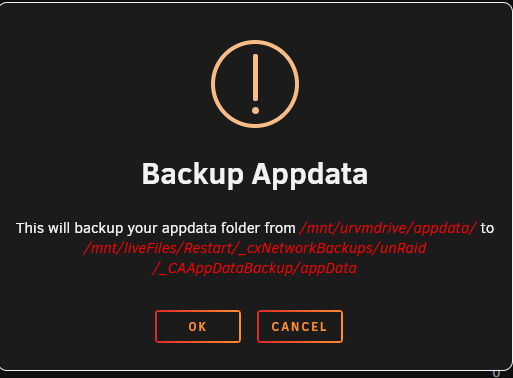
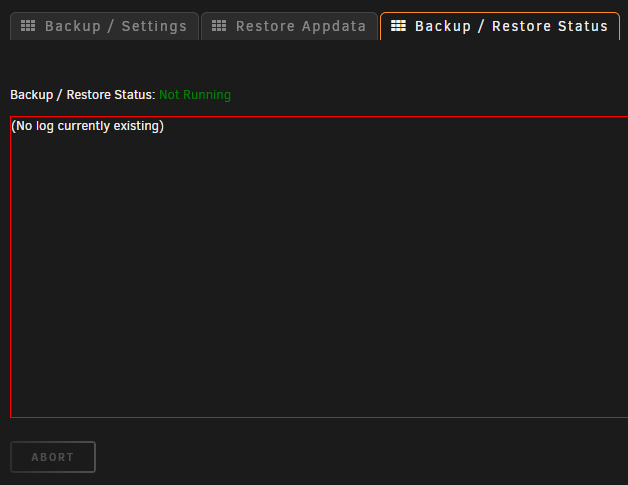
Hi everyone, I just updated from V2 to V3. V2 had been running solid since I installed it. I am unable to get V3 to run at all. A manual run produces no logs in the 3rd tab. I've verified that all my settings are the same as V2. I have verified all paths, and rebooted unraid. I have tried running manually with all dockers stopped, and nothing. Not a single line in the 3rd tab where the logs should be. EDIT: I set the notification settings to notify on start and stop, and running manually does not product a notification. As noted above I tried running with all dockers stopped, but if I try running it with my dockers running they are not shutdown. It is as if the plugin does not start at all. When running manually it warns me that the target folder will be overwritten. I click ok, and am taken to the 3rd tab, which shows "Backup / Restore Status: Not Running" Help? ur-diagnostics-20230126-1543.zip
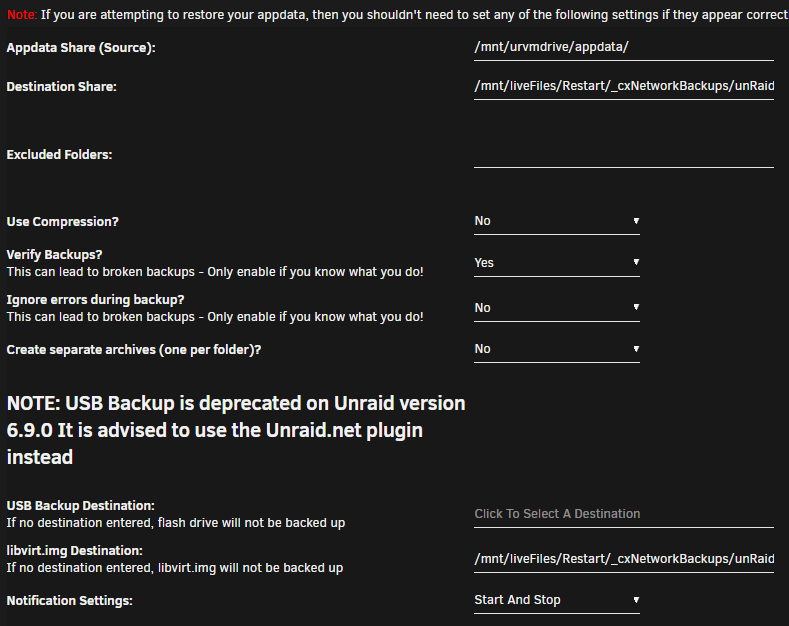
-
I'm not sure if this is what you mean, but the schedule I have is "0 0 2,16 * *" and the script is: #!/bin/bash zpool scrub hotBackupPool
-
Hi everyone, I have two Unraid pro servers which both have a scheduled task under the "user scripts" plugin to scrub my zfs pool. On my main server the script runs on a schedule without issue. Recently I noticed that the second server's script has not been running on the same schedule. I compared the setting between the two servers, and they match. I uninstalled, rebooted, and re-installed the "users scripts" plugin, but it still appears to not run on the schedule. Running the task manually does indeed work, it appears to simply not adhere to the schedule. What am I missing here? Feels like it must be something obvious. Here is my diagnostics from the second server that does not run the scheduled task. ur2-diagnostics-20221215-1546.zip
-
Thank you, this resolved the issue.
-
My apologies for the the double post, and thank you for replying. I have deleted my post above.
-
Hi everyone, I have an odd issue that started with the new Unraid update 6.11.3. On one of my 2 Unraid pro servers, the ZFS pool fails to "mount" (aka is not imported) on reboot with no error indicated. A manual "zpool import poolName" works, but upon a subsequent reboot the ZFS pool is again "unmounted". The second ZFS pool on the 2nd Unraid server does not exhibit this behavior. "zpool status" shows everything is fine after I import. I'm at a loss as to how to get the zpool to "auto import" on reboot. Sorry for my poor terminology. I hope I've explained the situation well enough. ur-diagnostics-20221108-2238.zip
-
Thanks @SimonF. I had not heard of SR-IOV before. Thanks for pointing me in the right direction.
-
Hi everyone, Potentially dumb question, but I'll throw it out there anyways. If I was to purchase a dual SPF+ NIC card for my UnRaid server, would the whole card be in 1 IOMMU group, and thus I would need to pass both SFP+ ports to the VM, or is it possible to pass only 1 of the SPF+ ports to a VM, and use the 2nd one for UnRaid? I only have one free PCI slot, so buying two separate cards won't work in this server. Thanks everyone
-
@ich777 thank you very much for your reply! Very much appreciated.
-
Thank you for your reply @ich777. I rebooted after applying the 6.11.0 update today. The update previous to that was around 30 days prior. When you say "the update help was updated about 2 weeks ago", is there any action I need to take to receive the update, or did the reboot I did today cause me to receive that update? EDIT: FWIW I regularly update whenever prompted. Thanks again @ich777

