Kasjo
Members
-
Joined
-
Last visited
-
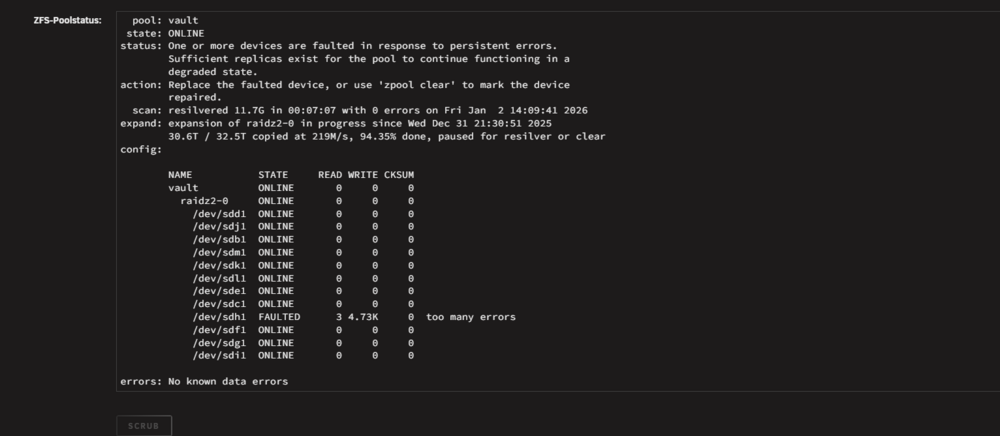
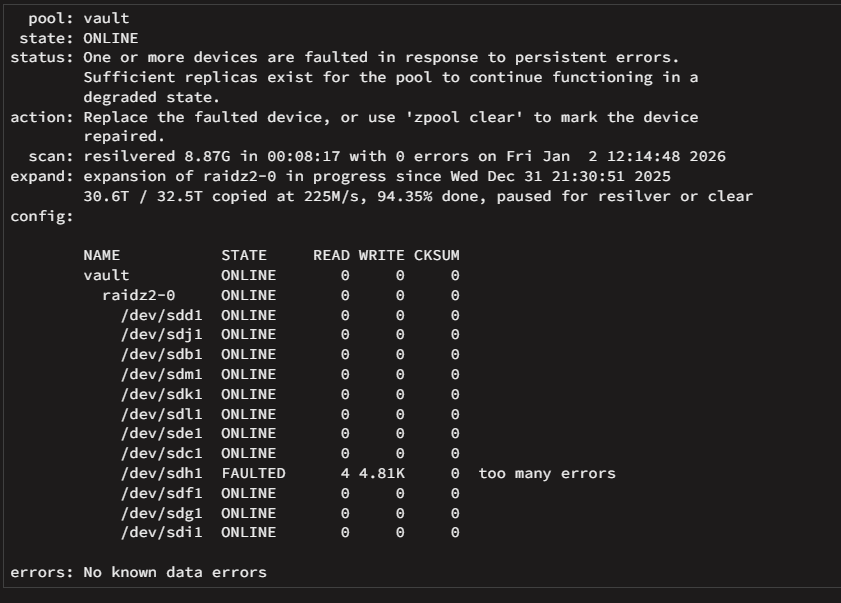
Yeah ok, i will do this then. Cables are replaced. Pool starts now to resilvering. ***Update: Ok it stops again for errors here: I guess so the drive is dead then? Better wait for the replacement then. As the N5 case has a backplane, i will shutdown the server now and swap the HDD to another slot, just to see if its a Drive or backplane problem. If the error still persists on this drive i think its dead and need a replace. Faulted again and followed the drive. Im replacing it. Thx for the help. Can i simply replace it while the expansion is in progress?
-
Hi all. I have following Problem: I currently adding drives to an existing ZFS pool (Raid Z 2) Wile adding the last Disk the pools stops because of read errors of a existing drive. I did a smart short test, result is fine. Long test is currently working. I ordered alrdy a new one, but what is the best way here. Should i "zpool clear" here to finish the expansion or should i directly replace the drive? I Replaced alrdy the cables just in case. I moved the server to a new Case (Jonsbo N5) and thought may i damaged a cable or something. dmesg | grep -i 'sdh\|disk\|error': root@Tower:~# dmesg | grep -i 'sdh\|disk\|error' [ 0.005060] RAMDISK: [mem 0x7dba3000-0x7fffffff] [ 5.167048] scsi 2:0:0:0: Direct-Access SanDisk Cruzer Force 1.00 PQ: 0 ANSI: 6 [ 5.182183] sd 2:0:0:0: [sda] Attached SCSI removable disk [ 67.307763] sd 3:0:3:0: [sde] Attached SCSI disk [ 67.309678] sd 3:0:0:0: [sdb] Attached SCSI disk [ 67.309709] sd 3:0:2:0: [sdd] Attached SCSI disk [ 67.309793] sd 3:0:1:0: [sdc] Attached SCSI disk [ 67.349296] sd 4:0:2:0: [sdh] 7814037168 512-byte logical blocks: (4.00 TB/3.64 TiB) [ 67.349305] sd 4:0:2:0: [sdh] 4096-byte physical blocks [ 67.357360] sd 4:0:2:0: [sdh] Write Protect is off [ 67.357365] sd 4:0:2:0: [sdh] Mode Sense: 9b 00 10 08 [ 67.358154] sd 4:0:2:0: [sdh] Write cache: enabled, read cache: enabled, supports DPO and FUA [ 67.384486] sdh: sdh1 [ 67.384566] sd 4:0:2:0: [sdh] Attached SCSI disk [ 67.395365] sd 4:0:1:0: [sdg] Attached SCSI disk [ 67.402654] sd 4:0:5:0: [sdk] Attached SCSI disk [ 67.403624] sd 4:0:4:0: [sdj] Attached SCSI disk [ 67.411663] sd 4:0:6:0: [sdl] Attached SCSI disk [ 67.413179] sd 4:0:3:0: [sdi] Attached SCSI disk [ 67.491856] sd 4:0:7:0: [sdm] Attached SCSI disk [ 67.929025] sd 4:0:0:0: [sdf] Attached SCSI disk [ 398.850914] sd 4:0:2:0: [sdh] tag#6892 CDB: opcode=0x8a 8a 00 00 00 00 01 bc 23 a0 d0 00 00 00 b0 00 00 [ 399.732843] sd 4:0:2:0: [sdh] tag#6024 CDB: opcode=0x8a 8a 00 00 00 00 01 bc 23 a0 38 00 00 00 90 00 00 [ 399.732880] sd 4:0:2:0: [sdh] tag#6851 CDB: opcode=0x88 88 00 00 00 00 00 d2 a1 e9 78 00 00 00 08 00 00 [ 404.797835] sd 4:0:2:0: [sdh] tag#6854 UNKNOWN(0x2003) Result: hostbyte=0x0b driverbyte=DRIVER_OK cmd_age=1s [ 404.797841] sd 4:0:2:0: [sdh] tag#6854 CDB: opcode=0x88 88 00 00 00 00 01 d1 c0 be 00 00 00 00 08 00 00 [ 404.797843] I/O error, dev sdh, sector 7814036992 op 0x0:(READ) flags 0x80700 phys_seg 1 prio class 2 [ 406.042244] sd 4:0:2:0: [sdh] tag#6858 UNKNOWN(0x2003) Result: hostbyte=0x0b driverbyte=DRIVER_OK cmd_age=37s [ 406.042245] sd 4:0:2:0: [sdh] tag#6857 UNKNOWN(0x2003) Result: hostbyte=0x0b driverbyte=DRIVER_OK cmd_age=37s [ 406.042251] sd 4:0:2:0: [sdh] tag#6857 CDB: opcode=0x8a 8a 00 00 00 00 01 bc 23 a0 38 00 00 00 90 00 00 [ 406.042251] sd 4:0:2:0: [sdh] tag#6858 CDB: opcode=0x88 88 00 00 00 00 00 d2 a1 e9 78 00 00 00 08 00 00 [ 406.042255] I/O error, dev sdh, sector 7451418680 op 0x1:(WRITE) flags 0x0 phys_seg 5 prio class 2 [ 406.042255] I/O error, dev sdh, sector 3533826424 op 0x0:(READ) flags 0x0 phys_seg 1 prio class 2 [ 406.042260] zio pool=vault vdev=/dev/sdh1 error=5 type=2 offset=3815126331392 size=73728 flags=2148533418 [ 406.042260] zio pool=vault vdev=/dev/sdh1 error=5 type=1 offset=1809319096320 size=4096 flags=3145856 [ 412.297993] sd 4:0:2:0: [sdh] tag#6889 UNKNOWN(0x2003) Result: hostbyte=0x0b driverbyte=DRIVER_OK cmd_age=7s [ 412.298000] sd 4:0:2:0: [sdh] tag#6889 CDB: opcode=0x88 88 00 00 00 00 01 d1 c0 be 00 00 00 00 08 00 00 [ 412.298004] I/O error, dev sdh, sector 7814036992 op 0x0:(READ) flags 0x0 phys_seg 1 prio class 2 [ 412.298008] Buffer I/O error on dev sdh, logical block 976754624, async page read [ 413.542329] sd 4:0:2:0: [sdh] tag#6893 UNKNOWN(0x2003) Result: hostbyte=0x0b driverbyte=DRIVER_OK cmd_age=7s [ 413.542334] sd 4:0:2:0: [sdh] tag#6893 CDB: opcode=0x88 88 00 00 00 00 01 d1 c0 bc 50 00 00 00 10 00 00 [ 413.542337] I/O error, dev sdh, sector 7814036560 op 0x0:(READ) flags 0x0 phys_seg 1 prio class 2 [ 413.542342] zio pool=vault vdev=/dev/sdh1 error=5 type=1 offset=4000786685952 size=8192 flags=1245377 [ 413.542363] sd 4:0:2:0: [sdh] tag#6894 UNKNOWN(0x2003) Result: hostbyte=0x0b driverbyte=DRIVER_OK cmd_age=7s [ 413.542366] sd 4:0:2:0: [sdh] tag#6894 CDB: opcode=0x88 88 00 00 00 00 00 00 00 02 50 00 00 00 10 00 00 [ 413.542368] I/O error, dev sdh, sector 592 op 0x0:(READ) flags 0x0 phys_seg 1 prio class 2 [ 413.542371] zio pool=vault vdev=/dev/sdh1 error=5 type=1 offset=270336 size=8192 flags=1245377 [ 413.542378] sd 4:0:2:0: [sdh] tag#6895 UNKNOWN(0x2003) Result: hostbyte=0x0b driverbyte=DRIVER_OK cmd_age=7s [ 413.542381] sd 4:0:2:0: [sdh] tag#6895 CDB: opcode=0x88 88 00 00 00 00 01 d1 c0 ba 50 00 00 00 10 00 00 [ 413.542383] I/O error, dev sdh, sector 7814036048 op 0x0:(READ) flags 0x0 phys_seg 1 prio class 2 [ 413.542386] zio pool=vault vdev=/dev/sdh1 error=5 type=1 offset=4000786423808 size=8192 flags=1245377 [ 414.811984] sd 4:0:2:0: [sdh] tag#6898 UNKNOWN(0x2003) Result: hostbyte=0x0b driverbyte=DRIVER_OK cmd_age=7s [ 414.811989] sd 4:0:2:0: [sdh] tag#6898 CDB: opcode=0x35 35 00 00 00 00 00 00 00 00 00 [ 414.811995] I/O error, dev sdh, sector 0 op 0x1:(WRITE) flags 0x800 phys_seg 0 prio class 2 [ 414.812001] zio pool=vault vdev=/dev/sdh1 error=5 type=5 offset=0 size=0 flags=2098304 [ 421.042072] sd 4:0:2:0: [sdh] tag#6062 UNKNOWN(0x2003) Result: hostbyte=0x0b driverbyte=DRIVER_OK cmd_age=52s [ 421.042083] sd 4:0:2:0: [sdh] tag#6062 CDB: opcode=0x8a 8a 00 00 00 00 01 bc 23 a0 d0 00 00 00 b0 00 00 [ 421.042086] I/O error, dev sdh, sector 7451418832 op 0x1:(WRITE) flags 0x0 phys_seg 6 prio class 2 [ 421.042091] zio pool=vault vdev=/dev/sdh1 error=5 type=2 offset=3815126409216 size=90112 flags=2148533418 [ 426.042087] sd 4:0:2:0: [sdh] tag#6065 UNKNOWN(0x2003) Result: hostbyte=0x0b driverbyte=DRIVER_OK cmd_age=9s [ 426.042092] sd 4:0:2:0: [sdh] tag#6065 CDB: opcode=0x88 88 00 00 00 00 01 d1 c0 be 00 00 00 00 08 00 00 [ 426.042094] I/O error, dev sdh, sector 7814036992 op 0x0:(READ) flags 0x0 phys_seg 1 prio class 2 [ 426.042099] Buffer I/O error on dev sdh, logical block 976754624, async page read [ 661.474553] mce: [Hardware Error]: Machine check events logged [ 661.474559] [Hardware Error]: Corrected error, no action required. [ 661.474567] [Hardware Error]: CPU:0 (19:21:2) MC18_STATUS[-|CE|MiscV|AddrV|-|-|SyndV|CECC|-|-|-]: 0x9c2040000000011b [ 661.474585] [Hardware Error]: Error Addr: 0x000000016eaf2900 [ 661.474590] [Hardware Error]: IPID: 0x0000009600150f00, Syndrome: 0x36a408000a800d01 [ 661.474599] [Hardware Error]: Unified Memory Controller Ext. Error Code: 0 [ 661.474614] [Hardware Error]: cache level: L3/GEN, tx: GEN, mem-tx: RD tower-diagnostics-20260102-1315.zip
-
I got my SteamWebhelper sorted out @Wachuwamekil I was reading a comment that it pointed out it was die home directory. https://forums.unraid.net/profile/278474-bomberus/ Ussually it is something like /mnt/user/appdata/steam-headless/ I changed this direktly to /mnt/vm/appdata/steam-headless/ vm here is the pool name were the appdata is located on my unraid.. So without the user/ And it works right away. So thanks tio @Bomberus for the hint.

-
Hmm But why it happens only to the first one? I have 4 pools named with unraid at the beginning? Anyhow, good that you can reproduce it. I will rename them then. ^^ Thx to take the time and find a solution or work arround.
-
Hi Sry für die viel zu späte rückmeldung. Ja browsercache usw. hab ich gelöscht. Brachtte leider keine besserung. Anbei die Diagnose daten. @JorgeB I Added the diagnostics. Browsercache clear dosnt help. tower-diagnostics-20250416-1725.zip
-
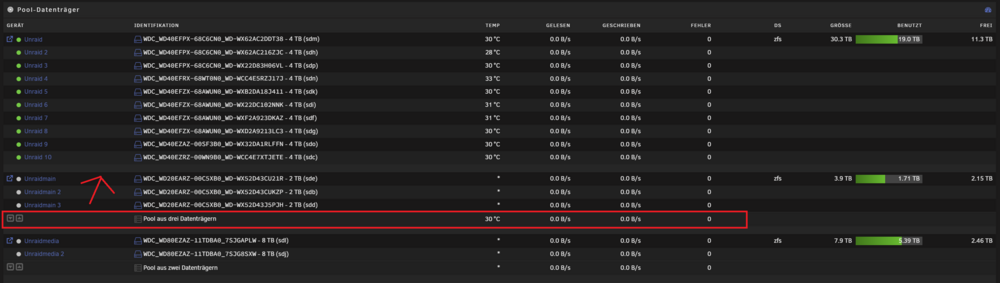
Grüße Ich hatte vergangene Tage bei meinem Unraid ZFS pool zwei SSDs entfernt welche dort als Cache hinterlegt waren. Hier bin ich nach einer anleitung aus nem englischen teil vom unraid forum gegangen. Hab mir den Beitrag aber nicht gemerkt. Es hat auch alles wunderbar Funktioniert und alles läuft, nur is mir aufgefallen das auf der Start Page, wo alle Pools aufgelistet sind, unter besagtem Pool nun die "Gesamt" anzeige fehlt. Anbei ein Screenshot der anzeige, welche im oberen Pool nicht mehr vorhanden ist. Weiß jemand wie ich die wieder herbekomme?
-
Hey there. I Have a question. I use on my unraid server the s3 sleep plugin (darkside40 Version). The latest version is not working on my server. Dostn detect any network stuff. Anyhow... Darksides plugin works, but i came on a idea. Is it possible, that at the time unraid starts Scrub oder Parity on the server, it could be able to stop the Sleep plugin, and after its done, start it again? The main problem is, as i dont monitor the pools, as it dont make sense on a ZFS pool, i use only the network traffic for shutdowns. That means also, the server goes offline/Standby even a party oder scrub is in progress. I would like to run the scrub in one go, but for that, i need always to disable the Plugin manual. Is there a way to make that automaticly?
-
Just letting you now. Not Final Statement but so far: I did a lot of research the last days and get to one thread that might helps. After a pass in memtest over the night i managed to find this thread: Faq for Unrraid Here is explains that my Ryzen model, 3900X wont support official higher speed as 2666 wit full loadout. So remembering myself, the old ram was also a 2666mhz... i changed the frequency and after the past two days, getting this error every 5 mins in the log right after the start, my server run for hours now without any error. I will check that the next days and weeks and will get back here to report the Result. But for now, it looks awesome so far. Again, many thanks for your help so far.
-
Yeah ram is really a pain sometimes. Another Question. If the Ram detects a error, and its a ECC Memory (multibit). He should repair it by itself right? Okay, so if that happnes, does the error looks like the one i got? Or ist that then more clear that the ram detects a error? I just want to figure out how i can get closer to the source of this error, because errors like this, like: Something with Memory is wrong" wont help much because on a unraid server, basically Everything is a kind of memory. Its not against you guys, more like how the systems create logs and stuff. Wish they could be more specific. I know that i got Hardware error in the past, with regular QVL doubblecheckt memory but never had the chance to get to the logfiles because its not a 24/7 server. At that time i ignored that error and moved on. And that was years ago. I have the Live Memory tester, but i tend to use "offline" methods like Memtest or something. It could be also a problem that i run 4 Slots of Memory. ECC Memory to find for this Plattform is a pain, were Asus directs you to the QVL List, Advertising it can handle ECC, but the list offers only regular non ECC kits. I think my next step so far is to let run Memtest over night and see what that brings. The Error occurs then may somewhere in the next two weeks. So for now, we cant determin if its CPU Cache or RAM.
-
Two things i have here in mind. First, i had this kind of error (not sure if its the same) since i have this Mobo CPU combo, but back in the days i had regular Memory, no ECC. I ignored the error and moved on. I didn't had the chance to check the logs back then, and yeah server runs over the month perfectly fine. Second thought: If its truly the ram, in my experience, should i have not a lot more Erros over the last two weeks? This error is really rar, and regardless how much ram i use with Dockers and VMs and so on, it runs perfectly fine. In my Experience with regular PC stuff, Ram errors should came up more frequently, right? Also, the server got the errors in the night, were he basically just runs to download steam game updates via a Docker. No special Tasks. Strange. Is there may a Option to check the ram via Memtest? Can i trigger this error there too? To Dismantle the server is a bit tricky XD
-
Hmm, what is SEL? I use a consumer Board from Asus. May you can give me a hint in the right direction. I have also no clue if that Board has something to look into.
-
Hi there. Today i noticed a few [Hardware Error]: Machine check events on my Unraid server. hey look almost the same, all of them. As i googled it some say this error could be CPU cache related because it has ECC. I recently upgraded to ECC DRAM as well so i ask myself maybe its the ram. The Server runs a few days now and i got this error mostly last night. Could someone please take a look at my Diagnostics? Im not that expert of this kind of error. Many Thanks tower-diagnostics-20241002-1107.zip
-
Eigentlich hat sichs bereits erledigt und ich hatte das Topic gelöscht. Interessant. Problem is soweit beseitigt. War ein Missverständnis meinerseits. Hatte das hier Fehlinterpretiert. Danke trotzdem.
-
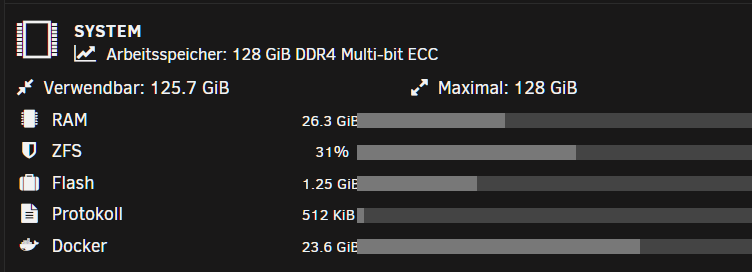
Grüße euch. Mir ist eben aufgefallen, nachdem ich die tage mehrere docker usw. installiert hab, das Docker als solches sehr viel ram belegt. Soweit ich gelesen habe ist das Docker Image welches gewachsen ist dran schuld. Aktuell ca 23gb. Jetzt meine Frage weil viele docker gar nicht laufen. Muss das im ram liegen? Ich hab dafür eigens eigentlich ein Nvme storrage angelegt wo das auch gespeichert ist. Warum muss das zusätzlich in den Ram geladen werden? Evtl. könnte mich jemand aufklären damit ich weiß ob ich nich irgendwas falsch eingestellt habe. Danke schon mal vorab.
-
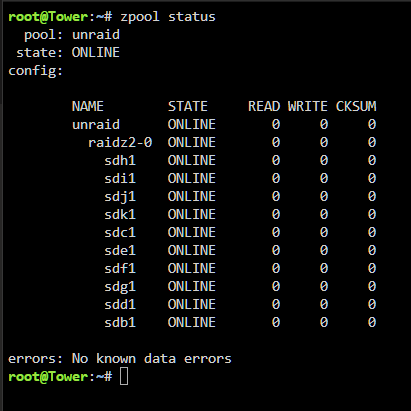
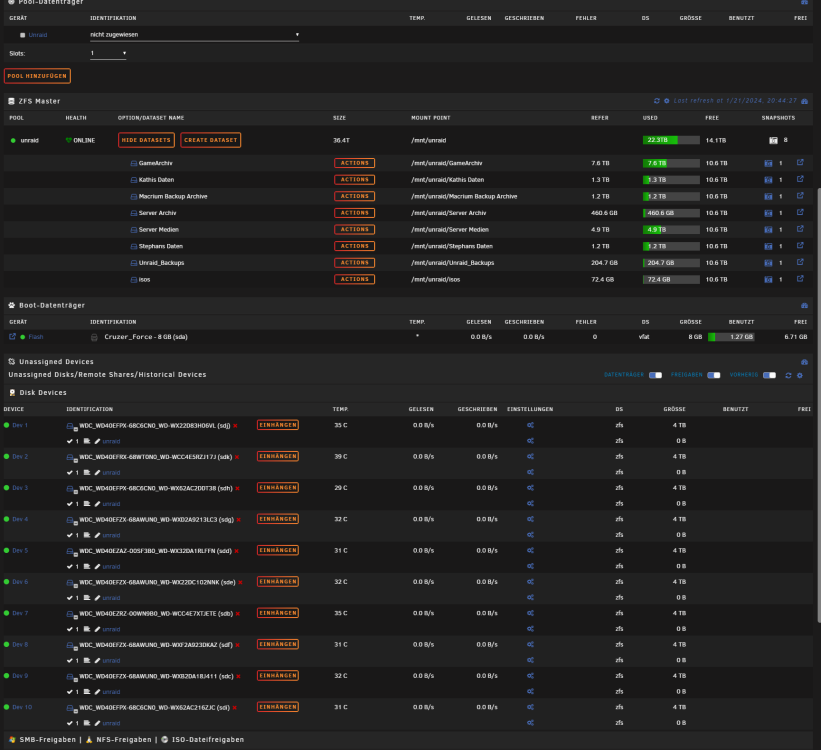
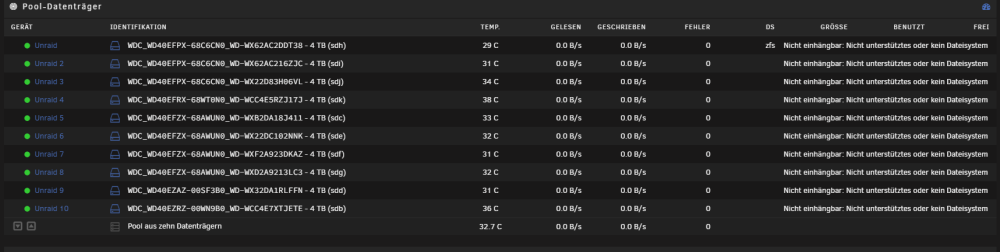
Grüße. Ich hatte eben einen harten crash am Server und dabei hats mir das ZFS zerlegt. Jetzt habe ich mittels zfs import soweit die datasets usw. wieder da. Aber im eigentlichen pool welcher initialisiert ist fehlen alle Datenträger. Beim ZFS import habe ich angegeben zfs import unraid Ich bin mir nur unsicher was ich als nächstes machen soll. Auch steht im eigentlichen unraid fenster unraid Großgeschrieben. Wenn ich dem leeren pool jetzt neu einstelle auf 10 drives, raid Z2 usw bin ich mir unsicher ob die reihenfolge aus dem cmd fenster auch korrekt ist. Bevor ich jetzt hier müll mache frage ich vorher nach. Wie bekomm ich das wieder hin? Hoffe jemand kann mir helfen. EDIT: Also bis jetzt komme ich nicht weiter. Ich kann zwar über die freigaben auf die jeweiligen Dateien zugreifen, sprich ich hab in einem Ordner zwei pdfs mit anzeigen lassen. Auch ein video file hab ich heruntergeladen das funktioniert. Das bedeutet das die daten da sind, aber unraid den pool als solchen nicht mehr erkennt. Ich frage mich ob ich das so erst quasi als neue Konfiguration speichern muss. Allerdings habe ich bange noch davor ob die Reihenfolge stimmt bzw. ob die bei einem raidz2 überhaupt eine rolle spielen da ja eigentlich überall die selben daten draufliegen müssten oder? Er möchte auch das ich den pool formatiere. Was aber ungünstig wäre. Edit 2: Also soweit scheint alles in Ordnung zu sein. zfs zeigt die datasets an, die shares funktionieren auch, kann also auf alles zugreifen vom pc aus, nur will unraid nach wie vor, das ich alle platten formatiere. Wieso akzeptiert es den Pool nicht als der, der er ist? tower-diagnostics-20240121-2224.zip Update: Nachdem ich in diesem oben beschriebenen zustand Unraid nun heruntergefahren habe und wieder hochgefahren, wurden die platten normal wieder angenommen. Vermutlich hat einfach ein sauberer Neustart gefehlt. Würde behaupten das die UI sich da irgendwo aufgehangen hatte wie in einem anderen thread. Mein Unraid is wieder am start und läuft wie es soll.