





MyStarserver
Members
-
Joined
-
Last visited
Everything posted by MyStarserver
-
Hi, really nice work on Unraid Deck. The app looks clean and well thought out. Do you have any plans to make it open source, or at least open up parts of it (especially the auth/networking pieces)? I’d like to use it, but I’m cautious about giving a closed-source client access to my Unraid server and my most important data....
-
Please just give us the option to save it in the config files; it is very annoying to reconfigure it every time I close the browser.
-
Thank you, I’ll take a look at this. I’m just still puzzled as to why this issue only occurs after I remove the drive from the history.
-
pi-tower-diagnostics-20241125-0955.zip
-
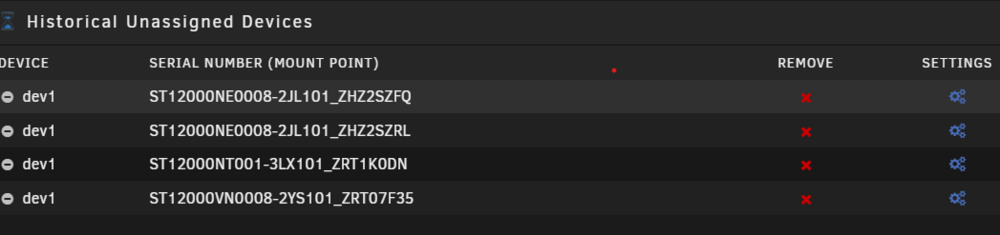
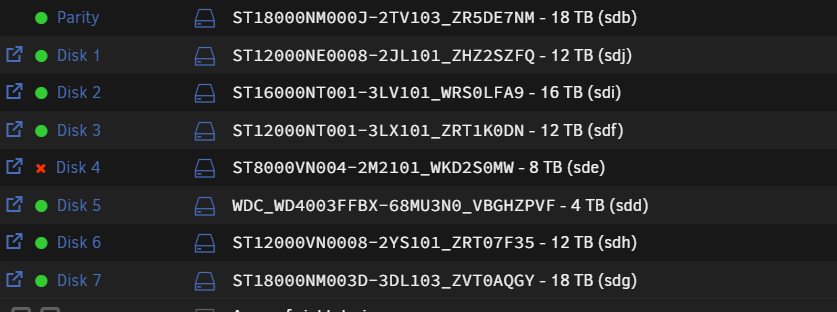
For some reason, drives that are actively part of the array still show up under the "Unassigned Devices History" list, even though they’re clearly part of the array. Thinking this was unnecessary, I decided to remove one of the drives from the history list. However, as soon as I did that, the exact same drive in the array was marked as disabled. I ran a thorough check on the drive, and everything seemed fine. I rebuilt the array with that drive, and it worked for a while. But not long after, the same drive failed again. Assuming this was just bad luck, I replaced the drive with a new one and thought nothing of it. Now, I’ve just removed another drive from the Unassigned Devices History list, and again, that exact drive has failed in the array! What on earth is going on here? Also The Faild Disk is shown under Unassigned Disk Devices

-
I want to know if I really need to back up my Plex Media Server/media. My media file is over 150 GB, and I want to know if it consists only of posters and some movie information that can be recreated when I set up a new media server without backing it up.
-
Hello, I have a problem where I am unable to delete or edit files created by Docker containers. I access the data through an SMB share using a separate user who should have the permissions to read and write files. I have noticed that the files created by Docker containers have permissions set to 755, and every time I want to delete or edit them, I have to manually change the permissions to 775. What should I do to be able to edit all files normally once I have given the SMB user the necessary permissions?


