Bfox135
Members
-
Joined
-
Last visited
-
I have been using the Cache-Mover plugin and honestly its a nightmare and I don't think its actually moving anything back. Gonna test this out and see if it works better. Thank you 👍
-
Anyone else having issues where when the plugin looks at drive or CPU temps it drops everything to 0 and stops working?
-
I'm Having a Problem that ever since 7.2.6 if any hard drives assigned to the fans causes the fan drop to 0% even i Idle speed is set. I know the Original Dev hasn't posted in a while but just bringing it up.
-
Still a random issue is 7.2 ....fun
-
When setting remote access to Always with Static or UPNP, Remote connection fails because the NginX Daemon does not start. a New Config File is generated with faulty configs. nginx config Test # nginx -t nginx: [emerg] a duplicate default server for 192.168.1.55:443 in /etc/nginx/conf.d/servers.conf:73 nginx: configuration file /etc/nginx/nginx.conf test failed Output when applying settings Aug 23 18:00:59 FoxServer rc.nginx: Reloading Nginx server daemon... Aug 23 18:00:59 FoxServer rc.nginx: Reloading Nginx server daemon... Aug 23 18:00:59 FoxServer rc.nginx: Reloading Nginx server daemon... Aug 23 18:01:00 FoxServer rc.nginx: Checking configuration for correct syntax and then trying to open files referenced in configuration... Aug 23 18:01:00 FoxServer rc.nginx: /usr/sbin/nginx -t -c /etc/nginx/nginx.conf Aug 23 18:01:00 FoxServer rc.nginx: Checking configuration for correct syntax and then trying to open files referenced in configuration... Aug 23 18:01:00 FoxServer rc.nginx: Invalid configuration, Nginx server daemon not reloaded Aug 23 18:01:00 FoxServer rc.nginx: /usr/sbin/nginx -t -c /etc/nginx/nginx.conf Aug 23 18:01:00 FoxServer rc.nginx: Invalid configuration, Nginx server daemon not reloaded Aug 23 18:01:00 FoxServer rc.nginx: Checking configuration for correct syntax and then trying to open files referenced in configuration... Aug 23 18:01:00 FoxServer rc.nginx: /usr/sbin/nginx -t -c /etc/nginx/nginx.conf Aug 23 18:01:00 FoxServer rc.nginx: Invalid configuration, Nginx server daemon not reloaded Servers.config sample # Listen on local socket for nchan publishers # server { listen unix:/var/run/nginx.socket default_server; location ~ /pub/(.*)$ { nchan_publisher; nchan_channel_id "$1"; nchan_message_buffer_length $arg_buffer_length; nchan_message_timeout 0; } location ~ /nchan_stub_status$ { nchan_stub_status; } } # # Always accept http requests from localhost # ex: http://localhost # ex: http://127.0.0.1 # ex: http://[::1] # server { listen 127.0.0.1:80; # lo listen 127.0.0.1:443; # lo listen [::1]:80; # lo listen [::1]:443; # lo # add_header Content-Security-Policy "frame-ancestors 'self' "; include /etc/nginx/conf.d/locations.conf; } # # Port settings for https protocol (self-signed cert) # ex: https://tower.local # server { listen 192.168.1.55:443 ssl default_server; # br0 listen 192.168.5.1:443 ssl default_server; # br2 listen 192.168.255.2:443 ssl default_server; # eth3 listen 100.125.166.23:443 ssl default_server; # tailscale1 listen [fd7a:115c:a1e0::e101:a617]:443 ssl default_server; # tailscale1 http2 on; add_header Content-Security-Policy "frame-ancestors 'self' "; # Ok to use concatenated pem files; nginx will do the right thing. ssl_certificate /boot/config/ssl/certs/FoxServer_unraid_bundle.pem; ssl_certificate_key /boot/config/ssl/certs/FoxServer_unraid_bundle.pem; ssl_trusted_certificate /boot/config/ssl/certs/FoxServer_unraid_bundle.pem; # # OCSP stapling ssl_stapling off; ssl_stapling_verify off; # location ~ /wsproxy/443/ { return 403; } include /etc/nginx/conf.d/locations.conf; } # # Redirect http requests to https # ex: http://tower.local -> https://tower.local # server { listen 192.168.1.55:80 default_server; # br0 listen 192.168.5.1:80 default_server; # br2 listen 192.168.255.2:80 default_server; # eth3 listen 100.125.166.23:80 default_server; # tailscale1 listen [fd7a:115c:a1e0::e101:a617]:80 default_server; # tailscale1 add_header Content-Security-Policy "frame-ancestors 'self' "; return 302 https://$host:443$request_uri; } # # Port settings for https protocol (self-signed cert) # ex: https://tower.local # server { listen 192.168.1.55:443 ssl default_server; # br0 listen 192.168.5.1:443 ssl default_server; # br2 listen 192.168.255.2:443 ssl default_server; # eth3 listen 100.125.166.23:443 ssl default_server; # tailscale1 listen [fd7a:115c:a1e0::e101:a617]:443 ssl default_server; # tailscale1 http2 on; add_header Content-Security-Policy "frame-ancestors 'self' "; # Ok to use concatenated pem files; nginx will do the right thing. ssl_certificate /boot/config/ssl/certs/FoxServer_unraid_bundle.pem; ssl_certificate_key /boot/config/ssl/certs/FoxServer_unraid_bundle.pem; ssl_trusted_certificate /boot/config/ssl/certs/FoxServer_unraid_bundle.pem; # # OCSP stapling ssl_stapling off; ssl_stapling_verify off; # location ~ /wsproxy/443/ { return 403; } include /etc/nginx/conf.d/locations.conf;
-
well it very much is cause I ran the mover on 7.0.1 and now I have about 4tb of shows missing from the drive it was moving the shows too.... every episode expect for the one's it moved.
-
I know this issue was Patched but does anyone know what versions of unraid were effected by this bug? Reason I am asking is because I am on version 7.0.1 and Thought I was save and used the Mover to empty a drive and I'm very sure it deleted a whole hardrive worth of data. Luckily it was just TV shows.
-
sorry for the delay but you have to add a new volume path. this is what I did to fix it.

-
Hey, I noticed it was mention in a older post but wanna bring up again. Traccar is missing Volume path. This needs to be added or else Traccar deletes the database when it updates. I had it happen twice now thinking it was a fluke but the docker container was missing this path. --volume /opt/traccar/data:/opt/traccar/data:rw \
-
For everyone having issues with Folder view on 7.0.X Having Issues TLDR: Remove and Reinstall Folder View.
-
I am using a Branched off version of your container that supports UDP port Forwarding. BUT I will give credit where credit it due! I was pulling my hair out trying to get Glutun to work so this was a night and day difference in ease of use.
-
Commenting to Bring this Suggestion up again. I also got EMC Array That I cant use both controllers on.
-
No issues, just wanna say good shit. I have tried a bunch of other VPN docker containers but yours just WORKS for port forwarding.
-
Did some testing and found that "Remote server 'NFS' port 2049 is not open" now the question is how do I enable that port on that specific ethernet port?
-
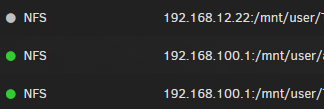
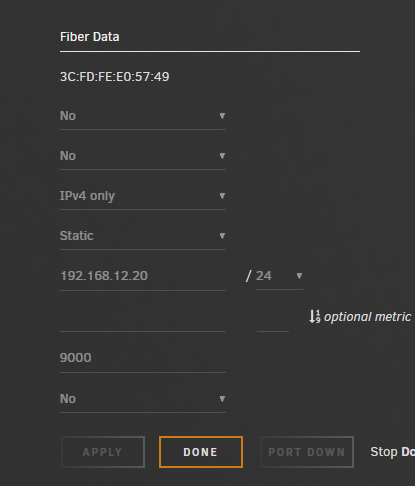
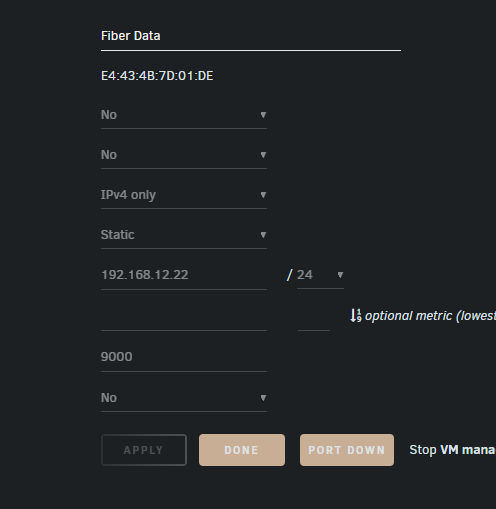
Have 2 unraid servers I am trying to interconnect and share storage. I have them bother directly connected and manual IP assigned. They are able to ping and see each other 192.168.12.22 <---> 192.168.12.20 but for some reason when I create a NFS connection it shows as offline EVEN THO it is able to see the shares and connection when createing the NFS? anyone have IP 192.168.100.1 is the normal connection out.