



Skip to content
View in the app

A better way to browse. Learn more.

Unraid

A full-screen app on your home screen with push notifications, badges and more.

To install this app on iOS and iPadOS
  1. Tap the Share icon in Safari
  2. Scroll the menu and tap Add to Home Screen.
  3. Tap Add in the top-right corner.
To install this app on Android
  1. Tap the 3-dot menu (⋮) in the top-right corner of the browser.
  2. Tap Add to Home screen or Install app.
  3. Confirm by tapping Install.

hispeedsurfer

Members
  • Joined

  • Last visited

  1. Very nice, may I ask where you got the Jonsbo N2 case.
  2. Hallo zusammen, bei mir gab es auch Schwierigkeiten den Server per S3 Sleep in den Schlaf zu legen. Seit dem ich das Plug-In "Cache Dirs" entfernt habe, ist das Problem nicht mehr aktuell.
  3. Thank you for the tipp. Keyboard language de works.
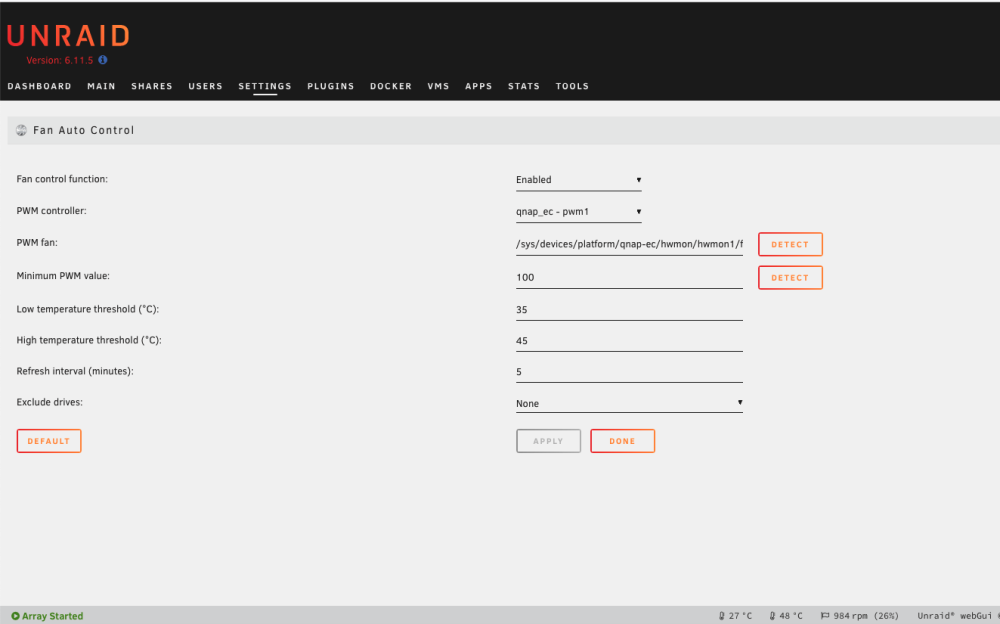
  4. Hello gregzee, I was at the same point as you and through some trial and error got the Autofan working with the QNAP-EC plugin. Since the auto-detect function did not work for me, I entered the path manually. PWM controller: qnap_ec_pwm1 PWM fan: /sys/devices/platform/qnap-ec/hwmon/hwmon1/fan1_input I hope I could help with this
  5. Hello, I know it is an old thread but for all with a similar requirement using Beyond Compare in Docker on UnRaid: https://github.com/hispeedsurfer/bcomp4-vnc Thank you to jlesage (Jocelyn Le Sage) providing the base image I used for the dockerfile.

Account

Navigation

Search

Search

Configure browser push notifications

Chrome (Android)
  1. Tap the lock icon next to the address bar.
  2. Tap Permissions → Notifications.
  3. Adjust your preference.
Chrome (Desktop)
  1. Click the padlock icon in the address bar.
  2. Select Site settings.
  3. Find Notifications and adjust your preference.
