





Mayo_248
Members
-
Joined
-
Last visited
Everything posted by Mayo_248
-
Hello @ZappyZap , First of all, thank you for your great work! I have a small feature request: Would it be possible to add a new environment variable to change the internal port of the container directly to 990? Currently, the container uses port 9990 by default and handles the port forwarding via iptables. However, since I run the container in "Custom Mode" (custom Docker network with a dedicated IP), the iptables rules do not apply there due to how the network architecture works. If I could set the port natively to 990 via a variable, the issue would be completely resolved in this mode and the container would work out-of-the-box. It would be awesome if you could implement this when you have the chance! Best regards
-
I'm happy that my work is being received so positively =) but unfortunately nothing is happening, I'm not getting a reply to my PM and no other reaction either, I'm not aware if I've done anything wrong, only the thread was moved thanks to Trurl, I still don't see a publication.
-
Hi, im docker von TeamSpeak 6 Beta Server gibt es die Parameter nicht so wie Alturismo schon erwähnt hat, daher müssen die Rechte über die extra Parameter gegeben werden. Dies ginge natürlich auch per Konsole ist jedoch im docker viel einfacher und übersichtlicher.
-
The process of integrating this into the Unraid App Store is already underway. We are working on making it available there to simplify the installation for everyone.
-
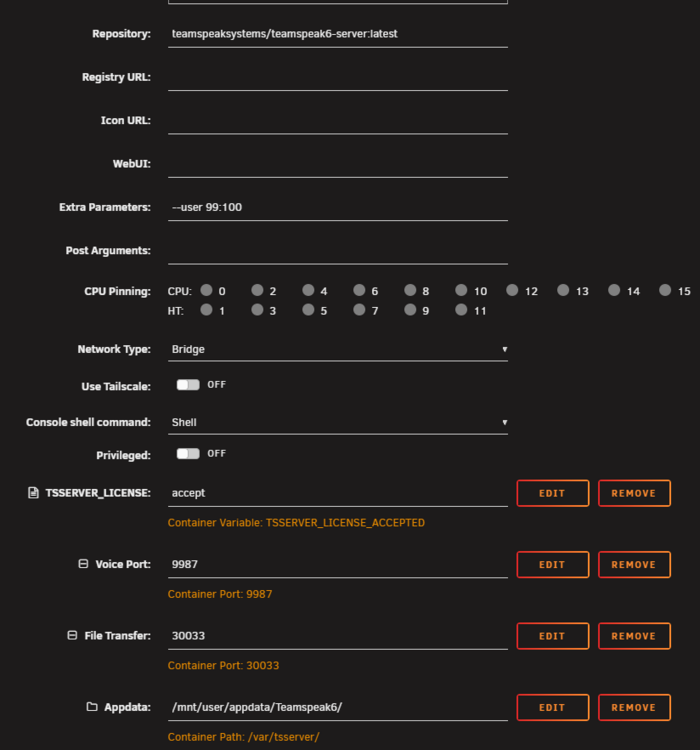
Hello everyone, I've created a new Docker template repository to help users easily install software that isn't available in CA yet. Currently, it features a ready-to-use, one-click template for the official TeamSpeak 6 Beta Server. The TS6 template includes all necessary ports (Voice, File Transfer, WebQuery) and the required extra parameters (--user 99:100) to ensure proper Appdata write access right out of the box. I would be very happy if this repository could be added to Community Applications! Best regards! TeamSpeak 6 Server (Beta) Application Name: TeamSpeak 6 Server Template Author: mayo-248 Template Repository Link (.xml): https://github.com/mayo-248/unraid-templates Current Version: v6.0.0-beta8 (Released January 22, 2026) Docker Hub: https://hub.docker.com/r/teamspeaksystems/teamspeak6-server Official GitHub: https://github.com/teamspeak/teamspeak6-server -------------------------------------------------- Overview This is the Unraid Docker template for the official TeamSpeak 6 Server (currently in Beta). TeamSpeak offers ideal voice communication for gaming, education, and business with high security standards, excellent voice quality, and low system and bandwidth usage. Disclaimer: I am not affiliated with, nor endorsed by, TeamSpeak Systems GmbH. All rights to the software and brand belong exclusively to TeamSpeak. This template is provided "as is" to help the Unraid community easily deploy the official Docker image. -------------------------------------------------- Installation Notes & Important Instructions 1. Appdata Permissions (Crucial Fix) By default, the official TS6 container runs as a restricted user internally. On Unraid, this causes the container to crash immediately with a "Failed to create log directory" error because it lacks write access to the newly created appdata folder. To fix this, this template automatically includes the Extra Parameter "--user 99:100". This forces the container to run with Unraid's default user permissions (nobody:users), granting it full read/write access to your appdata folder. Please do not remove this parameter. 2. Getting Your Admin Token (Privilege Key) On the very first start, the server generates a one-time admin token. You need this to claim ownership of your server in the TS6 Client. - Go to your Unraid Docker tab. - Left-click on the TeamSpeak6 container icon and select "Logs". - Look for the string "ServerAdmin privilege key" in the text output. - Copy the long key behind it and paste it into your TeamSpeak 6 Client when prompted. 3. Beta Limitations (Please read before installing) - Current Beta Version: v6.0.0-beta8 - There is currently no migration path between TS3 and TS6. - TS3 Server licenses are not compatible with TS6. - The server includes a 32-slot Beta License that renews automatically every two months during the beta/evaluation period. It is currently not possible to upgrade to a larger license. -------------------------------------------------- Support & Feedback If you encounter any issues specifically related to this Unraid template (like path variables or port mappings), feel free to post them below. For bugs related to the TeamSpeak server software itself, please report them directly to the developers on the Official TeamSpeak Forum or their GitHub issue tracker.
-
Hi ihr lieben, da ich heute unabhängig von euch die selben Probleme hatte, kommt hier meine Lösung. In den Extraparametern den Docken zwingen den usr 99 und die grp 100 zu verwenden, damit hat der Docker die Berechtigung Nobody und hat genügend Rechte den Ordner zu erstellen =) ""--user 99:100"" Unabhängig davon versuche ich gerade diese Version in den Store zu bekommen, jedoch hatte ich mit dem Thema bisher nichts zu tun, ich dachte mir nur, ggf. kann ich der Tollen Community damit helfen =)

-
Hello, I don't understand where to enter the protection code to unlock the Unraid system like on a PC. This message comes from the protocoll. Do I have to enter the code in the Docker terminal in Protocoll or in the general terminal of unraid, or does the code have to be specified in a variable? Gruß Patrick PS. Danke für die schnelle Umsetzung, ich hoffe das ich noch heute einen Server ans laufen bekomme 😃





