






Everything posted by junkerderprovinz
-
Great questions, and both are sorted in 2.4.0 (just released). Delete = per source, never both. Deleting a backup only removes the copy you're currently viewing. So deleting a local backup never touches the off-site copy, and vice versa. That's deliberate, exactly for your scenario: if the local repo is corrupt or gone, the off-site copy is still there to restore from. The restore browser now states this right next to the source switch. Restore from local OR off-site. You were right that you need to choose. Every backup browser (Containers, VMs, Flash) and the Integrity & Maintenance card now has a Local | Off-site switch. Flip it and the list, restore, download, verify/unlock/prune and delete all act on that copy. So a dead local repo is no problem: switch to Off-site and restore from there. Your screenshot is still 2.3.0 (no switch yet). Update to 2.4.0 and it's all there. Thanks again, this feedback shaped the release.
-
Hey @manilx both of these are done in 2.3.0, and they're tied together nicely. Flash restore "1104 errors": found and fixed. The old restore wrote the files out to a folder and then tried to set Linux ownership/permissions on each file on the /mnt/user share, which the share rejects per file. So your data was always fine, those were metadata-only errors, not data loss. The error box just showed restic's final count without the detail. The fix is exactly your P.S.: flash restore is now a direct .zip download. Pick a snapshot and it streams straight to your browser as flash-<id>.zip, ready to drop into the Unraid USB creator as-is, no copying out of a target folder. A zip carries no filesystem permissions, so the errors are gone. (I also made restic's per-item errors show up in the UI now, so nothing fails with just a number again.) Local + off-site at the same time: also done. There's a new "Off-site copy" section in Settings with a second repo per domain. After each successful local backup, BombVault replicates the new snapshot to that repo with restic copy. Your local backup stays primary and runs as before; the off-site copy is best-effort, so an off-site hiccup never fails the local backup. It works with any restic backend (rest:, s3:, b2:, sftp:), using the same Settings > Cloud credentials. REST with password only: leave the username blank and just set the password, that works. If your server ever rejects it you can also put it in the path, e.g. rest:http://:password@server:8000/repo. One more: saving settings used to wipe your stored cloud credentials in some cases, that's fixed too. Update to 2.3.0 and you've got all of it. Thanks again for the detailed testing, it's been driving most of these.
-
Update 2.2.0 is live, and it closes out everything from your last few posts. Permissions: yes, fully preserved. restic stores each file and folder's mode, owner (uid/gid), timestamps, ACLs and xattrs, and a restore puts them all back. So appdata that depends on specific ownership or permissions comes back exactly as it was, no manual chown afterwards. Unraid notifications (2.1.0): new option under Settings > Notifications. BombVault posts each backup result straight into Unraid's own notification system, so you set up email/Pushover/etc. once in Unraid and BombVault just feeds it, no separate integration needed. Same policy as the other channels (never / on failure / always), and the Test button covers it. It goes over the host SSH connection (the same one used for VM backups), so that needs to be configured under Settings > VM Backup. Remote targets without rclone (2.2.0): you can now point a Backup Path straight at a restic remote repo, for example: rest:http://your-server:8000/repo s3:s3.amazonaws.com/bucket/path b2:bucket:path sftp:user@host:/repo Credentials go in the new Settings > Cloud credentials card (S3 access key / secret / region, and restic REST user / password). They're stored encrypted and handed to restic as the standard env vars it expects. Secrets are write-only, so they're never shown again after saving; leave a field blank to keep the stored one, or clear everything to remove the config. rclone still works if you prefer it, but it's no longer required for these. Grab 2.2.0 and you've got all of it. Thanks again for the steady stream of input, it's been driving a lot of these improvements.
-
Both work, you don't strictly need a reverse proxy. A Cloudflare Tunnel is fine for client access and means zero open ports. Two things to know: Cloudflare caps uploads at 100 MB (the README already uses 100M, so that lines up), and for federation you still need the .well-known delegation to 443 (section 6 in the README). Voice/video (TURN) is UDP and can't go through a tunnel or proxy, so forward those ports either way. A normal reverse proxy (NPM, what the README documents) is the cleaner option if you want federation plus bigger media. And if you ever use Cloudflare's orange-cloud proxy instead of a tunnel, set the Matrix subdomain to DNS only (grey cloud), the orange proxy breaks non-browser clients and federation.
-
@manilx this is gold, thank you. Pretty much your whole list went into 2.0.0, just force-update the container to pull it: - The /mnt/user/bombvault share: fixed. BombVault no longer creates that folder on startup, so no more phantom share you can't delete. It's only created when you actually run a backup. - Delete backups you no longer want: done. Every backup now has a Delete button (containers, VMs and flash). - Prune: retention already prunes after each backup, and there's now a manual Prune button per repo under Settings > Integrity & maintenance to reclaim space on demand. - The lock issue (and "Failed to load backups"): there's now an Unlock button under Settings > Integrity & maintenance, and BombVault also clears stale locks automatically before a backup and when listing backups, so you shouldn't have to touch the locks folder by hand anymore. Same-repo operations are serialised now too, so a backup, prune and unlock can't trip over each other. - VMs shutting down without warning: fixed, and this was the big one. The "live" method now never shuts a VM down. Those shutdowns were an auto-fallback I'd added earlier; it's gone. The real cause for the VMs that kept failing was a leftover snapshot overlay (the .bombvault-tmp file you found and deleted) from an interrupted run. BombVault now detects that and commits it back automatically before the backup, so live keeps working without you cleaning anything up. The method dropdown also spells out graceful = shutdown vs live = no downtime now. - File restore: it's a proper collapsible folder tree now, expand/collapse like a file manager. One I couldn't action yet: you mentioned "something is buggy with log files", can you say a bit more about what you saw (which logs, what looked off)? I'll dig in. Thanks again, genuinely. A big chunk of 2.0.0 exists because of your testing.
-
Hey @manilx , thanks again for all the testing and the clear write-ups, that feedback shaped a whole release. I bundled everything into 2.0.0, just force-update the container in the Docker tab to pull it. Here's what's in there for the things you ran into: - "Failed to load runs": fixed, and good news, it's not a corrupted database. A backup that was still running or got interrupted left a record the run history couldn't read, and that one record broke the whole list. It loads fine again after updating, no reset needed. Interrupted runs also get tidied up on startup now instead of sitting there as "running" forever. - Containers with no data folder: they now show "Config only" instead of a plain "done", so it's clear no data snapshot was made (the container definition is still saved, so it can be recreated). And there's a new per-container Export button that drops a plain <name>.tar.gz + <name>.xml next to your repo, same idea as the Appdata Backup plugin, if you want the config/settings as readable files. - Containers without an appdata folder no longer fail with "all source directories do not exist". - The dashboard now shows which container/VM a run was for, and the error message when one fails, instead of an opaque snapshot id. - Stop other containers during a backup: each container has a field where you can list other containers (like a database) to stop while it's backed up and start again after. Covers the backrest-style use case, over the Docker API, no scripts. - VM live backups, two things. First, cd-rom / read-only disks are skipped during the snapshot now. Second, and this is the big one for your two VMs: if a live snapshot still can't be created, BombVault automatically falls back to a graceful backup instead of erroring out, so the backup always completes. So those two VMs should just back up now (they may quietly fall back to graceful, which means a short shutdown during the backup). If you'd rather keep them truly live, the snapshot is failing because of how one of their disks is set up. Grab "virsh dumpxml VMNAME" from the Unraid terminal and post it, and I'll get that disk classified properly. One more on the earlier "hash mismatch" on the Windows 11 VM: that one points at the host (RAM or the cache pool), not BombVault. BombVault actually caught it and refused to store a corrupt backup. A MemTest86 run is worth it when you get the chance. Thanks again, this was a great batch of feedback.
-
Hey, thanks a lot for taking the time to test this properly and write it all up. That kind of detailed feedback is exactly what I needed. Most of it is sorted in the latest version, so here's where things stand. The big one you caught: a backup was starting a container that had been stopped beforehand. That was a real bug and it's fixed now. A stopped container gets backed up in place and stays stopped, and a running one gets stopped for a clean backup and started again afterwards. Restore behaves the same way now, it brings the container back in the exact state it was in when you backed it up instead of always starting it. You also said there was no sign of anything happening during a backup or restore. There's now a live progress bar on each container, VM and flash card that fills up as the job runs, for both backup and restore, so you can actually see how far along it is. On the HTTP_ONLY setting: when it's on, the WebUI link still points at https, so for now you have to open http://[ip]:[port] yourself. I've noted that in the template description. For the Windows VM backup that failed without telling you why, I improved the error reporting, so instead of restic's generic "please open an issue" line you now get the real reason in the UI. About that specific failure: if the message is something like "detected data corruption while saving blob ... hash mismatch", that one is worth a closer look. restic checks every chunk it writes, and that error means the data changed in memory between being read and being written. If you run the backup a few times and it fails on a different block each time, while the disk file itself reads back identical when the VM is off, that points at the RAM rather than at the tool or the disk. The good news is restic refuses to store a corrupt backup, so nothing bad got saved. I'd run MemTest86 (it's in the Unraid boot menu), and if you're using an XMP or EXPO memory profile, try turning it off and testing again. That fixes this kind of thing more often than you'd expect. On backing up other folders: right now it automatically grabs the container's appdata. Choosing which of the container's other mapped folders to include or exclude, plus adding your own paths, is the next feature I'm working on. The Backup Hooks field isn't for that, by the way, it just runs a command around the backup (like dumping a database into appdata so it gets picked up), it doesn't add folders. I made that description clearer too. Good to hear the flash backup and the stopped-VM snapshot both worked for you. And yeah, it's still got room to grow, no argument there. Thanks again for pushing on it, it genuinely makes the thing better. Let me know how the next version treats you.
-
Thanks for trying it, and for the blunt feedback! 🙏 The "error 400 on some VMs" was a real bug: VM names with a space (e.g. Windows 11) got rejected by a too-strict name check. Fixed in v1.3.4, spaced names back up fine now. The mystery "datastore" is just the restic backup repo, it defaults to /mnt/user/bombvault/ (changeable in Settings → Backup paths). Fair point that it wasn't mentioned anywhere, now spelled out in the description + README. No pressure to switch from your scripts, but if you fancy another go, grab v1.3.4/:latest and it should just work. 👍
-
ShipLogRead the log before you set sail. What is this?ShipLog is a read-only update advisor that lives right inside Unraid's native Docker tab. Unraid already tells you that an update is available and lets you apply it — ShipLog tells you what actually changes and how risky it is first. Next to each container it adds a small changelog bubble: the version jump, a deterministic risk badge, the release notes, and a DEPRECATED badge when the upstream project is archived. It is a plugin (not a container): a tiny daemon on the host plus the bubble in the Docker tab. It never pulls, recreates, or stops anything — the Docker socket is read-only. Updating stays Unraid's own job. HighlightsChangelog where you need it — a per-container bubble in the native Docker tab, no separate dashboard to open What changes, not just “an update exists” — the release notes between your running image and the newest one Deterministic risk badge — patch / minor / major / digest, computed from the version jump (no guessing) Remembers the running version — even a rolling :latest image shows a real 1.7 → 1.8 jump once ShipLog has seen one update under its watch DEPRECATED badge when the upstream repository is archived (end-of-life) Read-only by construction — the Docker socket is mounted read-only; ShipLog cannot start, stop, recreate or pull anything Optional AI summaries via a local Ollama — a short, plain-language “what changed” per update (off by default) Optional Matrix notifications when a new update is first seen (off by default) Follows your Unraid light/dark theme and language (English + German, English fallback) Runs as a lightweight host daemon — no extra container RequirementsUnraid 6.10+ Outbound HTTPS to image registries and GitHub (to fetch changelogs). A free GitHub token (no scopes) in the settings raises the anonymous API limit — useful if you watch many GitHub-sourced images Optional: a reachable Ollama instance for AI summaries, and/or a Matrix account for notifications Install / updateInstall from Community Applications (search for ShipLog), or add the plugin by URL under Plugins → Install Plugin: https://raw.githubusercontent.com/junkerderprovinz/shiplog/main/plugin/shiplog.plg Open the Docker tab to see the bubble, or Settings → ShipLog for the options (poll interval, GitHub token, Ollama, Matrix). If you ever tested an early date-versioned build, remove the plugin and reinstall it once from the URL above. Posting a bug reportPlease post: Unraid version (Settings → System Information) ShipLog version (Plugins page) — currently v1.0.4 Daemon state and log: /usr/local/emhttp/plugins/shiplog/scripts/rc.shiplog status and tail -200 /var/log/shiplog.log Browser + OS (the bubble is rendered in your browser) Whether you set a GitHub token, Ollama, or Matrix — and, for a specific container, its image reference (e.g. ghcr.io/owner/app:latest) GitHub issues with the same info are equally welcome: github.com/junkerderprovinz/shiplog/issues CreditsBuilt in Go (engine) + a thin Unraid plugin for the Docker-tab bubble. Changelogs come from each image's org.opencontainers.image.source label and GitHub releases; optional summaries run on your own Ollama. If ShipLog saves you from a surprise update, you can buy me a coffee. Self-hosted, MIT-licensed, read-only by design — it advises, you decide.
-
BombVault – the only backup & recovery tool you need for UnraidYour Unraid data, sealed in a vault — armed with a fuse. What is this?BombVault is a single-binary, Unraid-native web app for one-click backup and full disaster recovery of your Docker containers, KVM/libvirt VMs and the Unraid flash — all powered by restic. The restore is the star: a backed-up container automatically reappears in the Docker tab and a VM in the VM Manager, exactly as before — no manual reinstall, no reconfiguration, even after you deleted it. Everything (backup paths, encryption on/off, schedule, retention) is configured in the modern dark web UI; nothing to hand-edit. HighlightsThree domains, one app — Docker containers (appdata + definition), KVM/libvirt VMs (disks + XML + UEFI NVRAM), and the whole Unraid flash (/boot) Restore that re-installs for you — containers are replayed against the Docker API and VMs re-defined in the VM Manager, so they come back exactly as they were VM backup with no libvirt mount — BombVault runs virsh on the host over SSH (qemu+ssh://), so it can never disturb your VM Manager; graceful-shutdown or live (guest-agent) snapshots Off-site repos — rclone (Backblaze B2, S3, Google Drive, …) plus SMB/NFS; the rclone config is stored encrypted Retention — keep-last / daily / weekly / monthly, auto-pruned after each backup File-level restore — browse a container snapshot and restore a single file back to its original location Integrity checks (restic check) and pre/post-backup hooks (e.g. mysqldump for an app-consistent backup) Incremental, deduplicated and always encrypted (encryption is optional); pre-flight IP/port conflict check before a restore Per-domain scheduling, HTTPS out of the box, optional password, English + German UI Multi-arch — amd64 + arm64. Image: ghcr.io/junkerderprovinz/bombvault:latest RequirementsUnraid 6.12+ The template mounts the Docker socket, your storage root (/mnt) and the flash (/boot) automatically — backup sources and destinations both live under /mnt; pick the exact subpaths in the WebUI A required APP_KEY — generate with openssl rand -hex 32. It derives the restic password, so keep it safe: losing it makes encrypted backups unrecoverable VM backup is opt-in — it talks to libvirt over SSH, so authorize BombVault's key on the host once (Settings → VM Backup over SSH shows a ready-to-paste command + a Test button). No libvirt mount needed Trusted LAN only: BombVault holds root-equivalent control of your host (via docker.sock and the /mnt mount). Run it on a non-exposed network; optional password protection is in Settings (off by default) Companion: BombVault WidgetBombVault Widget is a small, optional Unraid plugin (no container) that puts BombVault's activity log on the Unraid 7 dashboard as a real, native tile — every backup, restore, verify, prune, off-site replication and drill as it happens, plus the next scheduled run, in the same dark terminal-style log. Read-only by construction: it talks to BombVault through a same-origin proxy with a widget token that never reaches the browser. Install it from Community Applications (search BombVault Widget) or one-click from BombVault → Settings → System → Dashboard widget. Requires BombVault ≥ 6.9.0. Post widget questions in this thread too — it has no separate support thread. Posting a bug reportPlease post: Unraid version (Settings → System Information) Image tag (latest or a pinned vX.Y.Z) Output of docker logs --tail 200 BombVault Which domain (containers / VMs / flash) and what you were doing (backup / restore) For VM issues: the result of Settings → VM Backup over SSH → Test connection Browser + OS you're using GitHub issues with the same info are also welcome: github.com/junkerderprovinz/bombvault/issues CreditsThe core idea — one-click backup and automatic re-install of Docker containers — comes from VolumeVault by @Darkdragon14 (Apache-2.0). BombVault is an independent Go + restic rewrite that extends the concept to VMs and the Unraid flash. Built on restic (engine) and rclone (off-site). If BombVault saves your bacon, you can buy me a coffee. Self-hosted, MIT-licensed. BombVault has root-equivalent control of your host — you run it, you own your data and the responsibility.
-
FireSquireReads the beacon before your reboot catches fire. What is this?A reboot is never 100% guaranteed — but a large class of "it didn't come back right" is predictable from the current state of the running system. FireSquire inspects that state before you reboot and gives you one honest verdict: GO / CAUTION / NO-GO, with the exact findings. It is advisory only: it reads the host and reports — it never stops, mounts, unmounts or changes anything (acting on the host is exactly what tends to cause reboot trouble in the first place). The plugin adds a FireSquire button next to Reboot on the Main tab. Click, read the verdict, then reboot with confidence. HighlightsCritical (NO-GO) — array started & every device assignment OK (no disabled/invalid/missing disk); no parity/sync/rebuild/clear or mover running; no container mounting a host runtime dir (the bind class that can take libvirt/docker down on reboot); no stuck docker.img/libvirt.img loop; flash writable Caution — crashes since boot in the syslog, disk/IO errors (failing disk or loose cable), low free space, running VMs, a stopped core service, missing container bind sources, and SMART health (status + attributes: reallocated/pending/uncorrectable sectors, UDMA CRC, temperature) Advisory only — reads and reports, never changes the host Follows your Unraid theme & language — light/dark, all 26 supported languages (English fallback) No dependencies — a small Bash engine querying the tools Unraid already ships; no daemon, nothing to configure Honest limit: it is an early warning, not an oracle — genuine hardware, BIOS or timing failures during boot cannot be seen from a running system. What it covers reliably is the state-detectable class. RequirementsUnraid 6.10+ Nothing else — install from the Apps tab (or the .plg URL) and the button appears on the Main tab Posting a bug reportPlease post: Unraid version (Settings → System Information) FireSquire version (Plugins tab) The verdict + the lines shown, or the console output of bash /usr/local/emhttp/plugins/firesquire/firesquire-check.sh Browser + OS (for any WebGUI/display issue) GitHub issues with the same info are welcome: github.com/junkerderprovinz/firesquire/issues CreditsBorn from the classic homelab lesson that a green build is not a booting server. The engine stands on the tools Unraid already ships (mdcmd, smartctl, losetup, docker). If FireSquire saves you a bad reboot, you can buy me a coffee. Self-hosted, AGPL-3.0-licensed — you run it, you own your data and the responsibility.
-
Thanks! Yes, this is the full JDownloader 2, just running its native GUI in your browser via KasmVNC, so all of JD's normal captcha handling works exactly like on the desktop: When a filehost shows a captcha, JDownloader pops its captcha dialog right in the web GUI — you solve it there (click/type), same as desktop JD. All of JD's built-in options are available under Settings → Captcha: JAntiCaptcha (built-in OCR for simple image captchas), the interactive browser solver for reCAPTCHA/hCaptcha, and external solver services (9kw.eu, etc.). You can also link the container to MyJDownloader to get captchas forwarded to your phone/browser. Nothing is stripped or changed in the container, it's stock JDownloader 2, so its captcha features behave identically.
-
JDownloader — Selkies and Dark Mode edition for UnraidGrab it. All of it. In the dark. What is this?JDownloader 2, the full-featured download manager, running as one Unraid container and streamed to your browser via Selkies — no native install, no SSH. The entire GUI (download list, link grabber and the Advanced Settings table) is rendered in a clean, sleek monochrome IBM Carbon (#161616) dark theme, with light, readable progress bars and a green speed graph. Over HTTPS you also get full two-way browser clipboard — copy a link on your PC and paste it straight into JDownloader. It auto-installs and themes itself on first start and is configured entirely from the Unraid template. HighlightsComplete, sleek dark UI — monochrome IBM Carbon #161616 across the whole interface (download list, link grabber and settings), not just the menu bar; the sleek dark JDownloader you won't find elsewhere (one variable flips it to a matching light theme) Full clipboard support — over HTTPS the browser clipboard works both ways: copy a link on your PC and paste straight into JDownloader, and copy text back out Turnkey & self-healing — auto-installs JDownloader, auto-confirms its first-run prompts, and the theme self-heals after JD's own updates Update-safe — all config, links and session state live in /config; even hidden columns and column layout survive a restart Selkies web desktop — hardware-accelerated rendering, native file upload/download, high-DPI My.JDownloader-ready — pair it once and manage downloads remotely Optional WebUI login (CUSTOM_USER / PASSWORD), or leave it open on your LAN One container, multi-arch (amd64 + arm64), built on LinuxServer's baseimage-selkies Image: ghcr.io/junkerderprovinz/jdownloader:latest RequirementsUnraid 6.10+ Open the WebUI over HTTPS (port 3001) for the seamless browser clipboard — accept the self-signed cert once First start: JDownloader installs itself, so the WebUI stays black for a few minutes — wait for the JDOWNLOADER IS READY banner in the container log before opening it, and don't restart during the install Posting a bug reportPlease post: Unraid version (Settings → System Information) Image tag (latest or a pinned vX.Y.Z) Output of docker logs --tail 200 JDownloader Browser + OS you're using Whether you changed JD_THEME, the WebUI ports, CUSTOM_USER/PASSWORD, or the /config / /downloads mounts GitHub issues with the same info are also welcome: github.com/junkerderprovinz/jdownloader/issues CreditsBuilt on LinuxServer's baseimage-selkies and Selkies. JDownloader 2 is by AppWork. The dark theme is our own IBM Carbon palette, applied through JDownloader's native colour config on stock FlatLaf — see the repo for details. If this saved you a setup evening, you can buy me a coffee. Self-hosted, MIT-licensed — you run it, you own your data and the responsibility.
-
Hey I submitted my repo featherdrop but it shows the repository/maintainer name ‚featherdrop'. Please rename it to ‚junkerderprovinz' so it matches my other apps (Krusader etc.), or remove the entry so I can re-add it with the correct name. GitHub: https://github.com/junkerderprovinz/featherdrop Thanks!
-
featherdrop — a sleek, modern file sharer for UnraidDrop a file, get a link — encrypted, self-destructing, no accounts. What is this?A clean, login-free, self-hosted file sharer. Open the page, drop a file, set an expiry (plus an optional password or download limit), and share a short link or QR code. Files are encrypted at rest, uploads are resumable, and metadata is a single SQLite file — no accounts, no separate database, no tracking. Built with Next.js + Mantine, it runs as one small container and is configured entirely from the Unraid template — no SSH or config-file editing. HighlightsEncrypted at rest with age — the original filename and type are encrypted inside the file, so a stolen disk or backup reveals neither contents nor names Optional password shares are end-to-end; set a MASTER_KEY for short links Self-destructing — expiry from 1 hour to 30 days (or never), plus optional burn-after-N-downloads Inline image/PDF preview, a savable QR code, and clean link previews that never leak the file's name 26 UI languages (right-to-left for Arabic & Hebrew), light/dark, picked from the browser Custom branding — app name, logo and accent colour via env vars One container — resumable uploads (tus), a single SQLite file, separate data/config volumes Private by design — no accounts, no telemetry, no third-party calls at runtime Multi-arch — amd64 + arm64 Image: ghcr.io/junkerderprovinz/featherdrop:latest RequirementsUnraid 6.10+ A reverse proxy with HTTPS is recommended — set BASE_URL to your public URL so share links are correct (and so a link's decryption key in the URL fragment stays private in transit) Allow large uploads in your proxy (e.g. client_max_body_size 0 and generous timeouts) for big files Posting a bug reportPlease post: Unraid version (Settings → System Information) Image tag (latest or a pinned vX.Y.Z) Output of docker logs --tail 200 featherdrop Browser + OS you're using Whether you changed BASE_URL, ENCRYPT_UPLOADS, MASTER_KEY, DEFAULT_EXPIRY, the branding vars, or the /data / /config mounts GitHub issues with the same info are also welcome: github.com/junkerderprovinz/featherdrop/issues CreditsA much simpler take inspired by Pingvin Share. Built on age (encryption), tus (resumable uploads), Next.js, Mantine and better-sqlite3. If featherdrop saves you a trip to a third-party host, you can buy me a coffee. Self-hosted, MIT-licensed — you run it, you own your data and the responsibility.
-
Language bug is fixed now.
-
Already noticed it. I'll fix it during the next week or two.
-
Matrix AiOText like nobody's reading. Because nobody can. What is this?Your own Matrix homeserver, without assembling it yourself. This is a wrapper around the official Synapse image that adds everything a working server actually needs: coturn for voice and video relay, Element Web as the client, and the Ketesa admin interface, all behind one lightweight web server. You fill in your domain and your PostgreSQL connection; the container generates every config file itself. No SSH into the container, no YAML editing, no hand-written TURN secrets. Because it builds on top of the official image rather than alongside it, Synapse security patches land here as soon as upstream ships them. A workflow checks hourly and rebuilds automatically — and no build ships blind: CI boots each freshly built image against a throwaway PostgreSQL and refuses to publish it unless Synapse is demonstrably running on that database. HighlightsEverything in one container — Synapse (:8008), Element Web (:8080/element/), Ketesa admin UI (:8080/admin/), coturn, Prometheus metrics Config is generated, not edited — set SERVER_NAME and your Postgres details and start; overrides are re-rendered on every boot, so changing a setting is a container restart Federation works out of the box — Synapse serves /.well-known/matrix/server and /.well-known/matrix/client itself, so no extra reverse-proxy rules are needed Voice and video that actually connects — coturn with a pinned relay port range, optional TURN over TLS that switches itself on when you mount a certificate QR code device linking (new, opt-in) — sign a new device in by scanning a code, via Matrix Authentication Service. Off by default and it stays off until you enable it Admin account bootstrap — set two variables and the first server admin is created, or an existing account promoted Startup that fails loudly — a broken configuration stops the container with the reason in the log rather than quietly running on wrong settings Multi-arch — amd64 + arm64 Image: ghcr.io/junkerderprovinz/matrix:latest (mirrored to junkerderprovinz/matrix on Docker Hub) RequirementsUnraid 6.10+ PostgreSQL, external, and the database must use UTF8 with C collation or Synapse refuses to start: CREATE DATABASE matrix ENCODING 'UTF8' LC_COLLATE='C' LC_CTYPE='C' TEMPLATE template0 OWNER matrix; A reverse proxy for matrix.yourdomain.tld to Unraid-IP :8008. In the proxy host's Advanced tab add client_max_body_size 100m; and generous timeouts, or media uploads fail and long-polling sync times out For voice and video: the TURN relay UDP range must be reachable, so a port forward rather than a tunnel Only if you want QR code login: a second, empty PostgreSQL database and a second reverse-proxy host with HTTPS. The README explains what enabling it changes before you flip anything Posting a bug reportPlease post: Unraid version (Settings → System Information) Image tag (latest or a pinned vX.Y.Z) — and please confirm you actually pulled it; Unraid happily reuses a cached image on the same tag Output of docker logs --tail 200 Matrix Your SERVER_NAME (the domain is fine, no credentials) and whether the reverse proxy sits in front Whether you changed ENABLE_FEDERATION, ENABLE_REGISTRATION, the TURN variables, or anything in the Delegated Auth block For database errors: the output of \l in psql, so the encoding and collation are visible GitHub issues with the same info are also welcome: github.com/junkerderprovinz/matrix/issues CreditsBuilt on Synapse and Element by Element, the Matrix Authentication Service, Ketesa by etke.cc (the maintained continuation of Synapse Admin), and coturn. All used unmodified, each under its own license. If this saved you an evening of YAML, you can buy me a coffee. Self-hosted, AGPL-3.0 licensed — you run it, you own your data and the responsibility. Not affiliated with Element or the Matrix.org Foundation.
-
Krusader — Selkies and Dark Mode edition for UnraidDrag it. Drop it. In the dark. What is this?A community Docker build of Krusader — KDE's twin-pane file manager — running in your browser via KasmVNC. Hardware-accelerated, high-DPI ready, with Breeze Dark, Kate as external editor, full archive support (RAR / 7z / ZIP / TAR / …) and 25 selectable UI languages — all configurable from the Unraid template, no SSH or config-file editing. HighlightsKasmVNC instead of noVNC — hardware-accelerated rendering, real browser clipboard, native upload/download, high-DPI ready Breeze Dark pre-applied to Krusader, Kate and the whole KDE stack; switch to light with one env var Kate wired up as Krusader's external editor with Breeze Dark and spell-check Full archive support — RAR, 7z, ZIP, TAR, GZ, BZ2, XZ, LHA, ARJ, ACE, RPM, CPIO; right-click Extract here works out of the box 25 UI languages picked from a dropdown in the Unraid template Update-safe configs — first-run-only seeding, your customisations in /config survive every docker pull Multi-arch — amd64 + arm64 Image: ghcr.io/junkerderprovinz/krusader:latest RequirementsUnraid 6.10+ --shm-size=1gb for smooth KDE rendering — the Unraid template sets it for you Reverse-proxy users: the HTTPS port (3001, self-signed) is usually the smoother path for ws-over-tls Posting a bug reportPlease post: Unraid version (Settings → System Information) Image tag (latest or a pinned vX.Y.Z) Output of docker logs --tail 200 krusader Browser + OS you're using (KasmVNC rendering bugs are sometimes browser-specific) Whether you changed KRUSADER_LANG, KRUSADER_THEME, PASSWORD, CUSTOM_USER or the /storage / /config mounts GitHub issues with the same info are also welcome: github.com/junkerderprovinz/krusader/issues CreditsThis image stands on the shoulders of LinuxServer.io's excellent baseimage-kasmvnc, the KasmVNC team, the Krusader KDE community, and inspiration from the binhex / jlesage / ich777 Krusader containers that paved the way. Unofficial community wrapper. Not affiliated with the Krusader or KDE projects.
-
Unraid appsOne support thread for the Unraid apps I package. Find yours below and post here, just say which one. What is this?This thread covers the Unraid apps I package rather than write: desktop programs streamed to your browser, upstream software in my own images, and templates that run a vendor's image as it is. Each app has a section below with a link to its page in Community Applications. My own apps and a few bigger images have their own threads; the Support link on their Community Applications page leads there. Web-desktop apps PrusaSlicerThe 3D-printing slicer, in your browser on a fast Selkies web desktop: slice models, tune supports and export G-code without installing anything locally. No VNC client. Full PrusaSlicer desktop, streamed to the browser Multi-arch: amd64 and arm64 In Community Applications: PrusaSlicer Repository & README StellariumThe open-source planetarium, in your browser on a fast Selkies web desktop: pan the sky, zoom into a nebula and scrub through time, all from a tab. No VNC client. Full Stellarium desktop, streamed to the browser Multi-arch: amd64 and arm64 In Community Applications: Stellarium Repository & README Own images around upstream software ExcalidrawThe whiteboard for sketches that look hand-drawn, self-hosted so that it keeps to itself: shared links, live collaboration, pasted images, fonts and icons all come from your own server, and the browser never contacts anyone else. Scenes are encrypted in the browser before they are stored; the key stays in the part of the link a browser never sends The shape library and text-to-diagram would still reach Excalidraw's servers, so they are switches, off by default In Community Applications: Excalidraw Repository & README GarageA lightweight S3-compatible object store for small self-hosted setups, with its web admin panel in the same container. The single-node layout, an access key and a bucket are set up on the first start, so there is no command-line step. The official Garage server and garage-webui, both unmodified Access key, secret key and bucket come from the template fields In Community Applications: Garage Repository & README JuiceFSThe JuiceFS S3 gateway as a ready-to-run container: file metadata in a database, file contents in an object store, and anything on your server that speaks S3 can use it. The file system is created on the first start and left alone on every later one. Every setting is a template field; leave the secret key empty and one is generated for you Map Config and Data and back them up together: the data cannot be read without the database in Config In Community Applications: JuiceFS Repository & README Euro-OfficeA European document server for editing text documents, spreadsheets and presentations in the browser. It is a maintained fork of the OnlyOffice Document Server and works as the editor for OpenCloud, Nextcloud or ownCloud. Not a standalone app: point your file server at it Fixes an upstream permission bug on fresh Unraid volumes; nothing else about the official image changes In Community Applications: Euro-Office Repository & README Upstream-image templates OpenHandsOpen-source AI software-development agent: give it a task and it reads, writes and runs code in a sandbox. The template defaults to a local Ollama backend, so nothing leaves your server unless you point it at a hosted model. Web UI agent that can edit files, run commands and browse, all sandboxed Local-first: works against a local Ollama endpoint out of the box; any OpenAI-compatible API also works In Community Applications: OpenHands Image: docker.openhands.dev/openhands/openhands:1.7 Full README & setup Standard Notes ServerSelf-hosted sync server for Standard Notes, the encrypted notes app. Keeps your notes on your own hardware. Uses an external MariaDB and Redis (your existing Unraid containers). End-to-end encrypted sync under your control In Community Applications: Standard Notes Server Image: standardnotes/server:latest Full README & setup Standard Notes LocalStackS3-compatible file storage for the Standard Notes server, the backend that holds file attachments. A companion to the Server template (it shares this thread and that README). Provides the S3 API the Standard Notes server expects for files Only needed if you want file attachments In Community Applications: Standard Notes LocalStack Image: localstack/localstack:3.0 Full README & setup Standard Notes Web UIThe official Standard Notes web client, the browser app, self-hosted next to your server so you are not tied to the public web app. Full Standard Notes editor in the browser, pointed at your own server In Community Applications: Standard Notes Web UI Image: standardnotes/web:latest Full README & setup n8nWorkflow automation with 400+ integrations: connect apps, APIs and services into automated flows, with a visual editor. The template defaults to PostgreSQL and exposes every relevant option. Visual workflow builder; huge node/integration library PostgreSQL by default (your existing Unraid Postgres); SQLite also possible Every meaningful environment option surfaced in the template In Community Applications: n8n Image: n8nio/n8n:latest Full README & setup ClaperAn open-source, self-hosted alternative to Mentimeter and Slido: live polls, Q&A and quizzes next to your slides, and the audience joins from their own phone or laptop without installing anything. Needs a PostgreSQL database you already run, entered as one connection string Generate a Secret Key Base once and keep it; change the seeded admin password at the first login In Community Applications: Claper Image: ghcr.io/claperco/claper:latest Full README & setup CouchDBApache CouchDB, the document database that speaks HTTP and stores JSON, and the sync backend behind Obsidian LiveSync. The template maps the 3.x data and config paths to appdata, so your databases and CORS settings survive an update. Set an admin user and password before the first start; CouchDB 3.x will not start without one Run the single-node setup once afterwards, the README has the command In Community Applications: CouchDB Image: couchdb:latest Full README & setup RustFSAn S3-compatible object store written in Rust, one of the alternatives to MinIO's open edition. The template runs it as 99:100 so it can write to an Unraid share, and makes the access and secret key required fields. Pre-release: every RustFS version so far is an alpha, beta or release candidate, so keep a second copy of anything you store here Port 9000 is the S3 endpoint, 9001 the web console In Community Applications: RustFS Image: rustfs/rustfs:latest Full README & setup SeaweedFSA fast, actively developed S3-compatible object store. The template runs its single-process mode: master, volume, filer, S3 API and admin UI in one container, with all data under one /data mount. Set an access key and secret key before storing anything real; without them the S3 API runs unauthenticated The README covers rclone, mc and restic, and moving over from MinIO In Community Applications: SeaweedFS Image: chrislusf/seaweedfs:latest Full README & setup VersityGWPuts an S3 API in front of a folder you already have: every file on the share becomes an S3 object, readable over S3 and over SMB or NFS at the same time. Nothing gets imported or copied. Buckets are the top-level folders, objects the files inside them Pick the access and secret key before the first start; they are the root credentials An optional web interface for browsing and managing accounts In Community Applications: VersityGW Image: versity/versitygw:latest Full README & setup RequirementsUnraid 6.10+ with the Community Applications plugin Every app installs from Community Applications; the template fills in sensible Unraid defaults, paths and ports Some apps need a database or cache you already run, or an access key before the first start. The app's section and its README say which For anything reachable from outside, put a reverse proxy with HTTPS in front Posting a bug reportTell me which app, plus: Unraid version (Settings → System Information) Image tag (latest or the pinned version shown above) Output of docker logs --tail 200 <container> For the web desktops: the browser and OS; for the other apps: which fields you changed (database, ports, paths, keys, model endpoint) GitHub issues with the same info are welcome too, on the respective repository linked above. CreditsAll credit for the apps goes to their upstream projects, named in each app's README. I only maintain the Unraid packaging and templates. If they save you some setup time, you can buy me a coffee. Self-hosted packaging, each under its repository's own licence. You run the containers, you own your data and the responsibility.
-
Started from scratch, that helped, thank you very much.
-
Unfortunately hasn't changed anything. After the log reaches following lines, the docker container stops.
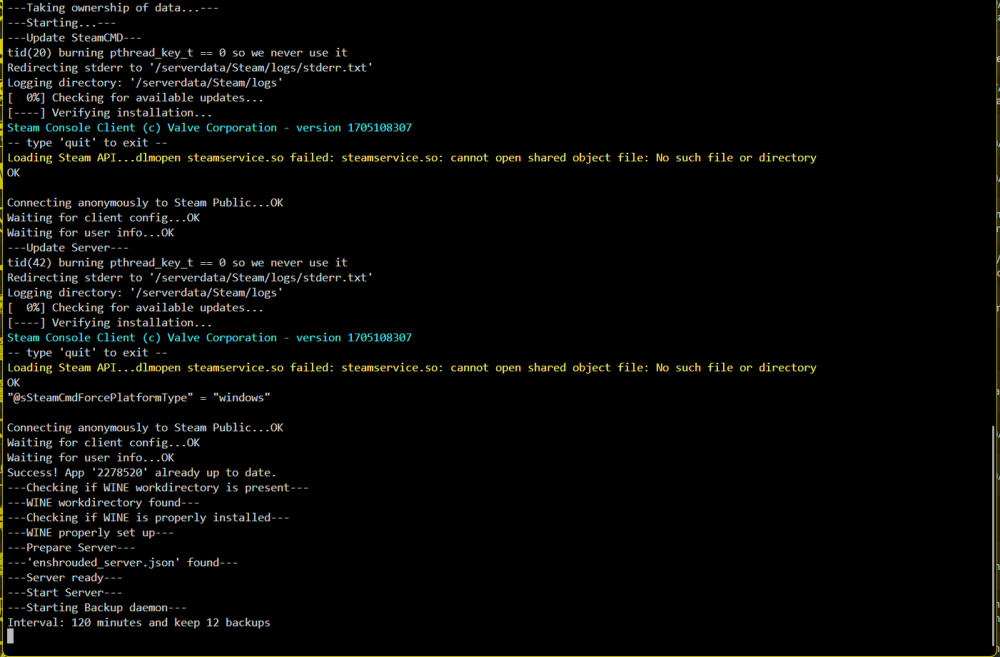
-
It wasn't the complete log. It's hard to make a screenshot because the log closes fast. Now this is the complete log. I think the server should be ready?
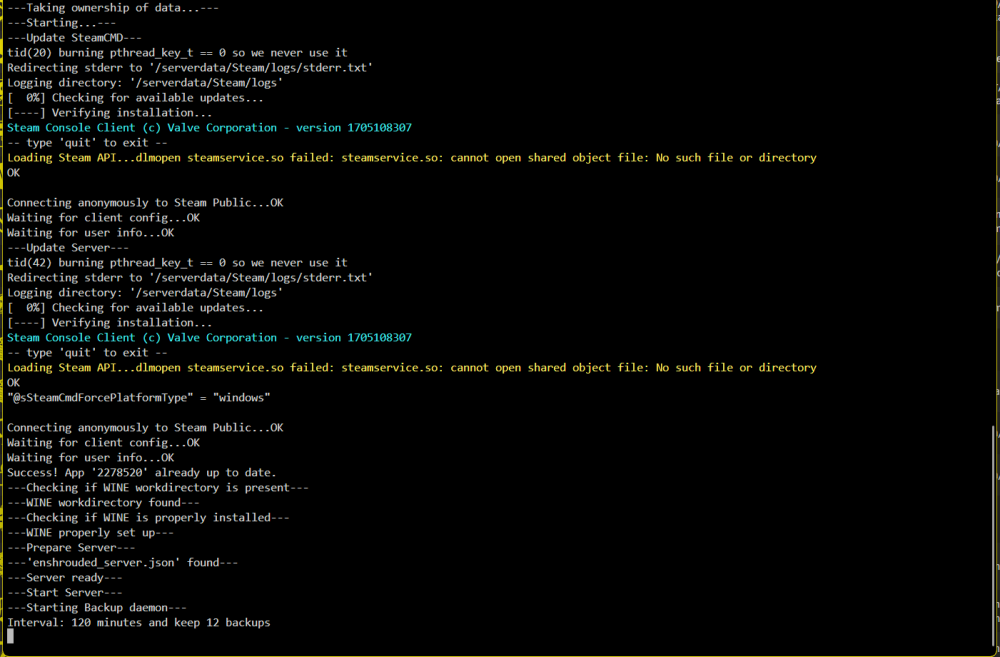
-
I have forwarded the ports but I can't add the server to favorites in Steam. It says, there is no server under the given address (192.168.1.4:15637). I'm running the container in bridge mode but tried already br0 with a static IP. Does anyone has a hint for me how to get it working?
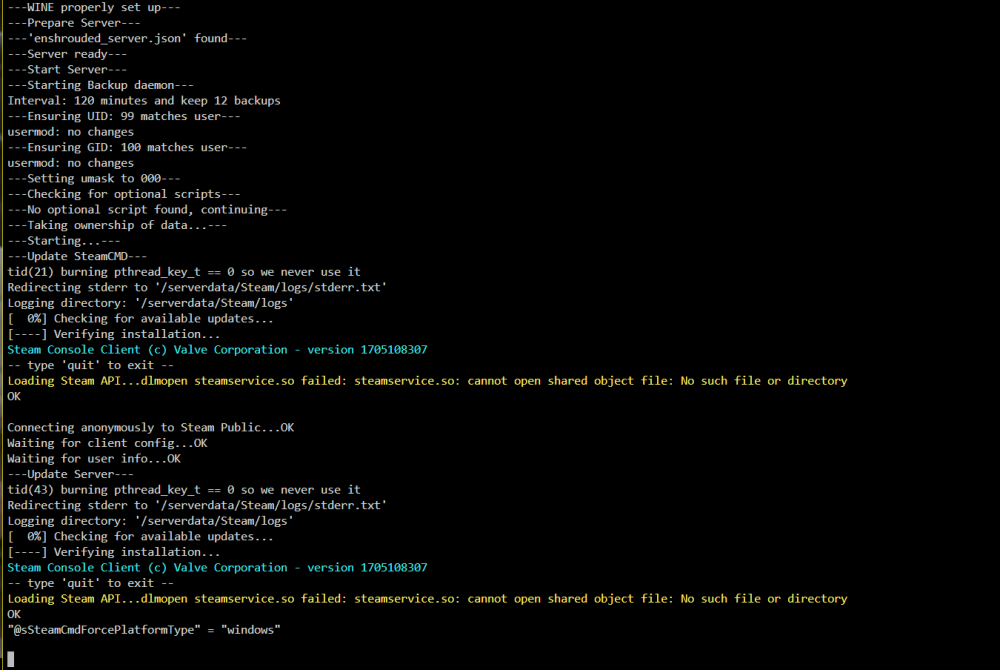
-
Hey, is there a chance to get MediaMonkey as a docker? https://www.mediamonkey.com/ I really would appreciate it!