





Joseph Higgins
Members
-
Joined
-
Last visited
-
I upgraded to v7 of unraid this morning and my dockers generally connect, but one of them has an error. I am connecting to a Lucee coldfusion server running on its own ip:8888. I go navigate to the docker locally just fine. But it will not route through cloudflare tunnel now. Any ideas on how to troubleshoot? 2025-01-10T16:18:06Z ERR error="Unable to reach the origin service. The service may be down or it may not be responding to traffic from cloudflared: dial tcp 192.168.1.4:8888: connect: no route to host" connIndex=0 event=1 ingressRule=47 originService=http://192.168.1.4:8888 2025-01-10T16:18:06Z ERR Request failed error="Unable to reach the origin service. The service may be down or it may not be responding to traffic from cloudflared: dial tcp 192.168.1.4:8888: connect: no route to host" connIndex=0 dest=https://cv.yu2me.com/favicon.ico event=0 ip=198.41.192.167 type=http
-
qemu-system-x86_64: warning: Deprecated CPU topology (considered invalid): Unsupported clusters parameter mustn't be specified as 1. My server crashed with an error in the console. tower-diagnostics-20240925_0510.zip
-
Does anyone know a docker that will change black and white photos to colored ones?
-
That did the trick. I forgot to unattach the usb devices from the VM prior to the reboot.
-
I was passing nvidia card and usb keyboard and mouse to vm. I changed that today back to unraid. To do so I edited the vm removing the devices. Then I installed nvidia driver. Then I changed the immou pass through setting in vm to not individualize the groups. Upon reboot i get stuck at usb portion. The usb devices get registered and then it says xhci_hcd 0000:02:00.0: usb bus 1 deregistered. The lights on my usb keyboard And mouse turn off and the boot process never completes. I went into the flash backup and attempted a restore and no change. I restored the vfio configuration file to the backup one. No change. Apart from starting over on my build, what is the next step? I also added an additional usb mouse and keyboard. When I put them on the ports on the top of the computer their lights went out too. When I plugged them into the mother board the lights stay on but the boot is still stuck.
-
Can anyone lend me some assistance with creating a container for this docker hub image? I keep having issues and would love a remote desktop session with someone who has used it on UNRAID.
-
I just installed and get the same thing. I see that my postgresql database is populated with tables, so it made the connection. The redis documentation is lacking and I cannot get that to work. Sitting here with a blank login screen too. Maybe I bag this app, but I want a multi user app. Dang it.
-
I ended up turning off all the writes (downloads) to the array while parity was building. For the size of the array it took 2 days to build. Strangely, the parity build would crash any dockers, even though they were on the cache drive. So I also had to disable docker during the parity build. If there were a rebuild of parity, I would not want to have to stop Docker. This is keeping me from using it in a production environment.
-
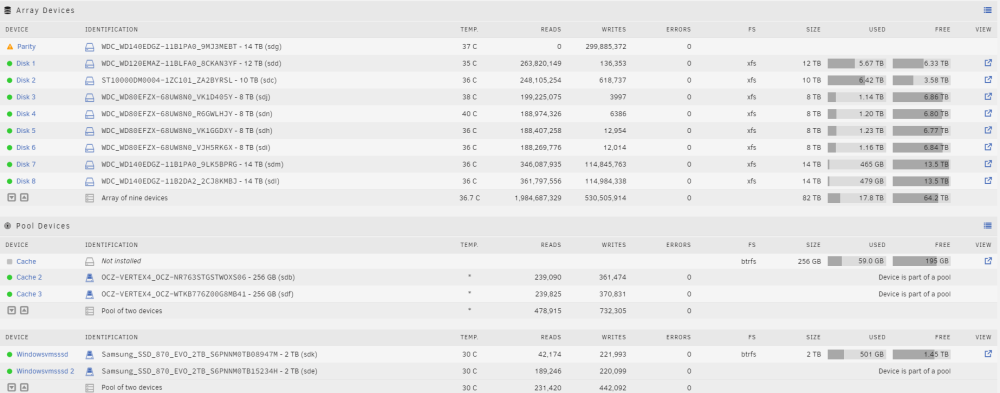
I had just added the 14 TB Parity and 2 additional 14 TB drives in the array yesterday.
-
Interresting, keeps dropping. Maybe speeding up in the unused space? I would not think it would matter much since it has to calculate every bit across all drives in the array.

-
Maybe something is wrong with my system? It was showing 365 days this morning. Can I expect it will keep dropping? At 1MB/second it will take a long time to chew through 14 TB I assume.

-
What I don't see anything talked about is time. If you are putting in large drives 10-18TB and have an 18TB parity drive it will take months for the parity to be created. If you lose a drive, (which I have not yet) I assume it will take just as long to rebuild the files. For things like family pictures, maybe you can wait months. For things like VM's or web application files, you need those back IMMEDIATELY. So best thing to do is create multiple backups of the files, and a cloud offiste backup too.
-
My issue was the Nvidia GPU I was attempting to passthrough. I was able to follow the instructions for VM device passthrough in the official documentation. The step I was missing was disabling the GPU in the Bios of the motherboard. It was binding to it on load of Unraid, then I could never pass it through successfully. I was able to play Harry Potter on my 2080ti passed through, although not at the best frame rates. Now I am wondering if I should just move my zzzdarr apps back into windows so that plex has access to the video card again...
-
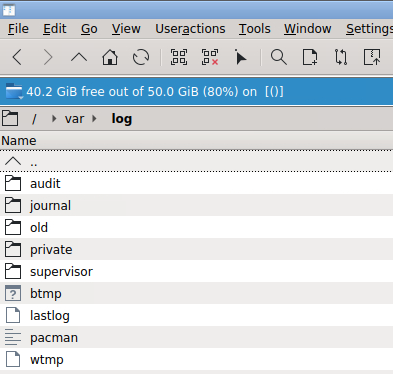
I used krusader to start with since I don't know the unix command lines at all. I did not think I saw it. Still can't find it.

-
I can't find that file to delete it....


