





AceBurn90
Members
-
Joined
-
Last visited
Everything posted by AceBurn90
-
It works, thank you!
-
Thank you JorgeB, you are a great help. For reasons unknown to me, I swapped the two NVMe slots with each other (which was on my agenda anyway). Afterwards both were recognized again. Now, however, the NVMe (2TB) previously used as a cache is no longer displayed as a cache but under “Unassigned Disk Devices”. This contains my “appdata” and “system” folders. 1. is it possible to restore my original cache? 2. or would it be easier to back up the data and format it to ZFS Encrypted, create a new cache pool, restore the data to it and then assign the new pool allocation to the shares? I would prefer the latter. alent-diagnostics-20250115-2026.zip
-
I have now performed a downgrade to the previous version and still do not see the SSD of the cache pool. Nothing is listed under “Unassigned Devices” either. I have attached the diagnostic file for the current version 6.12.14. alent-diagnostics-20250114-2316.zip
-
If it is relevant: I have read that XFS pools created before 6.12.xx are not displayed correctly in 7.0.0. -> https://forums.unraid.net/bug-reports/prereleases/700-beta3-cache-drives-wont-mount-r3273/ This seems to apply to me as well. Unfortunately, I can't remember exactly which version I created the pool for. I only know that it must have been in late summer 2022.
-
After updating from 6.12.14 to 7.0.0, my cache SSD is no longer found. Even a second restart after the “Update restart” did not help. I am currently at a loss as to how to proceed. I urgently ask for help. 🫠 The device that cannot be found is: Seagate_FireCuda_510_SSD_ZP2000GM30001_7QE00N2B - 2 TB I did two things before the update. 1. changed the cache pool from 2 slots to 1 2. i created the pool “Elencia” and formatted it to “ZFS Encrypted”. There alent-diagnostics-20250114-2121.zip

-
I have to thank you. It all worked out! Now that I have two pools, I was wondering if I can convert the old cache pool from btrfs to “ZFS Encrypted”? If not directly, I could use the second pool to backup the data and then reformat the cache pool, right? What would be the easiest way to do this?
-
Here is the new diags alent-diagnostics-20250114-1352.zip
-
Thanks for your help. Looks good. Everything seems to be working. What are the steps to remove the cache pool device?
-
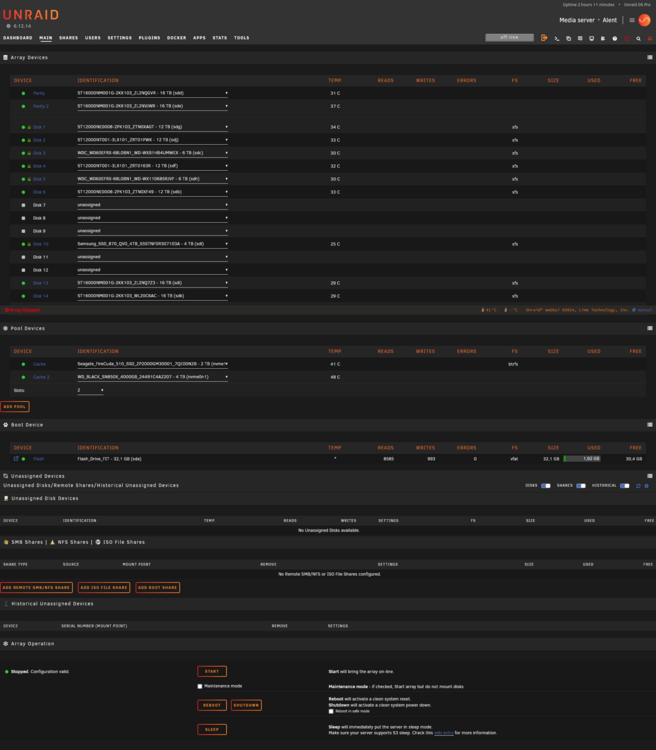
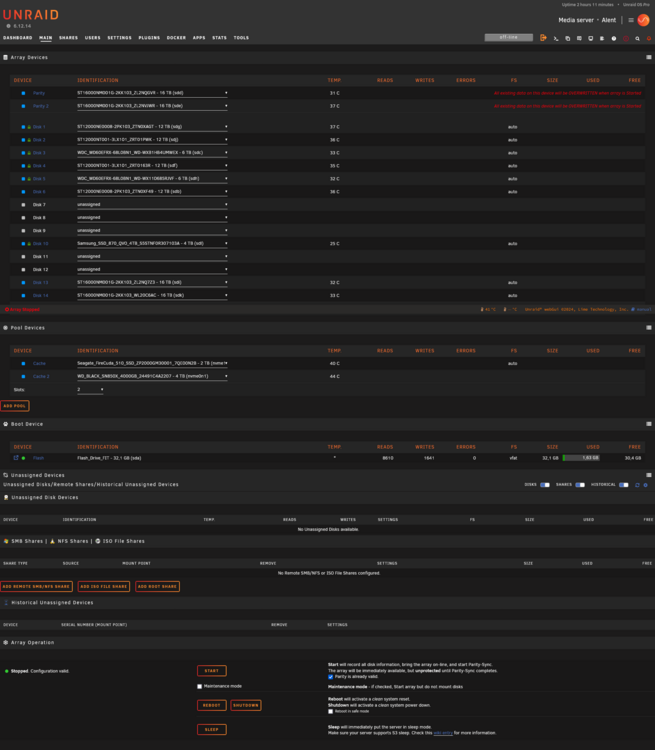
I have just done something very stupid. I deselected the 4TB as Unassigned under “Main”. Then I selected “Array” under “Tools>New Config” under “Preserve current assignments:” and clicked Apply. Unfortunately, I clicked too quickly. Can I undo this? I still have my exact assignments in an Excel file. I have reassigned these accordingly. But what is the next step? Can I just start the array and have to create the parity again? Can I remove the 4TB SDD from the Cache pool at the same time?
-
That sounds good. I am currently switching to RAID1. That should let me remove the 4TB afterwards. I was denied this in single mode. The data in the 4TB pool won't be that important. All important long-term data is stored in the array.
-
I have now switched to a new system. Almost everything worked straight away. I installed 4 new HDDs, replaced the old Parity 12TB with two 16TB and added another NVMe to the pool. Here I also caused a problem myself, which I am currently discussing in another thread. Unfortunately, I didn't realize that the default configuration of new array devices has changed. (For whatever reason?) Three of my HDDs are now formatted XFS (unencrypted). I have now of course changed the default configuration for new devices so that future HDDs will be formatted correctly again. The parity has already been calculated and there is still no data on the 3 new HDDs in the array. 1. is it possible to have a mixture of XFS and ZFS disks in the array or are there reasons why I should have everything in one format? 2. how can I now delete the 3 and format them again in encrypted form? 3. (Bonus): If I want to switch to ZFS and 3 HDDs are not yet formatted, can I move the data from the old HDDS with XFS to the 3 new HDDs, sofgern I have formatted them into ZFS and then format the old HDDs into the new ZFS?
-
Thank you for the important information. The anonymized diagnostic file is attached. I always plan to access an SSD quickly from my computer. My HDDs are too slow for this as they are always in sleep mode when I'm not using them for 15 minutes. Therefore, the fast access time and allways on of SSDs is important to me in this case. If I could remove this second SSD from my first cache pool and create a second one for it, this should solve my problem, right? The only problem I see is that my data would not be backed up in this case. Is there a simple solution for this? Always have the data automatically duplicated in the array? Is that possible? alent-diagnostics-20250114-1146.zip
-
Hello there, unfortunately I have two different sized NVMe's in my cache pool. 2TB the old one and 4TB the new one. I only realized later what a stupid thing I had done. I actually wanted to pack the SSD into my array. I now have put the second one in single mode. Question: 1. how can I make sure that there is no more data on the second NVMe? (it is just 3 days in my Server) 2. how can I remove the second NVMe from the pool? Thanks for your help. Best Regards AceBurn90
-
This should answer you problem. -> https://docs.unraid.net/unraid-os/release-notes/6.12.14/ I have the same Problem, but can't update to 7.0.0 becauce my parity is rebuilding.
-
ASUS specs: AMD Ryzen 9000 Series Desktop Processors*: 2 x PCIe 5.0 x16 slots (support x16 or x8/x8 modes) AMD X670 Chipset: 1 x PCIe 4.0 x16 slot (supports x2 mode)** * Please check the PCIe bifurcation table in support site (https://www.asus.com/support/FAQ/1037507/). ** PCIEX16_3 shares bandwidth with M.2_3 slot. Please adjust in BIOS setting to enable PCIEX16_3. This should work just fine. The 1080Ti is not a mandatory card but a test project for the future to see if I want to move my gaming/office computer to my server at some point. This means that only the HBA and P2000 cards are relevant.
-
@_cjd_ I'm glad you're in good spirits. I think I've decided to build a new server with a new processor, mainboard, RAM and housing, etc. The main reason is that I could replace the defective part more cheaply, but in the long run the electricity costs will make me regret it. I would have built a rack server after 2 years at the latest anyway, as the 8 HDDs in my Fractal Design Node 804 would not have been enough in the long term. Lastly, my annual electricity costs for the server were about 40% of my total electricity bill at just over ~865 kWh (1-person household) The costs are as follows: 37.51 €-cents/kWh is about $357.46 in dollar terms. I looked around and decided to go for the Inter-Tech 4U-4416: https://www.inter-tech.de/productdetails-142/4U-4416_EN.html Here is a summary of how far I have come so far with my new 2025 build: Planned System (as of December 2024) 1. Case Model: Inter-Tech IPC 4U-4416 (4U Rackmount Server Case) Key Features: Supports up to 16× 3.5" HDDs (future proof) E-ATX compatibility 2. Motherboard Model: ASUS ProArt X670E-CREATOR WIFI Socket: AM5 Chipset: X670E Form Factor: ATX Onboard SATA: 4–6 ports (varies by revision) M.2 Slots: Multiple, up to PCIe 5.0 ECC Support: Yes (with Ryzen 7000, proper BIOS required) 3. CPU Model: AMD Ryzen 7 7800X3D Cores/Threads: 8/16 TDP: 120 W Notable Feature: 3D V-Cache, highly efficient for gaming and multi-threaded workloads 4. RAM Capacity: 64 GB Configuration: 2× 32 GB Speed: DDR5-6000 Latency (CL): ~CL36 Example Kit: Kingston FURY Beast (KF560C36BBEK2-64) ECC Type: On-die ECC or partial system-ECC (depends on manufacturer specs) 5. Graphics Cards NVIDIA GTX 1080 Ti PCIe 3.0 x16 Installed in the primary GPU slot @ x16 (directly to CPU) NVIDIA Quadro P2000 PCIe 3.0 x16 (mechanical), running at x4 (via chipset or 3rd slot) 6. HBA Controller Model: Broadcom/LSI SAS 9305-16i Interface: PCIe 3.0 (x8) Purpose: Adds 16 SAS/SATA ports for 16× HDDs + 2× SATA SSDs 7. Storage HDDs: 16× SATA 3.5" SSDs: 2× SATA 2.5" NVMe: 2× M.2 (PCIe 4.0 / 5.0) directly on motherboard -> (right now i have 5x HHDs and 2x SSDs and 1x NVMe) 8. Optical Drive Model: ASUS BW-16D1HT (Blu-ray burner) Interface: SATA 9. PSU Power: 1000 W Model: be quiet! Straight Power 12 1000W (80+ Platinum) Notes: Sufficient PCIe power cables & SATA strands; may need Y-splitters for SATA power 10. Cooling CPU Cooler: Initially planned a be quiet! Dark Rock Pro 4 (possibly too tall for 4U). Considering a lower-profile air cooler or AIO with max height ~155 mm. Case Fans: Standard 4U server fans, ensuring good airflow for HDD cooling 11. OS / Software Host OS: Unraid for Docker containers and various services Docker Containers: Plex, Deluge, SABnzbd, MakeMKV, Filebot, Komga, Pi-hole, WireGuard Game Servers (Docker-based): Minecraft modded, 7 Days to Die, Battlefield 3/4 Planned PCIe Slot Layout Slot 1 (CPU – PCIe 5.0 x16): GTX 1080 Ti @ x16 Slot 2 (CPU – PCIe 5.0 x8 / x16 physical): Broadcom/LSI SAS 9305‑16i @ x8 Slot 3 (Chipset – PCIe 4.0 x4): Quadro P2000 @ x4 Additional Notes: For 64 GB @ DDR5-6000 on a Ryzen 7 7800X3D, a recent BIOS version is recommended for stability. With 16 HDDs + 2 SSDs, plan your SATA cable management carefully (SFF-8643/8644 breakout cables). A 1000W PSU gives enough headroom for CPU, GPUs, and all HDDs. ASUS BW-16D1HT requires an extra SATA power cable from the PSU. # Do you have an opinion on this?
-
Thanks for the suggestion. I have completely disregarded the lanes so far, but with so many devices I need to check this. I think to use a P2000 and a GTX 1080Ti with full performance potential 8x/8x should be enough or is that not enough for the 1080Ti?
-
@MAM59 & @MowMdown I think that the controller should not cause any problems, as I have also switched the slot between the two M.2s in the past and also the last few days for testing. I have also switched the SATA connections between them and also to the mainboard and have had no problems with them in the past.
-
2 HDDs and 2 SSDs are connected directly to the mainboard. 4 HDDs are connected with an m.2 adapter card -> https://www.amazon.de/gp/product/B09V141RFL
-
How can I check this if I no longer have access to the local system dashboard? Unfortunately, the system no longer starts. Is it possible to find the mapping somewhere on the USB drive? I could connect my USB drive to a notebook and boot from it and then screenshot the assignments. Provided the Unraid system accepts the “new” network card from the notebook on its own. Since I don't integrate the data carriers, it shouldn't be a problem, or does the hardware from the NB, for example, destroy the hardware configuration of the current defective system on the stick? PS. Here I have opened a thread to build a new system, if you want to help me ->
-
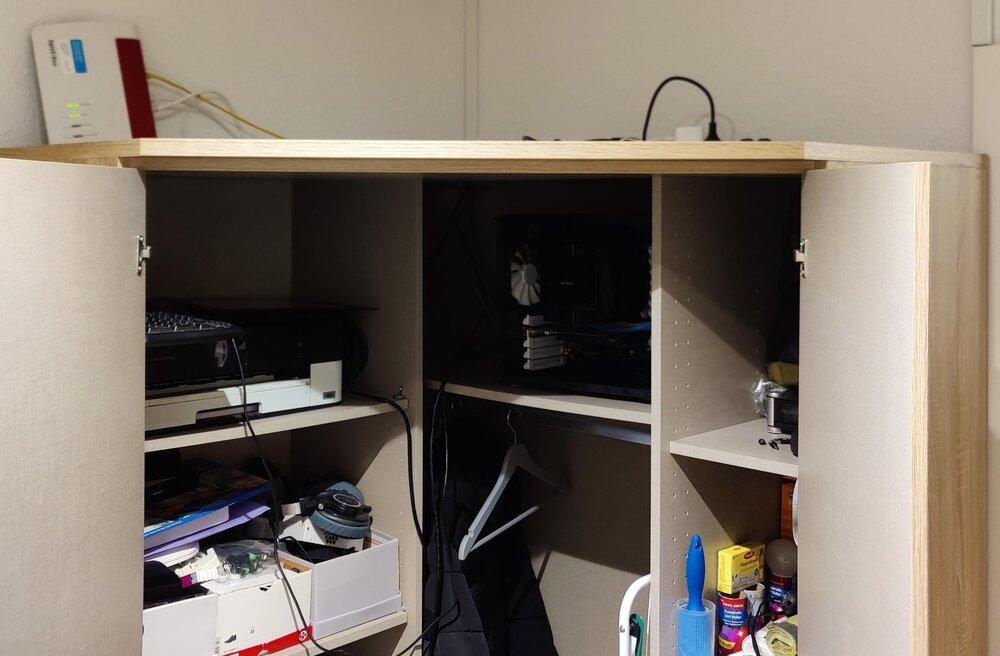
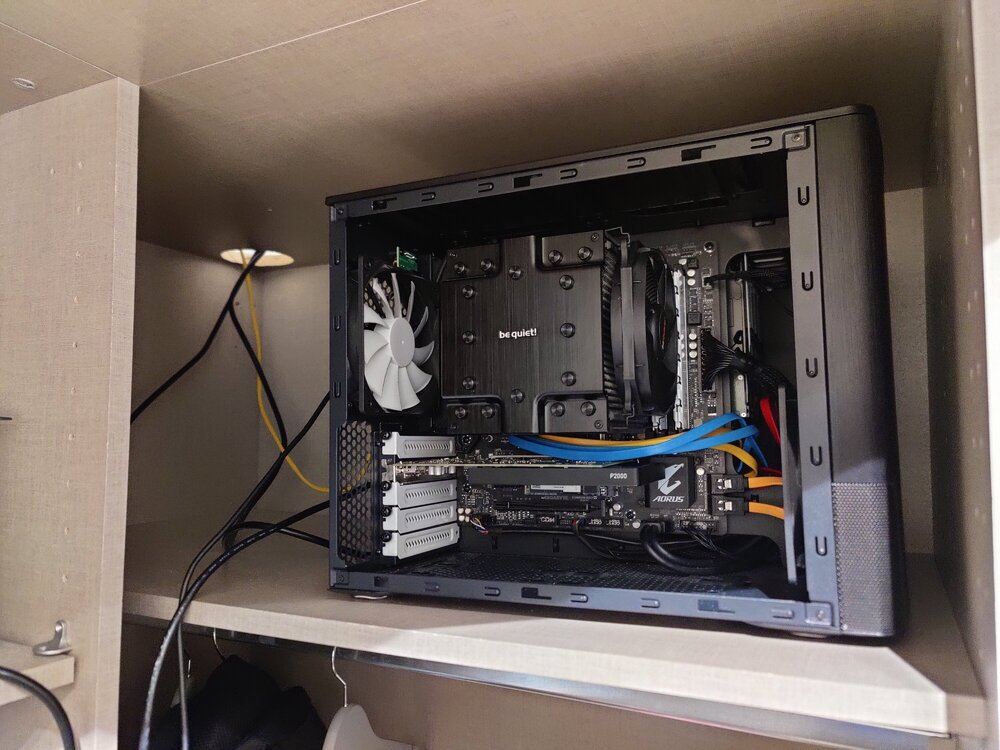
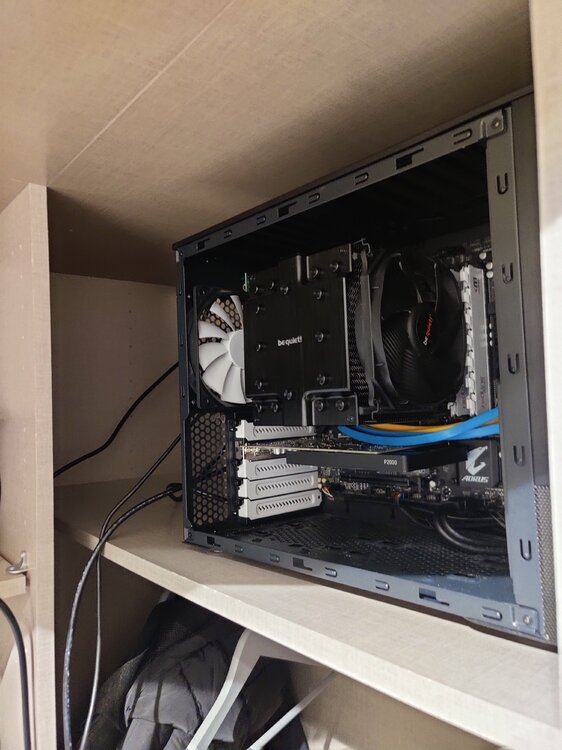
Hello everyone, unfortunately it has now happened, my mainboard is defective after less than 3 years (purchased: 30.01.2022). I would now like to put together a new server as quickly as possible. The difficulty was to find a board with 10 SATA ports in my current case that met my criteria. - Micro ATX - 10x SATA (should be for 8xHDDs and 2 SSDs) - 2x M.2 (4x + 4x) - 2x PCIe (16x + 8x) -> PNY Quadro P2000 for Plex transcode (already in use) + Asus GTX 1080Ti for VMs (future project) I only managed this with the combination of the mainboard mentioned below (4x SATA) and an M.2 SATA expansion card (6x SATA). Unfortunately, I was unable to install the second GPU because the USB3 port on the mainboard for the front connections on the case interfered with the installation of the second graphics card. I am also open to new ideas such as a new case (including racks), it should just fit in my cupboard and not be too loud at the end, as the server is in the hallway one door away from my bedroom. (Pictures attached). I would prefer an insulated server rack than to continue using my current housing. The dimensions for the closet area are 50x50x50cm to place the server. Would be nice if I could continue to use the 3900x, the RAM and the power supply, but it's not obligatory. The cost shouldn't be too expensive but with a good build I would consider it. Fortunately, I'm in a good financial position right now, so I'm not too affected by it. But it should also stay within limits My current broken build looks like this: Unraid: 6.12.14 Mainboard: Gigabyte B550m Aorus Pro-P CPU: AMD Ryzen 9 3900X, 12C/24T, 3.80GHz Core/4.60GHz Boost CPU cooler: Be Quiet! DARK ROCK PRO 4 RAM: Mushkin Redline ECC White DIMM Kit 32GB (2x 16 GB), DDR4-3600, CL16-19-19-39, ECC (MRD4E360GKKP16GX2) GPU: PNY Quadro P2000 5GB GDDR5 Case: Fractal Design Node 804 PSU: Be Quiet! DARK POWER 12 750W Cache: 1x NVme - Seagate FireCuda 510 SSD 2TB, M.2 Storage: 1x SSD - WD Blue 3D NAND, 500GB, SATA Storage: 1x SSD - Samsung SSD 870 EVO 4TB, SATA Storage: 4x HDD - Seagate IronWolf Pro NAS HDD 12TB, SATA (One as Parity) Storage: 2x HDD - Western Digital WD Red/NAS 6TB, SATA Thank you for your time!
-
Thank you @foo_fighter, that sounds much easier than I thought. Then I only have to check my RAM on the new system as I already had a UEFI BIOS before. 1. do I have to reactivate the license for new hardware or inform the UNRAID team about the new hardware for activation? With regard to a new USB stick, you have to rewrite the license, but since my stick has remained the same, I assume that I don't have to do anything. 2. i will open a separate thread for build advice. Is this the right place? Home>Community>Hardware : https://forums.unraid.net/forum/9-hardware/ Best regards Ace
-
Hello everyone, It seems that my mainboard is defective and I now want to assemble a new server. My question now is this: 1. how can I make sure that when I have reinstalled everything with my current 2x SSDs, 1x NVMe and my 8 SATA HDDs and my USB boot medium with UNRAID on it will work as before after the first power-on? 2. what do I have to consider beforehand? 3. if I have forgotten anything else for the change, please let me know. Thank you for your time
-
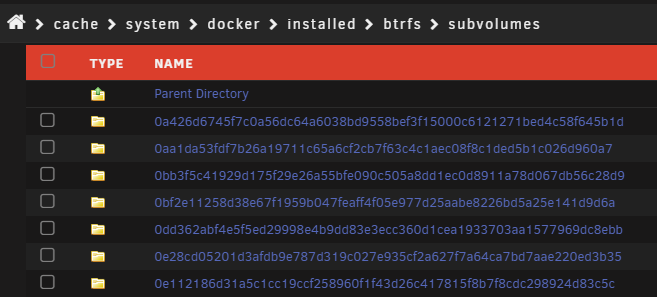
Hello frosty5689, thank you for reaching out to me. I have another problem that I need to ask you about. First of all, I changed and anonymized my configuration (CLIENT_KEY & ID) and saved it in the attachment. This configuration is not yet in operation as I wanted to discuss it with the community first. I have correctly stored my storage locations including upper and lower case. Unfortunately I have not been able to use the new configuration because my cache data was previously stored in the wrong place and I have to move it before I can use it. The reason for this is that the cache data is wildly distributed in the directory: “cache>system>docker>installed>btrfs> subvolumes > {several folders with number & letter combinations}" Like this: I now need to adjust the location and move the cache data all to the designated place and at the same time keep the downtime as short as possible. But now I don't know how to find the right cache data from all the folders and move it to the correct cache folder. Do you or anyone here on the board know what the best way to do this is? Best regards Ace my-hath.xml
-
Does this container support plugins? I want to install Dynmap. -> https://modrinth.com/plugin/dynmap Does is work so create a folder named "plugins" and put the downloaded dynmap file inside? UPDATE: Short answer -> Yes My server is running fabric 1.21 with Dynmap and SQLite.




