





danioj
Members
-
Joined
-
Last visited
Everything posted by danioj
-
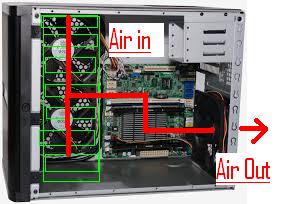
Having my first test of the airflow in this case. Running in the config as per my little diagram in previous post 2 side fans intake and rear one extracting! Fan speeds are stock based on default config - IPMI reports 1000 RPM. Whats in the box: ASRock C2550D4I Mini ITX Motherboard Kingston 4GB (1x4GB), PC-12800 (1600MHz) ECC Unbuffered DDR3L, ValueRAM, CL11, 1.35V, Single Stick Silverstone ST45SF-G 450W SFX Form Factor Power Supply - ST45SF-G 3 x Seagate 8TB Archive HDD, SATA III, 5900RPM, 128MB (in top 3 bays). There is nothing but trays in the remaining bays. Currently ALL disks are in cycle 1 of 3 preclear cycles (Currently in Pre Read). Disk 1 (Top Bay) is reporting - 37 C - Preclear Running Time: 1hr 40 Disk 2 (Second Bay) is reporting - 37 C - Preclear Running Time: 28 mins Disk 3 (Third Bay) is reporting 32 C - Preclear Running Time: 23 mins Currently the case has all vents and filters on and as the manufacturer intended. Lets see what happens!
-
Really? All as Exhaust! For me the two intake fans drawing cool air in (next to the drives) and then the exhaust fan (near the cpu) drawing air out pulls all ambient room temp air in over the drives and then over the cpu and then out the rear! Seems very optimal to me! Obviously this is without your experience but I am wondering why the issues you are noting exist!? P.S. I put a little drawing (sorry - it is quick and dirty) together to indicate what I mean!
-
Do you already have the q25 and are wanting this case? What about a q26? No - I had ordered the Q25 but they keep pushing it back 4 weeks month on month. For whatever reason it is just not becomming available. I cant find the Q26 either Thanks for the update on the cooling. I am looking to fill the sucker eventually with 8 x 8TB drives (4 to start with) and 2 x SSD's. Wierd - the cooling system looks allot like the Q25 and the ratings for the Q25 from a cooling perspective has always been excellent. Need to think before I pull the trigger! Thanks for the quick reply man!
-
Resurrecting this thread. In my backup server project (which is currently in bits on my test bench) I think I switching to this case from the Lian-Li PCQ25B. My supplier just cant get the Lian Li Case and has suggested this Silverstone box. They have it in stock - given the comments in this thread I think Ill go with it! Unless others have had any issues with it since this thread was last used?
-
I don't know the entire procedure for copy verify in one step but I think the procedure to verify is to get rsync to do a simulated sync and display the difference in files it has found: rsync -nrcv /path/to/sourcefolder /path/to/destinationfolder The output from this is a list of files in the source folder that are different.
-
I am just blown away by this sentence. This is just how I feel. LOL - and until now I wasn't sure I did! It has just cemented my plan for a backup server! I don't have the money to keep it off site like I would like but baring some act of god or some idiot with a grudge against my country I'll feel safe!

