fespinoza831
Members
-
Joined
-
Last visited
Everything posted by fespinoza831
-
There are other hard drives connected to the same PSU cable (before it and after it). the sata cables are new. will try other cables and other ports. so 650 psu is ok for this many hard drives?
-
so is it two different devices dropping offline, could this be a PSU issue? im only using a 650 watt psu.
-
Sorry though I had. plexserver-diagnostics-20230213-1654.zip
-
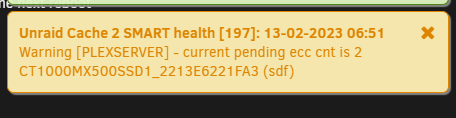
also see this often
-
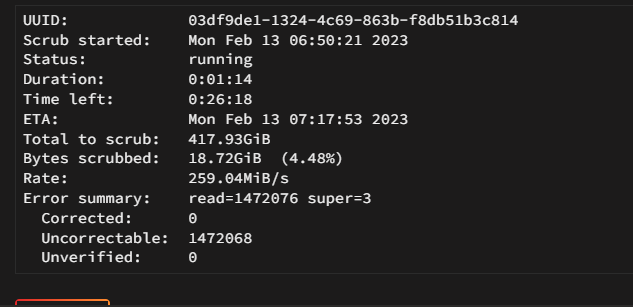
also notice that if I try and run the srub now it shows
-
Whats NOCOW, I also notice that this cache corruption tends to happend when I manually add file from my windows pc.
-
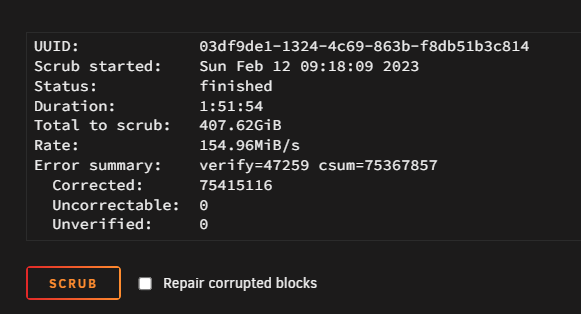
Swapped out some of the sata cables and verified every single cable. 2nd cache drive sata cable was actuall half way in. plexserver-diagnostics-20230212-1539.zip
-
rebuilt the array disk. plexserver-diagnostics-20230211-1946.zip
-
I disabled Docker, i have no VMs, ran the srub on cache restarted and pulled new diadnostics file. plexserver-diagnostics-20230210-1710.zip
-
-
Thanks, doing this now.
-
i bought a upgrade for one of my drives (larger drive). Replaced and a few days ago now this morning my new drive is disabled (disk 9). plexserver-diagnostics-20230210-0716.zip
-
that was is thank you so much
-
Hello, not sure if I got an update for qbit but it was working fine and now i cant even launch it. this is what im getting in the log 2022-11-10 06:50:43,842 DEBG 'start-script' stdout output: 2022-11-10 06:50:43 TLS Error: TLS key negotiation failed to occur within 60 seconds (check your network connectivity) 2022-11-10 06:50:43 TLS Error: TLS handshake failed 2022-11-10 06:50:43,842 DEBG 'start-script' stdout output: 2022-11-10 06:50:43 SIGHUP[soft,tls-error] received, process restarting 2022-11-10 06:50:43,842 DEBG 'start-script' stdout output: 2022-11-10 06:50:43 DEPRECATED OPTION: --cipher set to 'AES-256-CBC' but missing in --data-ciphers (AES-256-GCM:AES-128-GCM). Future OpenVPN version will ignore --cipher for cipher negotiations. Add 'AES-256-CBC' to --data-ciphers or change --cipher 'AES-256-CBC' to --data-ciphers-fallback 'AES-256-CBC' to silence this warning. 2022-11-10 06:50:43,842 DEBG 'start-script' stdout output: 2022-11-10 06:50:43 WARNING: file 'credentials.conf' is group or others accessible 2022-11-10 06:50:43 OpenVPN 2.5.8 [git:makepkg/0357ceb877687faa+] x86_64-pc-linux-gnu [SSL (OpenSSL)] [LZO] [LZ4] [EPOLL] [PKCS11] [MH/PKTINFO] [AEAD] built on Nov 1 2022 2022-11-10 06:50:43 library versions: OpenSSL 3.0.7 1 Nov 2022, LZO 2.10 2022-11-10 06:50:43,842 DEBG 'start-script' stdout output: 2022-11-10 06:50:43 Restart pause, 5 second(s)
-
Yeah I figured, thank you very much for all the support. I'll let you know how it turns out.
-
Finally got the sata cables replace two days ago but it happened again. plexserver-diagnostics-20221028-1644.zip
-
It just happened again. plexserver-diagnostics-20221012-1444.zip
-
Great thank you for all the help. What causes this corruption. Anything I did wrong or could have done to prevent it?
-
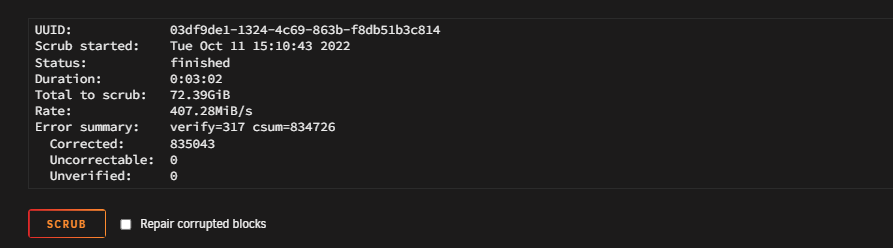
I checked cables and made sure they were seated properly. After booting back up, I was able to run the correcting scrub and here is the output and new diags. plexserver-diagnostics-20221011-1956.zip
-
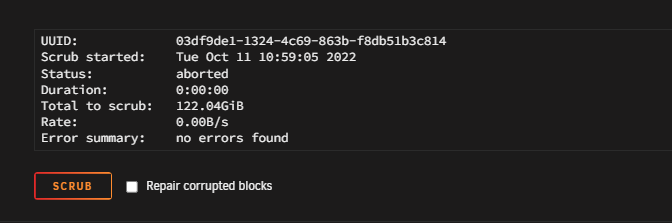
Thanks for the reply, I tried running the correcting scrub on the cache drive but it doesn't seem to do anything. When i click on apply the screen just flash but nothing happens. Not sure if I'm doing this incorrectly. Oh and by the way the issue with the ready only filesystem happened again this morning. Attached it the diagnostics from this morning. plexserver-diagnostics-20221011-0642.zip
-
Will do, Sorry about that was searching and didn't notice when it was posted.
-
Hello, every other day or so some of my containers will stop working because my cause drive isset as a read only file system. However when this happens. I reboot the server and everything is back to normal. Not quite sure what is going on here. Bad drive? Can someone point me in the right direction. plexserver-diagnostics-20221010-1351.zip
-
Hello, eveery other day or so some of my containers will stop working because my cause drive isset as a read only file system. However when this happens. I reboot the server and everything is back to normal. Not quite sure what is going on here. Bad drive? Can someone point me in the right direction. What logs may be needed for help?
-
ok thanks, I was scared that it might be filling up since i had to expand it to 30gb at one point.
-
Here it is.