papnikol
Members
-
Joined
-
Last visited
Everything posted by papnikol
-
Well, it will mean less bandwidth and heat. I also tried pausing parity check every few hours (just a hail mary) and it did not help. One thing I wanna try is rerun memtest (I ran it less than a year ago but you never know) but I have no monitor currently available and i have not found a way to run it headless.
-
The interesting (and perplexing for me) part is that parity check works ok while 2 parity drives and 11 data drives are being read. It usually freezes after passing the 8TB mark, meaning that 7 of the data drives do not have to be read anymore and spin down.
-
Thank you both for taking the time. But my CPU is not Ryzen. It is indeed AMD but pre-Ryzen - Athlon X4 840, released in the ancient times of 2014 Also, would it start being problematic after so many years (regarding this aspect)? I am aware of that warning but it was not a problem for me for many years (apart from a few parity errors). As I said before, Why would it suddenly start being problematic now?
-
Thanks (and I am attaching them here). towers-diagnostics-20260225-0027.zip
-
During the last few months, parity check has be leading to my server completely freezing (not ever reachable by ssh). The only way to regain access is a hard reset. Some details: The server will rub for days or weeks and only hang during a parity check. Transferring lots of big files is not a problem. I was running unraid 6.12.15 but updated to 7.2.3. That did not fix the problem. The parity check will run for at least the first 8 TBs and but freeze some time after that (my server is 14TBs, a parity drive is 18TBs - although I do not think this could be relevant) I have not changed any hardware VMs and docker are disabled. I had enabled Mirror syslog to flash so I am attaching it but I cannot see anything that would cause the problem When I did a parity swap some months ago, I had to try multiple times (maybe 5 or 6) unit I succeeded (this was quiet anxiety inducing) Any help would be welcome. I am expecting a new HDD any day now and I cannot replace my parity while this problem is going on. syslog-previous-2026.02.24
-
Thanks again, I really appreciated your (and @itimpi's) willingness to help
-
Thanks a lot for the help and patience. Rebuild seems to be going fine. I learned some new stuff I had not encountered before. I was wondering, what in the diagnostics file lead you to the conclusion that I should check the disk 3 filesystem?
-
Here you are:
-
Here is the msg i get:
-
Oh, sorry, I took diagnostics before the last step for me to look and I send those by mistake. Sorry for wasting you time. I have attached the correct ones with Array started in normal mode, disk 3 removed. towerp-diagnostics-20241118-1907.zip
-
Thanks for all your help. I am attaching new diags. I have performed New Config previously to restore a single redballed drive but not for such a case. I am guessing that I can now: - start the array again with disk3 - stop it - assign the new disk3 - start the array again & allow for the rebuild (why did I not think of that?) towerp-diagnostics-20241118-1853.zip
-
Yes, I had to reboot after the accident I mentioned. I was rebuilding disk 3. disk 1 seems fine
-
There you go, they are attached. towerp-diagnostics-20241118-1459.zip
-
Thanks for your response. The disk is disabled but it is fine (a cable was moved but nothing was being written to it, I tested it and it is actually fine) My whole plan is to first find a way to reenable the redballed disk and then start parity rebuild for the actually faulty one that has been replaced with a new disk...
-
Hi everyone, One data disk in my array needs replacement so I replaced it with a new one and initiated parity rebuild. Unfortunately, during that time my nephew (whom I have now disowned ) pushed my server by mistake and caused another data disk to redball. (I checked it and it is perfectly fine). Ideally, i want to reverse the "redballing", and restart the rebuild for the original faulty disk. Normally (if there was just a redballed disk), i would do that by creating a new configuration and accepting that parity is valid but now I cannot since the new disk was not rebuilt yet. Any suggestions are very welcome
-
First thank you very much for your willingness to help. I also learned about the concept of Rebuilding a drive onto itself. I would usually do a new config and accept the array. I hope to exploit it, hopefully, for one last time So, I removed drive 8 and its emulated counterpart seems to be working. I also mounted drive 8 as unassigned and it seems to work but, still, although I changed cables, the SMART test seems to get stuck at 90%, while it works for other drives. This is a bit strange, so I am thinking of using another drive for a rebuild. Does that make sense? Also, would it hurt if I simultaneously allowed the new 2nd parity to rebuild? That would allow me to be sooner protected from another failure...
-
Thanks a lot. Disks 1, 2, 3 (along with 4) share both the same SATA splitter and miniSAS. I will have to investigate. Just a few clarifications: what do you mean by that? since disk 8 is redballed, wouldn't the only way to mount it be to take it out of the array? Should I take it out of the array and try mounting with UD? (btw, I changed SATA cable and it still gets stuck at 90% of the short SMART test) -What exactly do you mean by "rebuild on top"? Accept disk 8 as good and rebuild the new parity drive?
-
Thanks, I just did.
-
Hi everyone,, I posted this question to r/unraid but I am posting it here too because it is somehow urgent: I have an array with dual parity. A few days ago I decided to replace both parity drives with larger ones (16TB). The first parity drive replacement went smoothly. The second parity sync stuck at some point and I had to reboot. When I came back one data drive was red balled. I run a short SMART test but it gets stuck at 90% (I tried other drives and they completed their short SMART test). This indicates that the drive might be problematic. So, my situation is: One of the 2 parity drives is un-synced and one data drive might need to be replaced. I also have a feeling that another disk might be on the verge of failing. What is the optimal solution:? replace the redballed disk with my previous parity drive (which was obviously removed from the array) and have the array simultaneously rebuild the new parity drive and the failed drive. 1st rebuild the new parity drive and then the failed data drive (so, 2 runs) Remove the new parity drive, accept the array as correct and check if the drive works. Then, if it works, add again the second parity drive for parity sync Some other solution I have not though of... Any input is welcome towerp-diagnostics-20240314-1206.zip
-
No, you were, I get it now. So, a viable solution would be to use a splitter with only 2 SATA connectors? Again, do you think I could use 1 splitter on every connector of the PSU cable? like that (where every "[" is a 1->2 splitter): PSU | | |----[ | |----[ | |----[ | |----[
-
I see. Yet, my Corsair has 4 SATA connectors on one cable. Maybe it is specifically made////
-
And they are easier to find, but, generally, from all the comments in various forums, the common wisdom is that they should be avoided (although that is what I have been using up to now)
-
Interesting, can you please point me to the source?
-
There are a few but they are relatively expensive: https://de.pcpartpicker.com/products/power-supply/#A=550000000000,2050000000000&D=20&sort=price&page=1&E=5,14 So, going back to the original question(s):
-
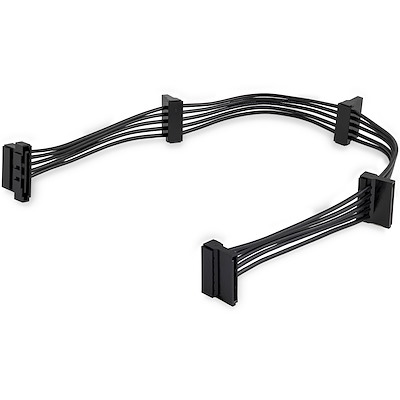
No, I am talking about this: Thanks for the info, I am aware, but even many good quality 750W PSUs usually do not have enough connectors to accommodate 20 drives. Whenever I built a PC, the last thing I use to cut costs is the PSU, but, obviously, I am trying to avoid buying something that I dont need, hence the power extenders (I also happen to have them at hand).