





AngryPig
Members
-
Joined
-
Last visited
Everything posted by AngryPig
-
I have been dealing with intermittent crashes and slowly trying different suggestions from various threads to fix it. Here is what I have tried so far: - Changing home network (moved house) - Safe mode with GUI - Upgrade to 6.11.5 from 6.9 and 6.10 - Enable a fix for 11th Gen iGPUs - Disabled XMP Last night I had a crash occur during a parity check and when I rebooted and checked the machine this morning there were 170,000 errors on the parity check. I read on the forum that for a similar issue to run again with correcting, so I did and got 270,000 errors. I then did a second one without correcting and it is still getting errors. Through research I have since found I probably need to rebuild my parity drives but I think through not knowing enough about the issue and the situation I have likely overwritten my data with the invalid parity check as a fair portion of media library is now unplayable among other signs of corruption. Is this assumption correct and I am SOL for the data on the array? I tried to get a new diagnostics but the CPU is at 100% and won't respond to anything other than navigating the UI. I have attached the syslog I managed to get from the flash. Any suggestions on what I should do to get back to a functioning state? Even if that means the data is lost. Also, is there a way to get a list of file names on each of the shares? Anything important is recoverable elsewhere but I want to make sure I remember to put everything back on if it is all reset and to make not of the damaged data. Did this on my desktop using the shares and dir command syslog
-
I had a thought for a potential check that could be added although it may be too much work for the benefit. Given that it is recommended to keep a minimum free space equivalent to the largest intended file of a share, perhaps a warning that checks for the largest file on a share and checks if that is bigger than the minimum free space. Therefore if someone sets up the share too low and starts putting large files on it, they will have a warning suggesting to increase the size. Other than the time to implement this, I could also see this as possibly being too long to check for, especially on larger arrays with lots of files (unless there is a fast way to get all file sizes)
-
That fixed the issue. Unsure how it got into that state (100% user error I would say) but the config files are updated to use the cache-backup now
-
Fingers crossed it is a simple solution but I would doubt it - I created a thread here if you find the solution Edit: Solution provided in the thread. I just needed to re-apply the Share settings. I must have made a change when I set the server up and caused an issue
-
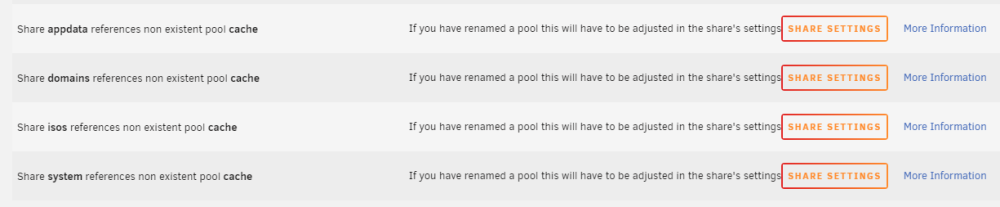
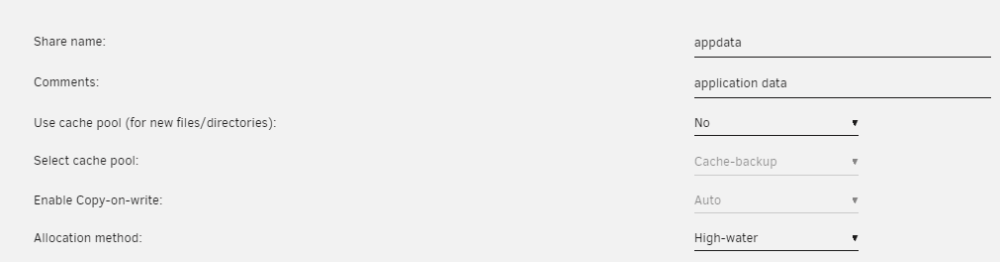
Thanks to the below post from the Fix Common Problems plugin support, I have discovered that the name of my Pool device in my config files does not match the chosen option in the GUI. Does anyone have any idea how this might have happened and how to fix the config to have the correct name? unraid-nas-diagnostics-20230609-0429.zip
-
Edit: In hindsight realized this is a question for the forum not for this thread. I will create a new post now that this issue has been discovered I took the screenshots today but they have been that way for many months. I do not even recall creating a pool by that name (unless I did and changed it in the first week of setup almost a year ago). How can the GUI show something different to the diagnostics and how can I fix it?
-
I am getting the follow errors about cache pool but when checking the settings of the shares this is not the case (only one screenshot for brevity but have checked all of them) unraid-nas-diagnostics-20230609-0429.zip
-
I went into my settings and disabled docker and then went to my flash settings and enabled safe mode no plugins (then rebooted) and it crashed today. Do you have any suggestions on what I should look into for hardware issues? Edit: I have attached the updated syslog file if that helps syslog
-
I was hoping that wouldn't be the case as it can take weeks to occur, which is a long time on reduced access, but if there is nothing obvious I guess I will have to
-
Ever since I started my server (about 9 months ago) I have been having intermittent crashes. I can no longer access my SMB shares through Windows or Android and my Plex server says my files are unavailable. I also check the router and my IP address no longer shows in the router as a connected device. In this time I have moved house and tried multiple ethernet cables thinking it was a networking issue. Recently it crashed twice in the one night so I followed the instructions to write my syslog to the boot USB. A week or two later brings it up to last night and it crashed whilst I was asleep. Once I realised it crashed I held in the power button and pulled the USB and have attached the syslog file below. I am a little confused looking at the time stamps as I received a notification in Discord from Sonarr at 4:57am but the last log is around 4:50am. As I am unable to access the network I have uploaded a diagnostics dump I made after the last crash and a reboot. Please let me know if anything further is required or if you have any recommendations as I am at a bit of a loss at the cause of the crashes. Edit: I assumed my system information would be in the diagnostics but re-reading the help post I saw that I was supposed to include it separately in the post - UNRAID 6.11.5 (not sure how to check this without booting to NAS but this is the name of the text file in the diagnostics) - ASUSTeK COMPUTER INC. - ROG STRIX Z590-A GAMING WIFI II - Intel Core i5-11400 - Corsair Vengeance LPX 16GB DDR4 3200MHz CL16 Dual Channel Kit (2x 8GB), White - LSI 9211-8i P20 IT Mode for ZFS FreeNAS unRAID Dell H310 6Gbps SAS HBA - 4x WD40003FFBX - 3x ST400VN008 - 1x Seagate_BarraCuda_Q1_SSD Running (from memory): - Sonarr* - Bazarr* - Radarr* - Plex - 1x Windows 10 VM - RStudio Docker - R Shiny Server* - DuckDNS - Wireguard * Installed in the last month; ie crashes happening from day one when everything else was installed syslog unraid-nas-diagnostics-20230609-0429.zip
-
I used testdisk undelete to make a copy of the files and then I compared the files name to what was on the fresh install of Unraid and renamed and copied them over after checking the contents to make sure they were not scrambled. I did consider this but since I copied my config over it auto-started the array, I presume the parity check has made writes overnight. Need to look up how to boot without starting array when it is set to auto-start for future reference. Thankfully other than some already uploaded to YouTube, GoPro footage, it was only my plex and video game libraries that was on there so not worth paying for it As mentioned above and previously it was non-critical and I had only just set up the array so not the end of the world. Anything critical already follows 3-2-1-1-0. This was just an accident branching out into the DIY NAS space as opposed to my other backup options. That is a fair point which appears to have since been echoed by others. I should have realised this myself but in the wee hours of the morning when it happened I was a bit too tired for sense
-
I rebuilt the USB and copied the config files over. My array settings are back but my drives all say they are at minimal data usage so I am guessing the data is gone unless the parity check comes back and finds mistakes
-
I booted into Kali and ran testdisk on the blank drive and did an undelete. This is what it got back https://pastebin.com/xxeqtgEL - not sure if links allowed so also included text file Does this look like all of it? Should I put it back onto the USB and try booting to it? recovered.txt
-
It's blank 😶
-
No I do not. I have only just started using the server with some non-critical data at this point. Was trying to set everything like that up. Re-booting with a monitor and it just goes straight to BIOS. Trying to boot to USB does nothing
-
Just tried rebooting but the web gui didn't load. Will have to try again with a monitor attached to the machine and see what it says
-
I had a share with a folder I could not delete so I went into the UNRAID terminal and ran roughly the following cd mnt cd disk6 cd Backups rm -r /* I believe I f***ed up by putting the slash and it went to home instead of the current path and now my server is offline. I did Ctrl + C after I started to realise What should I do going forward? I have 2 parity drives, 1 cache and 6 data drives


