





AngryPig
Members
-
Joined
-
Last visited
Everything posted by AngryPig
-
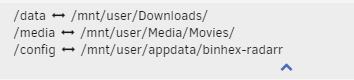
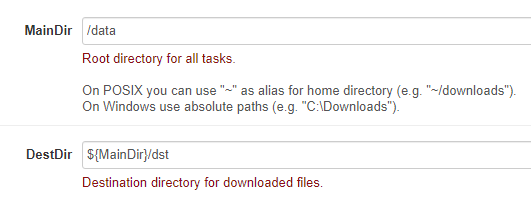
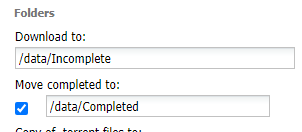
For some reason Radarr is copying the completed movies to /data instead of /media - what have I broken?
-
I want to enable Scan my library automatically in Plex so that I don't have to keep refreshing (or set it to periodic) but I was wondering if this is going to keep my media disks spun up all the time if it is doing an automatic scan. Is this the case? Or will they still spin down with this on?
-
I have my Windows 11 VM setup so that I can hibernate it on UNRAID 6.11.5. Is there a way to use a helper script (or something else) that will start a VM and then give you a notification when the VM is at the login screen with an IP and is ready for RDP? Just a little time saver instead of guessing when it is ready for RDP.
-
On Windows 11, in Chrome (with or without Incognito), if I am logged into my account on the forums and create a new post whilst the browser window is taking windowed but full screen, the scrollbar appears and disappears over and over. This only happens on my vertical 1080x1920 monitor. Not my 2560x1440 horizontal monitor. Does not occur in Firefox or Edge. I checked the HTML source and this appears to be added and removed from <head> repeatedly VID_20231023064944.mp4

-
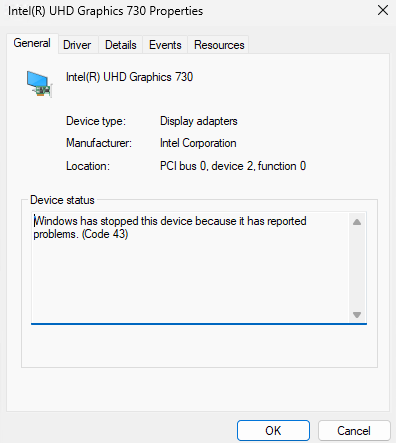
I managed to get the iGPU to attach to the VM but even after installing the latest drivers inside Windows 11 the Display Adapter is failing with error code 43
-
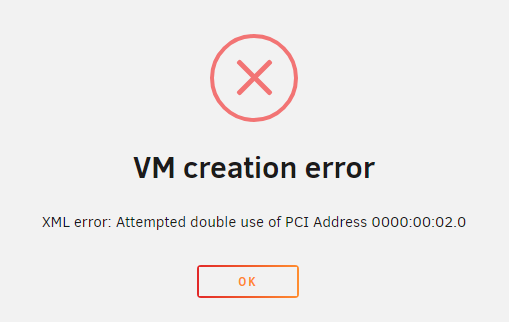
I am not sure what I should edit it to or how I would delete the XML sorry
-
I had an OVMF TPM setup for Windows 11 on my 6.11.5 UNRAID server. It suddenly went into a UEFI loop and recommendations on the forum said to try SeaBIOS to stop this issue occurring. After re-creating with SeaBIOS though I get an error trying to switch from VNC to iGPU. Any ideas why? <?xml version='1.0' encoding='UTF-8'?> <domain type='kvm'> <name>Windows 11</name> <uuid>eae3bf79-63a9-858a-a703-9b27a33ef283</uuid> <description>MDS-Grading</description> <metadata> <vmtemplate xmlns="unraid" name="Windows 11" icon="windows11.png" os="windowstpm"/> </metadata> <memory unit='KiB'>8388608</memory> <currentMemory unit='KiB'>8388608</currentMemory> <memoryBacking> <nosharepages/> </memoryBacking> <vcpu placement='static'>4</vcpu> <cputune> <vcpupin vcpu='0' cpuset='4'/> <vcpupin vcpu='1' cpuset='10'/> <vcpupin vcpu='2' cpuset='5'/> <vcpupin vcpu='3' cpuset='11'/> </cputune> <os> <type arch='x86_64' machine='pc-q35-7.1'>hvm</type> </os> <features> <acpi/> <apic/> <hyperv mode='custom'> <relaxed state='on'/> <vapic state='on'/> <spinlocks state='on' retries='8191'/> <vendor_id state='on' value='none'/> </hyperv> </features> <cpu mode='host-passthrough' check='none' migratable='on'> <topology sockets='1' dies='1' cores='2' threads='2'/> <cache mode='passthrough'/> </cpu> <clock offset='localtime'> <timer name='hypervclock' present='yes'/> <timer name='hpet' present='no'/> </clock> <on_poweroff>destroy</on_poweroff> <on_reboot>restart</on_reboot> <on_crash>restart</on_crash> <devices> <emulator>/usr/local/sbin/qemu</emulator> <disk type='file' device='disk'> <driver name='qemu' type='raw' cache='writeback'/> <source file='/mnt/user/domains/Windows 11/vdisk1.img'/> <target dev='hdc' bus='virtio'/> <boot order='1'/> <address type='pci' domain='0x0000' bus='0x03' slot='0x00' function='0x0'/> </disk> <disk type='file' device='cdrom'> <driver name='qemu' type='raw'/> <source file='/mnt/user/isos/Windows11.iso'/> <target dev='hda' bus='sata'/> <readonly/> <boot order='2'/> <address type='drive' controller='0' bus='0' target='0' unit='0'/> </disk> <disk type='file' device='cdrom'> <driver name='qemu' type='raw'/> <source file='/mnt/user/isos/virtio-win-0.1.229-1.iso'/> <target dev='hdb' bus='sata'/> <readonly/> <address type='drive' controller='0' bus='0' target='0' unit='1'/> </disk> <controller type='usb' index='0' model='ich9-ehci1'> <address type='pci' domain='0x0000' bus='0x00' slot='0x07' function='0x7'/> </controller> <controller type='usb' index='0' model='ich9-uhci1'> <master startport='0'/> <address type='pci' domain='0x0000' bus='0x00' slot='0x07' function='0x0' multifunction='on'/> </controller> <controller type='usb' index='0' model='ich9-uhci2'> <master startport='2'/> <address type='pci' domain='0x0000' bus='0x00' slot='0x07' function='0x1'/> </controller> <controller type='usb' index='0' model='ich9-uhci3'> <master startport='4'/> <address type='pci' domain='0x0000' bus='0x00' slot='0x07' function='0x2'/> </controller> <controller type='sata' index='0'> <address type='pci' domain='0x0000' bus='0x00' slot='0x1f' function='0x2'/> </controller> <controller type='pci' index='0' model='pcie-root'/> <controller type='pci' index='1' model='pcie-root-port'> <model name='pcie-root-port'/> <target chassis='1' port='0x10'/> <address type='pci' domain='0x0000' bus='0x00' slot='0x02' function='0x0' multifunction='on'/> </controller> <controller type='pci' index='2' model='pcie-root-port'> <model name='pcie-root-port'/> <target chassis='2' port='0x11'/> <address type='pci' domain='0x0000' bus='0x00' slot='0x02' function='0x1'/> </controller> <controller type='pci' index='3' model='pcie-root-port'> <model name='pcie-root-port'/> <target chassis='3' port='0x12'/> <address type='pci' domain='0x0000' bus='0x00' slot='0x02' function='0x2'/> </controller> <controller type='pci' index='4' model='pcie-root-port'> <model name='pcie-root-port'/> <target chassis='4' port='0x13'/> <address type='pci' domain='0x0000' bus='0x00' slot='0x02' function='0x3'/> </controller> <controller type='pci' index='5' model='pcie-root-port'> <model name='pcie-root-port'/> <target chassis='5' port='0x14'/> <address type='pci' domain='0x0000' bus='0x00' slot='0x02' function='0x4'/> </controller> <controller type='virtio-serial' index='0'> <address type='pci' domain='0x0000' bus='0x02' slot='0x00' function='0x0'/> </controller> <interface type='bridge'> <mac address='52:54:00:63:fe:94'/> <source bridge='br0'/> <model type='virtio-net'/> <address type='pci' domain='0x0000' bus='0x01' slot='0x00' function='0x0'/> </interface> <serial type='pty'> <target type='isa-serial' port='0'> <model name='isa-serial'/> </target> </serial> <console type='pty'> <target type='serial' port='0'/> </console> <channel type='unix'> <target type='virtio' name='org.qemu.guest_agent.0'/> <address type='virtio-serial' controller='0' bus='0' port='1'/> </channel> <input type='tablet' bus='usb'> <address type='usb' bus='0' port='1'/> </input> <input type='mouse' bus='ps2'/> <input type='keyboard' bus='ps2'/> <graphics type='vnc' port='-1' autoport='yes' websocket='-1' listen='0.0.0.0' keymap='en-us'> <listen type='address' address='0.0.0.0'/> </graphics> <audio id='1' type='none'/> <video> <model type='qxl' ram='65536' vram='65536' vgamem='16384' heads='1' primary='yes'/> <address type='pci' domain='0x0000' bus='0x00' slot='0x01' function='0x0'/> </video> <memballoon model='virtio'> <address type='pci' domain='0x0000' bus='0x04' slot='0x00' function='0x0'/> </memballoon> </devices> </domain>
-
Ended up being a faulty CPU. Had to RMA it.
-
I setup Wireguard on my Ubuntu 22.04.2 laptop following these instructions. The connection works fine on my Windows desktop and Android phone. However, after connecting on the laptop, it stays connected for 1 minute then dies. It is exactly one minute as I can watch the time since handshake on my UNRAID (6.11.5) dashboard and it disconnects on the minute every time. I enable persistent keep alive on both sides to see if that helped and did a tcpdump on the laptop and from what I can tell (I am no expert on tcpdump), it was sending a request every second (or other intervals) and nothing worked. Does anyone have any suggestions? I am very new to Ubuntu so it is hard to troubleshoot without specific instructions.
-
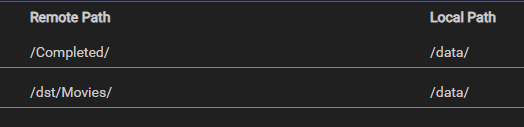
My solution to the same issue for others that may find themselves here; The trash guides instructions say not to add path mappings to your Sonarr (presumably Radarr also but untested) setups if you are within the same location however as shown here the mappings are slightly different. I had to add a path mapping for both like below

-
Fresh install of the app and it also says 0.12 for me. Must be using a different variable or just plain text in the source instead of referencing the actual file version
-
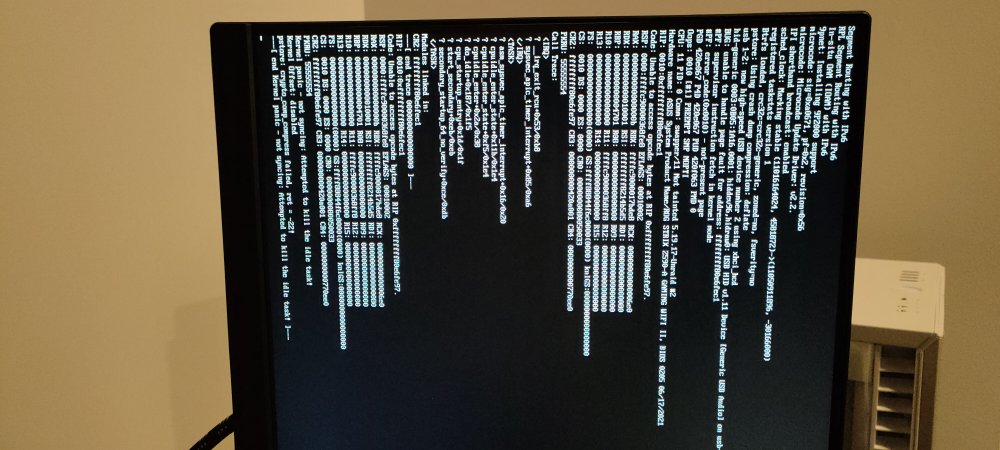
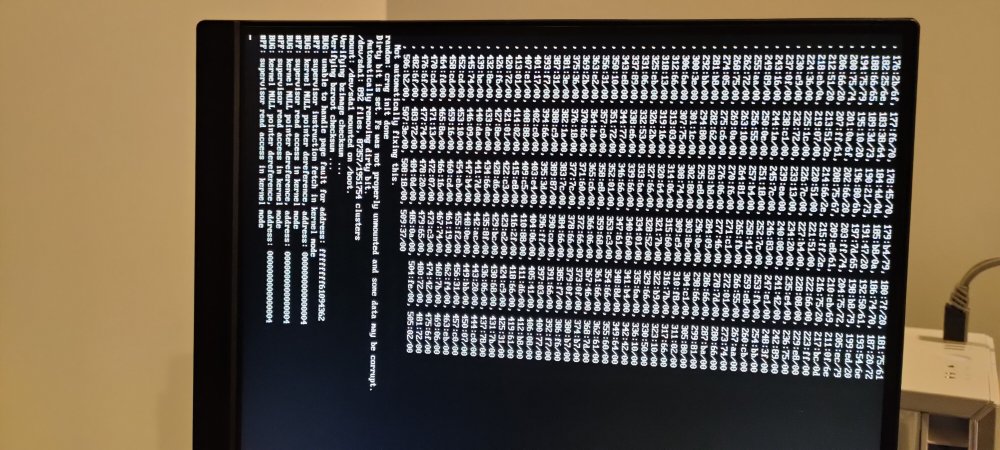
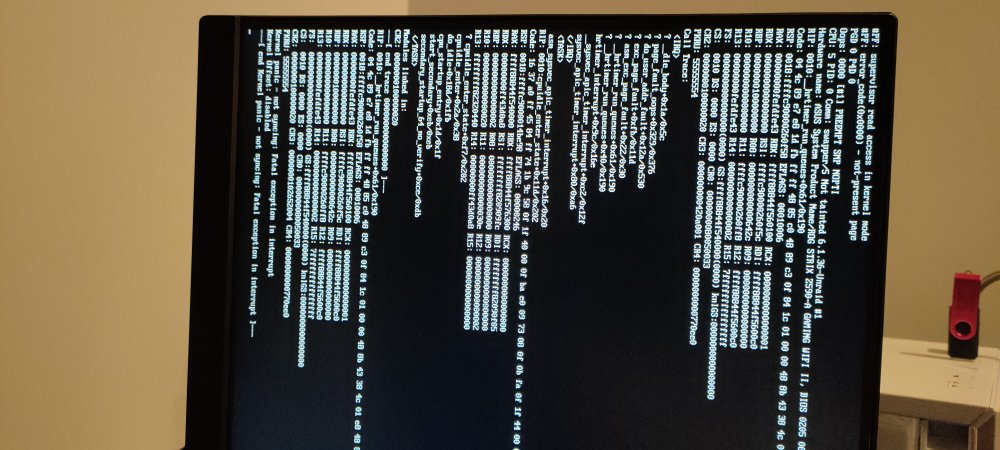
New update, it keeps having 'kernel panic' on startup now and if I try go to safe mode it gives me a kernel null pointer dereference error. I built a new USB with a trial license and tried booting to it and I also got 'kernel panic' so that pretty much confirms hardware I guess? Would it be worth booting into Ubuntu or Windows on a spare HDD or bootable USB to test the machine to try identify issues? I want to run all my options before going out and buying new hardware to start swapping parts
-
Cheers, I will give that a try
-
I know once you are in the GUI you can set the default option to safe mode, memtest etc. And I assume this can be done using SSH if in non-GUI mode. But is there any way to set the default on the UNRAID bootable USB drive by plugging it in to a PC and manually editing the files?
-
Any insight on what they mean? The timestamps roughly line up with the time of the parity check that didn't finish
-
I have attached it here syslog
-
I have syslog set to write to flash. Would it be accessible if I hard shutdown and pulled the USB or would it be wiped because of the panic? I thought I read that it was wiped at each reboot
-
Nah it's Intel
-
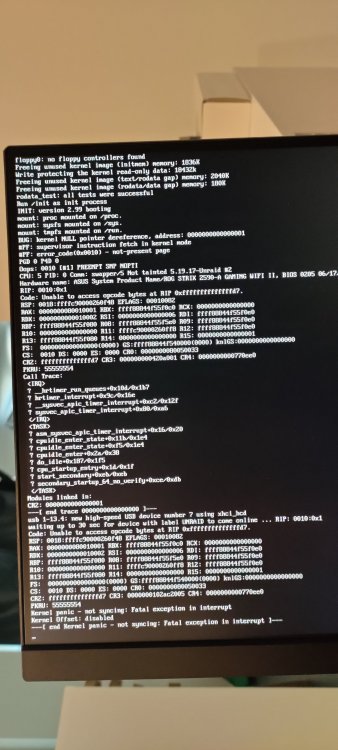
Due to broken parity on both of my drives (hard crash during parity check) I rebuilt parity on both of my parity drives. After the rebuilds had finished I ran a non-correcting check and it was stuck at 0 errors, less than one minute remaining for 24 hours. I used the web GUI to reboot and now it rebooted with a kernel panic error. I have attached a photo of the error for those who might understand it better than me. Is there anything I should do to fix the parity check and kernel panic ie just reboot, new flash drive etc? I have left it in this state because I did not know if I should try and get logs (if that is even possible) before rebooting. Edit: Attached syslog in below comment now that I know it was accessible from this state
-
Ah gotcha, I was thinking you meant memtest not the server. Are you saying switching to single stick "may" solve the parity errors or the crashing?
-
What's the benefit of doing individual sticks if it passed with both of them? And after ruling out RAM, what would be the best way to try get the system back to a normal operating state?
-
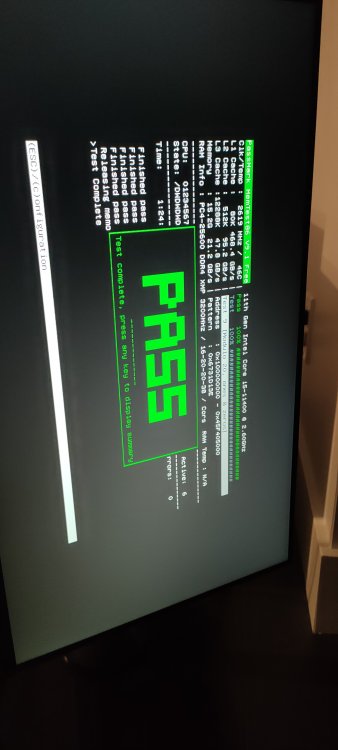
I'm pretty sure this is the same one; it's integrated into my BIOS - https://rog.asus.com/motherboards/rog-strix/rog-strix-z590-a-gaming-wifi-ii-model/
-
Memtest passed all tests
-
I tried rebooting to memtest using the flash and it failed (keep doing a boot loop). My motherboard has memtest in-built though so I am running it now Edit: have looked into the boot loop issue whilst memtest runs, most likely issue is that UNRAID's memtest is legacy and I probably have my BIOS as UEFI My last actions before taking the diagnostics were (this is during the 100% CPU usage and GUI not responding properly) - Change flash to reboot to safe mode no plugins - Accessed flash share to copy syslog (attached in OP) - Try reboot from GUI, failed - Held power button to turn off and then turn back on - Log in to GUI - Start the array and click cancel on the parity check - Accessed the shares on Windows to take a list of files - Downloaded the diagnostics from GUI I also have webhook setup to send to my Discord for UNRAID but I do not see the 170k parity check, just the 270k so not sure why I only got pinged for some of the checks
-
I have attached the diagnostics, had to get access to it again since it crashed the GUI so went into safe mode manually. As for the parity check, it does a parity check on array start and it had the correction option ticked so I assumed it did it by default (the 170k errors)? Then I manually ran again with corrections and got the 270k. warham-nas-diagnostics-20230628-0048.zip




