





AngryPig
Members
-
Joined
-
Last visited
Everything posted by AngryPig
-
Any chance you could update the docker template for Dawarich---Sidekiq to use latest instead of being fixed to 0.28.0? The latest for Dawarich is 0.32.0 but since it's template uses latest, it wasn't obvious to catch that they were on two different versions
-
My concern is losing settings/reapplying settings. i.e. does it transfer automatically, if not do I need to export, if there is no export button should I take a screenshot etc
-
I don't see instructions on how to update from the old version to the new version in the GitHub repo and searching this thread has been difficult to find anything useful because of how long it is. Can someone please point me in the right direction and also try make it easier to find these instructions?
-
I believe the typical recommendation is to keep as much space as the largest possible single file you may add to it
-
I currently have an array of 4 TB drives with 2 parity drives. I'm upgrading one of my parity drives to begin the process of moving to larger than 4 TB drives. Can I add it as an unassigned drive and pre-clear it before doing the parity swap or will it be ignored/error because it is larger than the 4TB parity drives? If so, what is the process?
-
Just as an FYI, I found the old nzbget Github issue for this - https://github.com/nzbget/nzbget/issues/558 After knowing where to look I found the same issue (unpack that resets to zero) and found that if I cancel the unpack process in the GUI I can manually unpack it from the console of the container. I doubt it helps but at least it is consistent symptoms on the new version some six years later
-
Thanks for the update. Unfortunately the stuck on unpacking is still happening so I think I will just setup a script to refresh it occasionally (assuming that is possible)
-
Glad to see I understood that part! That's good to know. Are they required to be in a Subvolume for Send to work or because they are Subvolumes themselves they will automatically work with Send? Thank you for clarifying this. Does the other file system have to BTRFS to be able to Send to it? ie I would not be able to send to my array as it is XFS? Does this plugin allow for me to Snap on a daily basis and Send on a weekly basis? So if I was Sending off-site it would not use my bandwidth as much? Or is it simply that since it maintains the BTRFS CoW, it would not be that much bandwidth after the initial send?
-
I want to implement Snapshots on my cache but this is my first time learning about Snapshots and how COW works so I want to make sure I am understanding the process correctly. I start with a single disk cache that is /mnt/cache-single that contains the shares Downloads, appdata and system. I run the four commands in the instructions for a share, eg Downloads mv /mnt/cache-single/Downloads /mnt/cache-single/some-temp btrfs sub create /mnt/cache-single/Downloads cp -aT --reflink=always /mnt/cache-single/some-temp /mnt/cache-single/Downloads rm -r /mnt/cache/some-temp This will convert that share to a subvolume. Since this is a file system level of change, do I need to go in and update Docker mappings and the Share Settings (Primary storage, move settings, SMB settings etc) as if a new Share had been created in UNRAID? Or do I now have two Shares of the same name and I need to configure the new one and remove the old one? I then repeat this for each Share and I will have 4 Subvolumes on this one pool. I can then enable Snapshots of a Subvolume and either store it within the Subvolume (preferred?) or to a different Subvolume as long as it is on the same pool. ie I cannot make a snap to /mnt/cache-single/some-snaps as 'some-snaps' is not a Subvolume and I cannot send to /mnt/cache-double/... as 'cache-double' is a different pool. At this point I will be able to restore from a snapshot manually if my Scrub notices a file is broken or I accidentally delete something I did not want to.
-
The test passed without error 🙃
-
Yep, COW is on so if I enable scrub then that should have me sorted for checksums? How would I restore from a snapshot/raid if the checksums show an error? I saw the Snapshots plugin but it says beta and added 2021 so I wasn't sure if it is still relevant/maintained?
-
I have two btrfs cache pools that are both single drives. One for unimportant stuff (mostly downloads and ISOs) and another for important stuff (like appdata, system, VMs). I am looking into ways to secure my important cache and what I assumed would be ideal would be to have some sort of snapshot to the array and/or cloud storage and then a checksum for bad files (bad blocks/bit rot?). From what I can tell the best way for bad files is to have a check sum using scrub but scrub only tells me there are errors and needs a back up somewhere. If I setup a snapshot, can I restore from there? Or is the only option to add a second drive to the pool and use RAID? I would prefer to only have to snapshot so that way I do not need to get an additional drive and use my existing storage but not sure if it is possible or more complicated. Can someone please point me in the write direction and/or provide advice on; 1) what is the best way to setup checksums? 2) what options do I have for snapshotting? Ideally I would want some sort of weekly local snapshot, monthly off-site snapshot and weekly checksums (scrubs?) to semi-automatically recover (ie I don't want to be manually copying and pasting from some zip file somewhere if there is an error)
-
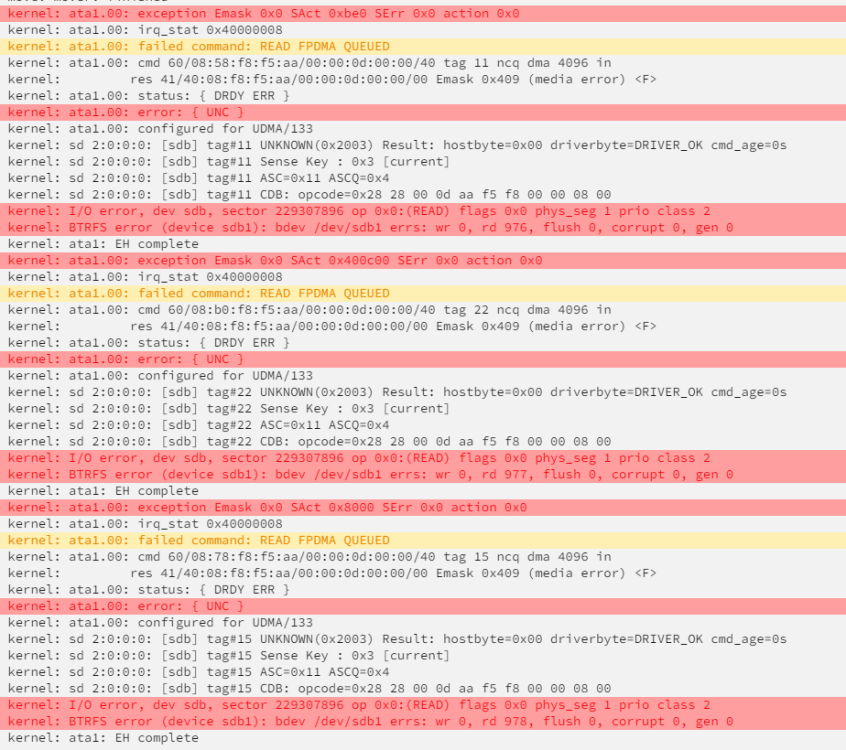
I was going through my shares to make sure they were backed up and I noticed a file stuck on the cache. I tried mover and nothing happened. I tried manually copy it from the terminal and got IO errors. I ended up just deleting the file as it was not important but wondering if there is a bigger issue. Here is the screenshot of the syslog after attempting mv in the terminal. I have the diagnostics before I did this if it is potentially serious and needs more investigation
-
Have you tried the forked https://nzbget.com/ version as opposed to the archived https://nzbget.net/ ?
-
If I have a Docker file from Docker Hub (in this case Shiny-verse by Rocker), and I want to install libglpk-dev inside the container I can open the console and run it. However, when the container receives an update, I have to install libglpk-dev again. What is the best way to automate this process? I believe I can create my own Docker File that uses verse as a base, then installs libglpk-dev and push that to Docker Hub. But if I do this, will I get an update in UNRAID if the Shiny-verse container gets an update?
-
This still happens
-
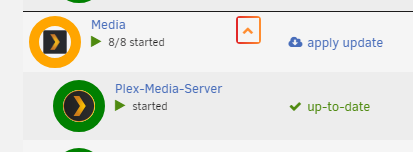
No worries! Good luck trying to fix your server 😓 Re. radius; 50% does work! It is just 4:30am hence the inelegant styling 😅 the main point was the selectors cause I figured you may have different approaches for the actual circle depending on your theme and variables 🙂 Edit: I believe your style does not have dashboard(?) but it can also similarly be done for the dashboard like so .hand:has(+ span .started) > img { border: 10px solid green; border-radius: 50%; } .hand:has(+ span .blue-text) > img { border: 10px solid orange !important; border-radius: 50%; }

-
Try this: tr:has( > td:nth-of-type(2) > a) > td img { border: 10px solid green !important; border-radius: 100px; } .hand:has(+ span .started) > img { border: 10px solid orange; border-radius: 100px; } Won't have perfect browser support given :has() and not the most elegant circle but gets the job done as a proof of concept
-
I just assumed since you have to tell the dockers to run somewhere in a loop that you could just grab the autostart value from the UI input and use that as a delay before the next loop using async await. I guess that is my misunderstanding of how plugins work sorry. How would I go about making a script to execute them instead? Is there a reference in this thread or another to get me started?
-
I am having this issue as well. From my understanding UNRAID has the delay column for reboot which works. However this plugin does not acknowledge this and just starts everything at the same time (when right clicking on folder and selecting start). Is there any way to make the plugin follow this logic given the information and ability to do so is already there?
-
Still getting stuck for me
-
That was my concern that automatic meant it would need to spin up and scan all the time but if they do not then that is good news. My appdata is on the cache so that is all good
-
This was my issue, I had advanced options enabled and missed this field 🤦🏻♂️ Thanks for the help!
-
I just installed this container last night and was having unpacking issues. I switched to this tag and it was fixed. Perhaps it was restarting the container that actually fixed it but at least it is working now. Will try some more files and update if it fails
-
I believe /Downloads and /Media/Movies is the other if I understand root folders correctly docker run -d --name='binhex-radarr' --net='bridge' --privileged=true -e TZ="America/Los_Angeles" -e HOST_OS="Unraid" -e HOST_HOSTNAME="Redacted-NAS" -e HOST_CONTAINERNAME="binhex-radarr" -e 'UMASK'='000' -e 'PUID'='99' -e 'PGID'='100' -l net.unraid.docker.managed=dockerman -l net.unraid.docker.webui='http://[IP]:[PORT:7878]/' -l net.unraid.docker.icon='https://raw.githubusercontent.com/binhex/docker-templates/master/binhex/images/radarr-icon.png' -p '7878:7878/tcp' -v '/mnt/user/Downloads/':'/data':'rw' -v '/mnt/user/Media/Movies/':'/media':'rw' -v '/mnt/user/appdata/binhex-radarr':'/config':'rw' 'binhex/arch-radarr' 71b1153d4a636c2916dbc086683cd35b3c4ea92662630fcb7599973961f8085b


