





m00nman
Members
-
Joined
-
Last visited
Everything posted by m00nman
-
I've described most of these settings/features extensively here: However, it would be great if these were added to the image by default: 1. Add <timer name='hypervclock' present='yes'/> along with the reset of prerequisites to Windows 10/11 VMs by default. This will dramatically reduce idle CPU usage of these VMs 2. Add "ksmtuned" daemon to the image for controlling KSM (kernel samepage merging) to reduce RAM usage for those with multiple similar VMs and enable it by default. It only gets triggered at 80% RAM utilization by default. It's really just a shell script. 3. Add ability to limit maximum number of cores for a VM without actually pinning the cores to physical cores to let the host kernel distribute the load.
-
Thanks for the feedback. That's a beefy CPU and should never be maxed out when all VMs are just idling. I wish unraid team just implemented these fixes into the image, but VMs is probably not the main focus of unraid.
-
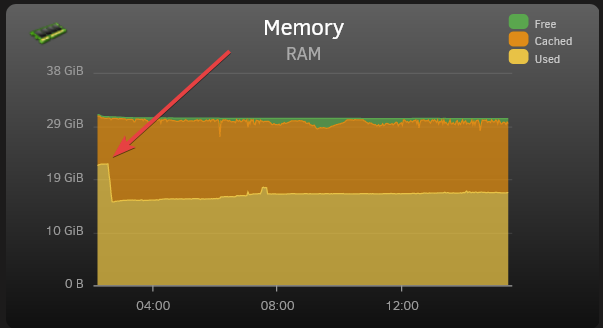
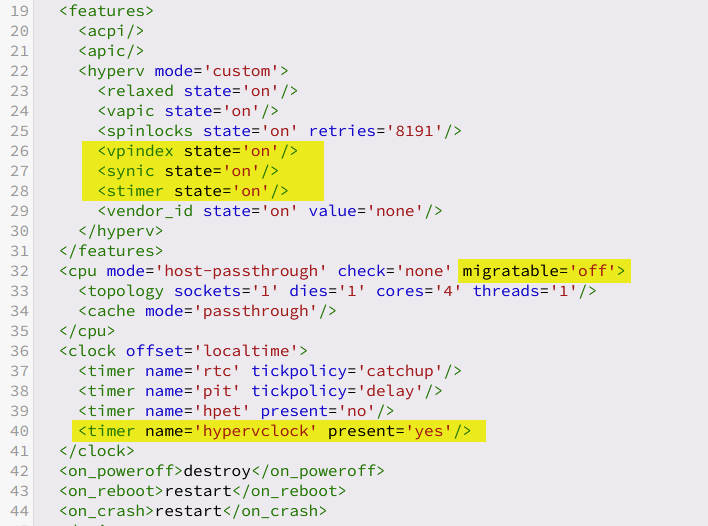
I've switched from Proxmox to unraid not that long ago and I've run into several problems/inconveniences that I managed to overcome and would like to share with everyone as it doesn't seem to be a common knowledge. The issues: 1. (IMPLEMENTED IN UNRAID 7.0) Windows VM (Win10 1703 +) high CPU usage when idle. Pretty self explanatory. Default settings the VMs are created with cause CPU to be busy with interrupts contstantly. 2. No KSM enabled by default = much less ram is free/available to other services when running 2+ windows VMs at the same time. This has caused OOM (out of memory) to kick in and kill one of the VMs over time when docker containers start using more RAM. This will probably be useful to people with limited RAM on their servers. I only have 32GB myself and this made a huge difference for me. 3. (IMPLEMENTED in UNRAID 7.1) CPU pinning is the default in unRaid. This is great to isolate certain cores to only be used with a certain VM in some situation, when for example, unraid is also your main PC and you want some cores dedicated to the VM that you use day to day to play games or whatever else you do, but terrible for server workloads, especially if your server doesn't have that many cores and a lot of containers/services/VMs and there is no way to know which core will be loaded at any given time, while others are idling. Solutions: 1. I stumbled upon a thread on the forums that recommended enabling HPET timer which seemed to resolve the issue somewhat. The issue is that HPET is an unreliable clock source and often goes out of sync. The real solution is to enable Hyper-V Enlightenments which was introduced in qemu 3.0. It is already partially enabled in unRaid by default. This is what Proxmox uses by default for Windows VMs Go to settings for your Windows VM, and enable XML view in the upper right corner. We will need to edit 2 blocks: add the following to <hyperv mode='custom'> block <vpindex state='on'/> <synic state='on'/> <stimer state='on'/> Change migratable='on' to migratable='off' in the following line <cpu mode='host-passthrough' check='none' migratable='off'> add the following to <clock offset='localtime'> block <timer name='hypervclock' present='yes'/> In the end, it should look like this The bonus is that this reduces idle CPU usage even further compared to HPET, without all of the HPET drawbacks. Please note this ONLY applies to Windows VMs. Linux and *BSD already use a different paravirtualized clock source. 2, (do NOT do this if you are gaming on the VM or otherwise need a more predictable performance not affected by all the other containers/VMs running on the same machine - you are better off adding more ram to the host) unRaid does come with a kernel that has KSM (kernel samepage merging) enabled (thank you, unraid dev team). What it does is it looks for identical pages in memory for multiple VMs and replaces them with write-protected single page, thus saving (a lot) of RAM. The more similar VMs you have, the more ram you will save with almost no performance penalty. To enable KSM at runtime append the following line to /boot/config/go echo 1 > /sys/kernel/mm/ksm/run And remove the following block from all of the VMs configs that are subject to KSM: <memoryBacking> <nosharepages/> </memoryBacking> Let it run for an hour or 2, and then you can check if it's actually working (besides seeing more free ram) by cat /sys/kernel/mm/ksm/pages_shared The number should be greater than 0 if it's working. If it isn't working then either your VMs aren't similar enough, or your server hasn't reached the threshold of % used memory. The result (This is with Windows 11 and Windows Server 2022 VMs, 8GB ram each) 3. (do NOT do this if you are gaming on the VM or otherwise need a more predictable performance not affected by all the other containers/VMs running on the same machine) We want to disable CPU pinning completely and let the kernel deal with scheduling and distributing load between all the cores on the CPU. Why is CPU pinning not always good? Let's assume you did your best to distribute and pin cores to different VM. For simplicity let's assume we have a 2 core CPU and 4 VMs. We pin core #1 to VM1 and VM3, and core #2 to VM2 and VM4. Now it so happened that VM1 and VM3 started doing something CPU intensive at the same time and they have to share that core #1 between the two of them all while core #2 is doing completely nothing. By letting kernel schedule the load without pinning it will distribute the load between both cores. Let's go back into the VM settings and Delete the following block <cputune> . . . </cputune> Make sure that the line <vcpu placement='static'>MAX_CPU_NUMBER</vcpu> and <topology sockets='1' dies='1' cores='MAX_CPU_NUMBER' threads='1'/> still has the maximum number of cores your VM is allowed to use (obviously MAX_CPU_NUMBER is a number of cores you want to limit this particular VM to, so replace it with a number) NOTE: if you switch back from XML view to the basic view and change some setting (could be completely unreleated) and save, unraid may overwrite some of these settings. Particularly I noticed that it likes to overwrite max cores assigned to VM to just a single core. You will just need to change back to XML view and change "vcpu placement" and "topology" again Bonus: - Make sure you are only using VirtIO devices for storage and network - Make sure CPU is in passthrough mode - Disable drive encryption (BitLocker) which is enabled by default with latest Win10 an 11 ISOs. - For "network model" pick "virtio" for better throughput ("virtio-net" is the default) - If you have Realtek 8125[A || B] network adapter and having issues with throughput, have a look at @hkall comment below. OR There is now a native r8125 driver available in under Apps within unraid.
-
This thread is gold and huge thanks to the OP for providing the drivers. I have IOCREST 2-port 2.5Gbit/s card with 8125B chip and r8169 is pure crap. It was easy to install dkms version with proxmox, but unraid has proven to be more difficult so I was exploring how to compile the driver myself, and even opened a bug report asking the developers to include this driver and someone suggested this thread. I would recommend to stay away from i225-v completely. Intel had 3 revisions of this chip because there was (and possibly is) a hardware issue with it. There are multiple reports of people with this chip stopping working completely over time, not passing through traffic, or working very slowly. Intel has confirmed hardware defects. Some people still say that even B3 stepping has issues.
-
Hi, I'm wondering if it's possible to include the r8125 realtek driver for 2.5Gbit/s realtek 8125B chips with the official images. The in-tree kernel driver r8169 is pretty bad for these cards. It is supported, it works, but the throughput with r8169 driver is nowhere near the throughput of r8125 driver. I'm personally getting 1.1 Gbit/s tops with IOCREST dual 2.5 gbit adapter, while I was getting at least 2.1 with r8125 with proxmox on the same system. Unfortunately it is not that simple to compile these ourselves for unraid. The repository that is mostly used for this drive is https://github.com/awesometic/realtek-r8125-dkms
-
https://github.com/awesometic/realtek-r8125-dkms At least that's the one I was using on proxmox, but it seems it's always Up to date. The driver officially supports up-to 5.19, but I just tried on on Arch with 6.0.9 kernel and it works just fine I added a bug report but I highly doubt anything will be done about it since r8169 driver support multiple devices and it technically works with 8125B chips (just slow)
-
@ich777 I'm wondering how do you compile drivers for unraid kernel? I don't believe there is a git repo with unraid kernel. Do you just take the mainline kernel of the same version, same toolchain version and compile the drivers every kernel update manually? There is obviously no dkms I'm wondering because I'm looking to get r8125 driver compiled for realtek 8125b 2.5Gbit chip in my system as the kernel built-in r8169 is crap in terms of throughput (just above gigabit on 2.5Gigabit link) - completely defeats the purpose of buying 2.5Gbit card.
-
Thank you @ich777 , I appreciate your input and, please, take your time. I just thought I would mention these things to make life easier since unRaid seems to be more GUI focused. I have been using lxc.cgroup.cpuset.cpus = x,y and seems to have been working. I'll try cgroup2 as well, but they are probably equivalent. Memory limit, unfortunately does not work, and I cannot start the container at all with this option in the config. Another interesting thing I notcied is that LXC in proxmox only shows the resources available to the container, while here all of hosts resources are shown, although loading the container to the full only appears to load the 2 cores I've assigned - so the limits are working.
-
Thanks for the plugin. I was able to transfer LXC container from Proxmox and run it in unraid. If possible, these 3 f features would make this plugin complete: 1. GUI for mounting unraid user share 2. GUI for limiting CPU and ram resources. 3. Editing the config from the gui.
-
Thanks for the suggestions. I'm using "Fill-up" allocation method right now, and just watch which plots return errors in cli and copy them to a specific drive manually, then go back and remove partially copied plots. I have set 110GB min free space now for the Chia share. Unfortunately not all drives are the same size. I mostly have 14TB, but there are 18TB and 8TB in the mix. What complicates things more is that I used ext4 fs previously with reduced inode count, and xfs seems to have less free space in the end compared to that (on the same drives). I guess I took the mergerfs' "moveonenospc" mount option for granted before
-
I just moved from regular linux + mergerfs to unraid and was surprised to learn that there is no graceful handling of running out of space on one of the drives if a file doesn't fit on the drive. For example with 3GB of free space on Drive1, if you try to 'cp' a file that's 4GB in size to the share, it will start copying the file until Drive1 fill up and will then throw an out of space error without trying to put the same file on Drive2 with (let's say) 1TB of free space. There is minimum free space option in share options, but 1. it wastes space that could be used for smaller files 2. it's hard to predict the maximum file size that could go in this share. Mergerfs has a mount option: which never gave me any issues and happened completely transparently in the background. I was able to fill up the drive with smaller files, while bigger files would get moved to the other drive with more free space. I'm hoping it could be implemented in unraid.
-
Thanks. That's unexpected. I expected a more graceful handling of this issue. I suppose I'll contribute to the "Feature requests" subforum now
-
Hello everyone, I recently decided to take the plunge and migrate from Proxmox to unraid to save time on setting up new services etc. With proxmox I was using mergerfs + ext4 drives and I'm now slowly copying the data to unraid and then refromatting the drives and adding them to the array. The issues I've encountered is when I'm using regular "cp -a" on command prompt to copy the data from ext4 drives to unraid pool, and when a drive fills up and there is no space left to hold the next file that's being copied, it just fails to copy this file and moves on to the next file which gets allocated to the next drive (with more free space) in the pool. With mergerfs the behaviour was that if the file doesn't fit in the free space in the drive, it will get allocated on a different drive without failing. Did I miss a setting or is this the expected behaviour?




