





apandey
Members
-
Joined
-
Last visited
Everything posted by apandey
-
You are mapping host port 5012 to container port 5000 You are specifying the host port here, but this is a file mounted inside the container and likely used by the container to bind the process running inside the container. You very likely need 5000 in the config file
-
I run a wud (Whats Up Docker) container, which allows me to list all updates. It has view to group my project label, which is how compose organizes stacks, so I just go in once in a while and update stacks that are showing updates wud has a lot of configurable features. I use notifications and rate limiting for checks. I think it also has means to auto update, but I dont use that, as I prefer to click update stacks button after being notified. That way, I know if something breaks and can be correlated back to this update. Wud also allows version pinning or regex matches to calculate updates by applying a docker label, this allows me to not be nagged about images that I want to stay at a specific version or range even if new updates are available Details: https://getwud.github.io/wud
-
I am currently running 22 drive server, 16 connected via a LSI 9300-16i and the rest via the motherboard I want to upgrade to LSI 9305-24i, to simplify the install, and to reduce some heat / power (the 9305 is a single chip controller, while 9300 is 2 of them slapped together on a PCB) My only concern is that if the new card isn't good, I may run a risk of corrupting my drives when I swap. What can I do to test / verify the new card before it can start writing to my drives? Is there a safe way to do the switch?
-
I have a mix of dockerman and composeman managed docker containers on my unraid Running unraid 7.2.0 wherein unraid should not be checking for image updates for composeman managed containers, which largely works ok, except for 1 odd container, where I see this: in here, unifi-network always keeps showing as update required, even though it is managed by compose. the actual image is up-to-date via docker compose. This container, like many others on my server was migrated from dockerman to composeman, but this particular one has got stuck in this wierd state I have tried to remove this container (compose down) and reinstall (compose up), but that still comes back with same state Any suggestions on how I can clean this up?
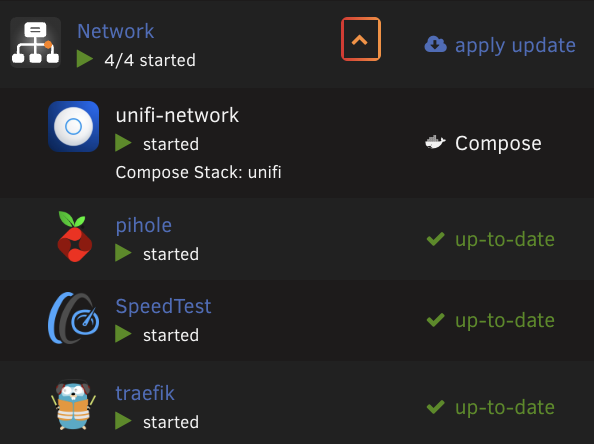
-
I believe this is already shown. example screenshot, see first column, right below container name and status

-
It would be even better if we can choose a set of docker labels to show in docker tab. I currently run a wud (what's up docker) container to keep track of my containers. It allows me to view and filter, and I can group by labels, so doing so my compose project label gives me the split out view. I mainly started using it to keep an eye on updates across dockerman and compose
-
yes, been there and done that. Unfortunately, it's a black box and I am more comfortable with gitops approach for config management where I know what is applied and can debug / change it of its not to my liking. Also, it unifies install / update and restore all to a single process, so I don't have to rethink when it comes to such infrequent maintenance. Personal preferences I guess I do have appdata backup runiing to take nightly backups along with all my data. But thats more of a fallback for operational errors rather than for data backups
-
Seems this involves re-installing the templates from previous apps. I was on a journey switching my containers to docker-compose, so I would first finish that migration before switching over. that way, all my state can roll out from a git repo via ansible
-
Indeed, I don't want to bother when I know where the space is going. I wasn't aware that I can use a directory instead of a disk image. Will certainly help and be simpler. Will look to switch to this and report back. Thanks a lot for the pointer
-
I have a 100GB docker image disk right now. As I have added more containers, I have had to iteratively increase the image disk size. This is not a misconfiguration, containers are not being written to to contribute to the size. The size is mainly coming from the docker images themselves - I have multiple ML images with models etc which are 5-10GB each adding up quickly. While updating versions, having 2 copies gets docker image into high utilization warning zone I have been increasing the disk image size slowly, adding about 10-20GB in each iteration. Is there any downside if I gave it a large headroom and not worry about it for a while? In other words, is making it 200GB OK without any side effects? I keep an eye on growth and any write activity into containers separately, so I am less likely to not notice a misconfigured container that eats up space via writes into the container
-
I version control both the stack files and override files. There is nothing in the override file that is dynamic, it can always be applied from a vcs copy. I am using the `plugins/compose-manager/project` folder and roll out my vcs content via ansible. works fine so far
-
Extended smart test was ok. Rebuilt on top, which also went fine. Been ok for a day, so all looks ok I'll get to log spam separately when I get a chance
-
Thanks. contents look ok. I cannot physically access the server and swap cables right now, but I have started an extended SMART test before doing the rebuild log spam, I am not sure what to do there. But will swap / reseat connections when I open up the server, perhaps over the coming weekend
-
any further suggestions from anyone?
-
rebooted, started array. please see diagnostics after array start godaam-diagnostics-20250327-2110.zip
-
ok, I have dug in a bit deeper and seems the noise in the logs may be due to the spindown issue in unraid 7.x. The noise is from the 2 unrelated cache drives, which are SATA SSDs connected to motherboard onboard controller. I've disabled spindown on those, as they are anyway SSDs. Haven't rebooted yet to confirm Now the question is whether I should attempt to rebuild the disabled disk onto itself, to replace it. Assuming I am not overlooking anything
-
Last night, one of my array drives hit read error and got disabled. SMART looks OK, though I haven't run extended test on it I see a lot of continuous errors in logs though, so not sure if its just a drive or the controller / cable Can someone look at attached diagnostics and guide me a bit godaam-diagnostics-20250327-2023.zip
-
While the built in mechanism does not update non-dockerman containers, it also does not interfere with them. Clicking update all simply skips updating non-managed containers. I use it all the time as I have a mix of doxkerman and composeman stacks The issue here looks like the old container is not removed from dockerman. I would bring the stack down, then update all, then properly remove the old container first (from apps/previous apps), before bringing the stack up.
-
I can do this with folder view plugin. I label the folder name in my stacks so all containers from the stack show up under a single folder. Then you can start/stop at folder level - example
-
I applied this to my server, and it seems to work very well. Any chance this can be merged so we can all benefit going forward?
-
I keep my docker compose files in version control and apply them to unraid server using ansible. The reason it doesn't work for you is because the unraid managed labels get overridden in a separate docker-compose.override.yml file sitting next to the docker-compose.yml assuming your stackname/docker-compose.yml has the following: services: serviceA: image: something:latest labels: some.non-unraid.label: some-value then create a stackname/docker-compose.override.yml with something like below. I use folder view plugin, and have some unraid labels there too, but you only need to include what you want services: serviceA: labels: folder.view: Network net.unraid.docker.managed: 'composeman' net.unraid.docker.icon: 'https://url/to/icon.png' net.unraid.docker.webui: 'http://[IP]:[PORT:8443]' net.unraid.docker.shell: '/bin/bash' you can check the contents of /boot/config/plugins/compose.manager/projects/<stackname>/ to see the structure (I also deploy name and autorun files to fully automate my setup)
-
I have been using this plugin for a while. recently I moved some disks around the server slots, and resaved the tray locations. Now, the unraid info labels are messed up for my disks. they seem to be mismatched with the disk or pool names I see on the main tab. What could have caused it, and how can I refresh this state?
-
One other thing you should know is that unraid recreates these networks on reboot, so the ID will change and break the compose managed containers, unless you have the “recreate containers on startup” setting on. If not, you will need to compose down/up after each reboot
-
the pool was created pre 6.12, using the zfs plugin. I don't remember exact steps on how I imported when 6.12 came out Anyway, replaced drive, resilvered, and then reimported as per your instructions, this time in same order as zdb. All good now
-
there seems to be some odd behaviour on the slots on unraid UI vs the disk order shown by zdb or zpool status. zdb shows the failed disk as 8th drive, but thats a different order than unraid assigned slots. Then unraid seems to be doing operations based on drive index rather than drive IDs (which is why it was trying to target sdo) I'll see how it looks after resilver and reimport, but if the drives don't line up, this may be an issue in future too



