





DeadMode
Members
-
Joined
-
Last visited
-
The new update fixed it for me also, but no issues with my photos being in the trash.
-
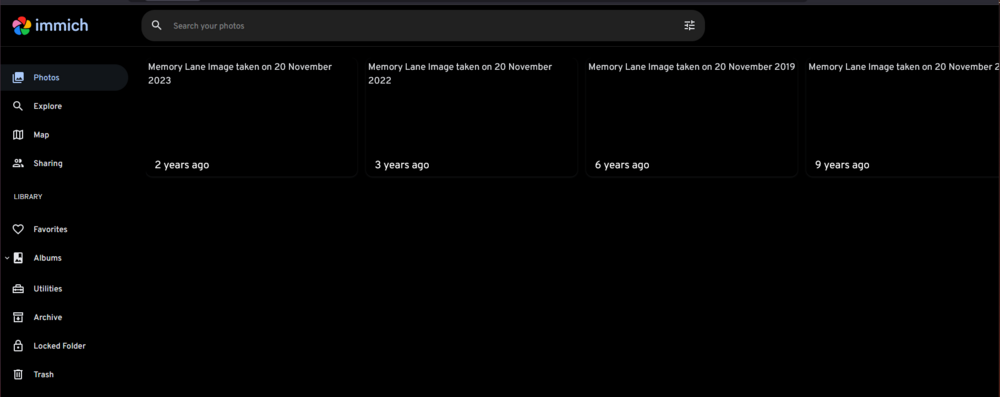
So a new issue for me this morning. It was showing an update available for the Immich docker container, so I updated it. I always check on it afterwards and it's just essentially a blank home screen now with no thumbnails and timeline. I always use Firefox normally, but have also tried in Chrome, and completely removed the cache and previous settings, still the same. You can't click anything on the page, and just get regular pop ups from the browser saying the page is slowing things down etc.. No error messages in the logs by the looks of it, and it's working fine on my Phone. Very odd! Pretty sure it was the 2.2.3 update that was installed.
-
Thanks for the suggestion, not quite sure why, but it seems to have stopped now (without me changing anything) so I'll leave it for now, but try what you suggested if it starts to play up again. Thanks very much for the quick response though, appreciated!
-
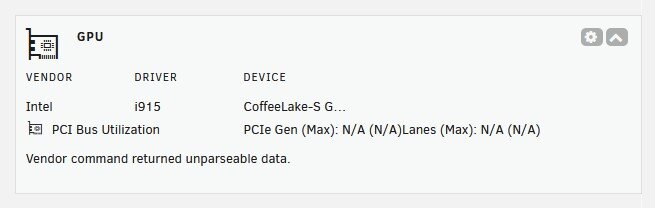
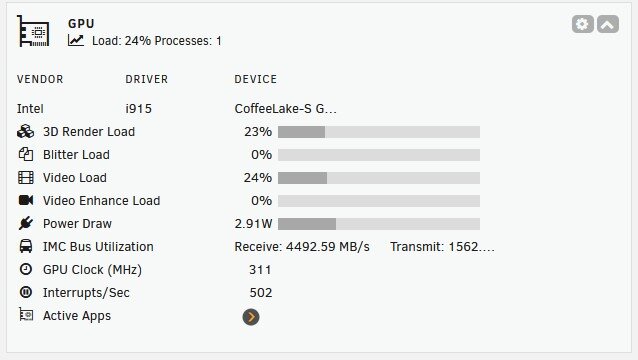
The main refresh is 2 seconds, and the Intel_top_command_timeout: is set at :- .7 1.3 I think the latter timing is correct based on seeing other threads where that was the advised setting to use if you had the 'Vendor command returned unparseable data' and nothing else. Just odd the way mine is working, then not, and rinse and repeat.
-
I've a bit of a strange issue I've noticed recently, not sure if it's because I recently upgraded Unraid to 7.0.1 or not. The plugin seems to flip between the error of 'Vendor command returned unparsable data' and then showing the stats as you would expect, including the same data being returned from gpu_top. It's an Intel i7-9700TE with the iGPU being the UHD Graphics 630. Intel_gpu_top runs without any issues and shows the stats and the application like plex when transcoding. Have tried removing and re-installing both plugins also, but the same issue. Anyone come across anything similar? I had a good look at the last few pages and most recent posts, but didn't notice anything similar.
-
Another one to say thanks to aarontry for working this out. Still an issue in 2025! Moved my Home Assistant VM from the cache to a new SSD and wouldn't boot (was a QCOW2 disk). I very rarely edit the XML directly, but was able to fix it using this. I do gave an archive of VM backups along with the XML config, so that would have been the next port of call. Not a nice feeling thinking I'd killed it with a simple disk move though!
-
So is there any point to adding an nvidia node to the setup after you've already done a big import and your libaray is up and running? Does it offer any benefits? Building a second unraid server soon and I'll be putting a GTX 1660ti into it, but I wasn't going to have it running all the time, but if it was worth it, I could consider it. Or even move immich over to the new machine. Not fully decided what to do with the setup at the moment, depends how low I can get the power consumption on it. My current server is an HP Prodesk with an 8th gen Intel and 16GB of ram. Does the job quite nicely and tends to run at between 5-10W depending on what it's up to at the time. That has Immich, Plex, Pihole and a few other bits.
-
So it wasn't quite the disaster I thought it was given that I had a full intact copy of the photo library that I setup originally. I had three accounts, and they existed as separate folders under the library folder (within the share I setup). And within each of those it's already categorised everything into year, date folders. My fear was that it wouldn't be structured in a way I could re-import but that isn't the case. It does mean I had to start from scratch essentially with the Immich setup though, but that's not the end of the world. I've already re-imported my own part of the library, and it did take a while for it to import and sort all the thumbnails etc.. One thing I did notice is that I have quite a lot of photos that don't have the correct date to them, which may be a lack of metadata with the stuff I imported from Google. That's a job for a rainy day! Once I've set it all up again, I need to ensure the DB is backed up properly though!
-
Thanks very much. I don't think any of the files moved (as far Docker is concerned) but obviously something screwed up the DB by the looks of it. A valuable lesson learned really. I didn't really think about backing up the DB and just focused on ensuring the Immich library was safe, but of course they are both very important. I've been having a poke around in the library and can see three separate top level folders for the three users I setup, so in theory I could start from scratch and re-import everything from those folders. I think at this stage that maybe what I will need to do. It was the Postgres template that SpaceinvaderOne made that I used in this case by the way.
-
I'm hoping someone can help me as I've gotten into somewhat of a pickle with Immich. I set it all up recently after watching SpaceInvaderOne's videos, and it all seemed to go very well. Anyway, been through a few updates also with no issues. Yesterday, I decided to re-jig how my server was setup as it seemed to be a bad idea the way I was running my disks. Disk 1 was a 4TB NVMe drive with all my main shares, appdata, immich photo libary etc.. Drive 2 is a Sata 4TB SSD with my plex library on. Anyway, I heard it's not a good idea to run SSD's like this due to trim issues, so I copied all the shares from Disk 1 to Disk 2 so they existed on both devices. Then stopped everything and essentially cleared down disk 1, re-assigned it as a Cache drive, formatted it to BTRFS, all was fine, so I copied everything back over, made sure the shares for appdata etc.. were all pointing to the correct paths, then started it all back up. I did have some mounting issues at first with the cache drive, but managed to sort all that. Everything was working fine, apart from immich (other docker containers no problems like plex and pihole). I now get the following in the logs for Immich. I've tried logging into the DB and doing the 'SELECT pgvectors_upgrade();' but that also fails. Can't get into the webui of Immich either. I guess something didn't copy properly or got corrupted, but I did before and after checks on all the files I copied between the disks. The other problem I've got is exported loads from Google Photo's and brought them into Immich, but don't have all the source files now, and I realise I should have kept all of the exported stuff as a saftey net really. I have all the photo libary files that immich has created, but they'd be essentially organised by Immich and I'm not sure I'd be able to recreate things if I lost this instance. Node.js v20.13.1 [Nest] 2659 - 06/08/2024, 10:38:27 AM LOG [ImmichServer] [EventRepository] Initialized websocket server [Nest] 2659 - 06/08/2024, 10:38:37 AM WARN [ImmichServer] [DatabaseService] Could not run vector reindexing checks. If the extension was updated, please restart the Postgres instance. [Nest] 2691 - 06/08/2024, 10:38:42 AM LOG [ImmichServer] [EventRepository] Initialized websocket server [Nest] 2691 - 06/08/2024, 10:38:52 AM WARN [ImmichServer] [DatabaseService] Could not run vector reindexing checks. If the extension was updated, please restart the Postgres instance. /app/immich/server/node_modules/typeorm/driver/postgres/PostgresQueryRunner.js:219 throw new QueryFailedError_1.QueryFailedError(query, parameters, err); ^ QueryFailedError: pgvecto.rs: IPC connection is closed unexpected. ADVICE: The error is raisen by background worker errors. Please check the full PostgreSQL log to get more information. Please read `https://docs.pgvecto.rs/admin/configuration.html`. at PostgresQueryRunner.query (/app/immich/server/node_modules/typeorm/driver/postgres/PostgresQueryRunner.js:219:19) at process.processTicksAndRejections (node:internal/process/task_queues:95:5) at async DataSource.query (/app/immich/server/node_modules/typeorm/data-source/DataSource.js:350:20) at async DatabaseRepository.shouldReindex (/app/immich/server/dist/repositories/database.repository.js:131:25) at async /app/immich/server/dist/services/database.service.js:43:21 at async /app/immich/server/dist/repositories/database.repository.js:189:23 { query: '\n' + ' SELECT idx_status\n' + ' FROM pg_vector_index_stat\n' + ' WHERE indexname = $1', parameters: [ 'clip_index' ], driverError: error: pgvecto.rs: IPC connection is closed unexpected. ADVICE: The error is raisen by background worker errors. Please check the full PostgreSQL log to get more information. Please read
-
Thanks, seems a shame not to be able to use the cache, but I'll be hopefully be putting an extra SSD in the system soon and may just backup directly to that, no moving about etc.. edit: Just to add, mover has been running for about 30mins now with my Vm shutoff and anything else that would touch the cache, and it's speeded up a great deal and shifted about 60,000 files in that time. So I guess the SATA drive was slowing things down with being accessed for other things when mover was running previously. If the advice is not to cache backups though, I'll stick with that as I don't want to risk file corruption or a backup that I can't use in the future.
-
Just a quick one that I wonder if anyone can help with. Loving the UrBackup container, thought it was going to solve all my backup needs. My main issue really is that I using it to backup a few Windows machines in my network, and the backups initially go to my cache in Unraid. Mover doesn't seem to be able to cope with the volume of files being backed up, as it's very slow to shift anything off the cache following a backup. I have a 512GB NVMe SSD for the cache (Samsung 980 pro) and the main array is just an 8TB 7200rpm Sata disk. No other issues with the setup, but mover is incredibly slow shifting the backups over to the array. Obviously I could have UrBackup write to it directly, but kinda defeats the point of having the cache in the first place really. Just trying to move one full backup of my main PC seems to bring it to it's knees (over 100,000 files). It is moving them, just very slowly. Perhaps I'm not being patient enough, I'm going to try stopping other services today like UrBackup and my Windows vm which syncs the array up to the cloud using Backblaze. I guess once it's finished the full backup, the following incremental backups in theory should be much smaller.
-
So far so good since I made those changes, drive is performing well. I did nearly buy another SSD as I was getting to the end of my tether with the Samsung issues. I was previously using an ADATA SSD M.2 256GB SX8200PNP drive which was faultless, but not quite big enough for my needs, hence swapping in the Samsung drive. Not actually sure if the Samsung Magician software would work with the drive in a USB enclosure or not, but it's the kind of thing I would buy just in case anyway, handy things to have lying around!
-
DeadMode joined the community
-
Well I came across this issue for the first time yesterday after fitting a Samsung 980 pro as my cache drive. Just adding the string to the Syslinux configuration alone didn't work for me. I had to remove the drive and connect it to a Windows system so I could upgrade the firmware using the Samsung magician software. So far so good though, it seems to have done the trick.

