kgregg
Members
-
Joined
-
Last visited
-
thanks! yeah i am over due for upgrade to 6.3.x will clean up cache drive
-
i am not using any SMB mounts made by UD.
-
attached. thanks. tower-diagnostics-20171220-2051.zip
-
having what looks to be similar problems with Sonarr this week. Part of the Sonarr log is below. Other parts of log mention "read only file system". Cannot shut down / re start Sonarr docker. This happened a day or two again and had to power off/on unRAID to get Sonarr to run properly. Sonarr failed to start: AppFolder /config is not writable
-
discovered today that sabnzbd docker was not running. the answer posted earlier in this thread worked for me. sab is now running again (and Mrs is happy to have her tv shows back) thanks for posting the fix.
-
maybe. i use sonarr and sab on a win10 pc (have yet to move these to unRAID dockers). have never run sabnzbvpn . using torguard on my torrent app has worked for me.
-
did you give API key from sab to sonarr?
-
long time sickbeard/sonarr/sabnzbd/bittorrent/torguard user on a win10 pc. first time CP user on any platform/OS. for giggles, i installed CP and SAB dockers today. i have the two apps configured but not certain i have CP set to use my acct with toguard when using torrents from KAT or TPB. did not see where to enter torguard userid/password in CP. really need to get the (torrent, not HTTP) proxy dialed in and soon. appreciate any advice. thanks.
-
eek, like you, i have installed joch's s3backup docker. i also have a "+" in my AWS secret code field. i dont see any indication that the docker has ever run and the docker log file is nearly empty (it has no err msgs). what specifically did you change to finally get this docker running? thanks, Kevin Sorry never noticed the question until now. I just regenerated my secret code until I got one without a + in it.... wow, did not know this option (regenerate secret code) existed with AWS S3. I now have new secret code (no plus sign) and will re-visit the s3backup docker to see if i can make it work. Thanks.
-
eek, like you, i have installed joch's s3backup docker. i also have a "+" in my AWS secret code field. i dont see any indication that the docker has ever run and the docker log file is nearly empty (it has no err msgs). what specifically did you change to finally get this docker running? thanks, Kevin
-
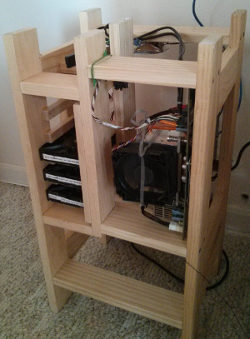
i hope i win the contest for "ugliest unRAID build"! Here is "Frankenputer".... I had all the parts to make a server EXCEPT for the case so I made a "case" from 1x3 boards on hand. It gets good air flow , though.