-C-
Members
-
Joined
-
Last visited
Everything posted by -C-
-
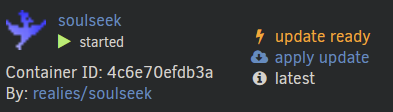
This is working great for me on the whole, but I have 2 weird issues. Firstly, about 25% of the time, on restart the config's lost. I backed up the config within SlSk, so I restore that, restart from the Docker controls and it's fine. Other times I can reboot the server and it'll come back as it was without needing to reload config. Secondly, every time I check the CA or docker panels, SlSk is reporting that it needs to update. Fairly sure the application hasn't been updated for years and the Github page is showing the last update to the Docker image was 2 months ago. Strangely, it's showing that it's the latest, but also that an update's ready... Can anyone shed any light on either of these?
-
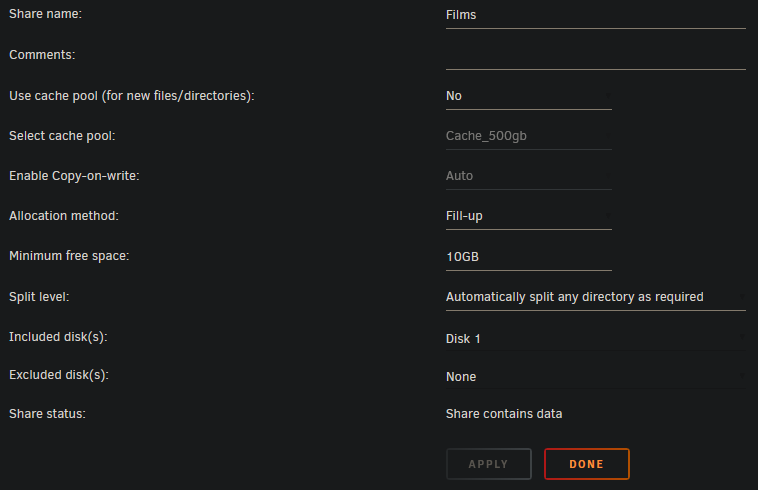
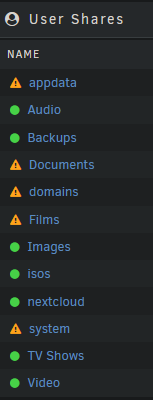
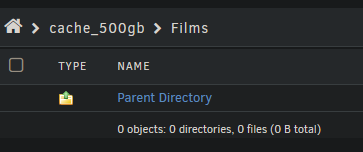
Thanks- While first setting things up, and before I moved any data onto Unraid, I changed the cache option on Films to No following reading some advice. I've read the cache options description but missed the part "any existing files for this share that are on the cache are left there." But I checked the SSD and it's showing there's nothing there: I guess it's counting the empty subdirectory as there being something stuck in the cache. What's the best way to resolve this? Turn caching onto Yes & invoke the mover? Regarding the isos share showing as protected- I would say this is unintuitive and inaccurate- it's not protected, it's just that there are currently no files to protect. A grey dot with a hover description of something like 'currently no files' would make more sense. As it is now, it suggests that files copied onto it will be protected.
-
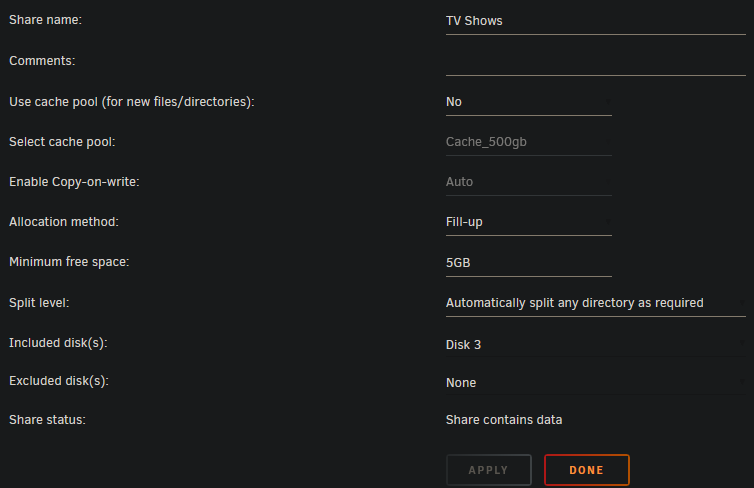
New user here (Hello!) who can't figure out why Films is showing as unprotected, while other shares with the same settings (e.g. TV Shows) is showing as protected. Any ideas? Added bonus question: why is the preconfigured isos share showing as protected when it's set to use the cache with Yes : Cache? (I currently only have a single SSD as cache with no redundancy, awaiting my Black Friday NVMes to show up!) Thanks tower-diagnostics-20221125-2026.zip