-C-
Members
-
Joined
-
Last visited
Everything posted by -C-
-
Dang it- I'm caught in a loop! Jan 6 04:51:01 Tower Parity Check Tuning: DEBUG: Manual Non-Correcting Parity Check running Jan 6 05:00:01 Tower Parity Check Tuning: DEBUG: Manual Non-Correcting Parity Check running Jan 6 05:02:08 Tower kernel: md: recovery thread: PQ incorrect, sector=39063584664 Jan 6 05:02:08 Tower kernel: md: recovery thread: PQ incorrect, sector=39063584696 Jan 6 05:02:08 Tower kernel: md: sync done. time=25740sec Jan 6 05:02:08 Tower kernel: md: recovery thread: exit status: 0 I'm not sure why this one took so much longer than previous checks to complete. At times it sounded like it was random seeking for hours, with very slow read speeds. Have been avoiding using the array during these checks as much as possible- barely any writes and only a few reads. tower-diagnostics-20230106-1229.zip


-
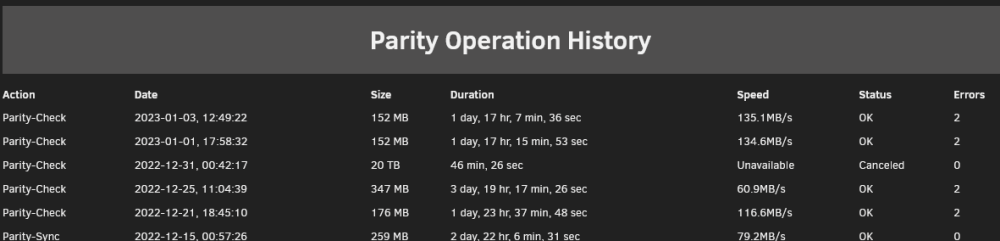
Parity check's now complete, but I don't see any difference- The status: ...and the history: both look the same as the previous non-correcting checks, with no mention of the errors having been corrected, which is of concern considering what @itimpi said previously: However, in the syslog I see this: Jan 3 12:48:01 Tower Parity Check Tuning: DEBUG: Manual Correcting Parity Check running Jan 3 12:49:22 Tower kernel: md: recovery thread: PQ corrected, sector=39063584664 Jan 3 12:49:22 Tower kernel: md: recovery thread: PQ corrected, sector=39063584696 Jan 3 12:49:22 Tower kernel: md: sync done. time=148056sec Jan 3 12:49:22 Tower kernel: md: recovery thread: exit status: 0 Can I now consider the Parity valid? Should I now run a non-correcting check as @trurl recommended previously?

-
That would be great 🤞
-
Hello all- I've followed the guide here: https://unraid.net/de/blog/wireguard-on-unraid to set up Unraid and clients on both my Windows laptop (via generated .zip config) & Android phone (via generated QR config). Have opened a UDP port in my Mikrotik router's firewall. I have a static IP so don't need to worry about dynamic DNS setup. Have double-checked all settings on Unraid's Wireguard page- it all looks good to me. However, when I try to click the Inactive switch to toggle to Active, it switches for a split second, then goes back to Inactive. The same happened the first time I tried it, so I deleted the tunnel and input everything from scratch in case I messed something up. Before clicking the Add Peer button, when reentering everything, I tried clicking on the Inactive toggle and it stayed activated. It was only once I'd added the peer that it would not stay active. Any ideas? Edit: have found that this is a known error (possibly only with 6.11.1) and in case anyone else is looking for the fix, it's here:
-
I do indeed- how could I not be making use of such a fine piece of software? ; P Thanks so much, that's confirmed: root@Tower:~# parity.check status DEBUG: Manual Correcting Parity Check running Status: Manual Manual Correcting Parity Check (9.6% completed) P.S. Be super great if this info could be displayed on the dashboard within the Parity block.
-
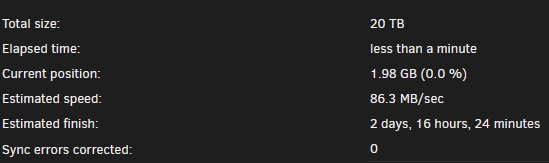
Thanks. I've removed it, rebooted and started the parity check again. It looks like this: Is there any way to confirm that it's running as a correcting check without having to wait for it to complete?
-
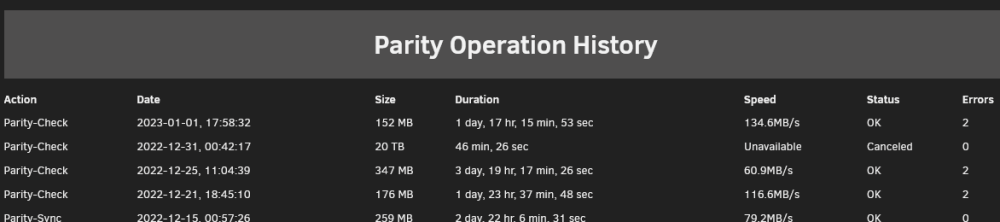
Happy New Year all It's just finished, found 2 errors again as expected, but listed the same in history as before, as a check without correction. On my system (6.11.1) the box is checked by default. I saw @trurl's last post after starting the sync, so stopped it and refreshed the Main page to double-check and this is what mine looks like by default: So I unchecked it and re-checked it, just to be sure, and started it again. But that hasn't made any difference- it has run a check again and not corrected the errors. This confirms what I was fairly sure of previously, that I'd run with this box checked on the check that finished on the 21st. I'm getting a lot of these in my syslog while the server's sitting idle: Jan 1 18:05:39 Tower rc.diskinfo[6358]: PHP Warning: strpos(): Empty needle in /usr/local/emhttp/plugins/unassigned.devices.preclear/scripts/rc.diskinfo on line 413 Jan 1 18:05:47 Tower rc.diskinfo[6742]: PHP Warning: strpos(): Empty needle in /usr/local/emhttp/plugins/unassigned.devices.preclear/scripts/rc.diskinfo on line 413 Jan 1 18:05:54 Tower rc.diskinfo[7030]: PHP Warning: strpos(): Empty needle in /usr/local/emhttp/plugins/unassigned.devices.preclear/scripts/rc.diskinfo on line 413 Jan 1 18:06:02 Tower rc.diskinfo[7807]: PHP Warning: strpos(): Empty needle in /usr/local/emhttp/plugins/unassigned.devices.preclear/scripts/rc.diskinfo on line 413 Jan 1 18:06:09 Tower rc.diskinfo[8114]: PHP Warning: strpos(): Empty needle in /usr/local/emhttp/plugins/unassigned.devices.preclear/scripts/rc.diskinfo on line 413 Jan 1 18:06:17 Tower rc.diskinfo[8598]: PHP Warning: strpos(): Empty needle in /usr/local/emhttp/plugins/unassigned.devices.preclear/scripts/rc.diskinfo on line 413 Jan 1 18:06:24 Tower rc.diskinfo[9008]: PHP Warning: strpos(): Empty needle in /usr/local/emhttp/plugins/unassigned.devices.preclear/scripts/rc.diskinfo on line 413 Jan 1 18:06:32 Tower rc.diskinfo[9357]: PHP Warning: strpos(): Empty needle in /usr/local/emhttp/plugins/unassigned.devices.preclear/scripts/rc.diskinfo on line 413 Jan 1 18:06:39 Tower rc.diskinfo[9738]: PHP Warning: strpos(): Empty needle in /usr/local/emhttp/plugins/unassigned.devices.preclear/scripts/rc.diskinfo on line 413 Jan 1 18:06:46 Tower rc.diskinfo[10176]: PHP Warning: strpos(): Empty needle in /usr/local/emhttp/plugins/unassigned.devices.preclear/scripts/rc.diskinfo on line 413 Jan 1 18:06:48 Tower rc.diskinfo[10318]: PHP Warning: strpos(): Empty needle in /usr/local/emhttp/plugins/unassigned.devices.preclear/scripts/rc.diskinfo on line 413 Jan 1 18:07:03 Tower rc.diskinfo[10980]: PHP Warning: strpos(): Empty needle in /usr/local/emhttp/plugins/unassigned.devices.preclear/scripts/rc.diskinfo on line 413 Jan 1 18:07:03 Tower rc.diskinfo[11040]: PHP Warning: strpos(): Empty needle in /usr/local/emhttp/plugins/unassigned.devices.preclear/scripts/rc.diskinfo on line 413 I've looked into what could be causing this, and not found anything yet. I don't currently have any unassigned devices connected. I've also been getting a GUI crash, seemingly due to unassigned devices, when running rsync manually, or via the unbalance plugin to move files around. Please see my post here for more info. Could these be causing issues with me not being able to run the parity check as correcting?

-
OK, and that's achieved by leaving the "Write corrections to parity" box checked before I click the Check button? As I said, that's what I thought I'd done on the one that finished on the 21st. I need to be clear that's the way to do it so I'm not wasting another 2 days+ on the wrong type of parity check... Thanks
-
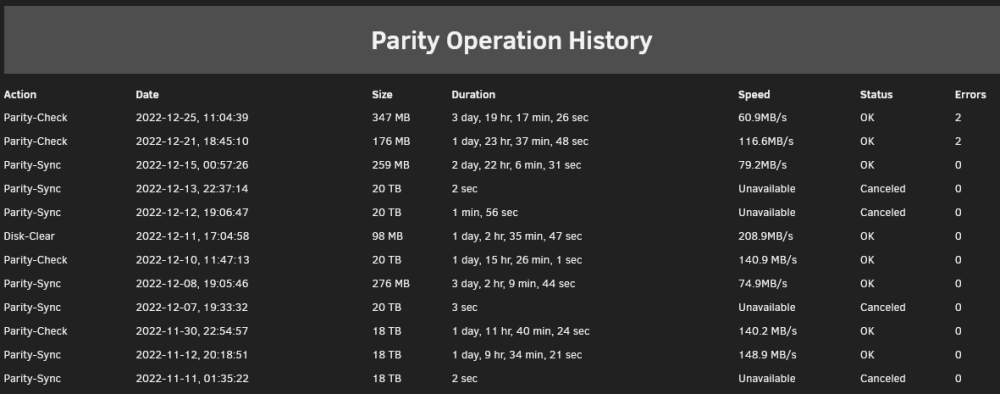
Here it is: As both of the last ones are showing as Parity-Check, it looks like I didn't do a Sync as intended. Is a parity sync achieved by keeping the "Write corrections to parity" checked before clicking the Check button? (I thought that's what I'd done when I ran the one that ended on the 21st).
-
I'd originally done a correcting parity sync and got this result: Then was advised to do a non-correcting that finished on the 25th with 2 errors. Won't running a correcting parity check again be doing the same as the one that completed on the 21st?

-
Attached, thanks tower-diagnostics-20221229-1333.zip
-
Just got back from xmas break (haven't managed to get Wireguard working yet) and this was the non-correcting parity check's result:

-
Earlier this week I moved my Unraid system across to new hardware based around an i5 13600K on a Z790 motherboard with 32GB DDR5 RAM. It's been running well since I put it together a couple of days ago until I just tried running Unbalance to gather some scattered media files onto one drive. Unbalance appears to be working well, but I've just had exactly the same error occur and my GUI's broken. When this crash happened previously I did have some unassigned devices connected, but this time it's only the array and cache/pool drives. The only thing I remembered I'd previously done (before this started happening) is install powertop into /boot/extra following the guide on this forum.
-
Parity check's just finished, but with 2 errors: Write corrections to parity was checked during this. Any reason for concern, or am I OK to consider parity's good now?

-
Thank you all for your help. The parity check's been running for > 2 hours now and we have zero errors, so things look like they've gone well. Special thanks to @Kilrah - that last screen grab was super helpful. I am running a Firefox add-on that turns light websites into dark mode, which normally works well, but sometimes gets things wrong or misses page elements. That was the cause of the dropdown not displaying correctly. I've now disabled that add-on for my Unraid, used Unraid's display settings to set things up how I like, now my dropdown looks the same as yours. This could well have been causing me issues with other pages, so I'm glad I've got that sorted.
-
All ready to start the array again, I've checked the Parity is already valid box, but I'm stuck at this point: Start a parity check without "Write corrections to parity" checked I don't see that option- where do I find it?
-
Ah, I see now- this is what it looks like for me: It was not at all clear that was a dropdown or an option I could change. A box around it or, better yet, Radio buttons would make things more obvious here. Thanks- I've found that part of the log and can now reassign all the drives.

-
I hadn't realised that the New Config tool was going to completely deassign all drives as soon as I clicked that button- I assumed I was going to be taken to some options where I could choose which drives I wanted change. Now all my drives are unassigned and I'm not sure which slots they were in. What's my best course of action from here? I have an backup of my system USB drive from about 3 weeks ago saved locally- I'm fairly sure all the drives had been put into their correct slots by then, but not certain. I have the My Servers backup set up, but the only option I see is to 'Generate Flash Backup' with a timestamp that looks like it's after I ran New Config. Is it possible to download an older backup from there (that's more recent than the one I have saved locally)? If the My Servers backup isn't going to be an option, rather than restoring the old backup I have and losing all the work I've done setting things up since then, is there a way to extract a config file from my local backup .zip that'll show me which drive was in which slot? I have also saved the syslog that covers since I booted Unraid, before I did the New Config. I can see these lines in it per drive. This is an example of an array data drive. Anything useful? Dec 19 16:02:40 Tower kernel: scsi 6:0:0:0: Direct-Access ATA ST6000DX000-1H21 CC48 PQ: 0 ANSI: 5 Dec 19 16:02:40 Tower kernel: sd 6:0:0:0: Attached scsi generic sg6 type 0 Dec 19 16:02:40 Tower kernel: sd 6:0:0:0: [sdg] 11721045168 512-byte logical blocks: (6.00 TB/5.46 TiB) Dec 19 16:02:40 Tower kernel: sd 6:0:0:0: [sdg] 4096-byte physical blocks Dec 19 16:02:40 Tower kernel: sd 6:0:0:0: [sdg] Write Protect is off Dec 19 16:02:40 Tower kernel: sd 6:0:0:0: [sdg] Mode Sense: 00 3a 00 00 Dec 19 16:02:40 Tower kernel: sd 6:0:0:0: [sdg] Write cache: enabled, read cache: enabled, doesn't support DPO or FUA
-
Apologies didn't refresh my page and see this before writing my previous post. So I've now got a (hopefully) surefire way of IDing the drives, so my course of action once I've done that is to: Assign the correct parity drive to its correct slot New Config, start the array with "Parity is already valid" Start a parity check without "Write corrections to parity" checked Hope that this checks out, if not rebuild parity If it checks out I'm good to go. Out of interest, how does the time to check parity compare with the time to rebuild it?
-
Have found that the s/n of the bare drive that Unraid is now detecting matches with the s/n printed on the USB case. I kept the USB controller PCBs inside the cases that they came from, so I'm going to temporarily put one of the drives back in its case, let Unraid see it and from here can see which is which. Once I've figured out which way round the parities go, is there a way to reassign them?
-
I put Unraid together on an old Thinkserver with the array's 4 data drives connected via SATA and the 2 x 20TB parity drives in their USB enclosures due to lack of power/ drive bays. Now I've built a new system in a bigger box and power supply with enough SATA power connections, I have shucked the 20TBs from their cases and put them inside. The problem is that Unraid's now seeing them as different drives. As rebuilding parity on these big drives takes so long, I'd like to avoid that. I've read https://wiki.unraid.net/Manual/Tools#New_Config which seems to be about reassigning the data drives rather than parity. It does say: "It exploits the fact that Unraid can recognise drives that have previously been used by Unraid and will leave their contents untouched (as long as the drive is not assigned as a parity drive)." But I'm not sure it's addressing my situation. The other possible issue I have is that I was not expecting this so did not make a note of which drive was which. I am now not sure which new drive ID marries up with the old USB one. Will this be an issue considering that the data on both parity drives should be identical? Can I avoid rebuilding parity?
-
I'm not running any scripts. ls / gives me: bin/ dev/ home/ init@ lib64/ opt/ root/ sbin/ tmp/ var/ boot/ etc/ hugetlbfs/ lib/ mnt/ proc/ run/ sys/ usr/ ls -lah /mnt gives me: total 16K drwxr-xr-x 13 root root 260 Dec 16 17:39 ./ drwxr-xr-x 20 root root 440 Dec 16 17:39 ../ drwxrwxrwx 3 nobody users 23 Dec 13 13:34 cache_2tb/ drwxrwxrwx 1 nobody users 56 Nov 13 00:26 cache_500gb/ drwxrwxrwx 8 nobody users 93 Dec 1 20:21 disk1/ drwxrwxrwx 8 nobody users 122 Nov 23 16:08 disk2/ drwxrwxrwx 3 nobody users 22 Nov 14 13:37 disk3/ drwxrwxrwx 5 nobody users 66 Dec 11 17:21 disk4/ drwxrwxrwt 3 nobody users 60 Dec 16 19:56 disks/ drwxrwxrwt 2 nobody users 40 Dec 16 17:38 remotes/ drwxrwxrwt 2 nobody users 40 Dec 16 17:38 rootshare/ drwxrwxrwx 1 nobody users 93 Dec 13 13:34 user/ drwxrwxrwx 1 nobody users 93 Dec 11 17:21 user0/
-
Filesystem Size Used Avail Use% Mounted on rootfs 16G 966M 15G 7% /
-
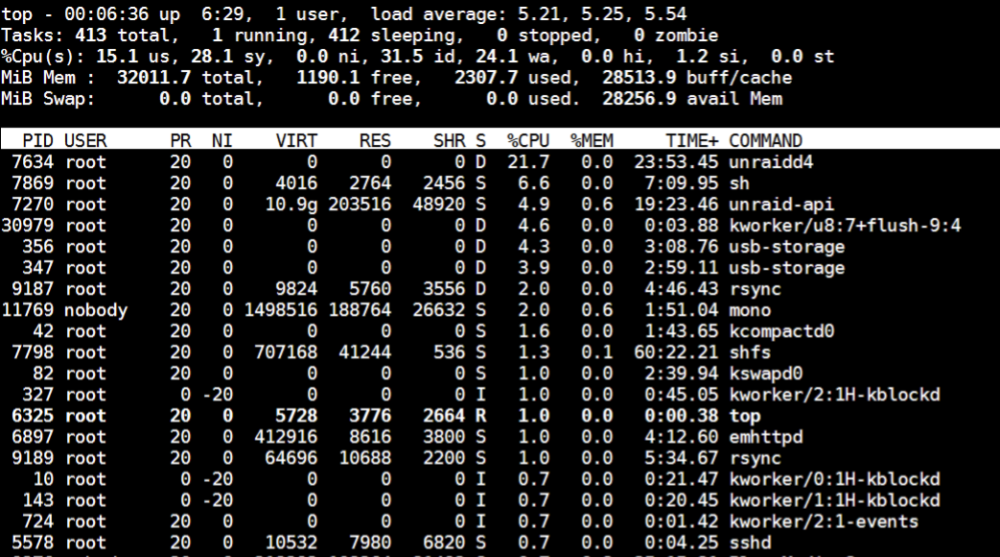
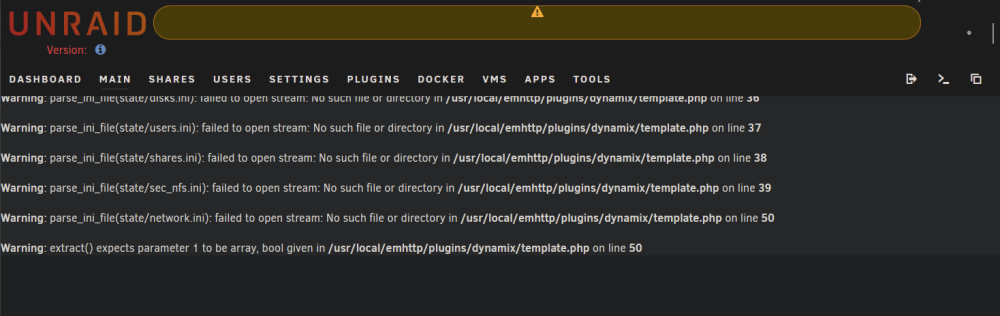
rsyncing some files on the array a few days after my last post and got the same error- no parity sync happening this time, so seems that wasn't the issue. In fact, the server wasn't doing anything else. Dec 17 00:00:38 Tower unassigned.devices: PHP Warning: parse_ini_file(/usr/local/emhttp/state/users.ini): failed to open stream: No such file or directory in /usr/local/emhttp/plugins/unassigned.devices/include/lib.php on line 49 Dec 17 00:00:38 Tower unassigned.devices: PHP Warning: parse_ini_file(/usr/local/emhttp/state/disks.ini): failed to open stream: No such file or directory in /usr/local/emhttp/plugins/unassigned.devices/include/lib.php on line 50 Dec 17 00:00:38 Tower unassigned.devices: PHP Warning: Invalid argument supplied for foreach() in /usr/local/emhttp/plugins/dynamix/include/DefaultPageLayout.php(708) : eval()'d code on line 21 Dec 17 00:00:38 Tower root: error: /webGui/include/Notify.php: uninitialized csrf_token Dec 17 00:00:38 Tower root: error: /plugins/unassigned.devices.preclear/Preclear.php: uninitialized csrf_token Dec 17 00:00:38 Tower root: error: /webGui/include/Report.php: uninitialized csrf_token Dec 17 00:00:38 Tower root: error: /plugins/dynamix.plugin.manager/scripts/PluginAPI.php: uninitialized csrf_token Dec 17 00:00:39 Tower root: error: /plugins/unassigned.devices/UnassignedDevices.php: uninitialized csrf_token Dec 17 00:00:39 Tower root: error: /plugins/unassigned.devices/UnassignedDevices.php: uninitialized csrf_token Dec 17 00:00:43 Tower root: error: /plugins/unassigned.devices/UnassignedDevices.php: uninitialized csrf_token Dec 17 00:00:44 Tower root: error: /webGui/include/Report.php: uninitialized csrf_token Dec 17 00:00:46 Tower root: error: /plugins/unassigned.devices/UnassignedDevices.php: uninitialized csrf_token Tried to download diagnostics, but the Unraid GUI jumps back to the Main page every few seconds. The top of it looks like this: First lines of top look like this:
-
In case it's of any use/ interest, I've just had a very similar problem. GUI was messed up and controls unresponsive. Had to reboot via SSH. It came back up and all looks to be well again. In my case I was (in retrospect rather stupidly) rsyncing a lot of files between disks while a Parity-Sync of my new 2nd parity drive was in progress. I will hold off until the parity sync's finished before I continue with the rsync. I have 32GB of RAM, and memory's normally well under 50% usage, but my CPU's a rather elderly Xeon E3-1226 v3 @ 3.30GHz, so maybe it was that just running out of steam that caused the issue? Here's the log output. This batch of lines was repeating seemingly indefinitely until the reboot: Dec 13 21:40:52 Tower unassigned.devices: PHP Warning: parse_ini_file(/usr/local/emhttp/state/users.ini): failed to open stream: No such file or directory in /usr/local/emhttp/plugins/unassigned.devices/include/lib.php on line 49 Dec 13 21:40:52 Tower unassigned.devices: PHP Warning: parse_ini_file(/usr/local/emhttp/state/disks.ini): failed to open stream: No such file or directory in /usr/local/emhttp/plugins/unassigned.devices/include/lib.php on line 50 Dec 13 21:40:52 Tower unassigned.devices: PHP Warning: Invalid argument supplied for foreach() in /usr/local/emhttp/plugins/dynamix/include/DefaultPageLayout.php(708) : eval()'d code on line 21 Dec 13 21:40:52 Tower root: error: /plugins/unassigned.devices/UnassignedDevices.php: uninitialized csrf_token Dec 13 21:40:52 Tower root: error: /webGui/include/Notify.php: uninitialized csrf_token Dec 13 21:40:52 Tower root: error: /webGui/include/Report.php: uninitialized csrf_token Dec 13 21:40:52 Tower root: error: /plugins/unassigned.devices.preclear/Preclear.php: uninitialized csrf_token Dec 13 21:40:52 Tower root: error: /plugins/dynamix.plugin.manager/scripts/PluginAPI.php: uninitialized csrf_token Dec 13 21:40:52 Tower root: error: /plugins/unassigned.devices/UnassignedDevices.php: uninitialized csrf_token Dec 13 21:40:52 Tower root: error: /plugins/unassigned.devices/UnassignedDevices.php: uninitialized csrf_token Dec 13 21:40:52 Tower root: error: /plugins/unassigned.devices/UnassignedDevices.php: uninitialized csrf_token Dec 13 21:40:55 Tower root: error: /plugins/unassigned.devices/UnassignedDevices.php: uninitialized csrf_token Dec 13 21:40:55 Tower root: error: /plugins/unassigned.devices/UnassignedDevices.php: uninitialized csrf_token