Kegath
Members
-
Joined
-
Last visited
Everything posted by Kegath
-
All the Mods 9 1.1.0 seems to have an issue grabbing from https://edge.forgecdn.net/files/6985/847/Server-Files-1.1.0.zip 1.0.8 tagged link works fine though edit: i think https://edge.forgecdn.net/files/6986/129/Server-Files-1.1.0.zip is the proper link
-
I noticed it was fixed shortly after I posted, we appreciate you. GTNH is Gregtech New Horizons. It's a popular Minecraft modpack. Someone else was asking previously if it could be supported in this thread. I have it up and running with itzg's docker container, but having automated/easier updates and installation would be nice. It also would be awesome to have a variable to install the regular version of the journeymap mod (would need to be the 1.7.10 version) on the server instead of the fairplay version. https://www.gtnewhorizons.com/
-
ATM9 latest tag is pulling 1.0.6, not 1.0.7 Also, if possible, a GTNH container would be fantastic
-
See this post:
-
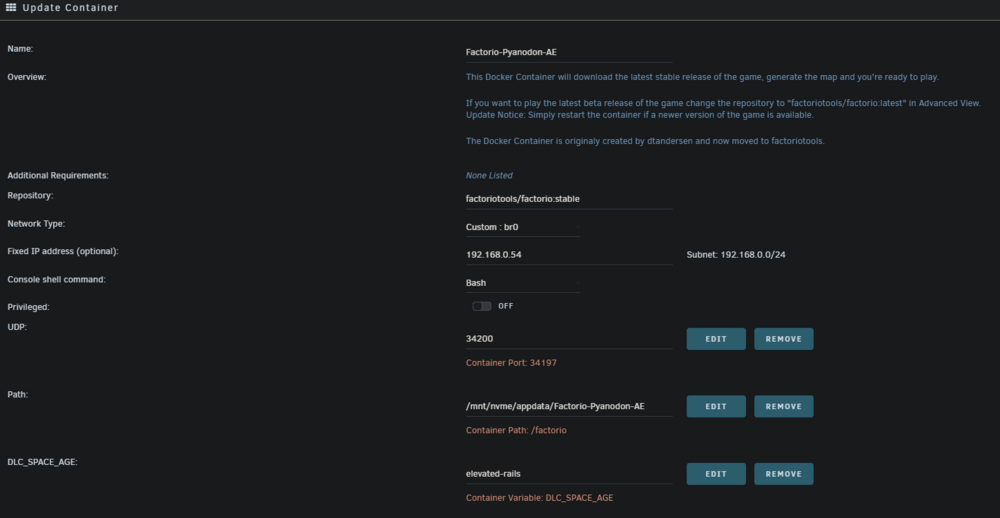
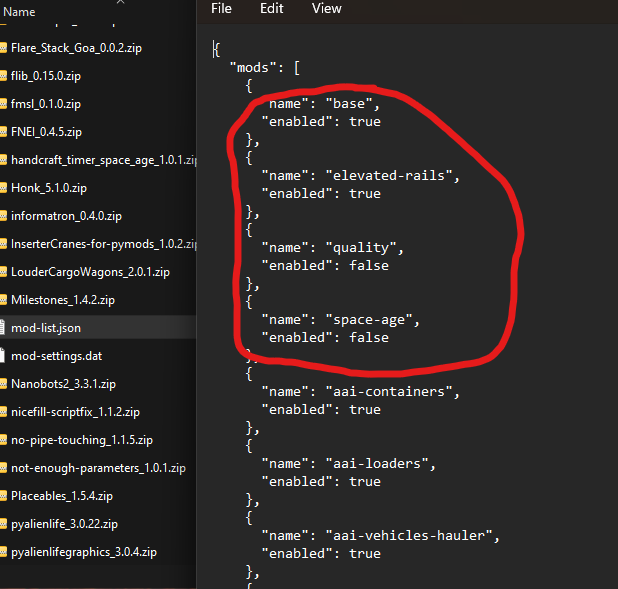
Strange. I think I needed to make a fresh container for is to work iirc, but here are some screenshots if it helps. I do know if you misspell the dlc name or put it in quotes it won't work correctly and resets the modlist, so make sure no typos or quotes
-
I spent so much time trying to figure this out too, but the factoriotools image added support for it. You need to add this variable DLC_SPACE_AGE and the value as needed ("true" for all 3 mods, "false" i'm assuming this will disable all 3?, or the mod name(s) you want such as "quality" "elevated-rails" "space-age" see here: https://github.com/factoriotools/factorio-docker?tab=readme-ov-file#user-content-fn-1-336ed1ee92ba76bc64b4913eba6e5f05 "Space Age mods can also be individually enabled by using their name separated by space. Example 1: Enable all by using true Example 2: Enable all by listing the mod names space-age elevated-rails quality Example 3: Enable only Elevated rails elevated-rails ↩"
-
Can confirm, br0 works now. Thanks ich!
-
My instance works on HOST, but not on br0 (server api error)
-
Hey ich, so just to make sure, br0 should NOT work at the moment? And would require coffee stain to correct the loopback issue? Thank you.
-
My network is br0 with local ip 192.168.0.51, I deleted -multihome=0.0.0.0 and it still has the api error
-
All good, thanks for all you do!
-
Is there a way to set up Palworld to auto restart when a new update is available? I have it restarting daily at the same time, but if an update releases, players need to wait until the scheduled restart to play unless i manually restart it.
-
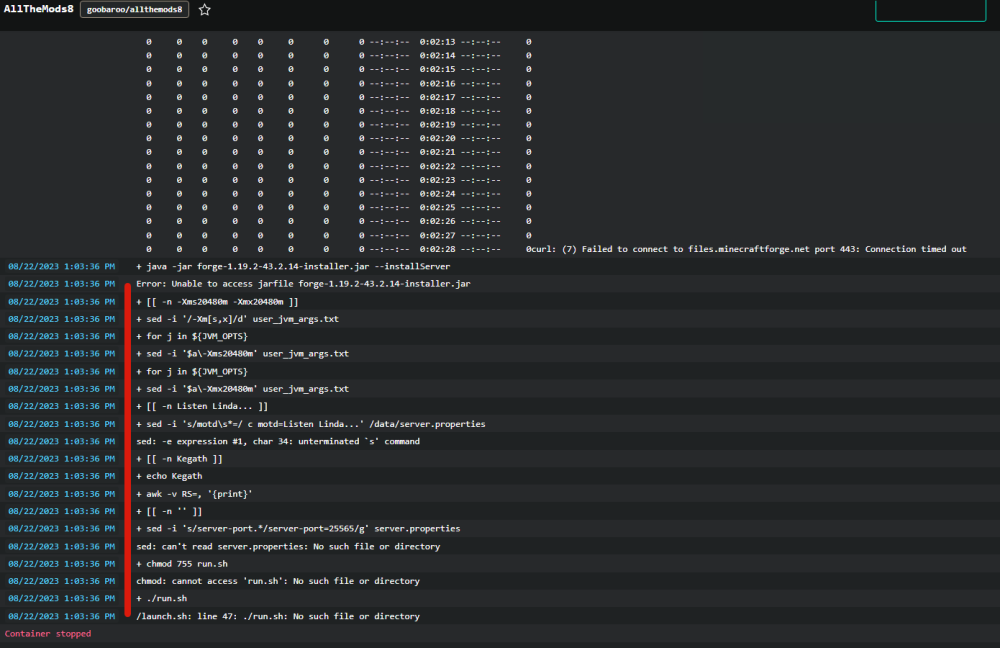
Unraid version 6.12.3 Hello, I am having this issue with allthemods8 and allthemods9 when I try to start the containers. The containers immediately stop when I try to start them. I wait for the container to stop by itself, but then I get the following message in the log. + FORGE_VERSION=1.19.2-43.2.14 + cd /data + [[ true = \f\a\l\s\e ]] + echo eula=true + [[ -f Server-Files-1.0.25a.zip ]] + [[ -n -Xms20480m -Xmx20480m ]] + sed -i '/-Xm[s,x]/d' user_jvm_args.txt + for j in ${JVM_OPTS} + sed -i '$a\-Xms20480m' user_jvm_args.txt + for j in ${JVM_OPTS} + sed -i '$a\-Xmx20480m' user_jvm_args.txt + [[ -n '' ]] + [[ -n '' ]] + [[ -n '' ]] + sed -i 's/server-port.*/server-port=25565/g' server.properties sed: can't read server.properties: No such file or directory + chmod 755 run.sh chmod: cannot access 'run.sh': No such file or directory + ./run.sh /launch.sh: line 47: ./run.sh: No such file or directory What am I doing wrong? I cannot find any information when I search for it. I am "Deleting the downloaded server file in /data will restart the install/upgrade process." to see if that resolves it. Deleting the zip file resulted in same issue. Changing permissions to read/write for owner, group, and other results in same issue I noticed this in the log while attempting to reinstall again. "Failed to connect to files.minecraftforge.net port 443: Connection timed out" Edit: issue appears to be resolved after many attempts of reinstalling the container. My guess is the minecraftforge site has issues