





Syrincs
Members
-
Joined
-
Last visited
Everything posted by Syrincs
-
So beim Neustart ist sie erstmal wieder da. tower-diagnostics-20240327-1008.zip
-
Ja das ist dies. Die NVME lief ja bis gestern noch ich dann bei der Fehler Suche wegen der Grafikkarte einiges raus genommen hab. seid dem ist der Fehler ja erst. Ich nehme mal auto tune raus und schau mal nach dem Neustart was dann passiert.
-
Wie meinst du das Advanced View? Unraid läuft immer ohne Monitor, wenn die VM genutzt nur über Remote.
-
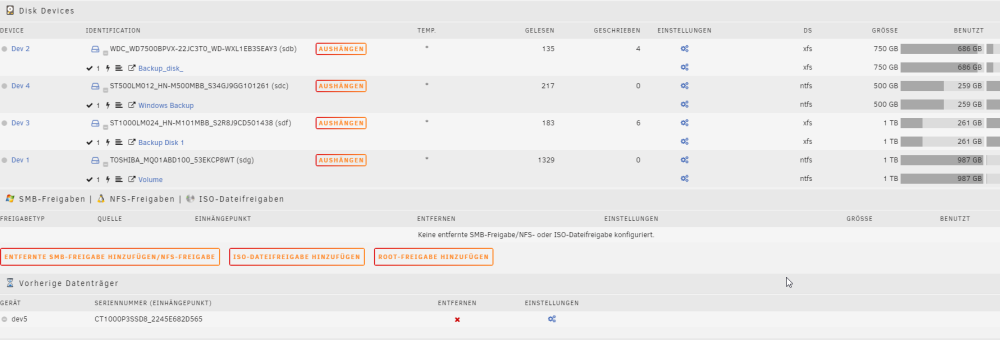
Meine NVME droppt nach eine zeit aus. auf dieser ist Win 11 Installiert dies wird. Die VM schläft die meiste Zeit. tower-diagnostics-20240327-0929.zip
-
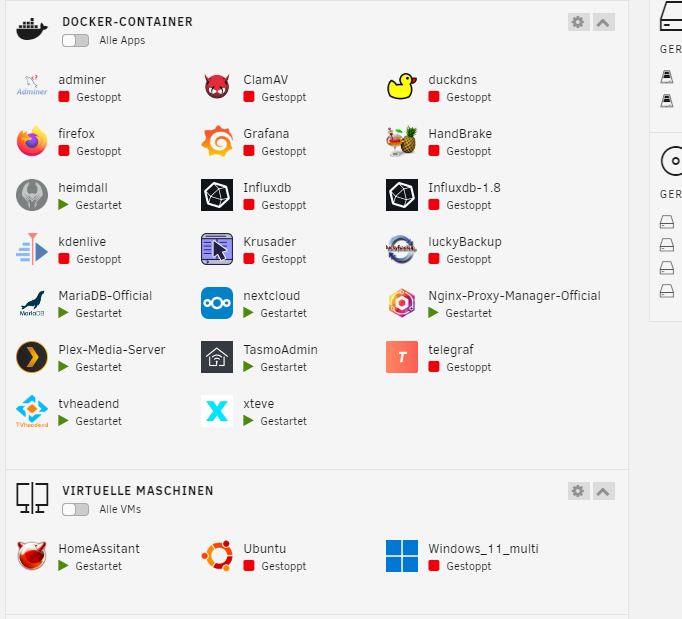
Die Docker sehen die Meiste zeit so aus. Plex und TVheadend sind per dev/dri auf die AMD GPU eingestellt. Die VM die die RTX nutzen soll ist eigentlich nur an wenn die Kinder da sind, so ist der Plan wenn es den mal läuft. Ich werde einfach den Lüfter wieder an die Grafikkarte hängen und gut. Dann ist der Verbrauch ja stabile im idle.
-
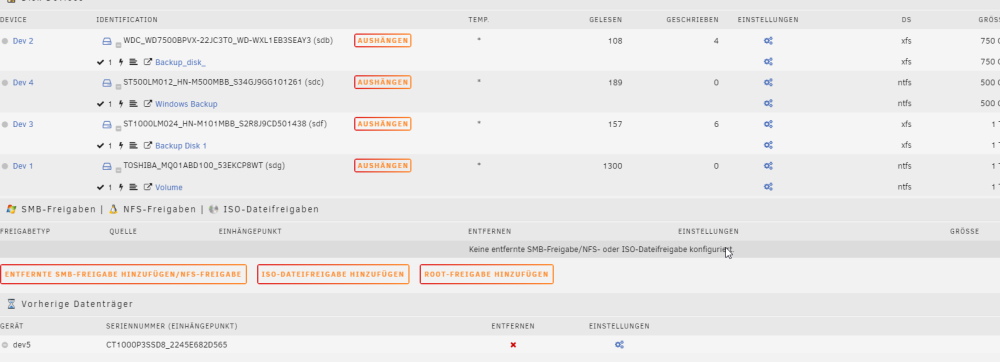
Ich hab mir nun jedoch ein weiteres Problem eingebaut die nvme der VM fliegt immer nach einer Zeit raus. Bekommt man diese wieder aufgeweckt ?
-
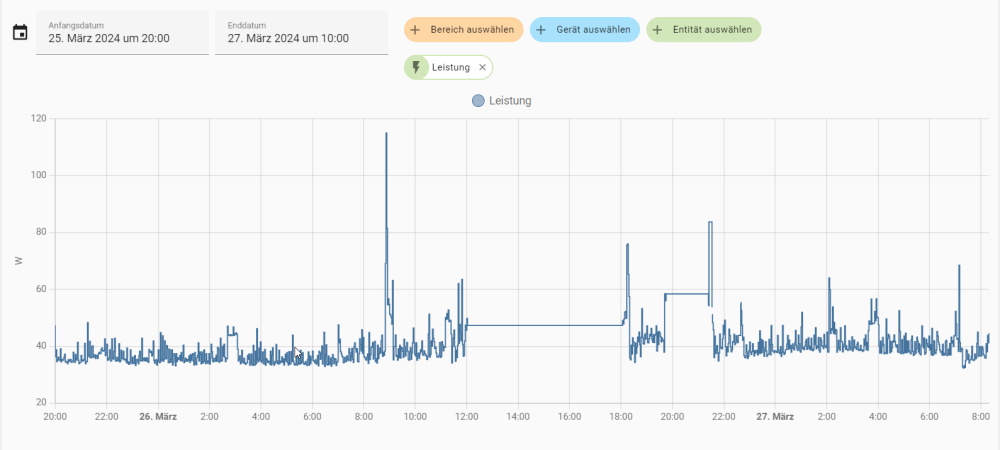
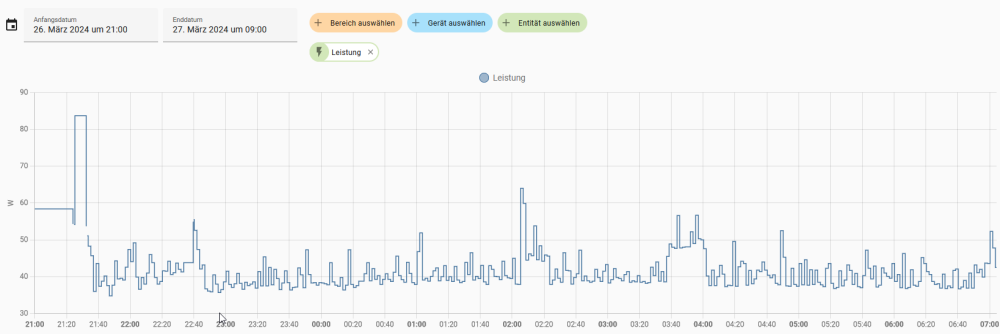
Das ist nicht subjektives siehe hier dder Verbrauch ist im schnitt 5 Watt höher.
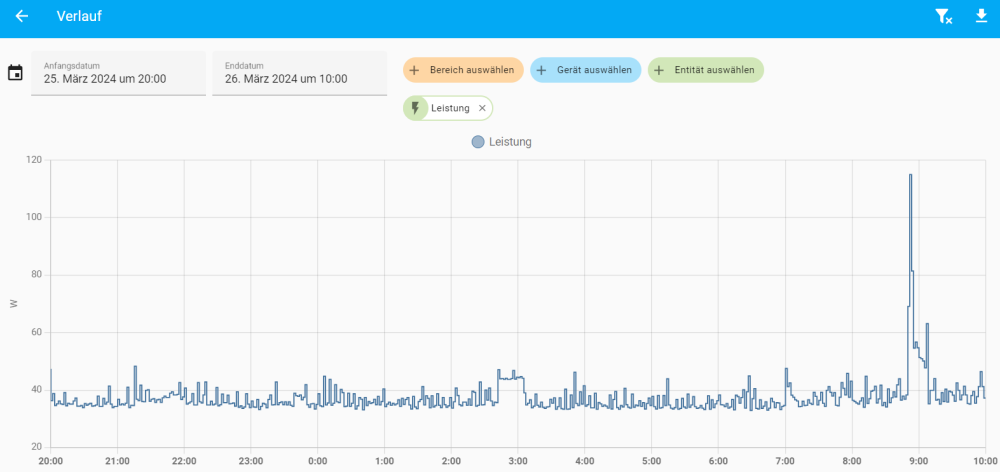
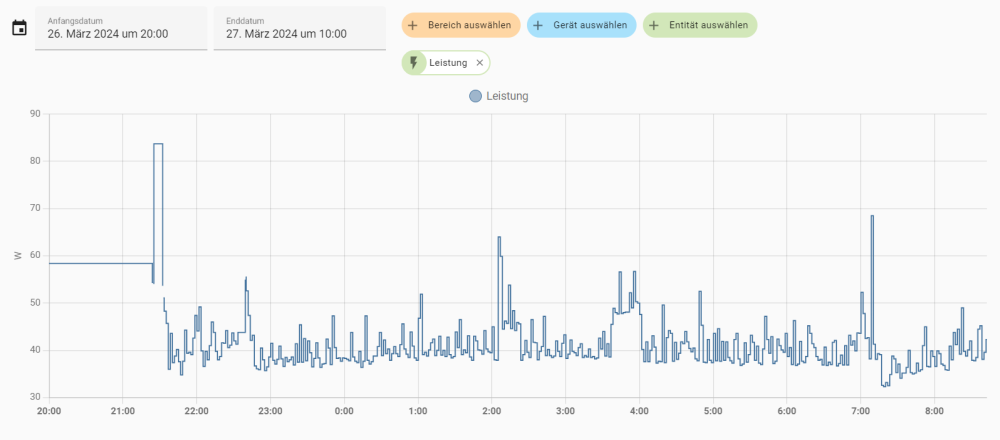
-
Gesendet von iPhone mit Tapatalk
-
Hier noch mal ohne Docker Dienste Gesendet von iPhone mit Tapatalk
-
Docker Dienste sind aus Nvidia geweckt und wieder einschlafen lassen. Nächste Fotos vom Handy wenn mein Wireguad funktioniert.
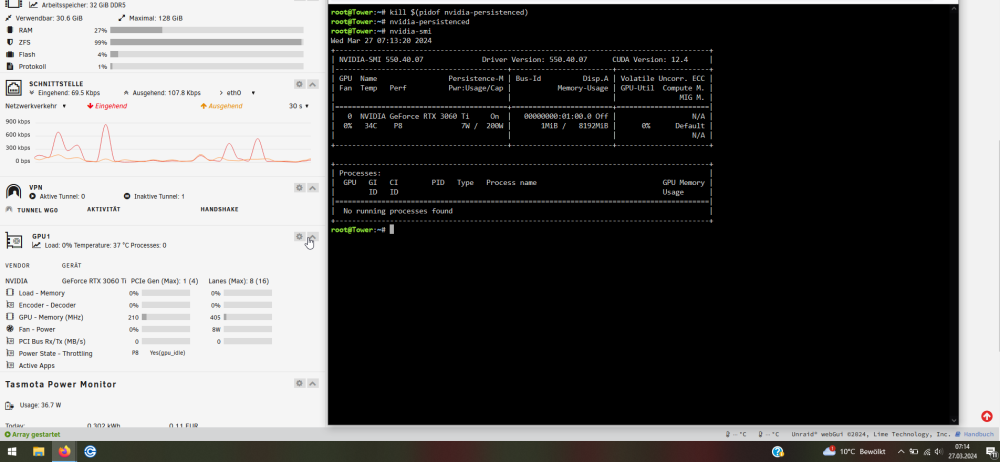
-
Docker Dienst versuche ich heute abend mal sonnst erreiche ich en server von arbeit aus nicht. könnte dann nur bilder vom handy aus machen. Grundverbrauch ist höher.
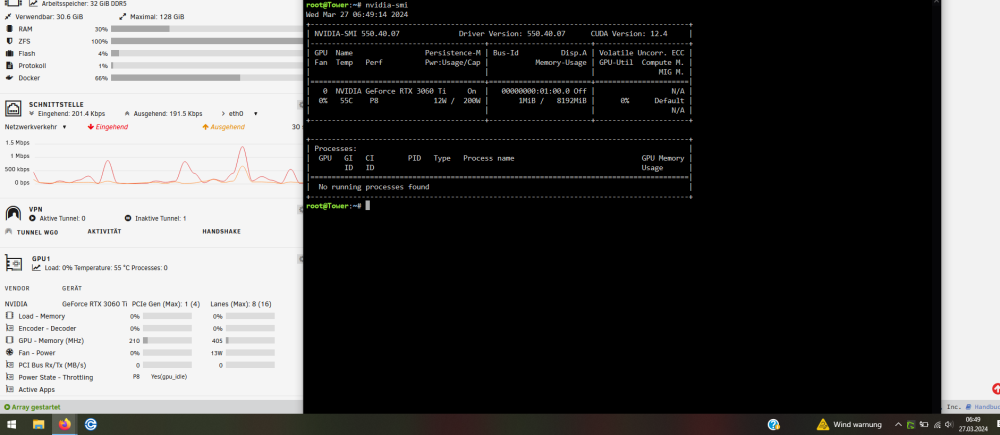
-
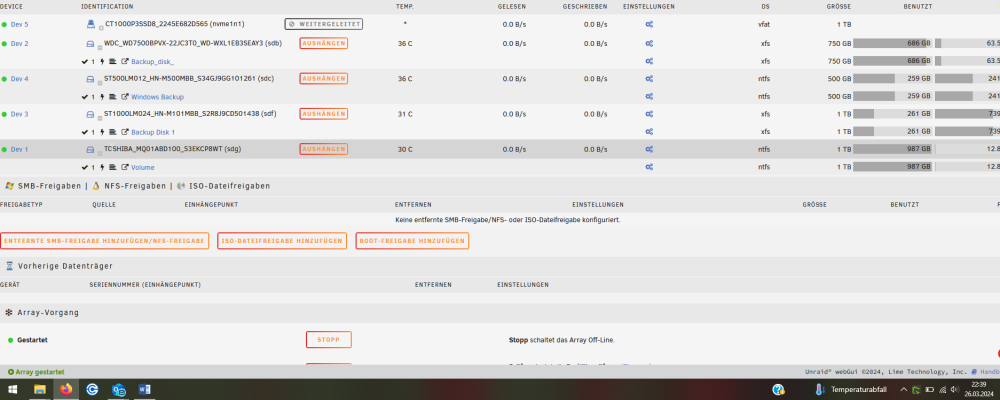
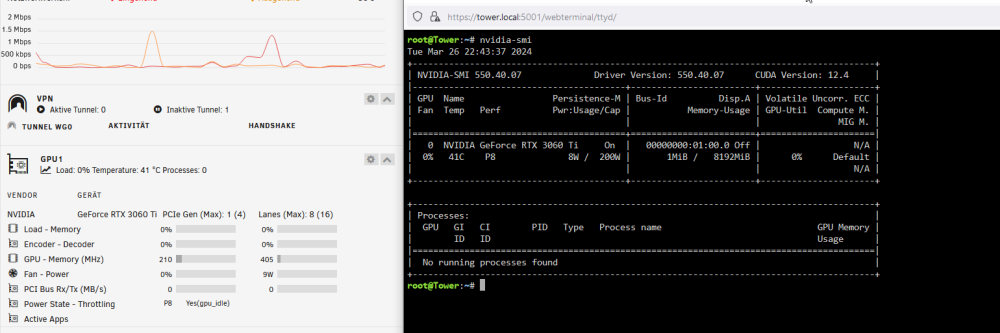
Hab gerade den Server noch mal neugestartet da die nvme für die win VM nicht mehr da war. Vorhin nach server start war sie da mal sehen wie das morgen früh aus schaut. Und die Grafikkarte ist wieder kühler und zieht nur 8 Watt.
-
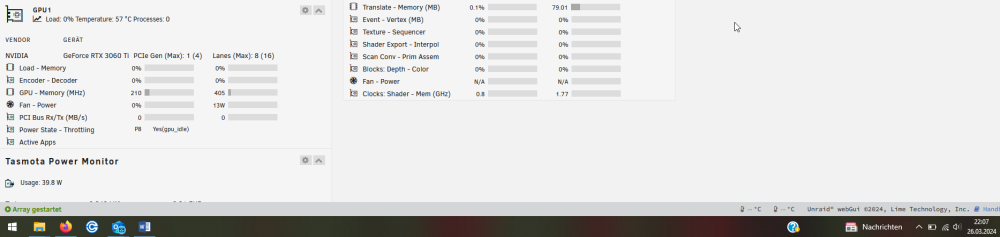
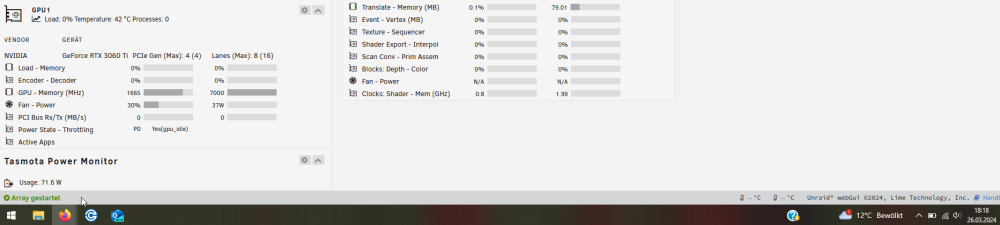
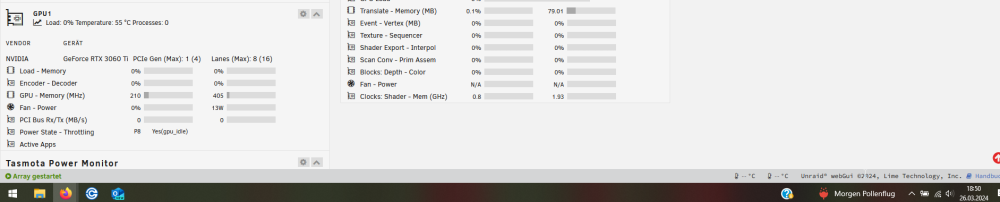
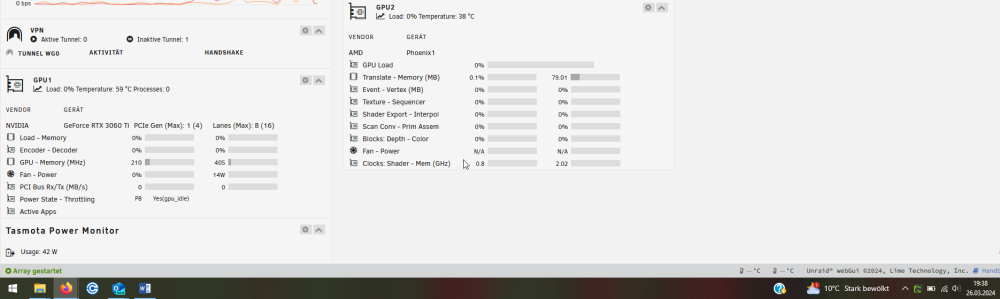
1Watt wäre ja ok aber nun haben wir schon wieder 4 Watt zu der Temperatur unter 40°C nvidia-smi zeigt das selbe an. und da ich sobald ich die karte aktiviere und die Lüfter der karte drehen bis ich sie wieder in den schlaf versetze die Temperatur wieder unter 40°C fäldt und der verbrauch auch und dies ja schon im gesamten über die Steckdose bestätigt bekommen habe ist das natürlich rätzelhaft. Und wenn ich den Lüfter wieder einbau ist es ja so das sich der Verbrauch bei 10Watt einpegelt. Diese Watt differenz war auch über die Steckdose offensichtlich. Ich lasse den Lüfter mal bis morgen weg und zeige euch die Ergebnisse. Danke für die Unterstützung. Jetzt hat die Karte schon wieder 59°C nun gibts eine abweichung der zwei Kontrollmetoden.
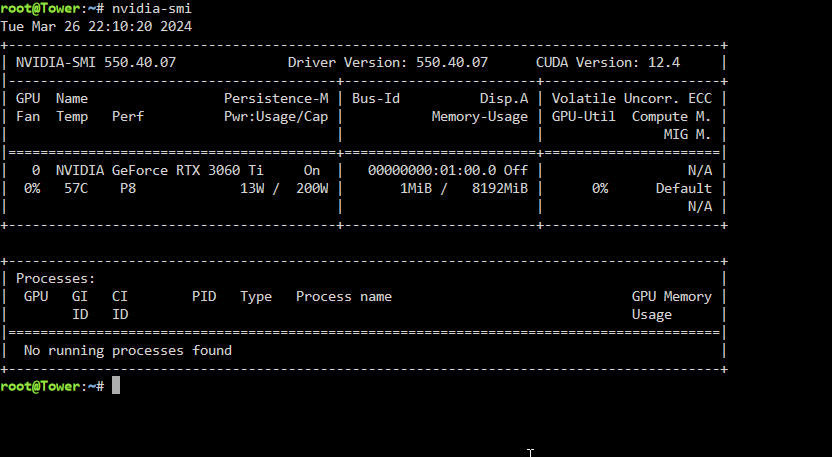
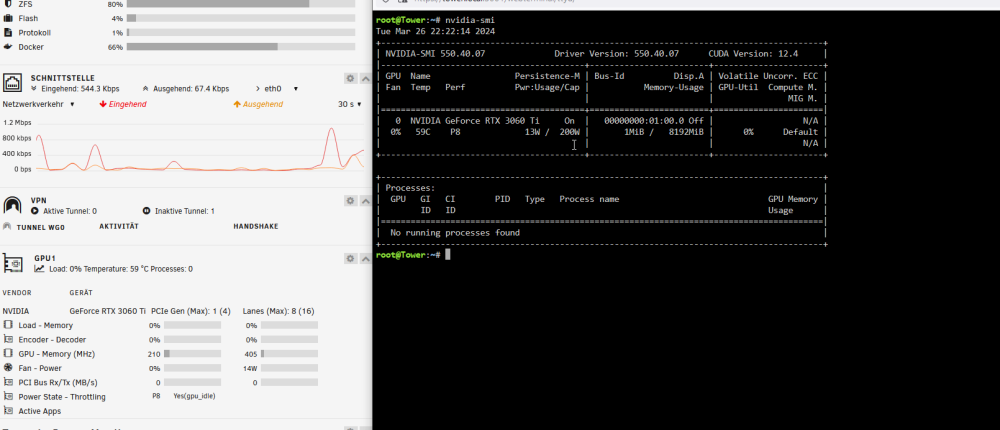
-
So erste eindrücke von nach dem zweiten neustart weil die nvme für die Windos VM nicht erkannt wurde. Sind die das, dass Grafikkarten Problem nach wievor besteht sie wird im Ruhezustand immer wärmer und der energie bedarf steigt. Strom verbrach im gesamten werde ich dann morgen nochmal aus HomeAssistant posten.
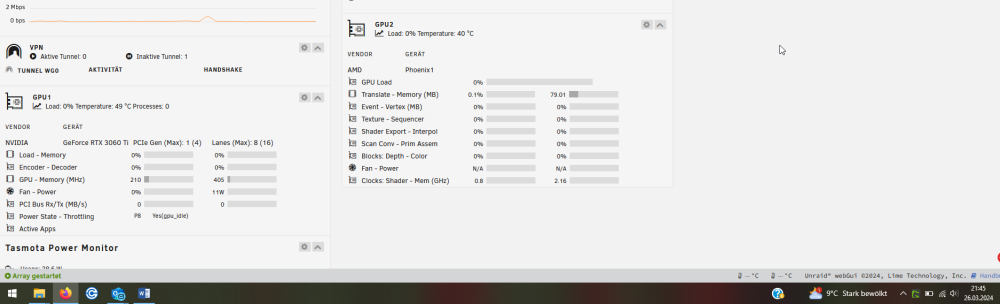
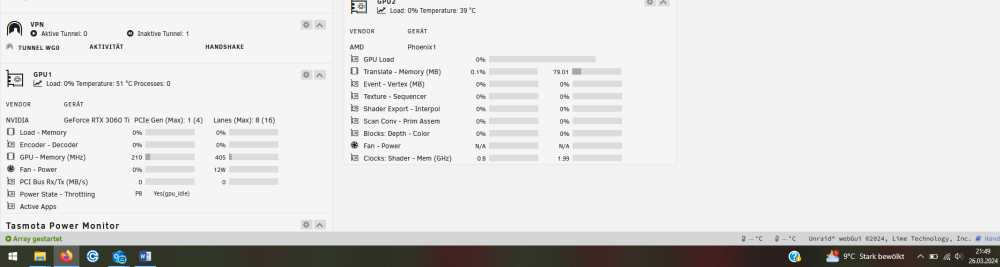
-
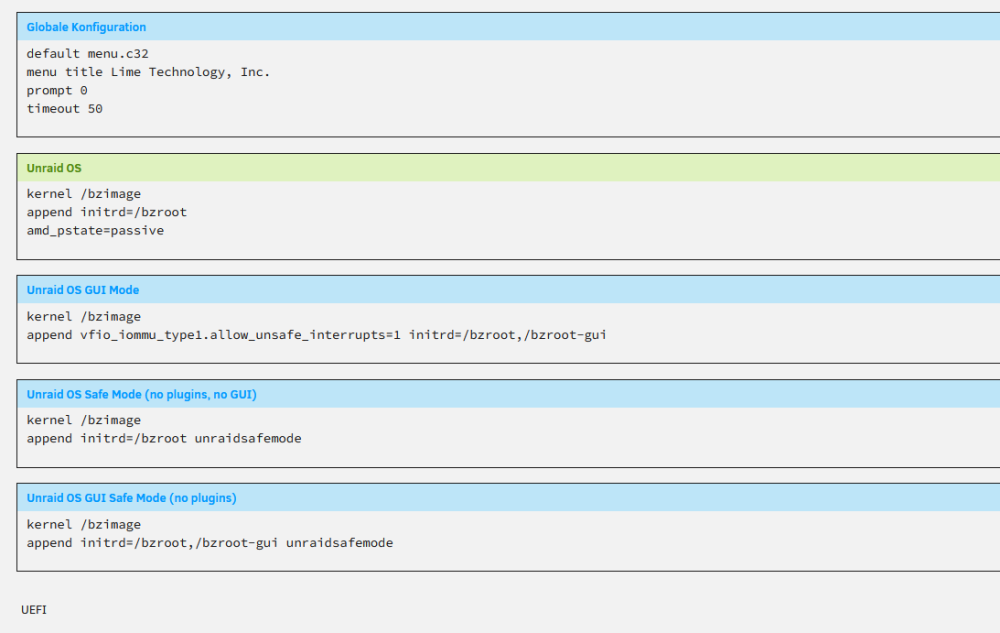
Also ohne diese zeile startet der server wieder nicht. append pcie_acs_override=downstream,multifunction vfio_iommu_type1.allow_unsafe_interrupts=1 Kann man nochwas zurücksetzen, damit es ohne diese zeile funktioniert? Fehler erkannt hab das append mal mit drin gelassen und der Server startet. Dann sollte es jetzt alles raus sein !? tower-diagnostics-20240326-2121.zip Noochmal die Dignostic
-
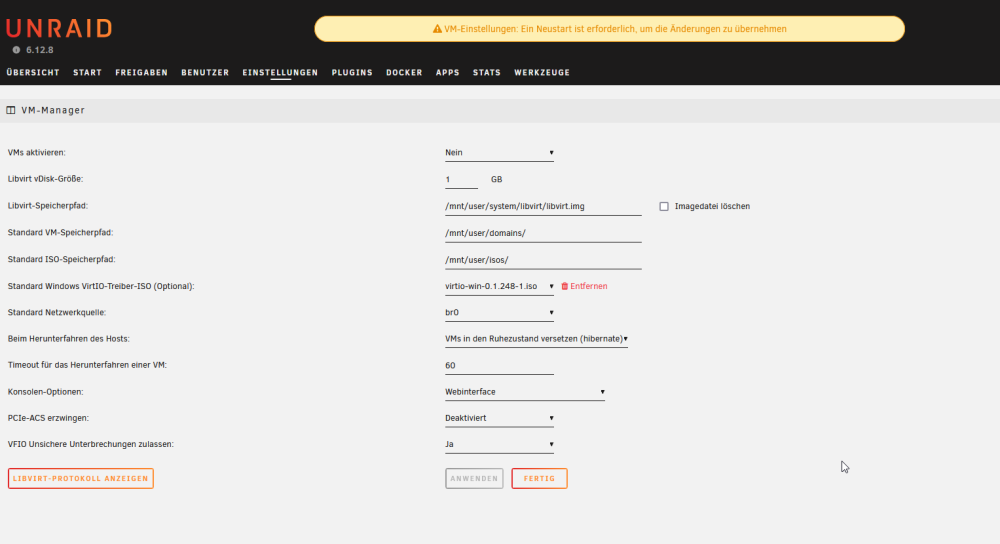
1. erledigt 2. PCI-Geräte und IOMMU-Gruppen Warnung: Das System wurde mit der PCIe-ACS erzwingen Einstellung gestartet. Die untenstehende Liste spiegelt nicht die Art und Weise wider, wie IOMMU Geräte normalerweise gruppieren würde. Um die Standard IOMMU-Gruppen für deine Hardware anzuzeigen, muss auf der VM Manager Seite die PCIe-ACS erzwingen Einstellung auf Deaktiviert gestellt werden. IOMMU group 0:[1022:14ea] 00:01.0 Host bridge: Advanced Micro Devices, Inc. [AMD] Device 14ea IOMMU group 1:[1022:14ed] 00:01.1 PCI bridge: Advanced Micro Devices, Inc. [AMD] Device 14ed IOMMU group 2:[1022:14ed] 00:01.2 PCI bridge: Advanced Micro Devices, Inc. [AMD] Device 14ed IOMMU group 3:[1022:14ea] 00:02.0 Host bridge: Advanced Micro Devices, Inc. [AMD] Device 14ea IOMMU group 4:[1022:14ee] 00:02.1 PCI bridge: Advanced Micro Devices, Inc. [AMD] Device 14ee IOMMU group 5:[1022:14ee] 00:02.2 PCI bridge: Advanced Micro Devices, Inc. [AMD] Device 14ee IOMMU group 6:[1022:14ea] 00:03.0 Host bridge: Advanced Micro Devices, Inc. [AMD] Device 14ea IOMMU group 7:[1022:14ea] 00:04.0 Host bridge: Advanced Micro Devices, Inc. [AMD] Device 14ea IOMMU group 8:[1022:14ea] 00:08.0 Host bridge: Advanced Micro Devices, Inc. [AMD] Device 14ea IOMMU group 9:[1022:14eb] 00:08.1 PCI bridge: Advanced Micro Devices, Inc. [AMD] Device 14eb IOMMU group 10:[1022:14eb] 00:08.2 PCI bridge: Advanced Micro Devices, Inc. [AMD] Device 14eb IOMMU group 11:[1022:14eb] 00:08.3 PCI bridge: Advanced Micro Devices, Inc. [AMD] Device 14eb IOMMU group 12:[1022:790b] 00:14.0 SMBus: Advanced Micro Devices, Inc. [AMD] FCH SMBus Controller (rev 71) [1022:790e] 00:14.3 ISA bridge: Advanced Micro Devices, Inc. [AMD] FCH LPC Bridge (rev 51) IOMMU group 13:[1022:14f0] 00:18.0 Host bridge: Advanced Micro Devices, Inc. [AMD] Device 14f0 [1022:14f1] 00:18.1 Host bridge: Advanced Micro Devices, Inc. [AMD] Device 14f1 [1022:14f2] 00:18.2 Host bridge: Advanced Micro Devices, Inc. [AMD] Device 14f2 [1022:14f3] 00:18.3 Host bridge: Advanced Micro Devices, Inc. [AMD] Device 14f3 [1022:14f4] 00:18.4 Host bridge: Advanced Micro Devices, Inc. [AMD] Device 14f4 [1022:14f5] 00:18.5 Host bridge: Advanced Micro Devices, Inc. [AMD] Device 14f5 [1022:14f6] 00:18.6 Host bridge: Advanced Micro Devices, Inc. [AMD] Device 14f6 [1022:14f7] 00:18.7 Host bridge: Advanced Micro Devices, Inc. [AMD] Device 14f7 IOMMU group 14:[10de:2486] 01:00.0 VGA compatible controller: NVIDIA Corporation GA104 [GeForce RTX 3060 Ti] (rev a1) IOMMU group 15:[10de:228b] 01:00.1 Audio device: NVIDIA Corporation GA104 High Definition Audio Controller (rev a1) IOMMU group 16:[144d:a80c] 02:00.0 Non-Volatile memory controller: Samsung Electronics Co Ltd NVMe SSD Controller S4LV008[Pascal] [N:0:1:1] disk Samsung SSD 990 PRO 1TB__1 /dev/nvme0n1 1.00TB IOMMU group 17:[1022:43f4] 03:00.0 PCI bridge: Advanced Micro Devices, Inc. [AMD] 600 Series Chipset PCIe Switch Upstream Port (rev 01) IOMMU group 18:[1022:43f5] 04:00.0 PCI bridge: Advanced Micro Devices, Inc. [AMD] 600 Series Chipset PCIe Switch Downstream Port (rev 01) IOMMU group 19:[1022:43f5] 04:01.0 PCI bridge: Advanced Micro Devices, Inc. [AMD] 600 Series Chipset PCIe Switch Downstream Port (rev 01) IOMMU group 20:[1022:43f5] 04:02.0 PCI bridge: Advanced Micro Devices, Inc. [AMD] 600 Series Chipset PCIe Switch Downstream Port (rev 01) IOMMU group 21:[1022:43f5] 04:0c.0 PCI bridge: Advanced Micro Devices, Inc. [AMD] 600 Series Chipset PCIe Switch Downstream Port (rev 01) IOMMU group 22:[1022:43f5] 04:0d.0 PCI bridge: Advanced Micro Devices, Inc. [AMD] 600 Series Chipset PCIe Switch Downstream Port (rev 01) IOMMU group 23:[c0a9:540a] 05:00.0 Non-Volatile memory controller: Micron/Crucial Technology P2 [Nick P2] / P3 / P3 Plus NVMe PCIe SSD (DRAM-less) (rev 01) IOMMU group 24:[1b21:1064] 06:00.0 SATA controller: ASMedia Technology Inc. ASM1064 Serial ATA Controller (rev 02) [1:0:0:0] disk ATA WDC WD7500BPVX-2 1A01 /dev/sdb 750GB [4:0:0:0] disk ATA ST500LM012 HN-M5 0003 /dev/sdc 500GB IOMMU group 25:[10ec:8125] 07:00.0 Ethernet controller: Realtek Semiconductor Co., Ltd. RTL8125 2.5GbE Controller (rev 05) IOMMU group 26:[1022:43fa] 08:00.0 USB controller: Advanced Micro Devices, Inc. [AMD] Device 43fa (rev 01) Bus 001 Device 001 Port 1-0 ID 1d6b:0002 Linux Foundation 2.0 root hub Bus 001 Device 002 Port 1-2 ID 0b05:19af ASUSTek Computer, Inc. AURA LED Controller Bus 001 Device 003 Port 1-3 ID 0461:4d0f Primax Electronics, Ltd HP Optical Mouse Bus 001 Device 004 Port 1-4 ID 0461:0010 Primax Electronics, Ltd HP PR1101U / Primax PMX-KPR1101U Keyboard Bus 001 Device 005 Port 1-6 ID 0bb4:2910 HTC (High Tech Computer Corp.) Slim Line Bus 002 Device 001 Port 2-0 ID 1d6b:0003 Linux Foundation 3.0 root hub IOMMU group 27:[1022:43f6] 09:00.0 SATA controller: Advanced Micro Devices, Inc. [AMD] 600 Series Chipset SATA Controller (rev 01) [25:0:0:0] disk ATA TOSHIBA MG08ACA1 0103 /dev/sdd 16.0TB [26:0:0:0] disk ATA TOSHIBA MG08ACA1 0103 /dev/sde 16.0TB [27:0:0:0] disk ATA ST1000LM024 HN-M 0002 /dev/sdf 1.00TB [28:0:0:0] disk ATA TOSHIBA MQ01ABD1 1A /dev/sdg 1.00TB IOMMU group 28:[144d:a80c] 0a:00.0 Non-Volatile memory controller: Samsung Electronics Co Ltd NVMe SSD Controller S4LV008[Pascal] [N:2:1:1] disk Samsung SSD 990 PRO 1TB__1 /dev/nvme2n1 1.00TB IOMMU group 29:[1002:15bf] 0b:00.0 VGA compatible controller: Advanced Micro Devices, Inc. [AMD/ATI] Phoenix1 (rev 05) IOMMU group 30:[1002:1640] 0b:00.1 Audio device: Advanced Micro Devices, Inc. [AMD/ATI] Rembrandt Radeon High Definition Audio Controller IOMMU group 31:[1022:15c7] 0b:00.2 Encryption controller: Advanced Micro Devices, Inc. [AMD] Family 19h (Model 74h) CCP/PSP 3.0 Device IOMMU group 32:[1022:15b9] 0b:00.3 USB controller: Advanced Micro Devices, Inc. [AMD] Device 15b9 Bus 003 Device 001 Port 3-0 ID 1d6b:0002 Linux Foundation 2.0 root hub Bus 004 Device 001 Port 4-0 ID 1d6b:0003 Linux Foundation 3.0 root hub IOMMU group 33:[1022:15ba] 0b:00.4 USB controller: Advanced Micro Devices, Inc. [AMD] Device 15ba Bus 005 Device 001 Port 5-0 ID 1d6b:0002 Linux Foundation 2.0 root hub Bus 006 Device 001 Port 6-0 ID 1d6b:0003 Linux Foundation 3.0 root hub IOMMU group 34:[1022:15e3] 0b:00.6 Audio device: Advanced Micro Devices, Inc. [AMD] Family 17h/19h HD Audio Controller IOMMU group 35:[1022:14ec] 0c:00.0 Non-Essential Instrumentation [1300]: Advanced Micro Devices, Inc. [AMD] Device 14ec IOMMU group 36:[1022:1502] 0c:00.1 Signal processing controller: Advanced Micro Devices, Inc. [AMD] AMD IPU Device IOMMU group 37:[1022:14ec] 0d:00.0 Non-Essential Instrumentation [1300]: Advanced Micro Devices, Inc. [AMD] Device 14ec IOMMU group 38:[1022:15c0] 0d:00.3 USB controller: Advanced Micro Devices, Inc. [AMD] Device 15c0 Bus 007 Device 001 Port 7-0 ID 1d6b:0002 Linux Foundation 2.0 root hub Bus 008 Device 001 Port 8-0 ID 1d6b:0003 Linux Foundation 3.0 root hub IOMMU group 39:[1022:15c1] 0d:00.4 USB controller: Advanced Micro Devices, Inc. [AMD] Device 15c1 Bus 010 Device 001 Port 10-0 ID 1d6b:0003 Linux Foundation 3.0 root hub Bus 009 Device 001 Port 9-0 ID 1d6b:0002 Linux Foundation 2.0 root hub CPU-Thread-Verknüpfungen Pair 1:cpu 0 / cpu 6 Pair 2:cpu 1 / cpu 7 Pair 3:cpu 2 / cpu 8 Pair 4:cpu 3 / cpu 9 Pair 5:cpu 4 / cpu 10 Pair 6:cpu 5 / cpu 11 USB-Geräte Bus 001 Device 001 Port 1-0ID 1d6b:0002 Linux Foundation 2.0 root hub Bus 001 Device 002 Port 1-2ID 0b05:19af ASUSTek Computer, Inc. AURA LED Controller Bus 001 Device 003 Port 1-3ID 0461:4d0f Primax Electronics, Ltd HP Optical Mouse Bus 001 Device 004 Port 1-4ID 0461:0010 Primax Electronics, Ltd HP PR1101U / Primax PMX-KPR1101U Keyboard Bus 001 Device 005 Port 1-6ID 0bb4:2910 HTC (High Tech Computer Corp.) Slim Line Bus 002 Device 001 Port 2-0ID 1d6b:0003 Linux Foundation 3.0 root hub Bus 003 Device 001 Port 3-0ID 1d6b:0002 Linux Foundation 2.0 root hub Bus 004 Device 001 Port 4-0ID 1d6b:0003 Linux Foundation 3.0 root hub Bus 005 Device 001 Port 5-0ID 1d6b:0002 Linux Foundation 2.0 root hub Bus 006 Device 001 Port 6-0ID 1d6b:0003 Linux Foundation 3.0 root hub Bus 007 Device 001 Port 7-0ID 1d6b:0002 Linux Foundation 2.0 root hub Bus 008 Device 001 Port 8-0ID 1d6b:0003 Linux Foundation 3.0 root hub Bus 009 Device 001 Port 9-0ID 1d6b:0002 Linux Foundation 2.0 root hub Bus 010 Device 001 Port 10-0ID 1d6b:0003 Linux Foundation 3.0 root hub 3. Default setzen / Wie? 6. PCI-Geräte und IOMMU-Gruppen IOMMU group 0:[1022:14ea] 00:01.0 Host bridge: Advanced Micro Devices, Inc. [AMD] Device 14ea IOMMU group 1:[1022:14ed] 00:01.1 PCI bridge: Advanced Micro Devices, Inc. [AMD] Device 14ed IOMMU group 2:[1022:14ed] 00:01.2 PCI bridge: Advanced Micro Devices, Inc. [AMD] Device 14ed IOMMU group 3:[1022:14ea] 00:02.0 Host bridge: Advanced Micro Devices, Inc. [AMD] Device 14ea IOMMU group 4:[1022:14ee] 00:02.1 PCI bridge: Advanced Micro Devices, Inc. [AMD] Device 14ee IOMMU group 5:[1022:14ee] 00:02.2 PCI bridge: Advanced Micro Devices, Inc. [AMD] Device 14ee IOMMU group 6:[1022:14ea] 00:03.0 Host bridge: Advanced Micro Devices, Inc. [AMD] Device 14ea IOMMU group 7:[1022:14ea] 00:04.0 Host bridge: Advanced Micro Devices, Inc. [AMD] Device 14ea IOMMU group 8:[1022:14ea] 00:08.0 Host bridge: Advanced Micro Devices, Inc. [AMD] Device 14ea IOMMU group 9:[1022:14eb] 00:08.1 PCI bridge: Advanced Micro Devices, Inc. [AMD] Device 14eb IOMMU group 10:[1022:14eb] 00:08.2 PCI bridge: Advanced Micro Devices, Inc. [AMD] Device 14eb IOMMU group 11:[1022:14eb] 00:08.3 PCI bridge: Advanced Micro Devices, Inc. [AMD] Device 14eb IOMMU group 12:[1022:790b] 00:14.0 SMBus: Advanced Micro Devices, Inc. [AMD] FCH SMBus Controller (rev 71) [1022:790e] 00:14.3 ISA bridge: Advanced Micro Devices, Inc. [AMD] FCH LPC Bridge (rev 51) IOMMU group 13:[1022:14f0] 00:18.0 Host bridge: Advanced Micro Devices, Inc. [AMD] Device 14f0 [1022:14f1] 00:18.1 Host bridge: Advanced Micro Devices, Inc. [AMD] Device 14f1 [1022:14f2] 00:18.2 Host bridge: Advanced Micro Devices, Inc. [AMD] Device 14f2 [1022:14f3] 00:18.3 Host bridge: Advanced Micro Devices, Inc. [AMD] Device 14f3 [1022:14f4] 00:18.4 Host bridge: Advanced Micro Devices, Inc. [AMD] Device 14f4 [1022:14f5] 00:18.5 Host bridge: Advanced Micro Devices, Inc. [AMD] Device 14f5 [1022:14f6] 00:18.6 Host bridge: Advanced Micro Devices, Inc. [AMD] Device 14f6 [1022:14f7] 00:18.7 Host bridge: Advanced Micro Devices, Inc. [AMD] Device 14f7 IOMMU group 14:[10de:2486] 01:00.0 VGA compatible controller: NVIDIA Corporation GA104 [GeForce RTX 3060 Ti] (rev a1) [10de:228b] 01:00.1 Audio device: NVIDIA Corporation GA104 High Definition Audio Controller (rev a1) IOMMU group 15:[144d:a80c] 02:00.0 Non-Volatile memory controller: Samsung Electronics Co Ltd NVMe SSD Controller S4LV008[Pascal] [N:0:1:1] disk Samsung SSD 990 PRO 1TB__1 /dev/nvme0n1 1.00TB IOMMU group 16:[1022:43f4] 03:00.0 PCI bridge: Advanced Micro Devices, Inc. [AMD] 600 Series Chipset PCIe Switch Upstream Port (rev 01) IOMMU group 17:[1022:43f5] 04:00.0 PCI bridge: Advanced Micro Devices, Inc. [AMD] 600 Series Chipset PCIe Switch Downstream Port (rev 01) [c0a9:540a] 05:00.0 Non-Volatile memory controller: Micron/Crucial Technology P2 [Nick P2] / P3 / P3 Plus NVMe PCIe SSD (DRAM-less) (rev 01) [N:1:1:1] disk CT1000P3SSD8__1 /dev/nvme1n1 1.00TB IOMMU group 18:[1022:43f5] 04:01.0 PCI bridge: Advanced Micro Devices, Inc. [AMD] 600 Series Chipset PCIe Switch Downstream Port (rev 01) [1b21:1064] 06:00.0 SATA controller: ASMedia Technology Inc. ASM1064 Serial ATA Controller (rev 02) [1:0:0:0] disk ATA WDC WD7500BPVX-2 1A01 /dev/sdb 750GB [4:0:0:0] disk ATA ST500LM012 HN-M5 0003 /dev/sdc 500GB IOMMU group 19:[1022:43f5] 04:02.0 PCI bridge: Advanced Micro Devices, Inc. [AMD] 600 Series Chipset PCIe Switch Downstream Port (rev 01) [10ec:8125] 07:00.0 Ethernet controller: Realtek Semiconductor Co., Ltd. RTL8125 2.5GbE Controller (rev 05) IOMMU group 20:[1022:43f5] 04:0c.0 PCI bridge: Advanced Micro Devices, Inc. [AMD] 600 Series Chipset PCIe Switch Downstream Port (rev 01) [1022:43fa] 08:00.0 USB controller: Advanced Micro Devices, Inc. [AMD] Device 43fa (rev 01) Bus 001 Device 001 Port 1-0 ID 1d6b:0002 Linux Foundation 2.0 root hub Bus 001 Device 002 Port 1-2 ID 0b05:19af ASUSTek Computer, Inc. AURA LED Controller Bus 001 Device 003 Port 1-3 ID 0461:4d0f Primax Electronics, Ltd HP Optical Mouse Bus 001 Device 004 Port 1-4 ID 0461:0010 Primax Electronics, Ltd HP PR1101U / Primax PMX-KPR1101U Keyboard Bus 001 Device 005 Port 1-6 ID 0bb4:2910 HTC (High Tech Computer Corp.) Slim Line Bus 002 Device 001 Port 2-0 ID 1d6b:0003 Linux Foundation 3.0 root hub IOMMU group 21:[1022:43f5] 04:0d.0 PCI bridge: Advanced Micro Devices, Inc. [AMD] 600 Series Chipset PCIe Switch Downstream Port (rev 01) [1022:43f6] 09:00.0 SATA controller: Advanced Micro Devices, Inc. [AMD] 600 Series Chipset SATA Controller (rev 01) [25:0:0:0] disk ATA TOSHIBA MG08ACA1 0103 /dev/sdd 16.0TB [26:0:0:0] disk ATA TOSHIBA MG08ACA1 0103 /dev/sde 16.0TB [27:0:0:0] disk ATA ST1000LM024 HN-M 0002 /dev/sdf 1.00TB [28:0:0:0] disk ATA TOSHIBA MQ01ABD1 1A /dev/sdg 1.00TB IOMMU group 22:[144d:a80c] 0a:00.0 Non-Volatile memory controller: Samsung Electronics Co Ltd NVMe SSD Controller S4LV008[Pascal] [N:2:1:1] disk Samsung SSD 990 PRO 1TB__1 /dev/nvme2n1 1.00TB IOMMU group 23:[1002:15bf] 0b:00.0 VGA compatible controller: Advanced Micro Devices, Inc. [AMD/ATI] Phoenix1 (rev 05) IOMMU group 24:[1002:1640] 0b:00.1 Audio device: Advanced Micro Devices, Inc. [AMD/ATI] Rembrandt Radeon High Definition Audio Controller IOMMU group 25:[1022:15c7] 0b:00.2 Encryption controller: Advanced Micro Devices, Inc. [AMD] Family 19h (Model 74h) CCP/PSP 3.0 Device IOMMU group 26:[1022:15b9] 0b:00.3 USB controller: Advanced Micro Devices, Inc. [AMD] Device 15b9 Bus 003 Device 001 Port 3-0 ID 1d6b:0002 Linux Foundation 2.0 root hub Bus 004 Device 001 Port 4-0 ID 1d6b:0003 Linux Foundation 3.0 root hub IOMMU group 27:[1022:15ba] 0b:00.4 USB controller: Advanced Micro Devices, Inc. [AMD] Device 15ba Bus 005 Device 001 Port 5-0 ID 1d6b:0002 Linux Foundation 2.0 root hub Bus 006 Device 001 Port 6-0 ID 1d6b:0003 Linux Foundation 3.0 root hub IOMMU group 28:[1022:15e3] 0b:00.6 Audio device: Advanced Micro Devices, Inc. [AMD] Family 17h/19h HD Audio Controller IOMMU group 29:[1022:14ec] 0c:00.0 Non-Essential Instrumentation [1300]: Advanced Micro Devices, Inc. [AMD] Device 14ec IOMMU group 30:[1022:1502] 0c:00.1 Signal processing controller: Advanced Micro Devices, Inc. [AMD] AMD IPU Device IOMMU group 31:[1022:14ec] 0d:00.0 Non-Essential Instrumentation [1300]: Advanced Micro Devices, Inc. [AMD] Device 14ec IOMMU group 32:[1022:15c0] 0d:00.3 USB controller: Advanced Micro Devices, Inc. [AMD] Device 15c0 Bus 007 Device 001 Port 7-0 ID 1d6b:0002 Linux Foundation 2.0 root hub Bus 008 Device 001 Port 8-0 ID 1d6b:0003 Linux Foundation 3.0 root hub IOMMU group 33:[1022:15c1] 0d:00.4 USB controller: Advanced Micro Devices, Inc. [AMD] Device 15c1 Bus 010 Device 001 Port 10-0 ID 1d6b:0003 Linux Foundation 3.0 root hub Bus 009 Device 001 Port 9-0 ID 1d6b:0002 Linux Foundation 2.0 root hub CPU-Thread-Verknüpfungen Pair 1:cpu 0 / cpu 6 Pair 2:cpu 1 / cpu 7 Pair 3:cpu 2 / cpu 8 Pair 4:cpu 3 / cpu 9 Pair 5:cpu 4 / cpu 10 Pair 6:cpu 5 / cpu 11 USB-Geräte Bus 001 Device 001 Port 1-0ID 1d6b:0002 Linux Foundation 2.0 root hub Bus 001 Device 002 Port 1-2ID 0b05:19af ASUSTek Computer, Inc. AURA LED Controller Bus 001 Device 003 Port 1-3ID 0461:4d0f Primax Electronics, Ltd HP Optical Mouse Bus 001 Device 004 Port 1-4ID 0461:0010 Primax Electronics, Ltd HP PR1101U / Primax PMX-KPR1101U Keyboard Bus 001 Device 005 Port 1-6ID 0bb4:2910 HTC (High Tech Computer Corp.) Slim Line Bus 002 Device 001 Port 2-0ID 1d6b:0003 Linux Foundation 3.0 root hub Bus 003 Device 001 Port 3-0ID 1d6b:0002 Linux Foundation 2.0 root hub Bus 004 Device 001 Port 4-0ID 1d6b:0003 Linux Foundation 3.0 root hub Bus 005 Device 001 Port 5-0ID 1d6b:0002 Linux Foundation 2.0 root hub Bus 006 Device 001 Port 6-0ID 1d6b:0003 Linux Foundation 3.0 root hub Bus 007 Device 001 Port 7-0ID 1d6b:0002 Linux Foundation 2.0 root hub Bus 008 Device 001 Port 8-0ID 1d6b:0003 Linux Foundation 3.0 root hub Bus 009 Device 001 Port 9-0ID 1d6b:0002 Linux Foundation 2.0 root hub Bus 010 Device 001 Port 10-0ID 1d6b:0003 Linux Foundation 3.0 root hub SCSI-Geräte [0:0:0:0]disk Intenso Slim Line PMAP /dev/sda 31.0GB [1:0:0:0]disk ATA WDC WD7500BPVX-2 1A01 /dev/sdb 750GB [4:0:0:0]disk ATA ST500LM012 HN-M5 0003 /dev/sdc 500GB [25:0:0:0]disk ATA TOSHIBA MG08ACA1 0103 /dev/sdd 16.0TB [26:0:0:0]disk ATA TOSHIBA MG08ACA1 0103 /dev/sde 16.0TB [27:0:0:0]disk ATA ST1000LM024 HN-M 0002 /dev/sdf 1.00TB [28:0:0:0]disk ATA TOSHIBA MQ01ABD1 1A /dev/sdg 1.00TB [N:0:1:1]disk Samsung SSD 990 PRO 1TB__1 /dev/nvme0n1 1.00TB [N:1:1:1]disk CT1000P3SSD8__1 /dev/nvme1n1 1.00TB [N:2:1:1]disk Samsung SSD 990 PRO 1TB__1 /dev/nvme2n1 1.00TB

-
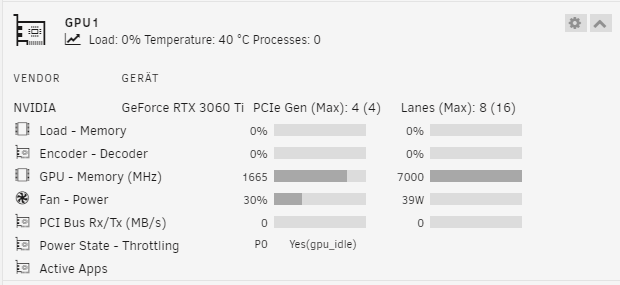
Ok das gehe ich mal durch. Jetzt hab ich erst mal das Gafikkarten Problem in Bildern und ich hänge die Dagnostic von den jetzigen einstellungen an. tower-diagnostics-20240326-1941.zip
.thumb.png.b5fdb6c721cabfc11eba55cc3ac7d9d0.png)
.thumb.png.1b7f0e76456edd45041d6ec1e9d53f14.png)
.thumb.png.6dc0d7fd81af0358b4608a23d522e759.png)
.thumb.png.9b9a7fd1636c73bfa63e79114604b238.png)
.thumb.png.df29c8847cb9bc1dfafa3d2a49b42ce8.png)
-
Wie bekomme ich die Zeilen wieder auf die Stelle auf dem Stick? Hat sich erledigt hab die Datei gefunden und diese zeile wieder eingefügt. Gesendet von iPhone mit Tapatalk
-
So jetzt weis ich auch wieso ich mein Server von Arbeit aus nicht mehr erreicht habe. Ich hab alles raus genommen aus der Go Datei. Und das andere was ich777 noch geschrieben hatte. Blöd gut Foto gemacht. pcie_acs_override=downstream,multifunction vfio_iommu_type1.allow_unsafe_interrupts=1 image001.png Nun hab ich diesen Fehler und der Server bleibt hängen. Gesendet von iPhone mit Tapatalk
-
Noch ne frage zur Go Datei. Es reicht doch wenn ich vor jede Zeile ein # setze das sie nicht mehr beachtet wird? So kenn ich es vom yaml code. Oder ist das in diesem Fall anders?
-
ich nehme es alles raus und lasse den Server übernachte laufen, dann melde ich mich morgen mit Erkenntnissen zurück. Aber eine der HDD´s läuft definitiv nicht. Außer Unraid zeigt falsche Sachen an. die HDD´s sind alle grau und gehen auch nach ihrer vorgegebenen Zeit in den Schlafmodus.
-
Aus der Go datei hab ich schon mal alles raus genommen. der Verbrauch war dann jedoch höher darum hab ich es wieder aufgenommen. Keine Ahnung was das ist ob das von irgendwelchen versuchen vergessen wurde. Wo ich ein Problem hatte und es mir ergoogelt hatte oder ob das von den Versuchen jetzt mit der Grafikkarte stammt

-
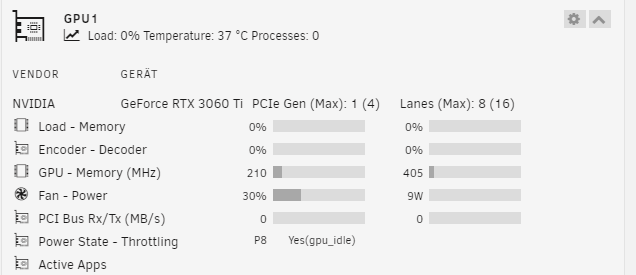
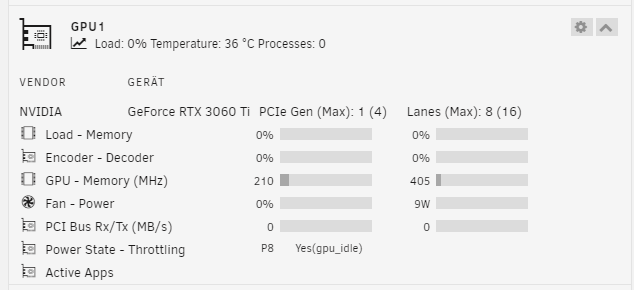
Wollte zeigen was die karte nach dem versetzen in den P8 macht funktioniert jedoch nicht so dadurch das der separate Lüfter ja weiter kühlt
-
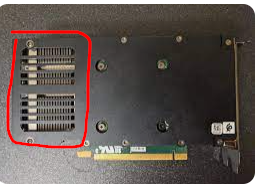
Den Lüfter hab ich hier drauf gebaut, bzw Aufgelegt und zwischen CPU Kühlkörper geklemmt.
-
tower-diagnostics-20240326-1117.zip Hier die Diagnostik. Ob es Sinn macht ist ja nicht die Frage mein System läuft wenn es alles im idle ist ohne jeglichen Lüfter. Die Gehäuse Lüfter sind vom Mainboard gesteuert wenn der Prozessor 55°C erreicht. Da die Grafikkarte aus irgend einem Grund im Idle wärmer wird und auch somit mehr Strom zieht (warum auch immer) und die Lüfter der Karte nicht anfangen zu laufen. Hab ich gedacht wenn ich einen Lüfter der langsam stendig dreht und so die Karte Kühlt wenn die Lüfter der Karte nicht drehen bleibt die Karte vieleicht bei den 7 Watt die sie im Idle zieht nachdem sie in den P8 versetzt wurde. Die 7 Watt hab ich damit nicht halten können jedoch schwankt sie nun bei 9-10 Watt. Und so ein Lüfter nimmt vieleicht 0,5 Watt wenn er langsm dreht dadurch spare ich schon fast 10 Watt. Ich bin gerade auf Arbeit und kann den Lüfter nicht anhalten aber ich mach mal paar Screenshots wenn die GPU in den Ile versetzt wird und die Lüfter von der karte noch nach laufen und dann Ausgehen.


.png.841491585659c6e9561d4ce84e37b91c.png)
.png.dc2aeeff0ac46063989c04071c3a84f6.png)
.png.4cad3433c86b32b66200e7670ea99505.png)

.png.1d20e98cc9991bd06d0ce1ee0d82cb7a.png)
.png.02b90b08a5338c0760e9b11f87187d1f.png)

