





Syrincs
Members
-
Joined
-
Last visited
Everything posted by Syrincs
-
ok geht Klar vielen dank. Hat leiderr am Stromverbrauch nichts oder besser zuungunsten verändert. Ob alles stabiel lief kann ich nicht sagen auf die kürze.
-
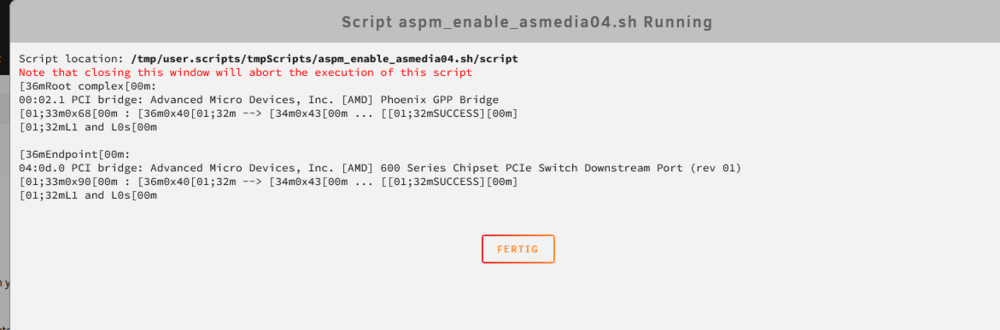
Vieen dank. hab es mal gemacht. die Kurzform ist dann ? sudo setpci -s 04:0d.0 0x90.B=0x42

-
sorry hab ich oben noch mit eingefügt
-
root@Tower:~# lspci -vv | awk '/ASPM/{print $0}' RS= | grep --color -P '(^[a-z0-9:.]+|ASPM |Disabled;|Enabled;)' 00:01.1 PCI bridge: Advanced Micro Devices, Inc. [AMD] Phoenix GPP Bridge (prog-if 00 [Normal decode]) LnkCap: Port #0, Speed 16GT/s, Width x8, ASPM L1, Exit Latency L1 <64us LnkCtl: ASPM L1 Enabled; RCB 64 bytes, LnkDisable- CommClk+ 00:01.2 PCI bridge: Advanced Micro Devices, Inc. [AMD] Phoenix GPP Bridge (prog-if 00 [Normal decode]) LnkCap: Port #1, Speed 16GT/s, Width x4, ASPM L1, Exit Latency L1 <64us LnkCtl: ASPM L1 Enabled; RCB 64 bytes, LnkDisable- CommClk+ 00:02.1 PCI bridge: Advanced Micro Devices, Inc. [AMD] Phoenix GPP Bridge (prog-if 00 [Normal decode]) LnkCap: Port #0, Speed 16GT/s, Width x4, ASPM L1, Exit Latency L1 <32us LnkCtl: ASPM Disabled; RCB 64 bytes, LnkDisable- CommClk+ 00:02.2 PCI bridge: Advanced Micro Devices, Inc. [AMD] Phoenix GPP Bridge (prog-if 00 [Normal decode]) LnkCap: Port #1, Speed 16GT/s, Width x4, ASPM L1, Exit Latency L1 <64us LnkCtl: ASPM L1 Enabled; RCB 64 bytes, LnkDisable- CommClk+ 00:08.1 PCI bridge: Advanced Micro Devices, Inc. [AMD] Phoenix Internal GPP Bridge to Bus [C:A] (prog-if 00 [Normal decode]) LnkCap: Port #0, Speed 16GT/s, Width x16, ASPM L0s L1, Exit Latency L0s <64ns, L1 <1us LnkCtl: ASPM L0s L1 Enabled; RCB 64 bytes, LnkDisable- CommClk+ 00:08.2 PCI bridge: Advanced Micro Devices, Inc. [AMD] Phoenix Internal GPP Bridge to Bus [C:A] (prog-if 00 [Normal decode]) LnkCap: Port #0, Speed 16GT/s, Width x16, ASPM L0s L1, Exit Latency L0s <64ns, L1 <1us LnkCtl: ASPM L0s L1 Enabled; RCB 64 bytes, LnkDisable- CommClk+ 00:08.3 PCI bridge: Advanced Micro Devices, Inc. [AMD] Phoenix Internal GPP Bridge to Bus [C:A] (prog-if 00 [Normal decode]) LnkCap: Port #0, Speed 16GT/s, Width x16, ASPM L0s L1, Exit Latency L0s <64ns, L1 <1us LnkCtl: ASPM L0s L1 Enabled; RCB 64 bytes, LnkDisable- CommClk+ 01:00.0 VGA compatible controller: NVIDIA Corporation GA104 [GeForce RTX 3060 Ti] (rev a1) (prog-if 00 [VGA controller]) LnkCap: Port #0, Speed 16GT/s, Width x16, ASPM L0s L1, Exit Latency L0s <512ns, L1 <16us LnkCtl: ASPM L1 Enabled; RCB 64 bytes, LnkDisable- CommClk+ 01:00.1 Audio device: NVIDIA Corporation GA104 High Definition Audio Controller (rev a1) LnkCap: Port #0, Speed 16GT/s, Width x16, ASPM L0s L1, Exit Latency L0s <512ns, L1 <4us LnkCtl: ASPM L1 Enabled; RCB 64 bytes, LnkDisable- CommClk+ 02:00.0 Non-Volatile memory controller: Samsung Electronics Co Ltd NVMe SSD Controller S4LV008[Pascal] (prog-if 02 [NVM Express]) LnkCap: Port #0, Speed 16GT/s, Width x4, ASPM L1, Exit Latency L1 <64us LnkCtl: ASPM L1 Enabled; RCB 64 bytes, LnkDisable- CommClk+ 03:00.0 PCI bridge: Advanced Micro Devices, Inc. [AMD] 600 Series Chipset PCIe Switch Upstream Port (rev 01) (prog-if 00 [Normal decode]) LnkCap: Port #0, Speed 8GT/s, Width x4, ASPM L1, Exit Latency L1 <32us LnkCtl: ASPM Disabled; LnkDisable- CommClk+ 04:00.0 PCI bridge: Advanced Micro Devices, Inc. [AMD] 600 Series Chipset PCIe Switch Downstream Port (rev 01) (prog-if 00 [Normal decode]) LnkCap: Port #0, Speed 8GT/s, Width x1, ASPM L1, Exit Latency L1 <32us LnkCtl: ASPM L1 Enabled; LnkDisable- CommClk+ 04:01.0 PCI bridge: Advanced Micro Devices, Inc. [AMD] 600 Series Chipset PCIe Switch Downstream Port (rev 01) (prog-if 00 [Normal decode]) LnkCap: Port #1, Speed 8GT/s, Width x1, ASPM L1, Exit Latency L1 <32us LnkCtl: ASPM Disabled; LnkDisable- CommClk- 04:02.0 PCI bridge: Advanced Micro Devices, Inc. [AMD] 600 Series Chipset PCIe Switch Downstream Port (rev 01) (prog-if 00 [Normal decode]) LnkCap: Port #2, Speed 8GT/s, Width x1, ASPM L1, Exit Latency L1 <32us LnkCtl: ASPM L1 Enabled; LnkDisable- CommClk+ 04:0c.0 PCI bridge: Advanced Micro Devices, Inc. [AMD] 600 Series Chipset PCIe Switch Downstream Port (rev 01) (prog-if 00 [Normal decode]) LnkCap: Port #12, Speed 2.5GT/s, Width x1, ASPM L0s L1, Exit Latency L0s <64ns, L1 <1us LnkCtl: ASPM Disabled; LnkDisable- CommClk+ 04:0d.0 PCI bridge: Advanced Micro Devices, Inc. [AMD] 600 Series Chipset PCIe Switch Downstream Port (rev 01) (prog-if 00 [Normal decode]) LnkCap: Port #13, Speed 2.5GT/s, Width x1, ASPM L0s L1, Exit Latency L0s <64ns, L1 <1us LnkCtl: ASPM Disabled; LnkDisable- CommClk+ 05:00.0 Non-Volatile memory controller: Micron/Crucial Technology P2 [Nick P2] / P3 / P3 Plus NVMe PCIe SSD (DRAM-less) (rev 01) (prog-if 02 [NVM Express]) LnkCap: Port #1, Speed 8GT/s, Width x4, ASPM L1, Exit Latency L1 unlimited LnkCtl: ASPM L1 Enabled; RCB 64 bytes, LnkDisable- CommClk+ pcilib: sysfs_read_vpd: read failed: No such device 07:00.0 Ethernet controller: Realtek Semiconductor Co., Ltd. RTL8125 2.5GbE Controller (rev 05) LnkCap: Port #0, Speed 5GT/s, Width x1, ASPM L0s L1, Exit Latency L0s unlimited, L1 <64us LnkCtl: ASPM L1 Enabled; RCB 64 bytes, LnkDisable- CommClk+ 08:00.0 USB controller: Advanced Micro Devices, Inc. [AMD] Device 43fa (rev 01) (prog-if 30 [XHCI]) LnkCap: Port #0, Speed 2.5GT/s, Width x1, ASPM L0s L1, Exit Latency L0s <4us, L1 <64us LnkCtl: ASPM L0s Enabled; RCB 64 bytes, LnkDisable- CommClk+ 09:00.0 SATA controller: Advanced Micro Devices, Inc. [AMD] 600 Series Chipset SATA Controller (rev 01) (prog-if 01 [AHCI 1.0]) LnkCap: Port #0, Speed 2.5GT/s, Width x1, ASPM L0s L1, Exit Latency L0s <4us, L1 <64us LnkCtl: ASPM L0s Enabled; RCB 64 bytes, LnkDisable- CommClk+ 0a:00.0 Non-Volatile memory controller: Samsung Electronics Co Ltd NVMe SSD Controller S4LV008[Pascal] (prog-if 02 [NVM Express]) LnkCap: Port #0, Speed 16GT/s, Width x4, ASPM L1, Exit Latency L1 <64us LnkCtl: ASPM L1 Enabled; RCB 64 bytes, LnkDisable- CommClk+ 0b:00.0 VGA compatible controller: Advanced Micro Devices, Inc. [AMD/ATI] Phoenix1 (rev 05) (prog-if 00 [VGA controller]) LnkCap: Port #0, Speed 16GT/s, Width x16, ASPM L0s L1, Exit Latency L0s <64ns, L1 <1us LnkCtl: ASPM L0s L1 Enabled; RCB 64 bytes, LnkDisable- CommClk+ 0b:00.1 Audio device: Advanced Micro Devices, Inc. [AMD/ATI] Rembrandt Radeon High Definition Audio Controller LnkCap: Port #0, Speed 16GT/s, Width x16, ASPM L0s L1, Exit Latency L0s <64ns, L1 <1us LnkCtl: ASPM L0s L1 Enabled; RCB 64 bytes, LnkDisable- CommClk+ 0b:00.2 Encryption controller: Advanced Micro Devices, Inc. [AMD] Phoenix CCP/PSP 3.0 Device LnkCap: Port #0, Speed 16GT/s, Width x16, ASPM L0s L1, Exit Latency L0s <64ns, L1 <1us LnkCtl: ASPM L0s L1 Enabled; RCB 64 bytes, LnkDisable- CommClk+ 0b:00.3 USB controller: Advanced Micro Devices, Inc. [AMD] Device 15b9 (prog-if 30 [XHCI]) LnkCap: Port #0, Speed 16GT/s, Width x16, ASPM L0s L1, Exit Latency L0s <64ns, L1 <1us LnkCtl: ASPM L0s L1 Enabled; RCB 64 bytes, LnkDisable- CommClk+ 0b:00.4 USB controller: Advanced Micro Devices, Inc. [AMD] Device 15ba (prog-if 30 [XHCI]) LnkCap: Port #0, Speed 16GT/s, Width x16, ASPM L0s L1, Exit Latency L0s <64ns, L1 <1us LnkCtl: ASPM L0s L1 Enabled; RCB 64 bytes, LnkDisable- CommClk+ 0c:00.0 Non-Essential Instrumentation [1300]: Advanced Micro Devices, Inc. [AMD] Phoenix Dummy Function LnkCap: Port #0, Speed 16GT/s, Width x16, ASPM L0s L1, Exit Latency L0s <64ns, L1 <1us LnkCtl: ASPM L0s L1 Enabled; RCB 64 bytes, LnkDisable- CommClk+ 0c:00.1 Signal processing controller: Advanced Micro Devices, Inc. [AMD] AMD IPU Device LnkCap: Port #0, Speed 16GT/s, Width x16, ASPM L0s L1, Exit Latency L0s <64ns, L1 <1us LnkCtl: ASPM L0s L1 Enabled; RCB 64 bytes, LnkDisable- CommClk+ 0d:00.0 Non-Essential Instrumentation [1300]: Advanced Micro Devices, Inc. [AMD] Phoenix Dummy Function LnkCap: Port #0, Speed 16GT/s, Width x16, ASPM L0s L1, Exit Latency L0s <64ns, L1 <1us LnkCtl: ASPM L0s L1 Enabled; RCB 64 bytes, LnkDisable- CommClk+ 0d:00.3 USB controller: Advanced Micro Devices, Inc. [AMD] Device 15c0 (prog-if 30 [XHCI]) LnkCap: Port #0, Speed 16GT/s, Width x16, ASPM L0s L1, Exit Latency L0s <64ns, L1 <1us LnkCtl: ASPM L0s L1 Enabled; RCB 64 bytes, LnkDisable- CommClk+ 0d:00.4 USB controller: Advanced Micro Devices, Inc. [AMD] Device 15c1 (prog-if 30 [XHCI]) LnkCap: Port #0, Speed 16GT/s, Width x16, ASPM L0s L1, Exit Latency L0s <64ns, L1 <1us LnkCtl: ASPM L0s L1 Enabled; RCB 64 bytes, LnkDisable- CommClk+ root@Tower:~# [*] Connection closed Last login: Sun Dec 8 17:50:55 2024 from 10.100.1.100 root@Tower:~# lspci -t -[0000:00]-+-00.0 +-00.2 +-01.0 +-01.1-[01]--+-00.0 | \-00.1 +-01.2-[02]----00.0 +-02.0 +-02.1-[03-09]----00.0-[04-09]--+-00.0-[05]----00.0 | +-01.0-[06]-- | +-02.0-[07]----00.0 | +-0c.0-[08]----00.0 | \-0d.0-[09]----00.0 +-02.2-[0a]----00.0 +-03.0 +-04.0 +-08.0 +-08.1-[0b]--+-00.0 | +-00.1 | +-00.2 | +-00.3 | \-00.4 +-08.2-[0c]--+-00.0 | \-00.1 +-08.3-[0d]--+-00.0 | +-00.3 | \-00.4 +-14.0 +-14.3 +-18.0 +-18.1 +-18.2 +-18.3 +-18.4 +-18.5 +-18.6 \-18.7 root@Tower:~# [*] Connection closed hier die Ausgabe
-
Ok da ich ja die Bridge habe, ist der endpoint und root_complex das selbe? Endpoint=04:01.0 root_complex=04:01.0 ?
-
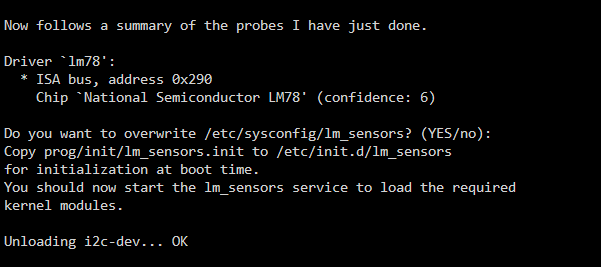
Wie kann ich es für die pci bridge machen?Nur hab ich die Antwort darauf nicht verstanden 😖Ja das wäre dann so? sudo setpci -s 04:0d.0 0x80.B=0x42 nur wo bekomme ich die 0x80 her? Keine Ahnung ob die stimmt.Hallo, vieleicht kann mir jemand helfen? Hab mit dem Plugin AutoTweak vieles auf ASPM L1 Enabled bekommen ist sind nur noch diese Geräte nicht Enabled. Bokommt man die noch überredet? 00:02.1 PCI bridge: Advanced Micro Devices, Inc. [AMD] Phoenix GPP Bridge (prog-if 00 [Normal decode]) Flags: PMEClk- DSI- D1- D2- AuxCurrent=0mA PME(D0+,D1-,D2-,D3hot+,D3cold+) Status: D0 NoSoftRst- PME-Enable- DSel=0 DScale=0 PME- Capabilities: Port #0, Speed 16GT/s, Width x4, ASPM L1, Exit Latency L1 <32us Settings: ASPM Disabled; RCB 64 bytes, LnkDisable- CommClk+ Status: Speed 8GT/s, Width x4 ASPM Capabilities: PCI-PM_L1.2- PCI-PM_L1.1+ ASPM_L1.2- ASPM_L1.1- L1_PM_Substates+ ASPM Settings: PCI-PM_L1.2- PCI-PM_L1.1- ASPM_L1.2- ASPM_L1.1- 03:00.0 PCI bridge: Advanced Micro Devices, Inc. [AMD] 600 Series Chipset PCIe Switch Upstream Port (rev 01) (prog-if 00 [Normal decode]) Flags: PMEClk- DSI+ D1- D2- AuxCurrent=0mA PME(D0+,D1-,D2-,D3hot+,D3cold+) Status: D0 NoSoftRst- PME-Enable- DSel=0 DScale=0 PME- Capabilities: Port #0, Speed 8GT/s, Width x4, ASPM L1, Exit Latency L1 <32us Settings: ASPM Disabled; LnkDisable- CommClk+ Status: Speed 8GT/s, Width x4 ASPM Capabilities: PCI-PM_L1.2+ PCI-PM_L1.1+ ASPM_L1.2+ ASPM_L1.1+ L1_PM_Substates+ ASPM Settings: PCI-PM_L1.2- PCI-PM_L1.1- ASPM_L1.2- ASPM_L1.1- 04:01.0 PCI bridge: Advanced Micro Devices, Inc. [AMD] 600 Series Chipset PCIe Switch Downstream Port (rev 01) (prog-if 00 [Normal decode]) Flags: PMEClk- DSI+ D1- D2- AuxCurrent=0mA PME(D0+,D1-,D2-,D3hot+,D3cold+) Status: D3 NoSoftRst- PME-Enable+ DSel=0 DScale=0 PME- Capabilities: Port #1, Speed 8GT/s, Width x1, ASPM L1, Exit Latency L1 <32us Settings: ASPM Disabled; LnkDisable- CommClk- Status: Speed 2.5GT/s, Width x1 ASPM Capabilities: PCI-PM_L1.2+ PCI-PM_L1.1+ ASPM_L1.2+ ASPM_L1.1+ L1_PM_Substates+ ASPM Settings: PCI-PM_L1.2- PCI-PM_L1.1- ASPM_L1.2- ASPM_L1.1- 04:0c.0 PCI bridge: Advanced Micro Devices, Inc. [AMD] 600 Series Chipset PCIe Switch Downstream Port (rev 01) (prog-if 00 [Normal decode]) Flags: PMEClk- DSI+ D1- D2- AuxCurrent=0mA PME(D0+,D1-,D2-,D3hot+,D3cold+) Status: D0 NoSoftRst+ PME-Enable- DSel=0 DScale=0 PME- Capabilities: Port #12, Speed 2.5GT/s, Width x1, ASPM L0s L1, Exit Latency L0s <64ns, L1 <1us Settings: ASPM Disabled; LnkDisable- CommClk+ Status: Speed 2.5GT/s, Width x1 04:0d.0 PCI bridge: Advanced Micro Devices, Inc. [AMD] 600 Series Chipset PCIe Switch Downstream Port (rev 01) (prog-if 00 [Normal decode]) Flags: PMEClk- DSI+ D1- D2- AuxCurrent=0mA PME(D0+,D1-,D2-,D3hot+,D3cold+) Status: D0 NoSoftRst+ PME-Enable- DSel=0 DScale=0 PME- Capabilities: Port #13, Speed 2.5GT/s, Width x1, ASPM L0s L1, Exit Latency L0s <64ns, L1 <1us Settings: ASPM Disabled; LnkDisable- CommClk+ Status: Speed 2.5GT/s, Width x1Hallo Leute, wie im Betreff werden endlich meine Lüfter erkannt. nur nicht alle oder besser gesagt bei dem ganzen rumprobiere sind mir welche abhanden gekommen. Da dachte ich ich lösche mal Treiber (ITE IT87 Driver u. Nuvoton NCT6687 Driver) und die Dynamix Plugins (Temp u. Fun) Restart Unraid Alles wieder instalieren und Restart Unraid Also nun hat Unraid keine Lüfter meht gefunden. Auch nicht wenn ich sensors-detect ausgefürt habe. Aber was haben wir gelernt Backup also schnell unraid 6 auf den Stick und nochmal das Update auf 7. Alle Lüter wieder da bis zum Rum probieren. Nun ohne Treiber und Plugins zu löschen weiter. sensors-detect würft mir das aus: Sensor also gefunden nicht wie in unraid 6 aber nur nach update wenn ich wieder die plugin und treiber lösche und neu instaliere, wird nichts gefunden.
 Danke das hat geholfen.das hat erstmal ein wenig geholfen danke. aber der verbrauch ist tretzdem noch 10W höher wie vorher. Aber den Govner kann ich nicht umstellen. wie speichert man die Einstellung in Corfreq?Hallo zusammen, hab gerade auf Unraid 7 umgestellt. Es wird nun der AMD Pstate dreiber wohl direckt geladen. Das problem ist das ich das auf unraid 6 schon probiert haben und der Stromverbrauch viel höher ist. Kann ich den normal Treiber laden ich glaube da hat unraid immer diesen genommen. ACPI tower-diagnostics-20241204-1243.zipHello, can I also mine BTC with the miner? I'm mining, so far, using a Windows VM with my own ckpoolHi wie bekomme ich diesen p8 wieder gekillt?Alles gut ich weiß was du meinst das es deine Zeit ist. Ich weiß jetzt nicht was ich von dir nicht beantwortet hab aber wenn ich sehe das etwas was ich versuchen soll oder rückgängig machen soll was ich mir irgendwo erlesen habe und es hinter her nur schlechter wird wie besser. Was soll ich da machen? Soweit ist ja alles gelaufen und das die Grafikkarte in meinem System immer wärmer wird und der Verbrauch hoch geht war offensichtlich. Da die Grafikkarte gebraucht gekauft wurde und ich diese bis jetzt noch nicht mal unter last getestet habe kann es durchaus nur an der Karte liegen. vielleicht liegt es auch am Treiber. Jetzt muss es erst mal so gehen und ich muss sehen wenn ich zeit hab mich nochmal damit zu beschäftigen.Wo kann ich mich hierzu einlesen was du hier gemacht hast? Ist ja schon ersichtlich das ich von diesen Sachen keine Ahnung habe. Aber wenn man wissen und verstehen will was andere hier machen gebe ich dir völlig recht muss man sich einlesen. Aber wo und was brauch ich genau?Ich hab es jetzt erstmal mit dem Lüfter eingerichtet und der Verbrauch ist erstmal wieder sichtlich runter gegangen.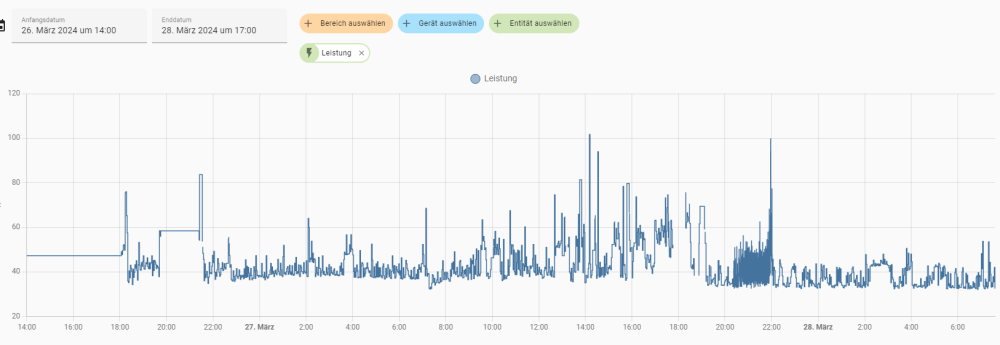
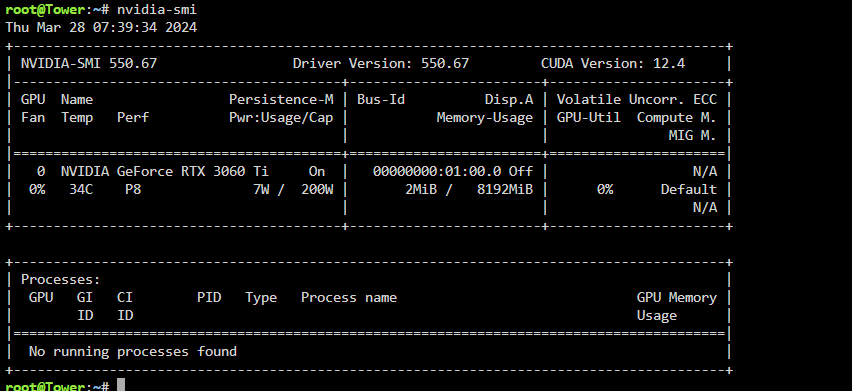 Hi, danke für deine Impressionen und auch danke für die viele Hilfe. Ich werde mir das mal anschauen bei Gelegenheit.Ja wird wohl so werden. Eine Idee hab ich noch kann man dein Skript oben auch nach der Temperatur im Sleep umschreiben?Da das Problem ja nicht behoben ist kann ich wieder den Lüfter einbauen oder gibt es eine Möglichkeit die Grafikkarten Lüfter einfach langsam drehen zu lassen?Hab die Daten in der GO reaktiviert jetzt läuft es wieder auch die Weboberfläche hat keine Aussetzer mehr. Bis jetzt ist die NVME auch noch nicht wieder gedroppt. tower-diagnostics-20240327-1335.zipMusste nun den Server per ssh neustarten die Weboberfläche war nicht mehr erreichbar. Zuvor hab ich im powertop alles was ging auf good gesetzt. Ich bin langsam am verzweifeln. bis ich gestern alles rausgenommen hab lief die Kiste und es gab nur das Problem mit der Grafikkarte die immer wärmer wird und mehr Strom zieht.So und schon ist sie wieder raus. tower-diagnostics-20240327-1045.zip Also mit Auto tune hate es nichts zu tun




