





Syrincs
Members
-
Joined
-
Last visited
Everything posted by Syrincs
-
Hi hab da gleich noch mal ne Frage zu der Grafikkarte. Die Karte Läuft und wie es aussieht nimmt Unraid diese nun für Plex, da ich sie in Stromsparmodus versetzt habe lief gestern die Serie meine Frau nur mit komischen Bild Wie erreiche ich das Unraid die Karte nur für die VM nimmt und sonnst auf die Grafik des Prozessors zugreift?
-
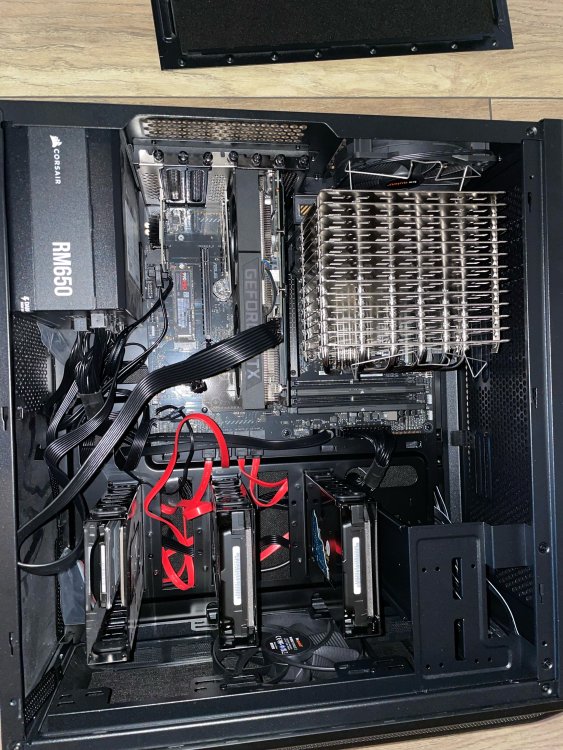
Hab den Kühler einmal rum gedreht und nun passt das auch mit der Grafikkarte im ersten Slot. Gesendet von iPhone mit Tapatalk
-
Nun Ja ich dachte das reicht aber seid dem ich mehr Leistung hab gibt's auch immer weiter Ideen. Damit reichen dann die Anschluss Möglichkeiten doch nicht mehr. Für das was ich wollte hätte es gereicht.
-
Hi, ja in den x1 Slots sind einmal die SSD für die VM und im anderen ASM1064 mit zwei hdd´s. Irgendwie hab ich auch noch mehr Ideen und ich glaube das das Board doch nicht dazu passt wollte doch auch noch eine TV Karte einbauen
-
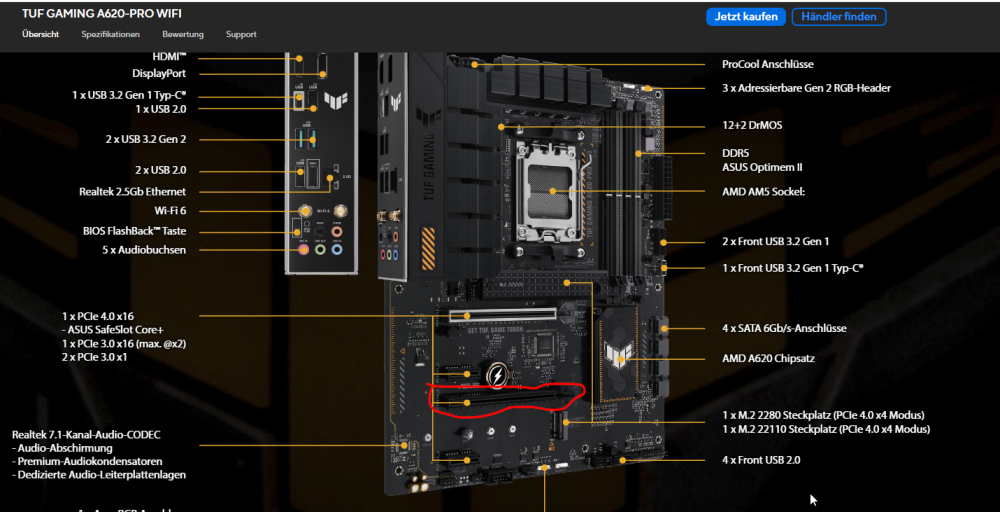
Hi, hab die Karte in diesem Slot da sie in den Oberen nicht rein gepasst hat da der Passive Kühler zu groß ist. Stromanschluss ist angeschlossen. Bios Einstellungen muss ich Prüfen wenn ich zuhause bin.
-
Hier bitte schön. tower-diagnostics-20240319-0945.zip
-
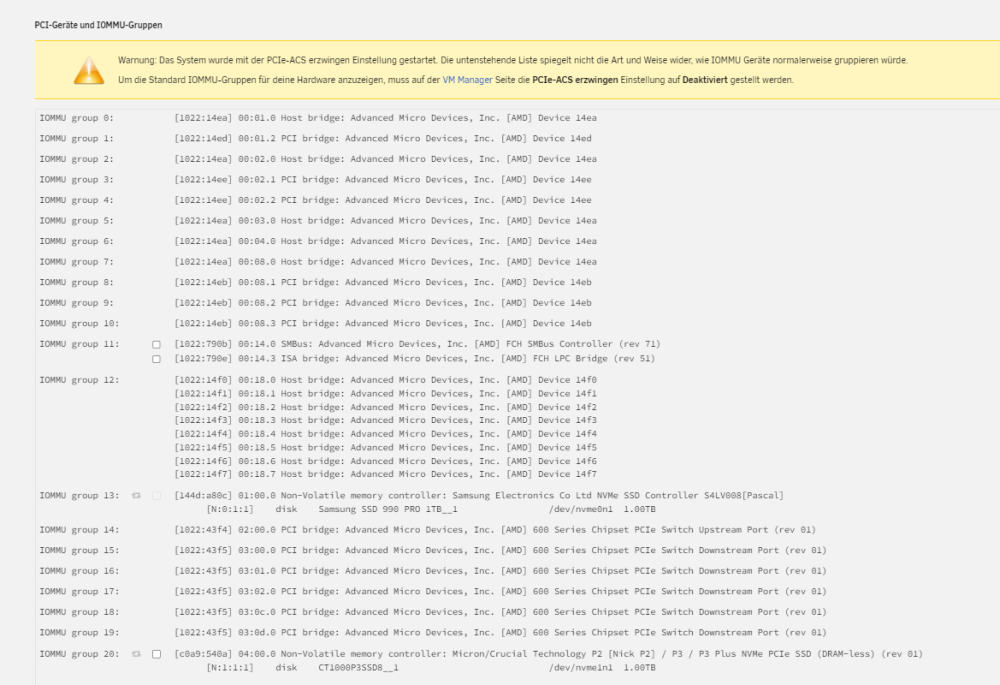
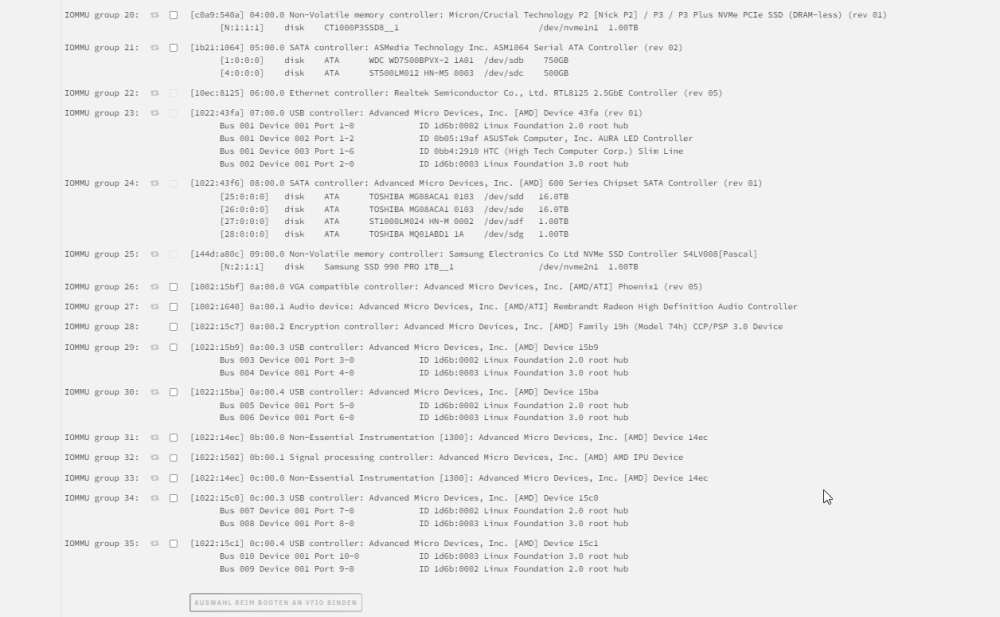
Hallo, ich hab gestern eine RTX 3060 TI eingebaut leider wird diese nicht angezeigt. Ich bin auch noch nicht dazu zu kommen einen Monitor an den Server zu klemmen. Aber es sollte doch die Grafikkarte anzeigen? Hat einer eine Idee?
-
Hab es hin bekommen! hab im Geräte-Maneger die Treiber für die nicht erkannten Geräte einfach per Vitro Laufwerk einzeln suchen lassen. Und schon gehts.
-
Hallo zusammen, meine Win 11 Enterprice VM läuft erstmal. Nun meine Frage. Hat jemand die Win 11 enterprise multi-session zum laufen gebracht da funktionieren die Treiber bei mir nicht. Bzw. bekomme ich keine Netzwerk Verbindung.
-
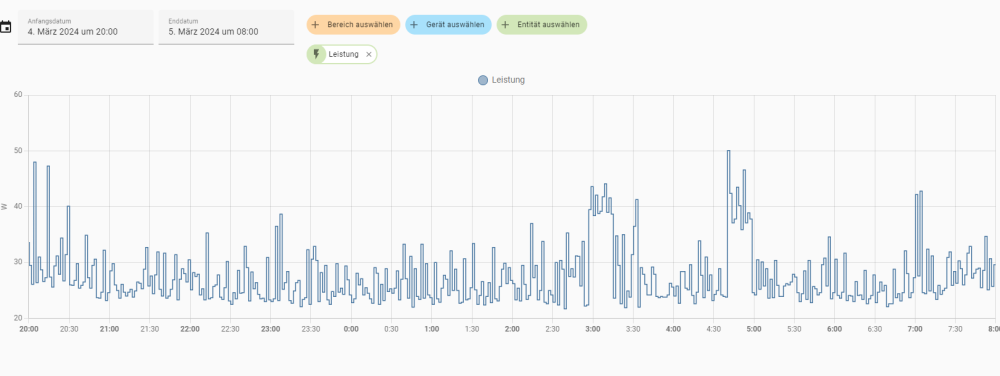
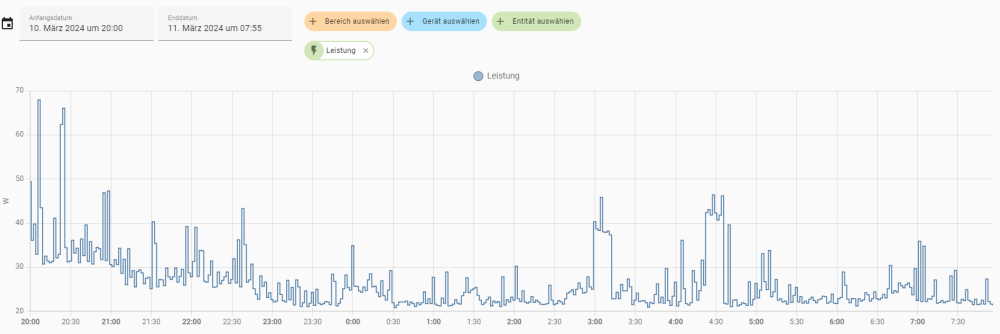
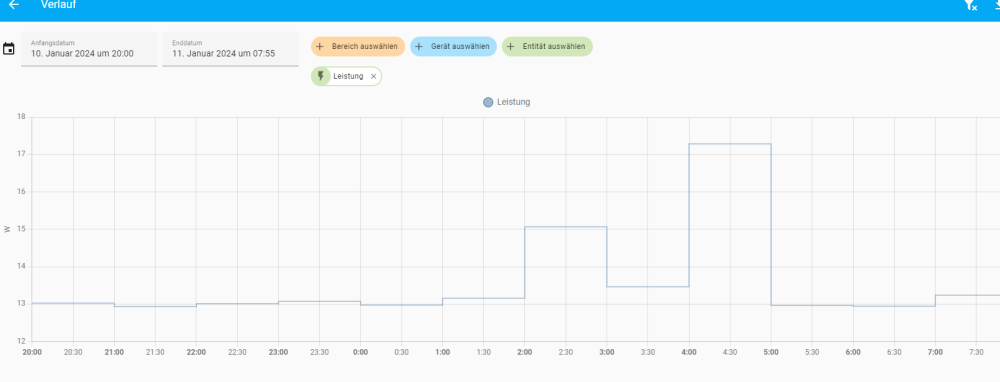
So ich hab nochmal das Bios zurück gesetzt von meine Board und nicht viel geändert außer Global C Stats angeschaltet. Und der Stromverbrach ist nochmal gesunken. erst nun so nun muss ich nur noch meine Docker die immer laufen so einstellen das die ihre arbeits lieber am tag erledigen wenn die Sonne scheint. Dann hab ich mit meinem neuen Server erheblich mehr Leistung zu meinem J5040 von vorher mit ca 10 W mehr im Idell. Damit kann ich leben. J5040
-
Alles gut, ich bin wenn die hdd schlafen mit meiner hartware mit den 2 ssd und einer ssd im pcie bei laufenden docker und Home Assistant vm bei schwankenden 22,7 bis 32 Watt. Wenn ich mal Zeit hab werde ich das was du sagtest mal durchtesten. Ansonsten hab ich nichts gegen deine konstruktiven Kritik. Das Problem ist das ich die meiste Zeit auf Arbeit habe und da nichts abstecken kann am Server 🫠 darum lese ich ja viel und weil ich nicht die meiste Ahnung habe frag ich ebend viel [emoji28] Gesendet von iPhone mit Tapatalk
-
Das könnte daran liegen das die deaktiviert sind die usb. Bei den andern habe ich keine Ahnung wieso [emoji37] Gesendet von iPhone mit Tapatalk
-
War vielleicht falsch formuliert so sollte es Aussehen wenn Stromsparen geht? (prog-if 02 [NVM Express]) LnkCap: Port #0, Speed 16GT/s, Width x4, ASPM L1, Exit Latency L1 <64us LnkCtl: ASPM L1 Enabled; RCB 64 bytes, Disabled- CommClk+ und so nicht? 0d:00.4 USB controller: Advanced Micro Devices, Inc. [AMD] Device 15c1 (prog-if 30 [XHCI]) LnkCap: Port #0, Speed 16GT/s, Width x16, ASPM L0s L1, Exit Latency L0s <64ns, L1 <1us LnkCtl: ASPM Disabled; RCB 64 bytes, Disabled- CommClk+
-
Hallo Leute, kann mir jemand sagen welcher Punkt hier bei den ASPM Sachen nicht stimmt. ~# lspci -vv | awk '/ASPM/{print $0}' RS= | grep --color -P '(^[a-z0-9:.]+|ASPM )' 00:01.1 PCI bridge: Advanced Micro Devices, Inc. [AMD] Device 14ed (prog-if 00 [Normal decode]) LnkCap: Port #247, Speed 16GT/s, Width x8, ASPM L1, Exit Latency L1 <64us LnkCtl: ASPM Disabled; RCB 64 bytes, Disabled- CommClk- 00:01.2 PCI bridge: Advanced Micro Devices, Inc. [AMD] Device 14ed (prog-if 00 [Normal decode]) LnkCap: Port #1, Speed 16GT/s, Width x4, ASPM L1, Exit Latency L1 <64us LnkCtl: ASPM L1 Enabled; RCB 64 bytes, Disabled- CommClk+ 00:02.1 PCI bridge: Advanced Micro Devices, Inc. [AMD] Device 14ee (prog-if 00 [Normal decode]) LnkCap: Port #0, Speed 16GT/s, Width x4, ASPM L1, Exit Latency L1 <32us LnkCtl: ASPM Disabled; RCB 64 bytes, Disabled- CommClk+ 00:02.2 PCI bridge: Advanced Micro Devices, Inc. [AMD] Device 14ee (prog-if 00 [Normal decode]) LnkCap: Port #1, Speed 16GT/s, Width x4, ASPM L1, Exit Latency L1 <64us LnkCtl: ASPM L1 Enabled; RCB 64 bytes, Disabled- CommClk+ 00:08.1 PCI bridge: Advanced Micro Devices, Inc. [AMD] Device 14eb (prog-if 00 [Normal decode]) LnkCap: Port #0, Speed 16GT/s, Width x16, ASPM L0s L1, Exit Latency L0s <64ns, L1 <1us LnkCtl: ASPM L0s L1 Enabled; RCB 64 bytes, Disabled- CommClk+ 00:08.2 PCI bridge: Advanced Micro Devices, Inc. [AMD] Device 14eb (prog-if 00 [Normal decode]) LnkCap: Port #0, Speed 16GT/s, Width x16, ASPM L0s L1, Exit Latency L0s <64ns, L1 <1us LnkCtl: ASPM Disabled; RCB 64 bytes, Disabled- CommClk+ 00:08.3 PCI bridge: Advanced Micro Devices, Inc. [AMD] Device 14eb (prog-if 00 [Normal decode]) LnkCap: Port #0, Speed 16GT/s, Width x16, ASPM L0s L1, Exit Latency L0s <64ns, L1 <1us LnkCtl: ASPM Disabled; RCB 64 bytes, Disabled- CommClk+ 02:00.0 Non-Volatile memory controller: Samsung Electronics Co Ltd NVMe SSD Controller S4LV008[Pascal] (prog-if 02 [NVM Express]) LnkCap: Port #0, Speed 16GT/s, Width x4, ASPM L1, Exit Latency L1 <64us LnkCtl: ASPM L1 Enabled; RCB 64 bytes, Disabled- CommClk+ 03:00.0 PCI bridge: Advanced Micro Devices, Inc. [AMD] 600 Series Chipset PCIe Switch Upstream Port (rev 01) (prog-if 00 [Normal decode]) LnkCap: Port #0, Speed 8GT/s, Width x4, ASPM L1, Exit Latency L1 <32us LnkCtl: ASPM Disabled; Disabled- CommClk+ 04:00.0 PCI bridge: Advanced Micro Devices, Inc. [AMD] 600 Series Chipset PCIe Switch Downstream Port (rev 01) (prog-if 00 [Normal decode]) LnkCap: Port #0, Speed 8GT/s, Width x1, ASPM L1, Exit Latency L1 <32us LnkCtl: ASPM L1 Enabled; Disabled- CommClk+ 04:01.0 PCI bridge: Advanced Micro Devices, Inc. [AMD] 600 Series Chipset PCIe Switch Downstream Port (rev 01) (prog-if 00 [Normal decode]) LnkCap: Port #1, Speed 8GT/s, Width x1, ASPM L1, Exit Latency L1 <32us LnkCtl: ASPM L1 Enabled; Disabled- CommClk+ 04:02.0 PCI bridge: Advanced Micro Devices, Inc. [AMD] 600 Series Chipset PCIe Switch Downstream Port (rev 01) (prog-if 00 [Normal decode]) LnkCap: Port #2, Speed 8GT/s, Width x1, ASPM L1, Exit Latency L1 <32us LnkCtl: ASPM Disabled; Disabled- CommClk+ 04:0c.0 PCI bridge: Advanced Micro Devices, Inc. [AMD] 600 Series Chipset PCIe Switch Downstream Port (rev 01) (prog-if 00 [Normal decode]) LnkCap: Port #12, Speed 2.5GT/s, Width x1, ASPM L0s L1, Exit Latency L0s <64ns, L1 <1us LnkCtl: ASPM Disabled; Disabled- CommClk+ 04:0d.0 PCI bridge: Advanced Micro Devices, Inc. [AMD] 600 Series Chipset PCIe Switch Downstream Port (rev 01) (prog-if 00 [Normal decode]) LnkCap: Port #13, Speed 2.5GT/s, Width x1, ASPM L0s L1, Exit Latency L0s <64ns, L1 <1us LnkCtl: ASPM Disabled; Disabled- CommClk+ pcilib: sysfs_read_vpd: read failed: No such device 05:00.0 Non-Volatile memory controller: Micron/Crucial Technology P2 [Nick P2] / P3 / P3 Plus NVMe PCIe SSD (DRAM-less) (rev 01) (prog-if 02 [NVM Express]) LnkCap: Port #1, Speed 8GT/s, Width x4, ASPM L1, Exit Latency L1 unlimited LnkCtl: ASPM L1 Enabled; RCB 64 bytes, Disabled- CommClk+ 06:00.0 SATA controller: ASMedia Technology Inc. ASM1064 Serial ATA Controller (rev 02) (prog-if 01 [AHCI 1.0]) LnkCap: Port #0, Speed 8GT/s, Width x1, ASPM L0s L1, Exit Latency L0s <4us, L1 <64us LnkCtl: ASPM L1 Enabled; RCB 64 bytes, Disabled- CommClk+ 07:00.0 Ethernet controller: Realtek Semiconductor Co., Ltd. RTL8125 2.5GbE Controller (rev 05) LnkCap: Port #0, Speed 5GT/s, Width x1, ASPM L0s L1, Exit Latency L0s unlimited, L1 <64us LnkCtl: ASPM Disabled; RCB 64 bytes, Disabled- CommClk+ 08:00.0 USB controller: Advanced Micro Devices, Inc. [AMD] Device 43fa (rev 01) (prog-if 30 [XHCI]) LnkCap: Port #0, Speed 2.5GT/s, Width x1, ASPM L0s L1, Exit Latency L0s <4us, L1 <64us LnkCtl: ASPM L0s Enabled; RCB 64 bytes, Disabled- CommClk+ 09:00.0 SATA controller: Advanced Micro Devices, Inc. [AMD] 600 Series Chipset SATA Controller (rev 01) (prog-if 01 [AHCI 1.0]) LnkCap: Port #0, Speed 2.5GT/s, Width x1, ASPM L0s L1, Exit Latency L0s <4us, L1 <64us LnkCtl: ASPM L0s Enabled; RCB 64 bytes, Disabled- CommClk+ 0a:00.0 Non-Volatile memory controller: Samsung Electronics Co Ltd NVMe SSD Controller S4LV008[Pascal] (prog-if 02 [NVM Express]) LnkCap: Port #0, Speed 16GT/s, Width x4, ASPM L1, Exit Latency L1 <64us LnkCtl: ASPM L1 Enabled; RCB 64 bytes, Disabled- CommClk+ 0b:00.0 VGA compatible controller: Advanced Micro Devices, Inc. [AMD/ATI] Phoenix1 (rev 05) (prog-if 00 [VGA controller]) LnkCap: Port #0, Speed 16GT/s, Width x16, ASPM L0s L1, Exit Latency L0s <64ns, L1 <1us LnkCtl: ASPM L0s L1 Enabled; RCB 64 bytes, Disabled- CommClk+ 0b:00.1 Audio device: Advanced Micro Devices, Inc. [AMD/ATI] Rembrandt Radeon High Definition Audio Controller LnkCap: Port #0, Speed 16GT/s, Width x16, ASPM L0s L1, Exit Latency L0s <64ns, L1 <1us LnkCtl: ASPM L0s L1 Enabled; RCB 64 bytes, Disabled- CommClk+ 0b:00.2 Encryption controller: Advanced Micro Devices, Inc. [AMD] Family 19h (Model 74h) CCP/PSP 3.0 Device LnkCap: Port #0, Speed 16GT/s, Width x16, ASPM L0s L1, Exit Latency L0s <64ns, L1 <1us LnkCtl: ASPM L0s L1 Enabled; RCB 64 bytes, Disabled- CommClk+ 0b:00.3 USB controller: Advanced Micro Devices, Inc. [AMD] Device 15b9 (prog-if 30 [XHCI]) LnkCap: Port #0, Speed 16GT/s, Width x16, ASPM L0s L1, Exit Latency L0s <64ns, L1 <1us LnkCtl: ASPM L0s L1 Enabled; RCB 64 bytes, Disabled- CommClk+ 0b:00.4 USB controller: Advanced Micro Devices, Inc. [AMD] Device 15ba (prog-if 30 [XHCI]) LnkCap: Port #0, Speed 16GT/s, Width x16, ASPM L0s L1, Exit Latency L0s <64ns, L1 <1us LnkCtl: ASPM L0s L1 Enabled; RCB 64 bytes, Disabled- CommClk+ 0c:00.0 Non-Essential Instrumentation [1300]: Advanced Micro Devices, Inc. [AMD] Device 14ec LnkCap: Port #0, Speed 16GT/s, Width x16, ASPM L0s L1, Exit Latency L0s <64ns, L1 <1us LnkCtl: ASPM Disabled; RCB 64 bytes, Disabled- CommClk+ 0c:00.1 Signal processing controller: Advanced Micro Devices, Inc. [AMD] AMD IPU Device LnkCap: Port #0, Speed 16GT/s, Width x16, ASPM L0s L1, Exit Latency L0s <64ns, L1 <1us LnkCtl: ASPM Disabled; RCB 64 bytes, Disabled- CommClk+ 0d:00.0 Non-Essential Instrumentation [1300]: Advanced Micro Devices, Inc. [AMD] Device 14ec LnkCap: Port #0, Speed 16GT/s, Width x16, ASPM L0s L1, Exit Latency L0s <64ns, L1 <1us LnkCtl: ASPM Disabled; RCB 64 bytes, Disabled- CommClk+ 0d:00.3 USB controller: Advanced Micro Devices, Inc. [AMD] Device 15c0 (prog-if 30 [XHCI]) LnkCap: Port #0, Speed 16GT/s, Width x16, ASPM L0s L1, Exit Latency L0s <64ns, L1 <1us LnkCtl: ASPM Disabled; RCB 64 bytes, Disabled- CommClk+ 0d:00.4 USB controller: Advanced Micro Devices, Inc. [AMD] Device 15c1 (prog-if 30 [XHCI]) LnkCap: Port #0, Speed 16GT/s, Width x16, ASPM L0s L1, Exit Latency L0s <64ns, L1 <1us LnkCtl: ASPM Disabled; RCB 64 bytes, Disabled- CommClk+
-
Ok danke, dass hat funktioniert. kann man das auch automatisch ändern wen ich meine VM starte? Die läuft nicht Permanent zur Zeit.
-
Was steht für was i 0 wäre Kern 1 und da da hinter? Bei dir i12 und dann 18. verstehe ich noch nicht? Gesendet von iPhone mit Tapatalk
-
Das geht auch bei den amd CPUs? Gesendet von iPhone mit Tapatalk
-
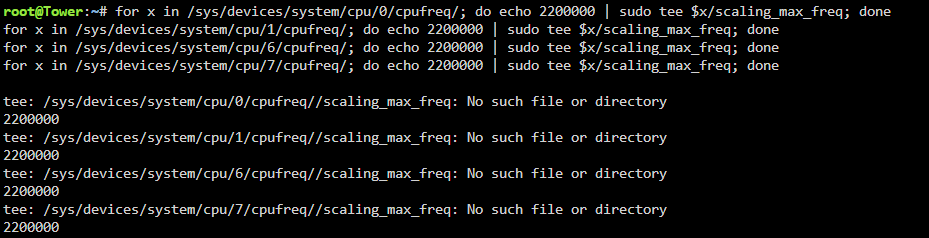
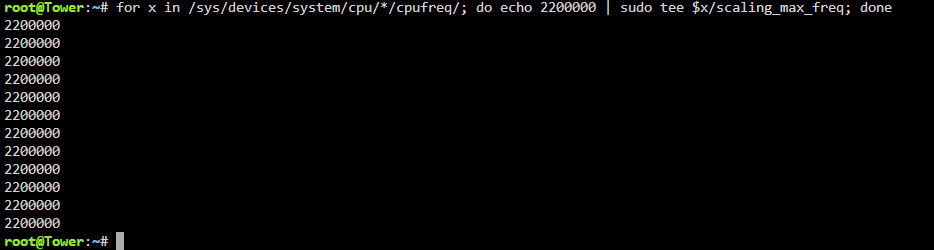
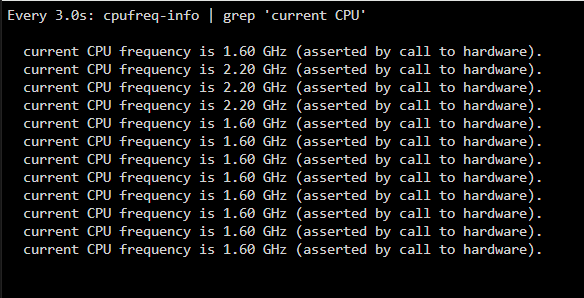
mit dem Stern für alle Kerne funktioniert es. für die einzelnen kerne kommt immer ein Fehler.
-
Danke das hat mir den richtigen tip gegeben hab die zwei Einträge einfach entfernt.
-
Wenn ich das noch wüsste was ich da damals eingetragen habe. Nach dem neu installieren habe ich da garnichts eingetragen. Gesendet von iPhone mit Tapatalk
-
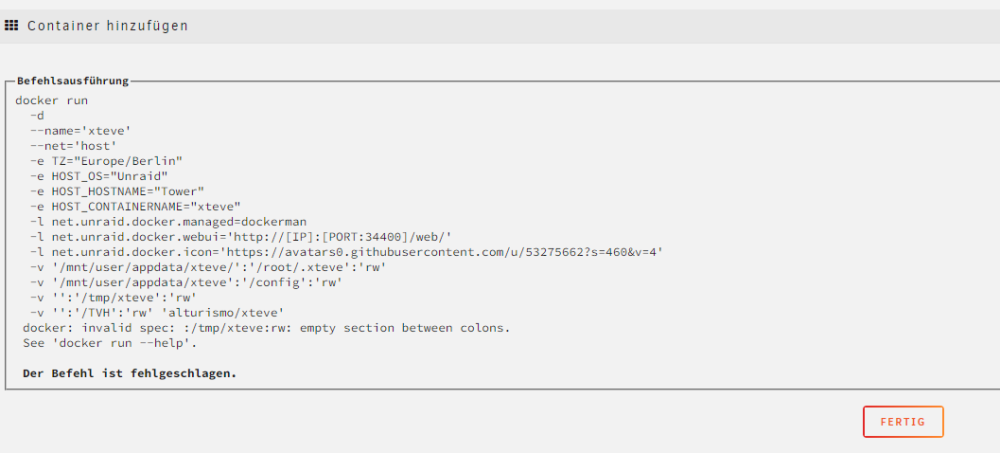
Hallo Leute bei meinem ganzen rum Probiere hab ich mir mein xteve docker wohl kaputt gemacht. er läst sich auch nicht neu instalieren. Ht jemand eine Lösung für mich?
-
Ok das versuch ich mal. wenn ich das dann in die go schreibe ist es bei jedem start aktiv?
-
Hallo zusammen, wie kann ich bei einzelnen Kernen das Maximum festlegen?
-
Hallo, kann ich meinen Ryzen 8600g iGPU für Docker und VM gleichzeitig nutzen?
-
So jetzt hab ich mal den Treiber Installiert (RTL8125 Drivers) damit kann ich noch mal 1,5-2W sparen nur lädt dann die Webgui wieder die Übersicht extrem langsam




