





Kation
Members
-
Joined
-
Last visited
-
No, still have this issue until 7.0.
-
It's a big trouble to recreate every container if docker broken. So use a command line from a txt file is easy to recreate. And I use a custom plugin to create a network, it never show in template dropdown list. And this plugin has a bug case docker hangs while starting if any container use --restart=unless-stopped
-
We need auto start configuration for 3rd Party container.
-
It's WebGUI's nginx, what relations with docker?
-
@MAM59 I ask friend who have 6.11.5 unraid. He disconnect pppoe and reconnect again to get new prefix. I can access his new address and old address. I did same operations but he can't access my new address. Use ifconfig I can see adapter get new IPv6 address. But nginx still listen old IPv6 address.
-
Unrad OS:6.12.4 I'm use SLAAC to get IPv6 address. Sometimes I need to reboot my route then IPv6 prefix will change. Unraid will get new IPv6 address and I can ping to it. But look at network in WebGUI, it's still show old IPv6 address. And use netstat -tulpn to show listening address and port. It will show nginx listening old IPv6 address. Use /etc/rc.d/rc.nginx reload to restart nginx then I can access WebGUI with new IPv6 address. How can it automatically listen new IPv6 address?
-
I found a article that help me compile unraid kernel: https://gitlab.com/stefan99353/unraid-custom-kernel But I found that zfs module is missing. How to compile kernel include zfs module?
-
First, Unraid VM crashed. When operate VM actions, show "Hook script execution failed: internal error: Child process (LC_ALL=C PATH=/bin:/sbin:/usr/bin:/usr/sbin HOME=/ /etc/libvirt/hooks/qemu Kation-VM prepare begin -) unexpected exit status 126: libvirt: error : cannot execute binary /etc/libvirt/hooks/qemu: Input/output error" See 1535 diagnostics. Then reboot unraid. VM worked. But Docker start failed. Run ./rc.docker start then ./rc.docker status show stopped See 1645 diagnostics. I have facing this issue once and recover after reboot. But this time it can't. It's broken. kation-nas-diagnostics-20230602-1535.zip kation-nas-diagnostics-20230602-1645.zip
-
ksmbd included in linux kernal and it is faster than samba. Importance is that ksmbd support RDMA
-
I found that ksmbd is include in kernal and it support rdma. Does unraid support use ksmbd instead of samba?
-
I facing this issue again. This time, I create new docker directory. Copy subdirectory one by one to new docker directory. I found there is a container occurs error. Delete this container's directory in containers directory, docker start successfully. But I don't know why it can broken the docker.
-
I'm using directory mode, there is no image file. Is there must to clean all docker data?
-
It's begin while unraid os dead. No ping response. No screen output. When I reboot it. It's hangs on array start. I have to use `ps aux | grep docker` to find `/usr/bin/dockerd -p` and kill it. Array start successfully. But docker is down. Use `/etc/rc.d/rc.docker start` it shows `starting dockerd ...` and hangs until I kill it again. All UI about docker also hangs while docker starting. I had faced this situation once before. Then I change docker storage mode from img to directory and all docker data lost. This time I don't want to lost it again... kation-nas-diagnostics-20230211-1914.zip
-
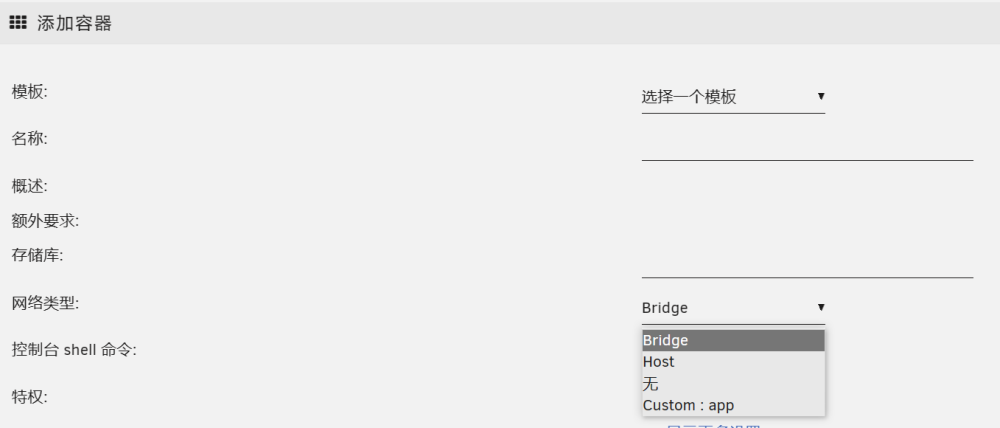
When I install https://github.com/devplayer0/docker-net-dhcp plugin I created a network but it does not show in docker ui network dropdown list. Network can use by docker run command.


-
Yes, I install it and it is working. I have not try boot unraid now.




