





boooch
Members
-
Joined
-
Last visited
Everything posted by boooch
-
A week of back an forth after the Post i finally got it to work, sort of. I start the Script now on my Remote NAS with only the read permission and the Rsync Container how suggested on the first Page. Now i can backup my data at full speed. But one Error is left. Can someone explain to me this Error? The Size of Bilder is around 27G and the Files are on the Remote NAS but markt as failed Backup sent 247.84K bytes received 27.59G bytes 4.99M bytes/sec total size is 27.59G speedup is 1.00 grep: : No such file or directory File count of rsync is 0 Error: rsync transferred less than 2 files! (Success: Backup of [email protected]:/mnt/user/Bilder was successfully created in /share/Backup_Disk2/20240620_105600 (0)!)! Grüße, Flo
-
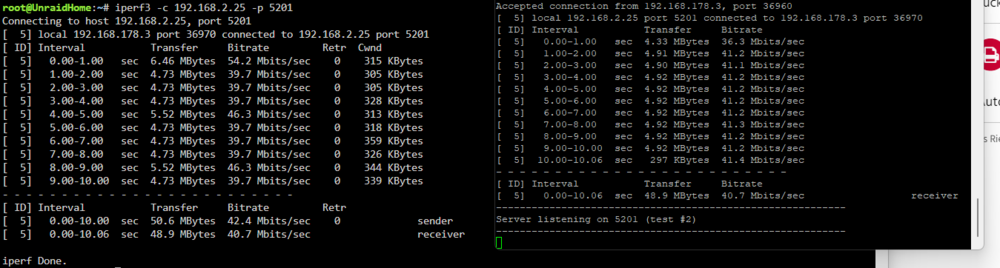
Hey Guys, first of all wonderful Script. I use this script to backup mine entiere unraid server. In my case Appdata, Disk 1&2&3. Lokaly on my Backup-Nas it worked without an issue. Since i moved the NAS to my sisters House i have some problems. Our two Houses are connected with Lan to Lan Connection over Wireguard (Fritzbox). I have tested the speeds from my Unraid Server to the NAS with iperf3 as shown. My Problem is when the script runs it drops significant in performance. Can someone explain to me where i can see the actual transferspeed of the script or some code i put into it for the log? Grüße, Flo
-
Same issue for me. No C-State below C3 after the Update. I got APSM working again after i installed the Realtek-Plugin, but no luck with the Powerconsumption. Idle now C3 ~21W , idle with 6.11.5 and C6 ~ 17W.
.thumb.png.af430a9561c8ba3439cab96de8ae4f08.png)
.png.badcbd4f20705f76aece67936116eb52.png)
-
Hi Folks, i had some Errors found in FCP. After a little bit of searching i found the Guide to replace my USB-Stick. Can someone confirm that I need to exchange the USB stick? Thanks unraidhome-diagnostics-20231102-1623.zip


.png.1086549a7942cdf86713f871a13b93c5.png)
.png.badcbd4f20705f76aece67936116eb52.png)

