





psychic99
Members
-
Joined
-
Last visited
Everything posted by psychic99
-
Ok. Thanks. I will wait for the next drop and logic fix. For the meantime I used unbalanced plugin to drain it to last me a few weeks. I will go manually update the share in config to keep it similar, these shares have been around for years so there is probably some junk left
-
I am having an issue w/ the new mover whereas I have a cache pool nvme_ssd_cache which is filled to 91% above the 85% that I have set and the mover doesn't do anything. There are 4 shares in this cache drive. I have three of them prefer or yes and they are below the 50% threshold, a vast majority of the files are in the Plex_Base share. The mover notices this share above threshold but in the end does not move down to 50%. Is this some logic issue here, or should I set all cache "sticky" shares (ones I want to stay on the SSD) to a singular setting. Thanks, Output https://pastebin.com/A2FW9w4q
-
There is a plugin called parity check tuning that will do what you want and you can then use the OG mover.
-
OK, I read through the code and figured it out after injecting some custom logging. The code only checks active shares, not passive ones so I had a passive directory (meaning not active) that was taking 400GB and the script was not calculating for it. Rather than try and fix I used the unbalance plugin to move the files off the then active share and repointed the share to the non-active cache and voila it is working now. So be aware if you have files in a cache drive and they are not active in the share definition but still under shfs the mover plugin will not account for files that are not listed in the active share. So for instance my active share was NVMe (cache)->array and I had files in the SSD cache (not active). The SSD cache was at 92% so it was not taking into account those files because it was only reading the active share config.
-
Thanks. I did say I didn't have any override and I started looking at the code (I thought maybe it was an easy fix). A few items: 1. Share override. If you have a share overrride the code injects a file with the share name in: /boot/config/plugins/ca.mover.tuning/shareOverrideConfig/$SHARENAME.cfg Since there are no files in here I would assume that that part of the code is working (as I have no share overrides) 2. The remove the files in the tmp suggestion won't work because with every run of the mover script it creates new files so its a runtime generation tmp file creation. 3. I could reinstall, but looking at the code, it is running the existing code base and I also ran it from the command line with the same issue so it would be isolated to the script not any of the plugin integration. 4. I am going to concentrate on the emit from the Filtered Files (which seems to be correct but I will doublecheck FS) and the Mover_action which emits "keep on primary" for 100% of the files (meaning nothing happens) Note: I am still on latest v6 so I cannot say if this is a v7 issue also.
-
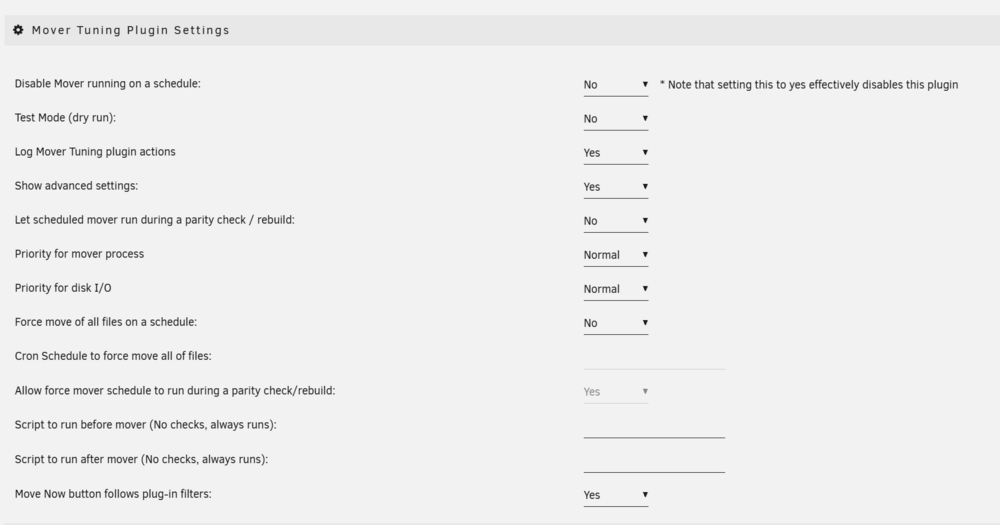
I checked, not in test mode:
-
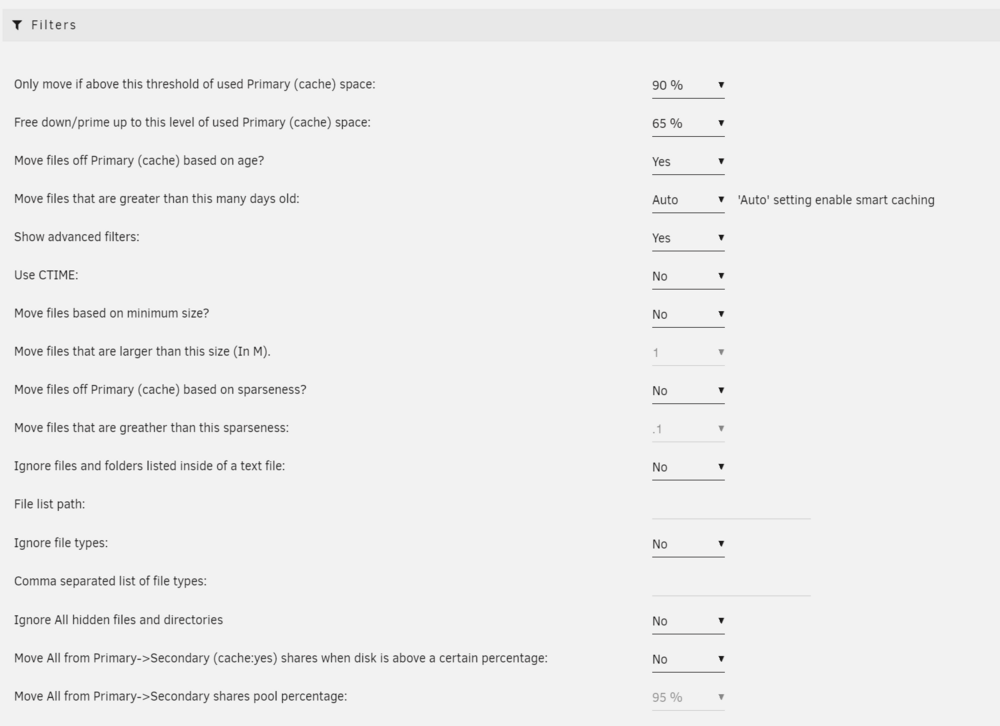
HI I have a situation where I am using the Reynald age_mover in 6.12.14 I have checked all shares no override. When the mover runs it finds that once of my primary cache is 92%, and says it will smart move old files from (cache) to user0, and says updating filtered file list. It completes and it moves nothing. If I go into the Mover_action file it says "keep on primary" for all the files and hence moves nothing. This is a tad of a problem because my primary cache is now 92% and I don't want to evacuate 2TB of files like the old mover did. How do I fix, thx. Example from one of the shares: 18:48:48.991 ----------------------------------------------------------- Processing utilities share ---------------------------------------------------------- 18:48:49.013 Primary storage: sata_ssd_cache - size: 1.9TiB - used: 92 % (1.7TiB) 18:48:49.015 Secondary storage: user0 18:48:49.021 Share Information: Name: utilities - Path: /mnt/sata_ssd_cache/utilities 18:48:49.027 Moving threshold: 90% (1.7TiB) ; Freeing threshold: 65% (1.2TiB) 18:48:49.029 Mover action: sata_ssd_cache->user0 (cache:yes). Pool is above moving threshold percentage: 92% >= 90%. 18:48:49.032 => Will smart move old files from sata_ssd_cache to user0. Nothing will be moved from user0 to sata_ssd_cache 18:48:49.039 Updated Filtered filelist: /tmp/ca.mover.tuning/Filtered_files_2025-01-16T184845.list for utilities Settings for mover:
-
Seems like you can do everything in containers (there are containers for tailscale and bittorrent I use) so I would divest and use a container cluster and have unraid as the NAS. For the NAS portion your current hardware is more than capable-- an embedded board is more than enough. As for containers I use Rancher/Harvester using etcd in 3 node and you can scale them as needed.
-
I did a little digging and it seems that Maple Ridge or Goshen Ridge (TB4) controllers are supported as of mainline kernel 5.11: Source: https://www.phoronix.com/news/Intel-Maple-Ridge-Linux There is also a document which goes deep into TB: https://stderr.nl/Blog/Hardware/Thunderbolt/TechnologyOverview.html My box on 6.1-74. I assume 6.5 is coming because this is not an LTS kernel, but good luck. I have a TB3 NVMe and a laptop w/ TB3 I may try it out this weekend if I have some time.
-
I went into the kernel modules built in the latest unraid on my machine and here are the kernel modules compiled. You can also see the thunderbolt network service is there and the ko thunderbolt net module is also compiled in. In the case of this TB3 network adapter I don't know if it needs to load the net module or not, but it is there. You may have to load it manually though (if it is necessary). This would be interesting to see if it is actually plug and play. I have no USB4 ports to test. alias tbsvc:knetworkp00000001v*r* thunderbolt_net alias wmi:86CCFD48-205E-4A77-9C48-2021CBEDE341 intel_wmi_thunderbolt alias pci:v*d*sv*sd*bc0Csc03i40* thunderbolt LM in kernel driver: thunderbolt-net.ko.xz thunderbolt.ko.xz I am not sure USB4 is compiled into the kernel yet so the modprobe needs to know about the port and how to attach the module to it but I am unsure it will work w/ USB4 but probably a trad TB3 port. But that is conjecture because I didn't look at the kernel symbols and have no idea what the Mobo would report upon plug. With all of that said just because you CAN do it, if it's not supported by limewire then you will be on your own.
-
First question is do you need a 10 gig NIC, and the issue among other things is B-series may at best have a TB header but it still requires a MATCHED TB card which will cost hundreds. If you want 10 gig it will be cheaper to just buy a new Mobo (you should consider Z-series) in the future as it has general better connectivity OR there are some mobo out there that have native TB3 in the mid $250+ range. So money wise it is definitely better and for compatibility to upgrade the mobo first, I'm pretty sure you cannot use TB on this board in the config you have. You could consider a mITX which has dual 2.5 and you could bond them and use scalable CIFS if that is a reason, then of course there is upgrading your entire network apparatus. 5 Gig should be enough and if you need critical work consider direct connection first.
-
I have the DFI plugin working, and I also use luck backup to archive data off the array (which now has hash) which copies to a drive using the unassigned devices plugin. When the data gets copied over (using fuse) it archives the entire directories (cache and array) so this means newer files do not have hashes against them. What I want to do however is when they are archived to this mount point I would like to compare the hashes created w/ DFI plugin versus what has been archived for obvious reasons (if i need to restore I want a good copy!). 1. What method would recommend to do this (I am sure someone has done this) 2. Is there a reason why unassigned plugin mount points are excluded from the DFI (only disks in the array). I don't think what I am trying to accomplish is unique -- I suppose I could nix luck and go to something like rsync w/ checksum. Let me know what your thoughts are. I am simply trying to ensure what is archived is archived with 100% fidelity. BTW I also send most of this data to the cloud but the local disk is the first restore candidate. Thanks.



