





JakeInEurope
Members
-
Joined
-
Last visited
-
I fixed it by uninstalling UnRaid connect but here you go. My 2nd server (HP NL40) is running 7.0.1 and Connect is fine but does not run any Docker or VM's if that helps. nastower-diagnostics-20250509-1724.zip
-
Thanks. Yeah, its unraid connect. I tried logging out - in but that did not work. I had to remove it and all is well now. With that said I have 2 unraid servers, 1 is working fine with Connect (both are 7.0.1)
-
Seeing this too, V7.0.1
-
This worked fine. Thanks.
-
I will go ahead and try this method. All parts are in so the new build is starting! I will post back and let all know how it went.
-
Hi all. I am building a new server with new drives and motherboard. So i want to get everything setup on a new USB drive with a trial key and transfer all my data over from the old server. Once done, is there a way to transfer my old USB key to the new server USB drive? thanks.
-
The used cable I 1st swapped out from my spare parts box was bad. A brand new SATA cable, fixed it. Thanks all.
-
Hi all. Just replaced a failed drive and rebuild is running at 2 -4mb and I know thats just not right. I have swapped ports and to another SATA cable. Turned off all docker and VM's but still running slow. Any ideas? FYI: Its the main array that is having an issue. I know there is a missing mirrored pool drive. unraidmain-diagnostics-20240804-0759.zip
-
Still dont get why the server locked up though??? I guess the computer gods wanted a hard drive sacrifice? LOL
-
I am marking this as fixed. Server stayed up all night. I will post again if I run into another issue. Thanks @JorgeB
-
SATA cable fix it but on reboot I would do a SCRUB and it would find errors. Fixed them and rebooted and again needed a SCRUB and fixed errors again. Anyway... Ended swaping another old 250Gb SSD I had laying around and it rebuilt and that is running fine. On reboot SCRUB is clean. So mirrored set is back to normal. (And thats why we have mirrored drives ) Will watch out for lockup issues. Server has been running rock solid in the past not counting the power outages.
-
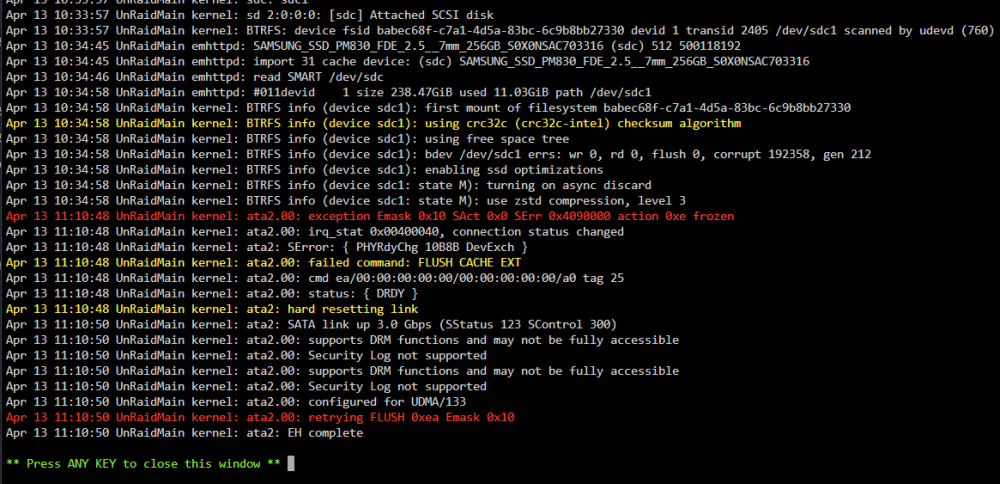
Hi all. Server was off line and locked up when I got up this morning. As I live in Ukraine with power that is up and down I just restarted the machine and updated to the latest version of Unraid as I had been planning on that anyway. So about 3 hours later it was locked up again. I checked and it looks like I have problems with a Pool device drive so thinking that needs to get replaced. (its a really really really old SSD but does pass the smart test) Do not really see how that could cause a lock up as its not part of any system files but just a mirrored pool I use to store files on. Anyway, does anyone see anything in my diags that look like a problem? '--- Drive that looks like it is dieing. unraidmain-diagnostics-20240413-1135.zip
-
Rebuilding now, Thanks to all!!!
-
As the drive is disabled how do i get it back in the array?
-
diag zip unraidmain-diagnostics-20240201-1736.zip

