





nunu22
Members
-
Joined
-
Last visited
Everything posted by nunu22
-
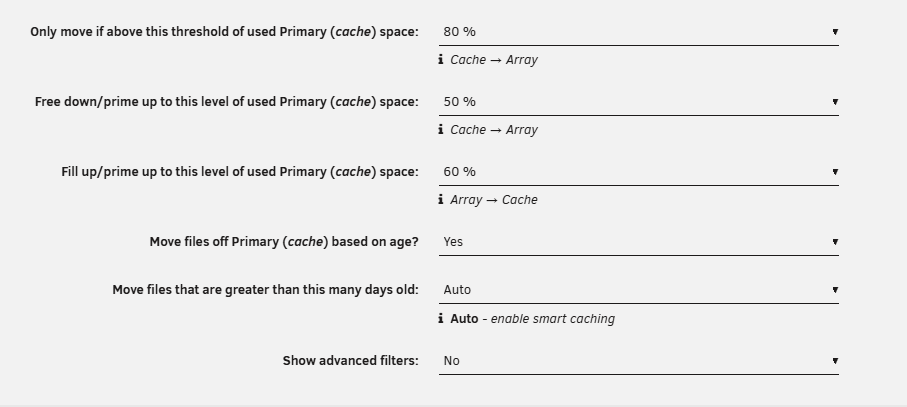
Hello everybody ! i'm facing issue with mover tuning: i'm above threshold, and no files are moved. configuration is quite standard: is there a way to have more information about, why nothing is moved (maybe i have missed something) ? regards

-
thanks !
-
Hello, I have a question about how Unraid handles uncorrectable read errors on a data disk. I recently saw the following SMART error on one of my HDDs: SMART Error: UNC (Uncorrectable Error) Error occurred during a normal read (READ FPDMA QUEUED) Specific LBA reported as unreadable My question is about Unraid’s behavior in this situation: When Unraid encounters an uncorrectable read error on a data disk: Does Unraid use parity to reconstruct the missing data in memory? Is the reconstructed data then written back to the same disk (potentially forcing sector reallocation)? Or is the disk only marked as having a read error without attempting a rewrite? Under what conditions will Unraid: Automatically reconstruct and rewrite the bad sector? Disable the disk? Leave the sector pending until a manual operation is done? regards.
-
Thanks for your answers. as my case is a jonsbo2, LRNV9547L-4 is too long. My other concern is about thermal in this case. there is no ventirad for air extraction, only a low profile one on CPU. So i'm hesitating with my initial idea ...
-
the pcie adaptors : Carte PCIe 3.0 x16 for 4 SSD M.2 NVMe (PLX PEX8747) has its own pcie switch. This should work ? My board has an intel H170 , bifurcation seems not be supported.
-
ok ... so i think i need to use a double face adaptors like this : i will be able to install 2x M2 MVME SSD and an other adptor like that : i don"t know if this could be reliable ...
-
arg .... this is NGFF https://www.startech.com/en-eu/cards-adapters/pexm2sat3422
-
hi, i thought about Something like That (2 sata ports and 2 NVME M2 slot): i don't need performance, but to avoid write on HDD and to get some images or shared directory on SSD. I don't know if this kind of adaptors has been used or tested with unraid. regards
-
Hello everybody, i have a minitx board withg 4 sata ports and a pcie <=> sata adaptors for my 7 sata HDDs. 5 HDDs and 2 SSD sata cache drive (2x 512 Go). I would like to increase cache size with 2 SSD of 4To. To get performance and be "futur proof", i would like to use 2 M2 nvme SSD. So i need a low profile pcie adaptors with 2 M2 slots and at least 1 Sata connector. Do you have any advice or recommandation ? regards
-
it seems that my cache has been flushed ???!! As it is base on "old age", is it possible that files with less that 1 day old, are not moved ?
-
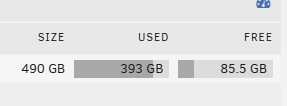
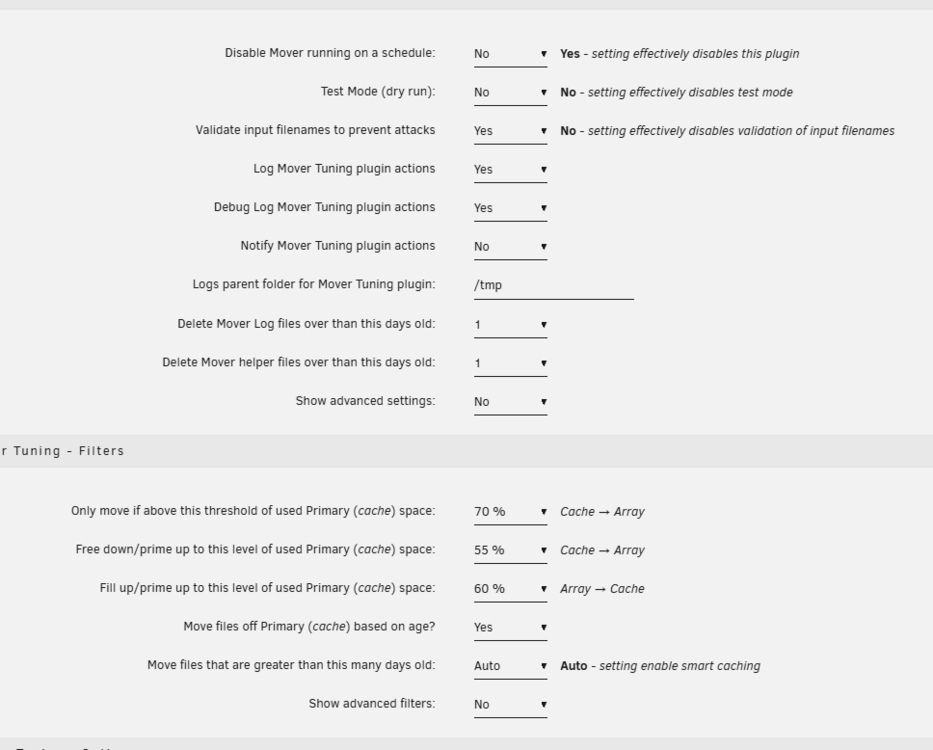
Hello, i have an issue with CA Mover Tuning : data are not moved from cache to array : Unraid Version: 7.0.1 Mover Tuning Version: 2025.04.24a Issue: eg. data are not moved from cache to array : Here my cache : CA mover Tuning settings : Logs : Apr 26 19:00:04 Saroumane move: ------------------------------------------------------------ Processing [media] share ----------------------------------------------------------- Apr 26 19:00:05 Saroumane move: Primary storage: cache - size: 457GiB - used: 83 % (367GiB) Apr 26 19:00:05 Saroumane move: Secondary storage: user0 Apr 26 19:00:05 Saroumane move: Share Information: Name: media - Path: /mnt/cache/media Apr 26 19:00:05 Saroumane move: Moving threshold: 70% (320GiB) ; Freeing threshold: 55% (252GiB) Apr 26 19:00:05 Saroumane move: Mover action: cache->user0 (cache:yes). Pool is above moving threshold percentage: 83% >= 70%. Apr 26 19:00:05 Saroumane move: => Will smart move old files from cache to user0. Nothing will be moved from user0 to cache Apr 26 19:00:05 Saroumane move: ------------------------------------------------------ Debugging [media] share Find Function ---------------------------------------------------- Apr 26 19:00:05 Saroumane move: FINDSTR: find "/mnt/cache/media" -type f -depth -not -name '.placeholder' -printf '%T@|%s|%S|%n|%i|%p|\0' | awk -v RS='\0' -v FS='|' -v SPARSENESS='0' -v PRIMARYSTORAGENAME='cache' -v SECONDARYSTORAGENAME='user0' -v SHARENAME='media' -v SHAREUSECACHE='yes' -v PRIMARYSIZETHRESH='269557680128' ' { printf "%s|%s|%s|%s|%d|%d|%d|%d|%d|%d|%s\n", PRIMARYSTORAGENAME, SECONDARYSTORAGENAME, SHARENAME, SHAREUSECACHE, $1, PRIMARYSIZETHRESH, $2, $3, $4, $5, $6}' Apr 26 19:00:05 Saroumane move: Apr 26 19:00:05 Saroumane move: Updated Filtered filelist: /tmp/ca.mover.tuning/Filtered_files_2025-04-26T190002.list for media Apr 26 19:00:05 Saroumane move: ------------------------------------------------------------ Processing [system] share ---------------------------------------------------------- Apr 26 19:00:05 Saroumane move: Primary storage: cache - size: 457GiB - used: 83 % (367GiB) Apr 26 19:00:05 Saroumane move: Secondary storage: user0 Apr 26 19:00:05 Saroumane move: Share Information: Name: system - Path: /mnt/*/system Apr 26 19:00:05 Saroumane move: Moving threshold: % (0B) ; Filling up threshold: 60% (55GiB) Apr 26 19:00:05 Saroumane move: ----------------------------------------------------- Debugging [system] share Find Function ---------------------------------------------------- Apr 26 19:00:05 Saroumane move: FINDSTR: find "/mnt/disk2/system" -type f -depth -not -name '.placeholder' -printf '%T@|%s|%S|%n|%i|%p|\0' | awk -v RS='\0' -v FS='|' -v SPARSENESS='0' -v PRIMARYSTORAGENAME='cache' -v SECONDARYSTORAGENAME='user0' -v SHARENAME='system' -v SHAREUSECACHE='prefer' -v PRIMARYSIZETHRESH='58052586700' ' { printf "%s|%s|%s|%s|%d|%d|%d|%d|%d|%d|%s\n", PRIMARYSTORAGENAME, SECONDARYSTORAGENAME, SHARENAME, SHAREUSECACHE, $1, PRIMARYSIZETHRESH, $2, $3, $4, $5, $6}' Apr 26 19:00:05 Saroumane move: Apr 26 19:00:05 Saroumane move: --------------------------------------------------------- Debugging [system] count files -------------------------------------------------------- Apr 26 19:00:05 Saroumane move: Amount of files on secondary storage: 0 Apr 26 19:00:05 Saroumane move: Apr 26 19:00:05 Saroumane move: ************************************************************ ANALYSING MOVING ACTIONS *********************************************************** Apr 26 19:00:05 Saroumane move: Deciding the action (move/sync/keep) for each file. There are 131 files, it can take a while... Apr 26 19:00:06 Saroumane move: No new files will be moved/synced from primary to secondary Apr 26 19:00:06 Saroumane move: No new files will be moved/synced from secondary to primary Apr 26 19:00:06 Saroumane move: Cleaning lock and stop files Apr 26 19:00:06 Saroumane move: ****************************************************************** WE ARE DONE ! **************************************************************** I know that in media i have 135G all data than can be fluh to array. But nothing happen. I don't see any errors. maybe i have misunderstood something in the settings ?! regards
-
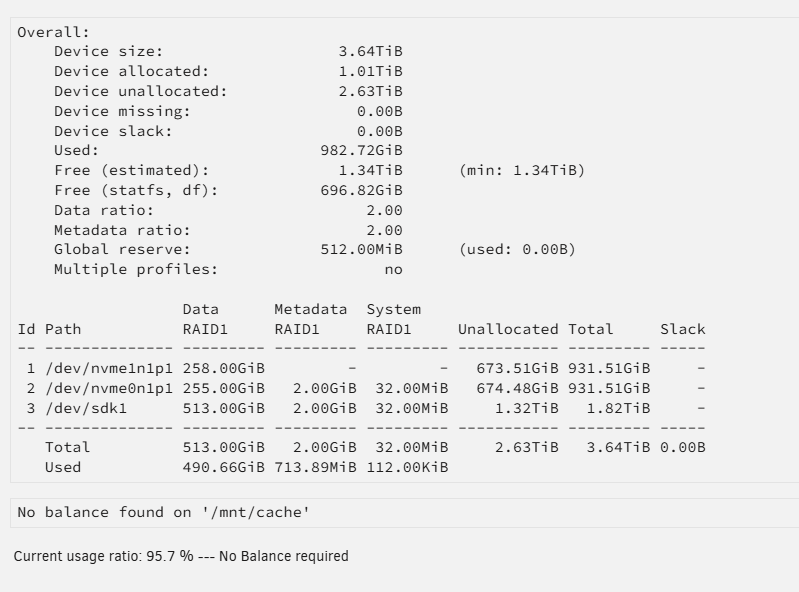
Thanks. As i'm using mover plugin (with % for disk used from moving data from cache), i guess it will based on false free space estimation ?
-
yes it is RAID1 it seems taht balance is not necessary ?
-
Hello ! back on the subject : I have added the 2T SSD, and here the result : It seems that USED and FREE representation are not correct. Size is 2T, but if add USED and FREE space, i don't have my 2T of space ?! mayeb i'm wrong ?

-
Thanks a lot. I think i will stay on RAID 1 + btrfs as it is straight forward. With 2T for the cacheit will be enough. Thanks for the support ! regards
-
with the calculator, i see that in raid5 with an additionnal 1TBytes disk, i would have 2T available
-
thanks. so, i suppose that during operation, cache data won't be lost ?! I just need to set pool size to 3 devices and add the device, and that it's ? should i stop docker services during the cache build ?
-
@itimpi you're right. I will have two 1Tbytes NVME disk + a third one. - So if i add a 1TByte, i will have a 1.5T (in fact, it is logic ....) - But if i add a 2 Tbytes SSD, Pool will automatically merge the two 1Tbytes NVME into One of 2Tbytes and Mirror it on the 2Tbytes SATA ?
-
Thanks @JorgeB, a question: why around half the time on the HDD as there are 3 disks ?
-
hello everybody ! i have a pool cache with 2 NVME SSD of 1 Tbytes (so 1T size in RAID 1). I would like to extend it to 2T by adding a 1T sata SSD 2.5 disk (so less performance) - could it be a problem ? - if the thrid HDD has 980Gbytes available and the 2 other 1Terabytes, what happen ? regards
-
thanks ! i can put NVME on a pci adaptor to free the m2 slot. regards
-
? https://www.amazon.com/JIUWU-AD905A-Adapter-Connector-Converter/dp/B07R6KNR4H?sr=8-7
-
it is nvme devices
-
Hello: in my current settings, i have a cache composed of 2 M2 SSD drive. I want to put them in SATA adaptors (no need huge performance) to use M2 slot for other stuff. What will the system behaviour ? lost of the cache and 2 new HW drives ? or it will ne transparent ? regards
-
hum ... thanks for your reply, now, i know it exists .... 😞

