





yoleska
Members
-
Joined
-
Last visited
Everything posted by yoleska
-
Oh there was a log message, but I'm not sure what it means. Other docker apps have no problems accessing this folder/files... 22:39:29 => Failed to delete file '/storage/X/Cyber-DL/Sorted Downloads/Videos/good_movie.mp4', reason: Access to the path '/storage/X/Cyber-DL/Sorted Downloads/Videos/good_movie.mp4' is denied., Stacktrace at System.IO.FileSystem.DeleteFile(String fullPath) at VDF.GUI.ViewModels.MainWindowVM.DeleteInternal(Boolean fromDisk, Boolean blackList, Boolean createSymbolLinksInstead, Boolean permanently) in /tmp/vdf/VDF.GUI/ViewModels/MainWindowVM.cs:line 911
-
Seeing a problem where the files don't appear to be deleting. I choose "Select Lowest Duration/Quality" and then after all the boxes are selected for the files I want to delete, I choose "Delete From Disk", and the selected items still show up in the list. In fact at the window at the bottom of the page, it shows me how many duplicates there are and "Total Size Removed:0"

-
Ok, I think I found the problem and a working solution. Replying in case others have this use case. The problem was that the JDownloader plugin that I had downloaded was the incorrect one. Once I downloaded the correct one from the myjdownloader site https://my.jdownloader.org/apps/?ref=myjd_web , NOW it asks me for the user/pass for the cloud service. Now it works as expected: I right click a link, choose "Download with JDownloader" and it sends it to the cloud, then relays it to my connected server and adds it to the queue. Almost perfect. I wish I didn't have to rely on the cloud service to make this happen. It would be better if this docker container had the "get" ports enabled, either 3129 or 9666 (I think) and then I could just point the browser extension directly and the local LAN IP and bypass the cloud MITM transaction. Oh well, it's working, so that's the important part.
-
Yup, I have an account there, but it's still a manual effort to get links into it that then get sent to the docker instance. That's a nice feature, but not what I'm looking for. What I'm looking for is to get the right-click context menu in Jdownloader extension for Chrome to send the links directly to the docker instance. The Chrome extension does have the option "Remote Server" so I assume it *can* talk to the docker instance, but I'm just missing a piece of the puzzle - maybe some parameters on either client/server side. Is that possible or maybe it's just wishful thinking?
-
New topic, maybe discussed before, but I'm not reading through 16 pages. I have the Unraid docker image setup, no big settings changed. I installed the Chrome JDownloader plugin. It asks for a remote server and I put the server URL (that I can get to from my web browser). After that I would assume I could just right click a link, choose "Download Link" and it will get passed to the Jdownload docker instance, but it does not. Instead it asks me to install this 5 year old helper application (which Win11 thinks is malicious). Is that still the recommended way, or can I tweak some other setting to send the link to the download client from the browser? Edit: I installed the helper app (found one not as old), but I'm still unsure how to have the chrome plugin talk to the docker container. It errors that it's looking for an executable, but the executable isn't local to chrome, it's the docker container.
-
I think I just found my own answer. Lots of recommendations comparing Drive to Nextcloud, so I'll look into that.
-
After moving from Synology to Unraid, I think one of the most used apps that I used was their Cloud Station or now called "Drive" where it was a shared folder between any PC (local or on WAN) and the NAS. Is there any application or solution similar for Unraid? Transferring small files between work, home, was just easier when there was a common folder among them all. Or a Dropbox-like client would also work.
-
Ditto, found this very helpful.
-
Well that makes the choice easy. I thought I was giving up performance by using Unraid Array versus ZFS Pools and I am for the reads - but it's not as bad as I had thought reading from a single disk. With 2.5Gb networking between my machine and Unraid box, I'm maxing out the link for READ and when writing to the cache it's max too. But writing directly to the Unraid Array, is utter garbage after the first 5GB with no cache. I think I'll stick with non-ZFS pools for now, but will still use the ZFS file system to get some of the added error handling. I wonder if there will be an option to migrate the Unraid array over to full ZFS Array in 6.13, or I'm stuck with what choices I make now - which isn't that bad. Thanks!
-
It looks like this isn't supported, but is there any way to have the zpool act similar to vanilla Unraid array? Meaning in an Unraid array (not using zfs pools), in the share settings you can set the storage path from Cache to Array, or Array to Cache, etc.. But when the pool is ZFS, there's no option to go from Cache > Zpool. This seems like a big drawback to me, as there's no advantage to using the cache disk for writes, unless the data is going to stay there. And there's no mover option available. This really makes me rethink my decision to use ZFS at all, as this was a great feature I was looking forward in moving to using Unraid OS for my storage needs. Is this on the roadmap at all?
-
Oh yeah, I will blow this test zpool out of the water and get the 4x16TB added as primary and then add the smaller vdev to the pool. Thanks...next question.
-
As I embark upon this new road with Unraid and ZFS, my knowledge is a bit scattered, and I'm looking for direction. Please excuse the ignorance here, I'm a noob to Unraid, but my career is in networking and security. I can follow directions well. I have general understanding of how ZFS is structured: A pool consisting of vdevs which contain n number of disks. But as I just noticed when I setup my first ZFS pool there was no mention of creating a vdev in any of the settings. So when I bring my new disks online (4x 16TB), I want to add them to the pool as a second vdev, but I'm not sure how to do this. Like how do I let Unraid know those disks are the second vdev of the original pool. And then let's imagine that they are part of the ZFS pool (I find out how to have 2 vdevs in 1 pool), I have a question about shares and file system use in general. If I create a share, I would assume that it would just use both vdevs and share the load between them. Is that the case with Unraid or am I missing something? I definitely don't want 2 pools and then have to have my /appdata or /coolmemes shares split between them. I want Unraid to think of all 8 disks as an entire pool that I can address with data structures.
-
Yup, @domrockt that's exactly what I was trying to do. Ok, I pushed the button and set them in the Unraid Array. I'll stop it, find a spare USB drive and do that. I'd give you both credit if I could.
-
Aha! Do you have it as the parity disk or member disk, or does it matter? Then I can create my ZFS pool?
-
As the title suggests, I'm testing out some scrap drives while I wait for my new 16TB ones to preclear. No whammies this time!! And yes, I did check and they covered under Seagate's 5yr warranty! Anyway, I created a pool of 4 8tb drives, assigned the first one to be ZFS with Raidz1. I had thought that's all I needed to do to start the array, but it's grayed out and tells me that there's no drives in the array. So.... did I misunderstand and the drives HAVE to be listed in the array and then I can somehow make them ZFS during the startup sequence? Currently, I have them in the array and about to push "start" but wanted to check here first. I have a feeling they'll just come up as Unraid OS and not ZFS.
-
Yeah, I think I rushed into that one based on the price and didn't do my DD. I ordered 4 NEW (made sure) drives. I still like Seagate, so not complaining yet about them, just the Amazon retailer.
-
So it turns out that these drives are OEM drives and not warrantied by Seagate. I checked. So they're all going back and I'll get another 4 from somewhere else.
-
Well damn. Brand new drives and it looks like a couple of them are going to be RMA. Seagate doesn't appear to recognize other tools for diagnostics, so I guess I'm running their Seatools on the drive to see what it shows. Bummer...
-
Crud, I just noticed this in the drive Attributes. Think this qualifies for a new drive?

-
Sure, the report is attached. -1022 is the drive in question. -1032 is another drive. There are some differences. Quick SMART test showed no errors, but it looks like there might be a few problems in this report with this first drive. Thoughts on what those errors mean? medusa-smart-20230608-1022.zipmedusa-smart-20230608-1032.zip
-
I had read some other forum/reddit posts where the consensus was that the controller was bottlenecked, but as you can see in this next picture, when that drive started zeroing, it had similar write speeds as the other drives. I'm sure that the drives slow down as they get to the "end of the disk", but a 3 hour difference? No SMART errors or anything on this disk so far. Same temps as the other ones. The system is a Z790 i7-12700, 64G DDR5 ram, so I doubt it's a system bottleneck . CPU is jumping all over the place, but load is between 25-29% while the preclear is happening.
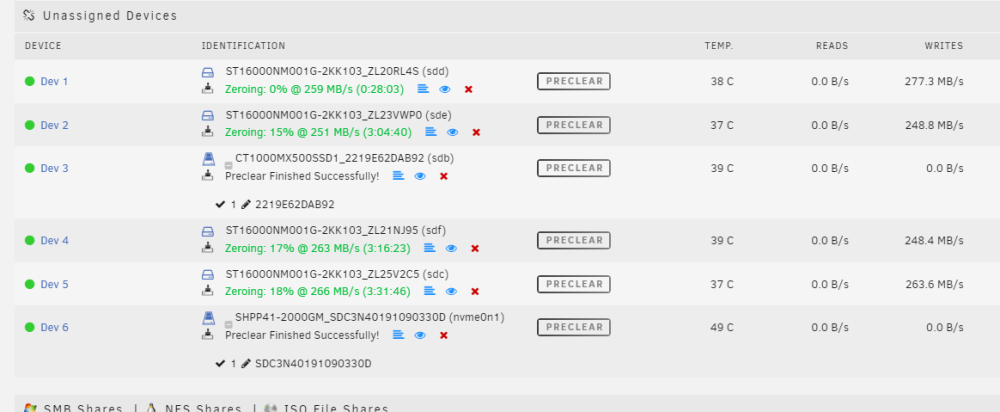
-
I have a set of 4 Seagate EXOS drives for my Unraid project. I started the preclear at the exact same time for all of them. 3 of the drives pretty much finished within a few minutes of each other. However 1 drive is taking it's sweet time. They are all plugged into the onboard SATA controller and when preclear started the read process they were all showing around 250MB, which is good, from what I've learned. But as the pre-read cycle was nearing 100% (maybe around 70%) the speeds started slowing down - and in this last drive down to about 140MB. My question is - does this one drive (the top one in the pic) that is taking much much longer than the other 3 drives indicate any type of problem with the drive? I would think they would all be relatively the same speed. They are the same MGF date, same firmware.
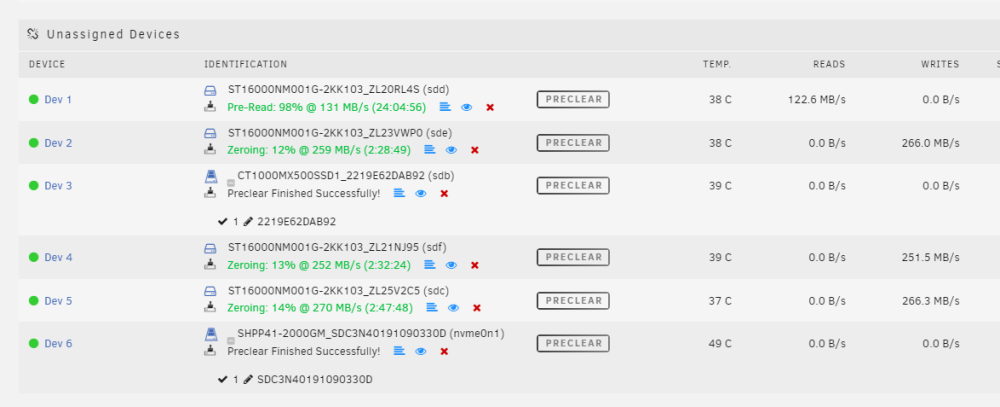
-
Great, that's a good explanation. So the term "Array" probably is going away (from one of the linked posts on that thread). What about the cache drive question? I don't think those would be part of the ZFS pool, but I assume they would be ZFS. Would both disks be in 1 pool, or should I split them up. I don't plan on doing mirroring or Raidz between them - just having two different locations for hi/low speed apps.
-
Hey there, first time posting and working with Unraid, so be gentle. I just built my first Unraid server. I am on the 6.12 rc7 build cause I just like to live dangerously and it seems stable now. I have 4x 16TB drives that currently going through pre-clear. When they are done, I am curious about ZFS. Do I add the drives to the array and set the type to ZFS? Or do I create a pool specifically for the drives and set type to ZFS for each one? Do I then add the pool to the array, or is the array just not used at that point? Also for cache drives/pool. I have two (1 nvme and 1 ssd) that I wanted to use for cache/vms, etc.. Do I add them to the same pool with 2 drives, or each have their own pool? I assume they don't need to be part of the ZFS pool, or do they? Still learning, much to digest. Thanks!





