





erqz
Members
-
Joined
-
Last visited
-
Sorry for being not really clear. I collected the diagnostics after parity check and brought back the cache pool. Then I stopped the array and shutdown the server for electrical work. Now the server is running but it doesn't connect to the network (i can check the routeur connected devices/dhcp) so I can't access anything from remote and there is no screen connected to the server and it will be too complicated for my wife to connect a screen and give a picture of the error on boot. I just ask her to confirm the green led is showing through the case window, it's the max I can ask her So it's running (under power) but it does'nt behave as usual.
-
The parity check did finish, restored the port back to 8888, in the previous configuration the SWAG container was displaying a dummy page on 80 and 8888 wasn't exposed outside the local network. Pool seems to be mounted correctly and my wife called an electrician to repair something (might be the original cause of the outage) on our electrical network at home. So I did shutdown the NAS before the electrician did some work on the electric installation. It doesn't boot properly anymore. I'm screwed . olivia-diagnostics-20260929-0043.zip
-
I have two questions : How can I check remotely if the flash drive has an hardware issue ? With my old backup how can I check the diff as the config has been partially set back to default, I've only identified the name and the port of the webui Is there something I need to focus on ?
-
Thank you for the advice, The array seems fine, I did assign the nvme to the cache pool then start the array with a parity check as usual when an unhealthy shutdown happen. I did save the flash usb. I'm using a VPN to connect to the webgui usually the :8888 is not exposed to internet but as it reverted to default config the :80 was exposed behind a swag docker container. I have a previous flash backup (30/08) but I did that before upgrading to 7.0.1. I'm back at home in 5 months so I won't be able to replace the flash drive if it's what is faulty there. The parity check is a 30% right now.
-
Thank you for your answer, I've attached diagnostics tower-diagnostics-20260928-0031.zip
-
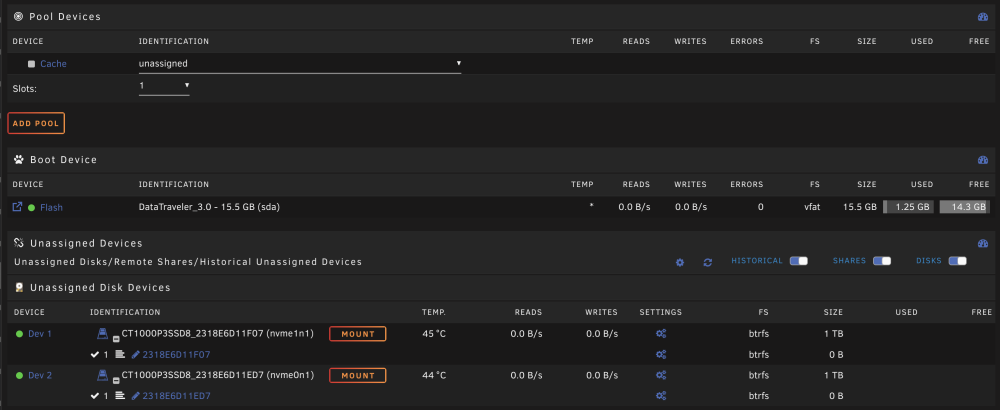
Hello, To give some context, i'm not at home at the moment and I've been facing what might be a power outage on my unraid server. I did log back few hours ago, start a parity check because it was not a healthy shutdown. Then the server became unresponsive few hours later but in fact I was able to see it was connected to the network, usually i'm loogin through ip:8888 but it's now just ip and the name change from its name to Tower (like default name) and the two NVME usually mount as cache are appearing as unmount in the interface. I don't know what to do ? Any suggestion I'm a bit worried, I ask AI of course and it says it could be an issue with the flash drive. But I prefer to ask experienced users of course before taking any action.
-
Not recently performed a memtest. The machine is up for several years now. I can have physical access to the machine pretty soon. I ll try to get the log in a way or another.
-
Not recently performed a memtest. The machine is up for several years now. I can have physical access to the machine pretty soon. I ll try to get the log in a way or another.
-
Unfortunately I cant get them though GUI
-
Hello, It a bit trivial but its something happening for months, after a certain time the GUI become broken. It fails loading data only showing an empty gui, some part of the gui are shown but not everything. I can see buttons or details (as seen on attached screenshot) but I can't do anything, page are sometimes not loading showing an Empty Response error. I can't even properly reboot to get it I have to deal with unclean shutdown on a regular basis. I have no exotic plugins its pretty the same configuration and the same docker images running for a while, all services are running fine so it's pretty a silent failure. It starts failing last year when I was abroad, this time i'm at home and I have been able to capture the log by screenshot very fast because the popup is closing itself. I'm quite sure it certainly be part of the issue. I did search on the forums if somebody as the same error/issue, there is tons of approaching issue but not really the same. What can I do ? Thank you,


-
Ok my wife pushed down the button, the shutdown wasn't clean but everything is back as normal after a day of parity check. My life can resume now ;) Thank you for the hint by the way.
-
Yeah definitely dhcp related error. I'll give a try to a gentle reboot (thank you very much for the hint). I have fixed ip adress on unraid server, i've added a dhcp rules on the server nic MAC in case of. It didn't solve the issue. I'll wait my wife awakening to ask her yo reboot it. Thank you again, the community here is so kind and the software is gem.
-
Hello, I think it's dumb but I prefer to ask. My unraid server was running fine but my ISP went into an issue 10 days ago that brought everything offline until yesterday. When connectivity from the ISP went back online few devices reconnected but my Unraid server remain unreachable. I'm currently away from home so my ability to check things is limited and my wife is not tech-savvy enough to plug a monitor on the server and check what would be written on the console. She tried to disconnect the ethernet cable and plug it into another port of the router. No success there. I feel a bit stuck, can you confirm my only option is to make her push down the power button of my server then restarting it and then crossing finger the boot will be normal. Thanks
-
Yes, you right. My bad. TCP ports instead of UDP. Works like a charm. Sorry for consuming your time badly. Thank you again for your support.
-
Thank you for your answer, and I'm sharing your views i'm just a bit lost and without tools in my hand with my current knowledge. I don't know how to see more information about what happen when a connection to the game is made. Only few things in log when successful nothing when it can't reach. By the way, if at least people could connect with IP adress it would help. Ports are forwarded. Other services are running when with the same template in face.



