





namvan
Members
-
Joined
-
Last visited
Everything posted by namvan
-
Thanks @Kilrah for the comment. @itimpi, I think you addressed my point more accurately. Thank you. My use case is quite simple. I've got a VM running pihole and that is my DNS. It was running from a proxmox box but I moved it to unRAID recently only to realise the VM went offline when my array wasn't started. Since it is my DNS, I could not access quite a number of devices in my network. This made me think, in case of failure to hard drive in unRAID and I need to tinker, my whole setup will not be good. I am now thinking of moving the pihole back to the proxmox box. I intentionally put the VM in to a SSD pool, not in the array thinking that the VM should work, kind of independently.
-
Allow to start/view VMs which are not stored in the Array but in pools.
-
How is that different from device="lun"? Can you give a full xml example of the configuration for passthrough SSD? Thank you.
-
Hello SimonF, It is not that it is not working for me. With device='disk' the VM sees the disk as HDD, not SSD and all information about the disk is lost. No temperature, nothing. With 'lun' the VM recognises it as SSD with correct brand and all info. And trim is also detected and supported.
-
I'd say it will depend on the location of source and target. I have observed the behaviour below When source and target are within the same root share then I will be a server side copy. When the 2 shares are completely different then files will go to Windows from the source then to the target. Hope this helps.
-
Hello, When you define a share you might have selected Primary and Secondary storage, you then can specify Mover action. See the attached screenshot. Under Settings | Scheduler you can see the default definition for this action. See the second screenshot.
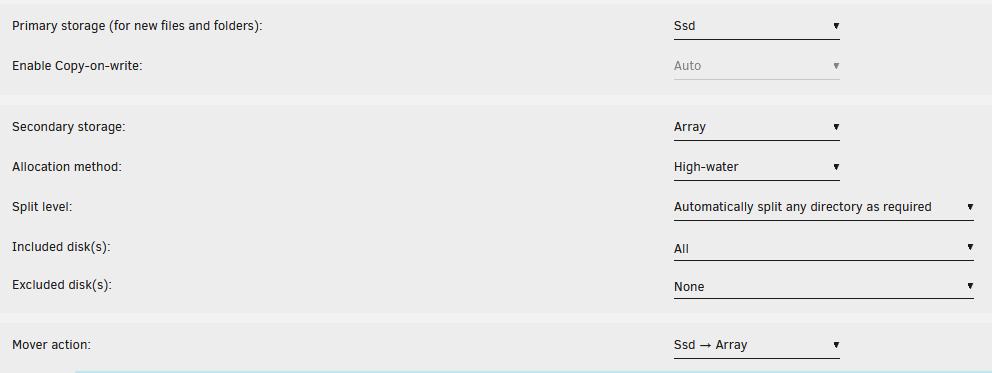

-
Oops I forgot that fact that ALL other data drives to be present good. That makes sense. Thanks @itimpi What would be the options to rebuild in this situation? What would be the most positive outcome to expect?
-
Hi all, I got my unRAID set up now with 1 on-board NIC and a dual-NIC PCIe card. The default setting when installing unRAID was a bonded network with all the 3 together. I have made a change like this - Broke the bonding configuration. - Left the on-board as default network with static IP - Configured the first NIC of the dual with DHCP as I wanted to use this for VM only - Left the second NIC of the dual blank as I wanted to passthrough this to a VM for dedicated traffic. Would that be a good set up comparing to the default bonded network? Thank you in advance.
-
It sound like a potential big loss. Have you tried to put the drive to a working Linux machine and check if you can see data? Are you looking to start up your system with 7 replacement drives when waiting for the 7 to be recovered? With 2 parity drives you can recover 2 drives out of your 7. Therefore it would really depend on how many drives could you get back from the recovery service. - If all 7 are back good --> best. just plug them in and play. - If 5 are back good, meaning 2 failed, --> still best since you can recover the 2 bad from using the 2 parity drives.
-
Hey @bubbadk You can try to edit the VM and switch between the option for Graphic Card: virtual and the iGPU. You would see that when selecting virtual, unRAID will automatically give you option for VNC or SPICE in VM Control Protocol. see the screenshot attached. The virtual option would allow you to control the VM within the web interface of unRAID. When you select the iGPU or eGPU if available, you are to connect your monitor to the output of the relevant iGPU or eGPU. That would not mean you can't remotely connect to you VM using VNC. You would just need to install it into your VM first. Hope this helps.
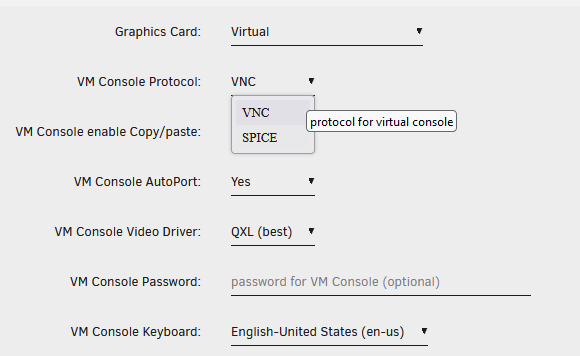
-
Hello, I moved one of my VMs from Linux Mint and it was set up to passthrough the SSD from the host as LUN. Something like the screenshot below. I could not find any option in the unRAID GUI to do so but editing the XML worked for me. However when switching back to GUI for the particular VM, the disk disappeared. Is this a limitation of the unRAID GUI ? Thank you in advance.


