





warwolf7
Members
-
Joined
-
Last visited
Everything posted by warwolf7
-
@Slystuff I'm very glad that it solved your problem and saved you time.
-
well, it seems to not work anymore for me. I have been using app password for a bit now. I had to create a new app password about 1month ago, it stopped working maybe a little bit over a week ago. So I then proceeded to create a new app password in outlook, but this time it doesn't work. This is annoying. I can't create app password in gmail either.
-
HI, first of all thank you for looking at this. (I know very very little about programming, so I'm hoping you or someone from unraid would actually look at this and propose something, it would be probably a lot better than me making a pullrequest. I'm somewhat scared to create more problems) I would guess third option, I don't know all the errors that can be thrown. but running this command "btrfs filesystem show invalideuuid" does return "ERROR" So I re-added the problematic uuid in the pool config file, rebooted, added your third option, but it did not triggered the notification. Just to be sure notification were working I created a dummy notification that I worked immediatly. /usr/local/emhttp/webGui/scripts/notify -i "alert" -s "TEST" -d "TEST" this line if (exec("/sbin/btrfs filesystem show "._var($disk,'uuid')." 2>/dev/null|grep -c 'missing'")>0) { seems to be removing stderr ( 2>/dev/null). So maybe the intent was something else. Otherwise it would have been something like this no? if (exec("/sbin/btrfs filesystem show "._var($disk,'uuid')." 2>&1>/dev/null|grep -Ec 'missing|ERROR'")>0) { and that one triggered notification and works properly. I would absolutly not known whether this should be changed to this or not. I guess the author would know. But I believe that there should be a notification, otherwise the line that calls btrfs filesystem show <uuid> will wake up all drive and leaves no trace to help find the problem. It seems the script does not trigger a notification every minute even if it runs every minutes and encounter this error with the modified line. So I did not add the "-x". I looked a bit more and I think that the script stores that notification status in this file "/boot/config/plugins/dynamix/monitor.ini" and reads it every minute preventing multiple notification for the same problem. Now the uuid problem in the config file This is strange to me. Why would the UUID in the config file "nano /boot/config/pools/poolname.cfg" contains a UUID but that UUID field is not populated in all my new pool configs. Is that uuid only used when the pool contains more than 1 drive/ssd? Why would the monitor script look for that specific config uuid information and have a code section just for that if that UUID field is not used anymore. Nonetheless, that uuid that was in my config file created a situation where every "btrfs filesystem show <pooluuid>" would wake up all drive to find it. To me it seems like the notification should be different to help the admin understand that it could create this sorts of situation. I think the description should read like this "the command btrfs filesystem show <insert uuid> returned an error instead of returning info for this disk <insertpool diskinfo> This error can spin up all your drives. This command is called every minute " something like this, but that works. I don't know how to insert the uuid in the string. Shouldn't this be an alert instead of a warning? exec("$notify -l '/Main' -e ".escapeshellarg("Unraid $text message")." -s ".escapeshellarg("Warning [$server] - Cache pool BTRFS missing device(s)")." -d ".escapeshellarg("the command btrfs filesystem show <insert uuid> returned an error instead of returning info for this disk [$info] This error can spin up all your drives. This command is called every minute")." -i \"warning\" -x 2>/dev/null"); Let me know what you think. Thank you
-
@FlamongOle I confirmed that fixes the problem for me. Thank you very much! I even get to have my username in the changelog! Love it! I'm impressed with the time you are spending on your plugin and your responsiveness. Many thanks!
-
Do you have non allocated drive (unassigned devices) when you test? That's when I get the problem. If all disk are assigned to a location I don't have the problem, but logically, I can't assigned them a location if I can't get them to blink first (thats why your plugin is so useful). I have the same problem in firefox, edge, chrome 122.0.6261.95 (Official Build) (64-bit). It's not the browser. It very clear in the code. The code tries to remove a class in an object that doesn't exist in the tray preview at the top. The top tray preview only contains assigned drive. While your code remove class from every drive even the ones that are not assigned. That doesn't work because unassigned drive are not present in the top tray preview. If the object doesn't exist, you can't remove a class. Therefore you get an error telling that you can't read property of null because the selector refers to a non existent element.
-
Thank you for that change but I get the same error. Your "for" code version 2024.03.20 incremented from 0 to 20 (21 disks) Your "for" code version 2024.03.20 incremented from 0 to 19 (20 disks), but I only have 19 assigned disks in the visualiser. This part i < y.length - 1 takes into account the entire drive list, while th code inside take action on 2 different object list. It takes an action on the entire drive list and on the preview above that might not contain the entire list. Because this line : document.getElementById("bg3-" + y[i].id).classList.remove('flex-container-locate'); is the disk location preview above the page. This one only contains allocated disk therefore does not contains the same element that this array return: document.getElementsByClassName(locateDisk); because that array, contains the entire list of drives, allocated and non allocated, in my case 19+2 While the preview contains only the allocated drive (19) You either need to create a new "for" loop just the the preview above or another way. This works for me function locateKillAll(locateDisk){ $x("//div[starts-with(@id, 'bg3-')]").forEach(el=>{el.classList.remove('flex-container-locate')}) $x("//div[@id='" + locateDisk + "']").forEach(el=>{ el.value = "Locate" el.style.backgroundColor = "#F2F2F2" }) $.get('/plugins/disklocation/pages/locate.php',{ cmd:"killall"},function(data) {}); } function locateStart(locateDisk){ if(locateDisk) { locateDisk.value = "Stop"; locateDisk.style.backgroundColor = "#020202"; var diskpath = encodeURI(locateDisk.id); $.get('/plugins/disklocation/pages/locate.php',{ disklocation:diskpath, cmd:"start"},function(data) {}); $x("//div[starts-with(@id, 'bg3-')]").forEach(el=>{el.classList.remove('flex-container-locate')}) //this also need to be changed } } or if you can't get the xpath thing to work you can add a try catch arround the problematic lines like this (I didnt put anything in the catch brackets but you could add some error handling code if needed) function locateStart(locateDisk){ if(locateDisk) { locateDisk.value = "Stop"; locateDisk.style.backgroundColor = "#020202"; var diskpath = encodeURI(locateDisk.id); $.get('/plugins/disklocation/pages/locate.php',{ disklocation:diskpath, cmd:"start"},function(data) {}); try{document.getElementById("bg3-" + diskpath).classList.add('flex-container-locate');}catch(){} } } function locateKillAll(locateDisk){ var y = document.getElementsByClassName(locateDisk); var i; for (i = 0; i < y.length - 1; i++) { y[i].value = "Locate"; y[i].style.backgroundColor = "#F2F2F2"; try{document.getElementById("bg3-" + y[i].id).classList.remove('flex-container-locate');}catch(){} } $.get('/plugins/disklocation/pages/locate.php',{ cmd:"killall"},function(data) {}); } I hope this helps
-
I looked at the dev tool debugger the locateKillAll function seems to remove class 'flex-container-locate' from all drives in the tray visualisator at the top this line, "i" goes to 20. While I only have 19 allocated drive in the trays and 2not allocated drives. y= 21 but it shouldn't have to removeclass in the drive visualisator at the top for the not allocated drives should it ? function locateKillAll(locateDisk){ var y = document.getElementsByClassName(locateDisk); var i; for (i = 0; i < y.length; i++) { y[i].value = "Locate"; y[i].style.backgroundColor = "#F2F2F2"; document.getElementById("bg3-" + y[i].id).classList.remove('flex-container-locate'); } $.get('/plugins/disklocation/pages/locate.php',{ cmd:"killall"},function(data) {}); } This lines fails when i==19. document.getElementById("bg3-" + y[i].id).classList.remove('flex-container-locate'); wouldn't it be more efficient to call it like that? using xpath $x("//div[starts-with(@id, 'bg3-')]").forEach(el=>el.classList.remove('flex-container-locate')) You wouldn't need to know how many are there and you would remove all of them. I'm not developper, so there could be millions of reasons not to use my code that I don't know. Hopefully it helps.
-
Hi, thank you for the update. I updated but I get a similar error. Uncaught (in promise) TypeError: Cannot read properties of null (reading 'classList') at locateKillAll (locate_script_top.js.php?v=1710947424&path=/plugins/disklocation:40:44) at HTMLInputElement.<anonymous> (locate_script_bottom.js?v=1710947424:25:3) at HTMLInputElement.dispatch (dynamix.js?v=1700087630:5:43336) at y.handle (dynamix.js?v=1700087630:5:41320) I did not reboot the server to see if it would change the outcome. I'm worried about the issue raised by @Vetteman
-
Hi, the locate button was working and I used it before. Now after the update (i was a couple of updates behind, I dont exactly know from what version I come from) the locate button simply does not work anymore In dev tools I get this error locate_script_top.js…ins/disklocation:56 Uncaught (in promise) TypeError: Cannot read properties of null (reading 'classList') at locateKillAll (locate_script_top.js…/disklocation:56:44) at HTMLInputElement.<anonymous> (locate_script_bottom…s?v=1710881723:25:3) at HTMLInputElement.dispatch (dynamix.js?v=1700087630:5:43336) at y.handle (dynamix.js?v=1700087630:5:41320) locateKillAll @ locate_script_top.js…ins/disklocation:56 (anonymous) @ locate_script_bottom.js?v=1710881723:25 dispatch @ dynamix.js?v=1700087630:5 y.handle @ dynamix.js?v=1700087630:5 edit : thank you for this wonderful plugin, it's absolutly awsome! I love it!
-
SOLVED : CONCLUSION : my feb25th hypothesis was correct The command "btrfs filesystem show 32f96308-aa9a-4c86-b799-d222f4af4a75" was causing all disks to spinup because it couldn't find the UUID requested. That command was issued by /usr/local/emhttp/plugins/dynamix/scripts/monitor that took that information from the "/var/local/emhttp/disks.ini" file that probably gets populated from the files in this directory /boot/config/ The dynamix monitor is called every minute from a cron job in "/etc/cron.d/root" The UUID in the config file in /boot/config/pools/ are left empty, why? That would be my question. In my case, my older pool config had an uuid that became invalid (or always have been I don't know) when the array failed due to bad ram and I reformatted 1 of the 2mirror drive in that pool and removed the other drive. That UUID was left in the config file of the pool. When I removed that uuid, the monitor script stopped waking all disk every minutes. It is my understanding that unraid created that problem somewhere during one of those manipulation because I have never played with any of those files prior to this investigation 🔍 Proposition 1 to unraid Look at what happens when you create a pool array with 2 devices. remove one device, reformat the other one and look at the UUID in the config file. (I can't recreate that, I don't have unused disk right now) Why is there not UUID in the btrfs pool config file? Why did I have one before but not my new one. Was there a changes in the code from previous versions? Also look for other cases that can create that type of wrong UUID, there might be more that just mine. Proposition 2 to unraid The monitor script also fails to recognized the error and send a notification regarding that error. if (exec("/sbin/btrfs filesystem show "._var($disk,'uuid')." 2>/dev/null|grep -c 'missing'")>0) { we can see here that it only looks for 'missing' but when a filesystem is not found, it actually return ERROR: ERROR: not a valid btrfs filesystem: 6790d0c5-bc2f-499f-a9cb-5b5bf6f03d0z This should be changed to 'ERROR' But since this script execute every minute, and the next section creates a warning on an error notification. it could potentially flood an unraid admin with warning email. Which could be too much. (I wish I could create a pullrequest, but I couldn't find the repo on github, the only one I found was 8years old and the code did not match the one in unraid current release) However, proposition1 has to be implemented first, otherwise, a lot of users might get wrong warnings. notes: @foo_fighter do you use the unassigned plugin? if so, I suggest you update it. This is in the changelog >Fix: Zpool operation that kept disks from spinning down. Thank you Thank you everyone that took a look at my thread and for help and guidance along my route. finally Big hurray to me, I have very very basic knowledge of any of this. So congrats to me for finding it. It can potentially affect a lot of users. Please unraid acknowledge in this thread that something will be done.
-
unraid safemode, no plugins no gui.. I couldn't run the "iotop -bktoqqq -d .1" command, but the syslog shows the same behavior, no matter at what second the hdd gets spinned down, it's always spinned back up at the exact same second in all the test in this thread and the read smart that happens after appears at the same seconds, it always hh:mm:08 or 09. Even if the disk was spun down at hh:mm:03 or hh:mm:41, the read smart is always at the exact same time. To me it sound like something happening on a strick schedule is triggering this. I confirmed that the cron schedule was active by using the pstree command and this output still appears at every minute ├─crond───sh───monitor───sh─┬─btrfs │ └─grep I did another interesting test. I could see in the earlier test that I would see the command "btrfs filesystem show 32f96308-aa9a-4c86-b799-d222f4af4a75" being sent every minute, which is originating from dynamix monitor plugin. As soon As I saw the spinning down /dev/sdc entry in syslog, I sent the same command ( dynamix monitor was going to send it anyway 50sec later) Tadaaa, it spun the disk right back up before returning the response to the command. #disk is spun down after 15minutes SYSLOG : Mar 17 21:53:03 ChapelleSixtine emhttpd: spinning down /dev/sdc #I immediatly send the command btrfs filesystem show 32f96308-aa9a-4c86-b799-d222f4af4a75 # I can hear the disk spin up. And I get this output only after the disk is completely spun up ERROR: not a valid btrfs filesystem: 32f96308-aa9a-4c86-b799-d222f4af4a75 #SYSLOG shows this right after #Usually this would have happened at 21:54:08 Mar 17 21:53:28 ChapelleSixtine emhttpd: read SMART /dev/sdc I was able to wake the disk by the same command that the dynamix monitor script is sending. Also that command always returns an error. (the only ever existing devices in btrfs in my server are the nvme and they were always accessible during all of those tests) So here I am trying to understand the code in this file "/usr/local/emhttp/plugins/dynamix/scripts/monitor" First thing I see, is the line leading to "/var/local/emhttp/disk.ini". In that file I notice that 2 pool that each contains a nvme. One of them has an uuid (the first pool that I created), but the second pool doesn't have a uuid. That UUID is "32f96308-aa9a-4c86-b799-d222f4af4a75". Why one would have a UUID, and not the other one. Also no other disks have that value, I guess that's a btrfs or a Pool specificity. back to monitor script This line is calling the uuid if (exec("/sbin/btrfs filesystem show "._var($disk,'uuid')." 2>/dev/null|grep -c 'missing'")>0) { But is only calling it if there is a uuid in the disk.ini // check file system of cache pool $item = 'pool'; if (in_array($name,$pools) && strpos(_var($disk,'fsType'),'btrfs')!==false && _var($disk,'uuid')!=="") { $attr = 'missing'; if (exec("/sbin/btrfs filesystem show "._var($disk,'uuid')." 2>/dev/null|grep -c 'missing'")>0) { if (empty($saved[$item][$attr])) { exec("$notify -l '/Main' -e ".escapeshellarg("Unraid $text message")." -s ".escapeshellarg("Warning [$server] - Cache pool BTRFS missing device(s)")." -d ".escapeshellarg("$info")." -i \"warning\" 2>/dev/null"); $saved[$item][$attr] = 1; } } elseif (isset($saved[$item][$attr])) unset($saved[$item][$attr]); $attr = "profile-$name"; if (exec("/sbin/btrfs filesystem df /mnt/$name 2>/dev/null|grep -c '^Data'")>1) { if (empty($saved[$item][$attr])) { exec("$notify -l '/Main' -e ".escapeshellarg("Unraid $text message")." -s ".escapeshellarg("Warning [$server] - $pool pool BTRFS too many profiles (You can ignore this warning when a pool balance operation is in progress)")." -d ".escapeshellarg("$info")." -i \"warning\" 2>/dev/null"); $saved[$item][$attr] = 1; } } elseif (isset($saved[$item][$attr])) unset($saved[$item][$attr]); } } So, here is I believe where this leads to . If I run the command btrfs filesystem show $btrfs filesystem show Label: none uuid: 4f4d49b1-cf2c-4043-8ac8-5d5a2787ecd8 Total devices 1 FS bytes used 262.94GiB devid 1 size 931.51GiB used 286.02GiB path /dev/nvme0n1p1 Label: none uuid: 6790d0c5-bc2f-499f-a9cb-5b5bf6f03d07 Total devices 1 FS bytes used 349.50GiB devid 1 size 931.51GiB used 372.02GiB path /dev/nvme1n1p1 Label: none uuid: 37054439-aa79-4407-98df-7c5b2c5851f4 Total devices 1 FS bytes used 4.17GiB devid 1 size 20.00GiB used 6.52GiB path /dev/loop2 Label: none uuid: b4112bdf-b443-4437-8c49-732da8465892 Total devices 1 FS bytes used 1.28MiB devid 1 size 1.00GiB used 126.38MiB path /dev/loop3 Those are two valide uuid. The uuid in disks.ini is not show here ("32f96308-aa9a-4c86-b799-d222f4af4a75".) I conclude that there is a bug within unraid somewhere that doesnt properly register the uudi in the disks.ini. Can someone tell me which file I should modify to correct this problem? Should I just remove the uuid in the "/boot/config/pools/" within the file that contains a wrong uuid? This is what I'm going to try right now. I'll see what happens
-
Hi, Thank you for your help. I completely removed the lsi card. The disk spins down after 15min, and then spins right back up exactly like before. The card does not seems to be the source of the problem here. I'm going to try safemode with as much as possible disable before downgrading unraid.
-
hmmm... Ok, so I guess that it is a dead end. I changed aggressive LPM support to enable in the bios, That didn't changed anything. I then, reset the motherboard bios to default settings. That didn't change anything. and the iotop output I was getting, I noticed it is happening every minute. But when the hdd is spinned down, the output is delayed 15second, which is the time it takes for the hdd to spin up. I looked at the little light in the supermicro tray of that drive and it light up at exactly hh:mm:01 which is the time the btrfs filesystem show happens. 15:03:02 19475 be/4 root 13779.76 K/s 0.00 K/s ?unavailable? btrfs filesystem show 32f96308-aa9a-4c86-b799-d222f4af4a75 15:03:02 19475 be/4 root 65614.34 K/s 0.00 K/s ?unavailable? btrfs filesystem show 32f96308-aa9a-4c86-b799-d222f4af4a75 15:03:02 19475 be/4 root 15609.48 K/s 0.00 K/s ?unavailable? btrfs filesystem show 32f96308-aa9a-4c86-b799-d222f4af4a75 15:03:02 19475 be/4 root 15784.98 K/s 0.00 K/s ?unavailable? btrfs filesystem show 32f96308-aa9a-4c86-b799-d222f4af4a75 15:03:02 19475 be/4 root 14842.28 K/s 0.00 K/s ?unavailable? btrfs filesystem show 32f96308-aa9a-4c86-b799-d222f4af4a75 15:03:02 19475 be/4 root 73454.09 K/s 0.00 K/s ?unavailable? btrfs filesystem show 32f96308-aa9a-4c86-b799-d222f4af4a75 15:03:02 19475 be/4 root 196640.07 K/s 0.00 K/s ?unavailable? btrfs filesystem show 32f96308-aa9a-4c86-b799-d222f4af4a75 15:03:02 19475 be/4 root 132946.68 K/s 0.00 K/s ?unavailable? btrfs filesystem show 32f96308-aa9a-4c86-b799-d222f4af4a75 15:03:02 19475 be/4 root 201293.48 K/s 0.00 K/s ?unavailable? btrfs filesystem show 32f96308-aa9a-4c86-b799-d222f4af4a75 15:03:02 19475 be/4 root 66717.12 K/s 0.00 K/s ?unavailable? btrfs filesystem show 32f96308-aa9a-4c86-b799-d222f4af4a75 15:03:02 19475 be/4 root 3187.30 K/s 0.00 K/s ?unavailable? btrfs filesystem show 32f96308-aa9a-4c86-b799-d222f4af4a75 15:03:02 19475 be/4 root 66092.91 K/s 0.00 K/s ?unavailable? btrfs filesystem show 32f96308-aa9a-4c86-b799-d222f4af4a75 15:03:02 19475 be/4 root 69398.06 K/s 0.00 K/s ?unavailable? btrfs filesystem show 32f96308-aa9a-4c86-b799-d222f4af4a75 15:03:02 19475 be/4 root 62686.95 K/s 0.00 K/s ?unavailable? btrfs filesystem show 32f96308-aa9a-4c86-b799-d222f4af4a75 15:03:02 19475 be/4 root 167341.36 K/s 0.00 K/s ?unavailable? btrfs filesystem show 32f96308-aa9a-4c86-b799-d222f4af4a75 15:03:02 19475 be/4 root 33581.05 K/s 0.00 K/s ?unavailable? btrfs filesystem show 32f96308-aa9a-4c86-b799-d222f4af4a75 15:03:02 19475 be/4 root 129263.85 K/s 0.00 K/s ?unavailable? btrfs filesystem show 32f96308-aa9a-4c86-b799-d222f4af4a75 15:03:32 6167 be/4 root 0.00 K/s 766.04 K/s ?unavailable? [kworker/u12:0-flush-8:0] 15:04:01 22035 be/4 root 13813.99 K/s 0.00 K/s ?unavailable? btrfs filesystem show 32f96308-aa9a-4c86-b799-d222f4af4a75 15:04:01 22035 be/4 root 65362.57 K/s 0.00 K/s ?unavailable? btrfs filesystem show 32f96308-aa9a-4c86-b799-d222f4af4a75 15:04:02 22035 be/4 root 15383.88 K/s 0.00 K/s ?unavailable? btrfs filesystem show 32f96308-aa9a-4c86-b799-d222f4af4a75 15:04:02 22035 be/4 root 15744.94 K/s 0.00 K/s ?unavailable? btrfs filesystem show 32f96308-aa9a-4c86-b799-d222f4af4a75 15:04:02 22035 be/4 root 14884.63 K/s 0.00 K/s ?unavailable? btrfs filesystem show 32f96308-aa9a-4c86-b799-d222f4af4a75 15:04:02 22035 be/4 root 68517.50 K/s 0.00 K/s ?unavailable? btrfs filesystem show 32f96308-aa9a-4c86-b799-d222f4af4a75 15:04:02 22035 be/4 root 3746.03 K/s 0.00 K/s ?unavailable? btrfs filesystem show 32f96308-aa9a-4c86-b799-d222f4af4a75 15:04:02 22035 be/4 root 197760.15 K/s 0.00 K/s ?unavailable? btrfs filesystem show 32f96308-aa9a-4c86-b799-d222f4af4a75 15:04:02 22035 be/4 root 987.48 K/s 0.00 K/s ?unavailable? btrfs filesystem show 32f96308-aa9a-4c86-b799-d222f4af4a75 15:04:02 22035 be/4 root 197501.69 K/s 0.00 K/s ?unavailable? btrfs filesystem show 32f96308-aa9a-4c86-b799-d222f4af4a75 15:04:02 22035 be/4 root 63786.35 K/s 0.00 K/s ?unavailable? btrfs filesystem show 32f96308-aa9a-4c86-b799-d222f4af4a75 15:04:15 22035 be/4 root 33670.51 K/s 0.00 K/s ?unavailable? btrfs filesystem show 32f96308-aa9a-4c86-b799-d222f4af4a75 15:04:15 22035 be/4 root 32075.12 K/s 0.00 K/s ?unavailable? btrfs filesystem show 32f96308-aa9a-4c86-b799-d222f4af4a75 15:04:15 22035 be/4 root 66182.80 K/s 0.00 K/s ?unavailable? btrfs filesystem show 32f96308-aa9a-4c86-b799-d222f4af4a75 15:04:15 22035 be/4 root 33284.72 K/s 0.00 K/s ?unavailable? btrfs filesystem show 32f96308-aa9a-4c86-b799-d222f4af4a75 15:04:16 22035 be/4 root 99792.56 K/s 0.00 K/s ?unavailable? btrfs filesystem show 32f96308-aa9a-4c86-b799-d222f4af4a75 15:04:16 22035 be/4 root 4333.78 K/s 0.00 K/s ?unavailable? btrfs filesystem show 32f96308-aa9a-4c86-b799-d222f4af4a75 15:04:16 22035 be/4 root 224846.02 K/s 0.00 K/s ?unavailable? btrfs filesystem show 32f96308-aa9a-4c86-b799-d222f4af4a75 15:04:16 22035 be/4 root 164364.76 K/s 0.00 K/s ?unavailable? btrfs filesystem show 32f96308-aa9a-4c86-b799-d222f4af4a75 15:04:16 22035 be/4 root 68529.48 K/s 0.00 K/s ?unavailable? btrfs filesystem show 32f96308-aa9a-4c86-b799-d222f4af4a75 why would it be spin up at hh:mm:01 if it was spin down at hh:mm:38? Mar 16 15:03:38 ChapelleSixtine emhttpd: spinning down /dev/sdq Mar 16 15:04:15 ChapelleSixtine emhttpd: read SMART /dev/sdq To me, I feel like the btrfs filesystem command triggered by I don't know what, is problematic. I did found this in the last unassigned plugin change log. I will update and see >Fix: Zpool operation that kept disks from spinning down. that didn't change anything, while I don't have zfs, it was worth a try. by running pstree command, I fell on this ├─crond───sh───monitor───sh─┬─btrfs │ └─grep From this I understand that there is a cron job running every minute. I then tried to find where a cron job could actually been trigged and wondered if that was the problem $nano /etc/crond.d/root In that file, I did find a few entries that were scheduled every minutes. And decided to make a copy of that file and modify them to happen once every 10min. This way it would give me time to call them myself and see if any of them actually wakes the hdd. But by changing the file, it did not change the frequency at which the btrfs filesystem output appears. They changed back automatically. So I removed all the dynamix plugin and restarted the server. The dynamix entry was still there in the cron job file. However, there were a lot less ouput from iotop at every minute. I looked into the folder /usr/local/emhttp/plugins/dynamix/scripts/monitor, but why is there a dynamix folder still there even after I uninstalled the plugin? I see some btrfs_balance and check and scrub script... So anyway, I commented out that entry for the /etc/cron.d/root file. rebooted the server but then, it reappared. Are those systems plugin that we cant uninstall? gotta end todays test, no more time Other options not explored yet - downgrade unraid back to an earlier version - change my lsi card to another one (:-( I don't have another one). Maybe I could simply remove it and see what happens and keep the hdd connected directly to the mobo through sata. Not starting the array, that for sure. See if it still happens. That would rule out the lsi card. - create a new config in another computer to see. - uninstall all plugins one by one to see if it solves my problem
-
One thing I would like to sort out, if you have a btrfs pool, can you look in your "/boot/config/pools" folder and look for your config files and compare the uuid to the uuid in the pool by going in the "main" tab and then select "pool devices" then select your devices, finaly in the First tab, under "Scrub Status" Does your UUID match the config file? Because, currently, in my server, they dont
-
Hi, thank you for your response. I will look into those settings when I can, but I can't get into the lsi card right now as I have to It would be quite weird that as setting like that got magically switched as disk were properly spin down before until end of dec/jan. The lsi card is in it mode. thus not using any hardware array. They were able to spin down. I tried to get into the card config, but ctrl+c is not working, I tried a few different settings in the bios, but I could get into the card's config. I think I had to swap that card to another computer to be able to configure it. I hope to not have to do that. I hope to continue to go down the path I'm going at the moment, if that ends up being a dead end, I'll look into that. Another point :
-
I tried the command "btrfs filesystem show 32f96308-aa9a-4c86-b799-d222f4af4a75" it returned : ERROR: not a valid btrfs filesystem: 32f96308-aa9a-4c86-b799-d222f4af4a75 I also ran the command immediatly after spinning down the drive and they spun right back up (although sequentially and took a bit more than a minute) I'm really thinking this is command is related to my problem. This command is also seen in every minute, which fits my problem as well. Additionnally, I had an btrfs array with two nvme in mirror mode. They got corrupted due to bad ram. (this info was not in my first post, I guess I should've added that) I replaced the ram, and changed the 1 x btrfs array from 2nvme in mirror to 2xarray of 1nvme. I formatted the 2x nvme but I'm not sure if I reused the existing array or created 2 new ones. That are the only btrfs disk that ever existed in this server. By looking in "/boot/config/pools" I found the config detail of my 2 x 1nvme array. surprise, I see this, the uuid that matches the command that I saw in iotop. Why does it says it's not a valid filesystem? Why does the second array have no diskUUID? vm-dbs-docker.cfg (modified date feb25th2024 from last reboot I guess) diskUUID="32f96308-aa9a-4c86-b799-d222f4af4a75" diskFsType="btrfs" diskFsProfile="single" diskFsWidth="0" diskFsGroups="0" diskNumMissing="0" diskCompression="off" diskAutotrim="on" diskWarning="" diskCritical="" diskComment="" diskShareEnabled="yes" diskShareFloor="" diskExport="-" diskFruit="no" diskSecurity="public" diskReadList="" diskWriteList="" diskVolsizelimit="" diskCaseSensitive="auto" diskExportNFS="-" diskExportNFSFsid="0" diskSecurityNFS="public" diskHostListNFS="" diskId="WDC_WDS100T2B0C-00PXH0_2041BA804150" diskIdSlot="-" diskSize="976761560" diskType="Cache" diskSpindownDelay="-1" diskSpinupGroup="" the second array backup_of_vm-dbs-docker.cfg (modified date feb25th2024 from last reboot I guess) diskUUID="" diskFsType="btrfs" diskFsProfile="single" diskFsWidth="0" diskFsGroups="0" diskNumMissing="0" diskCompression="off" diskAutotrim="on" diskWarning="" diskCritical="" diskComment="" diskShareEnabled="yes" diskShareFloor="0" diskExport="-" diskFruit="no" diskSecurity="public" diskReadList="" diskWriteList="" diskVolsizelimit="" diskCaseSensitive="auto" diskExportNFS="-" diskExportNFSFsid="0" diskSecurityNFS="public" diskHostListNFS="" diskId="WDC_WDS100T2B0C-00PXH0_21146K803754" diskIdSlot="-" diskSize="976761560" diskType="Cache" diskSpindownDelay="-1" diskSpinupGroup="" while in the gui, If I click on the array 1 and 2 I see those details. UUID doesn't math the info from the config !?! I'm way above my league here. I know very little about how the config files should be looking like. Any idea what is going on? Thank you
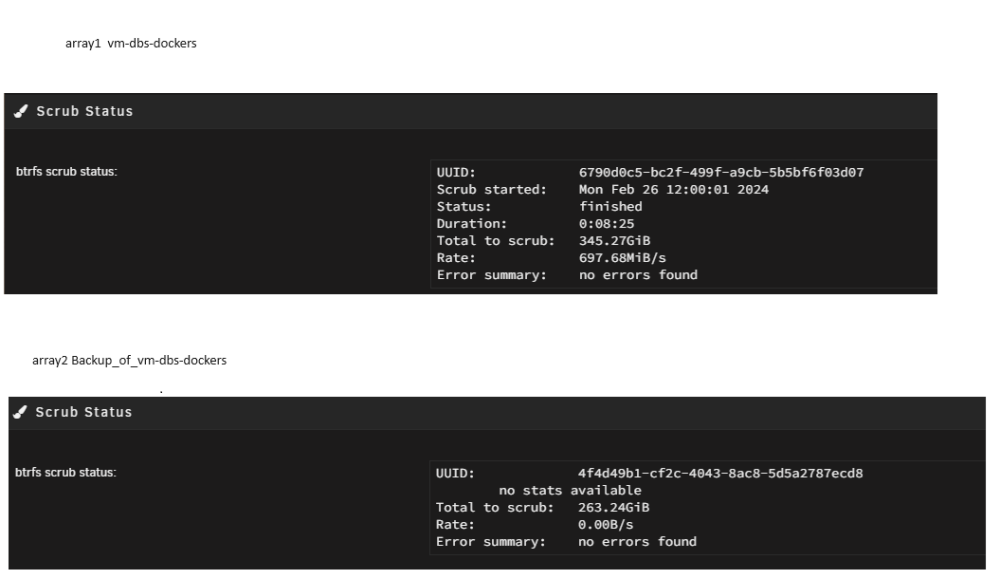
-
first, Thank you for looking at my problem. I really appreciate it a lot. Correct, the docker.img and libvirt.img are on a btrfs partition on a nvme drive. using blkid I get this (if this can help figure out the uuid question I have) /dev/sda1: LABEL_FATBOOT="UNRAID" LABEL="UNRAID" UUID="2054-2B8B" BLOCK_SIZE="512" TYPE="vfat" /dev/loop1: TYPE="squashfs" /dev/sdf1: UUID="E04F-7A11" BLOCK_SIZE="512" TYPE="vfat" PARTLABEL="^FM-XM-^@M-mM-^AM-^[^AM-oM-2M-^PM-PM-\"" PARTUUID="d8dc08b4-476d-4b27-9fa5-c0c9afbdba3a" /dev/sdf2: BLOCK_SIZE="512" UUID="01D6BAD60A80CFF0" TYPE="ntfs" PARTLABEL="M-aM-5M-^\M-iM-)M-&^E" PARTUUID="67dc4043-2e07-42f6-8950-7f35db9608ca" /dev/nvme0n1p1: UUID="4f4d49b1-cf2c-4043-8ac8-5d5a2787ecd8" UUID_SUB="8a7e058f-a0ba-4872-a5ab-89447e85079b" BLOCK_SIZE="4096" TYPE="btrfs" /dev/sdo1: LABEL="Chia_Plot6" UUID="b16cac7b-70f1-4351-8f98-9692e12ac770" BLOCK_SIZE="4096" TYPE="xfs" PARTUUID="8b453002-d47e-40e5-98cd-28c01b94d9b5" /dev/sdd1: UUID="67ff4bbe-aa12-4dd4-969b-41066e725c21" BLOCK_SIZE="512" TYPE="xfs" PARTUUID="400c85ba-3b66-4aa8-8210-2c0aed761d1b" /dev/md2p1: UUID="84d9a213-f984-4041-9daf-969ab82fc1fb" BLOCK_SIZE="512" TYPE="xfs" /dev/sdm: LABEL="Chia_Plot8" BLOCK_SIZE="512" UUID="205BF6D701F727BE" TYPE="ntfs" /dev/sdb1: UUID="345078c8-eebd-49c2-b8dc-52c47395acc8" BLOCK_SIZE="512" TYPE="xfs" PARTUUID="73055663-5848-4059-a745-f61416725a84" /dev/md5p1: UUID="345078c8-eebd-49c2-b8dc-52c47395acc8" BLOCK_SIZE="512" TYPE="xfs" /dev/sdk1: UUID="84d9a213-f984-4041-9daf-969ab82fc1fb" BLOCK_SIZE="512" TYPE="xfs" PARTUUID="71ecb223-83ae-47f9-a4bb-d39af9bf0522" /dev/sdi1: UUID="7345a548-0fd5-4a77-9da0-bd7bcf468d1e" BLOCK_SIZE="512" TYPE="xfs" PARTUUID="1f4b9897-a42c-412d-9a22-0ea803beebb5" /dev/md1p1: UUID="543c965e-17bd-4737-9c24-0714a6089066" BLOCK_SIZE="4096" TYPE="xfs" /dev/md4p1: UUID="67ff4bbe-aa12-4dd4-969b-41066e725c21" BLOCK_SIZE="512" TYPE="xfs" /dev/loop0: TYPE="squashfs" /dev/sde1: UUID="b5d6290f-015b-4569-b7e7-d8d0a2b5e491" BLOCK_SIZE="512" TYPE="xfs" PARTUUID="204051fd-ff72-4bcb-b32f-5d80a5a9b4d5" /dev/sdn1: LABEL="Chia_Plot2" BLOCK_SIZE="512" UUID="514C8EE3245D66AC" TYPE="ntfs" PARTUUID="495769c3-478a-4607-b396-513074d28d37" /dev/sdc1: UUID="c1c8dcff-7ed7-4019-89e8-8c0e2afc9c52" BLOCK_SIZE="512" TYPE="xfs" PARTUUID="972bd0a5-87bc-4fac-80d3-01e86e2c8a1b" /dev/sdl: LABEL="Chia_Plot7" BLOCK_SIZE="512" UUID="12EC49946D53211A" TYPE="ntfs" /dev/nvme1n1p1: UUID="6790d0c5-bc2f-499f-a9cb-5b5bf6f03d07" UUID_SUB="425c9a10-1680-4bb4-9db6-09a7457e8dbc" BLOCK_SIZE="4096" TYPE="btrfs" /dev/md28p1: UUID="b5d6290f-015b-4569-b7e7-d8d0a2b5e491" BLOCK_SIZE="512" TYPE="xfs" /dev/sdj1: UUID="543c965e-17bd-4737-9c24-0714a6089066" BLOCK_SIZE="4096" TYPE="xfs" PARTUUID="8dd33739-1207-4e57-8804-bc2e1849b1e6" /dev/md3p1: UUID="7345a548-0fd5-4a77-9da0-bd7bcf468d1e" BLOCK_SIZE="512" TYPE="xfs" /dev/md6p1: UUID="c1c8dcff-7ed7-4019-89e8-8c0e2afc9c52" BLOCK_SIZE="512" TYPE="xfs" /dev/sdp1: LABEL="Chia_Plot4" BLOCK_SIZE="512" UUID="56C15B304ACE8A26" TYPE="ntfs" PARTUUID="5fead960-cfb1-456e-8ec7-9d2cc6b2142b" /dev/loop2: UUID="37054439-aa79-4407-98df-7c5b2c5851f4" UUID_SUB="2dc8080e-b2e6-4a03-be4f-b4fa82d40d27" BLOCK_SIZE="4096" TYPE="btrfs" /dev/loop3: UUID="b4112bdf-b443-4437-8c49-732da8465892" UUID_SUB="3276b63f-b557-47ac-8808-dc5d7570b172" BLOCK_SIZE="4096" TYPE="btrfs" /dev/sdg1: PARTUUID="237b19a2-c834-40e6-9565-e37cf01140c2" /dev/sdh1: PARTUUID="528b7fd5-fb01-4dee-a41a-e61e04557662"
-
okok, I have some info to give. Not a solution yet, but maybe someone here can help me some of my hdd are connected directly to sata port on server, most others hdd are through an lsi card Serial Attached SCSI controller: Broadcom / LSI SAS2308 PCI-Express Fusion-MPT SAS-2 (rev 05). They all get woke up <1min after being spun down. (so I don't believe it is due to the card) I disabled docker stopped the array changed one disk spin down delay to 15min. This happens on every disk a min or less after the spin down. so it does matter what hdd does it, therefore I decided to spin up and down a single disk I installed iotop through nerdtools and ran this command iotop -bktoqqq -d .1 TIME TID PRIO USER DISK READ DISK WRITE SWAPIN IO COMMAND 15:51:01 14897 be/4 root 12159.54 K/s 0.00 K/s ?unavailable? btrfs filesystem show 32f96308-aa9a-4c86-b799-d222f4af4a75 15:51:01 14897 be/4 root 60745.88 K/s 0.00 K/s ?unavailable? btrfs filesystem show 32f96308-aa9a-4c86-b799-d222f4af4a75 15:51:01 14897 be/4 root 60019.35 K/s 0.00 K/s ?unavailable? btrfs filesystem show 32f96308-aa9a-4c86-b799-d222f4af4a75 15:52:02 17063 be/4 root 50308.71 K/s 0.00 K/s ?unavailable? btrfs filesystem show 32f96308-aa9a-4c86-b799-d222f4af4a75 15:52:02 17063 be/4 root 25501.22 K/s 0.00 K/s ?unavailable? btrfs filesystem show 32f96308-aa9a-4c86-b799-d222f4af4a75 15:53:01 19147 be/4 root 16931.36 K/s 0.00 K/s ?unavailable? btrfs filesystem show 32f96308-aa9a-4c86-b799-d222f4af4a75 15:53:01 19147 be/4 root 60612.63 K/s 0.00 K/s ?unavailable? btrfs filesystem show 32f96308-aa9a-4c86-b799-d222f4af4a75 15:53:01 19147 be/4 root 75370.34 K/s 0.00 K/s ?unavailable? btrfs filesystem show 32f96308-aa9a-4c86-b799-d222f4af4a75 15:54:01 21278 be/4 root 32661.45 K/s 0.00 K/s ?unavailable? btrfs filesystem show 32f96308-aa9a-4c86-b799-d222f4af4a75 15:54:02 21278 be/4 root 4982.77 K/s 0.00 K/s ?unavailable? btrfs filesystem show 32f96308-aa9a-4c86-b799-d222f4af4a75 15:54:02 21278 be/4 root 4704.45 K/s 0.00 K/s ?unavailable? btrfs filesystem show 32f96308-aa9a-4c86-b799-d222f4af4a75 15:54:02 21278 be/4 root 30341.35 K/s 0.00 K/s ?unavailable? btrfs filesystem show 32f96308-aa9a-4c86-b799-d222f4af4a75 15:54:02 21278 be/4 root 37.56 K/s 0.00 K/s ?unavailable? btrfs filesystem show 32f96308-aa9a-4c86-b799-d222f4af4a75 15:54:03 21278 be/4 root 50048.81 K/s 0.00 K/s ?unavailable? btrfs filesystem show 32f96308-aa9a-4c86-b799-d222f4af4a75 15:55:01 23468 be/4 root 4637.08 K/s 0.00 K/s ?unavailable? btrfs filesystem show 32f96308-aa9a-4c86-b799-d222f4af4a75 15:55:01 23468 be/4 root 20174.36 K/s 0.00 K/s ?unavailable? btrfs filesystem show 32f96308-aa9a-4c86-b799-d222f4af4a75 15:55:08 23468 be/4 root 37.27 K/s 0.00 K/s ?unavailable? btrfs filesystem show 32f96308-aa9a-4c86-b799-d222f4af4a75 15:55:08 23468 be/4 root 40318.78 K/s 0.00 K/s ?unavailable? btrfs filesystem show 32f96308-aa9a-4c86-b799-d222f4af4a75 15:55:08 23468 be/4 root 10475.77 K/s 0.00 K/s ?unavailable? btrfs filesystem show 32f96308-aa9a-4c86-b799-d222f4af4a75 15:55:08 23468 be/4 root 7213.60 K/s 0.00 K/s ?unavailable? btrfs filesystem show 32f96308-aa9a-4c86-b799-d222f4af4a75 15:55:08 23468 be/4 root 52775.84 K/s 0.00 K/s ?unavailable? btrfs filesystem show 32f96308-aa9a-4c86-b799-d222f4af4a75 15:55:16 14867 be/4 root 640.61 K/s 0.00 K/s ?unavailable? [kworker/u12:1-loop1] 15:55:16 24055 be/4 root 1017.45 K/s 0.00 K/s ?unavailable? smbd -D ... 16:10:01 24220 be/4 root 6987.66 K/s 0.00 K/s ?unavailable? btrfs filesystem show 32f96308-aa9a-4c86-b799-d222f4af4a75 16:10:01 24220 be/4 root 60275.00 K/s 0.00 K/s ?unavailable? btrfs filesystem show 32f96308-aa9a-4c86-b799-d222f4af4a75 16:10:01 24220 be/4 root 15163.80 K/s 0.00 K/s ?unavailable? btrfs filesystem show 32f96308-aa9a-4c86-b799-d222f4af4a75 16:10:01 24220 be/4 root 45080.63 K/s 0.00 K/s ?unavailable? btrfs filesystem show 32f96308-aa9a-4c86-b799-d222f4af4a75 16:11:02 26550 be/4 root 6994.43 K/s 0.00 K/s ?unavailable? btrfs filesystem show 32f96308-aa9a-4c86-b799-d222f4af4a75 16:11:02 26550 be/4 root 20261.11 K/s 0.00 K/s ?unavailable? btrfs filesystem show 32f96308-aa9a-4c86-b799-d222f4af4a75 16:11:08 26550 be/4 root 10327.58 K/s 0.00 K/s ?unavailable? btrfs filesystem show 32f96308-aa9a-4c86-b799-d222f4af4a75 16:11:08 26550 be/4 root 29950.20 K/s 0.00 K/s ?unavailable? btrfs filesystem show 32f96308-aa9a-4c86-b799-d222f4af4a75 16:11:08 26550 be/4 root 10215.82 K/s 0.00 K/s ?unavailable? btrfs filesystem show 32f96308-aa9a-4c86-b799-d222f4af4a75 16:11:09 26550 be/4 root 19700.42 K/s 0.00 K/s ?unavailable? btrfs filesystem show 32f96308-aa9a-4c86-b799-d222f4af4a75 16:11:09 26550 be/4 root 30249.68 K/s 0.00 K/s ?unavailable? btrfs filesystem show 32f96308-aa9a-4c86-b799-d222f4af4a75 16:12:01 28608 be/4 root 60618.31 K/s 0.00 K/s ?unavailable? btrfs filesystem show 32f96308-aa9a-4c86-b799-d222f4af4a75 16:12:01 28608 be/4 root 30564.69 K/s 0.00 K/s ?unavailable? btrfs filesystem show 32f96308-aa9a-4c86-b799-d222f4af4a75 in unraid log I got the Feb 25 15:54:03 ChapelleSixtine emhttpd: spinning down /dev/sdd Feb 25 15:55:08 ChapelleSixtine emhttpd: read SMART /dev/sdd Feb 25 16:10:03 ChapelleSixtine emhttpd: spinning down /dev/sdd Feb 25 16:11:08 ChapelleSixtine emhttpd: read SMART /dev/sdd here is what I see btrfs filesystem show 32f96308-aa9a-4c86-b799-d222f4af4a75 is the only thing accessing a disk after a spindown. The thing is, No drive in the array is btrfs. I have 2 cache nvme that are in btrfs I saw the syslog and iotop populate in realtime simultaneaously while hearing the disk being accessed. Doesn't seems like a coincidence as I heard and saw that exaclty 3 times 🤔hypothesis : The "32f96308-aa9a-4c86-b799-d222f4af4a75" is meant to be a hdd right? well, I don't have any hdd with that uuid. Could that cause the sytem to wake up all disk trying to find it? As it wakes all disks when that trace is shown using the iotop command if any disks is spun down. I used the command " lsblk -o KNAME,TYPE,SIZE,MODEL,UUID" and "blkid /dev/*" and "blkid" and "fdisk -l" and "lshw -class disk -class tape" I can't find that guid/uuid number anywhere. Any ideas on where that uuidguid would be from?
-
This is what I did read in all of the post that I did found regarding problems of hdd spinning backup. The smart read is triggered once the disk is spun up. I did look at file activity plugin and couldn't find what was causing this. If someone would be willing to go over each step to figure out what is going on, I'm willing to try anything. During the day, only 25% of the disk should be spinning but currently they are all spinning all the times. I plan on adding more disk, but I would like this issues to be resolve before doing so. That's a lot of wasted energy. Its not too bad in the winter time, but the extra heat from the psu and hdd in the summer is going to add more cost to the cooling. It all adds up.
-
At least some ideas on what to look for and where please edit : I updated to 6.12.6 a couple of days ago but this hasnt changed. Disk spins right up after they were spun down by the spindown delay here is the current log Feb 12 17:12:08 ChapelleSixtine emhttpd: read SMART /dev/sdb Feb 12 17:18:03 ChapelleSixtine emhttpd: spinning down /dev/sdk Feb 12 17:18:13 ChapelleSixtine emhttpd: spinning down /dev/sdg Feb 12 17:18:25 ChapelleSixtine emhttpd: spinning down /dev/sdh Feb 12 17:19:12 ChapelleSixtine emhttpd: read SMART /dev/sdk Feb 12 17:19:23 ChapelleSixtine emhttpd: read SMART /dev/sdg Feb 12 17:19:35 ChapelleSixtine emhttpd: read SMART /dev/sdh Feb 12 17:37:03 ChapelleSixtine emhttpd: spinning down /dev/sdi Feb 12 17:38:08 ChapelleSixtine emhttpd: read SMART /dev/sdi Feb 12 17:39:02 ChapelleSixtine emhttpd: spinning down /dev/sdd Feb 12 17:39:10 ChapelleSixtine emhttpd: spinning down /dev/sdc Feb 12 17:40:07 ChapelleSixtine emhttpd: read SMART /dev/sdd Feb 12 17:40:14 ChapelleSixtine emhttpd: read SMART /dev/sdc Feb 12 18:16:03 ChapelleSixtine emhttpd: spinning down /dev/sde Feb 12 18:17:05 ChapelleSixtine emhttpd: read SMART /dev/sde Feb 12 18:17:52 ChapelleSixtine emhttpd: spinning down /dev/sdj Feb 12 18:18:11 ChapelleSixtine emhttpd: read SMART /dev/sdj Feb 12 19:12:02 ChapelleSixtine emhttpd: spinning down /dev/sdb Feb 12 19:13:08 ChapelleSixtine emhttpd: read SMART /dev/sdb Feb 12 19:19:03 ChapelleSixtine emhttpd: spinning down /dev/sdk Feb 12 19:19:14 ChapelleSixtine emhttpd: spinning down /dev/sdg Feb 12 19:19:25 ChapelleSixtine emhttpd: spinning down /dev/sdh Feb 12 19:20:11 ChapelleSixtine emhttpd: read SMART /dev/sdk Feb 12 19:20:23 ChapelleSixtine emhttpd: read SMART /dev/sdg Feb 12 19:20:34 ChapelleSixtine emhttpd: read SMART /dev/sdh Feb 12 19:40:02 ChapelleSixtine emhttpd: spinning down /dev/sdd Feb 12 19:40:09 ChapelleSixtine emhttpd: spinning down /dev/sdc Feb 12 19:41:07 ChapelleSixtine emhttpd: read SMART /dev/sdd Feb 12 19:41:15 ChapelleSixtine emhttpd: read SMART /dev/sdc Feb 12 20:17:02 ChapelleSixtine emhttpd: spinning down /dev/sde Feb 12 20:18:05 ChapelleSixtine emhttpd: read SMART /dev/sde Feb 12 20:18:07 ChapelleSixtine emhttpd: spinning down /dev/sdj Feb 12 20:19:13 ChapelleSixtine emhttpd: read SMART /dev/sdj So today, I turned the spin dow delay to never
-
Hi, if anyone has any guidance I would really appreciate it.
-
post 1 incomplete. it posted against my will. Please give me 10minutes to complete Post1 is now complete
-
Hi, I have been trying to troubleshoot this by reading other threads. With no success Problem unraid version v6.12.1 A few weeks ago, the hdd were spinned down after 2 hours of inactivity like configured. I discovered yesterday that they don't spin down anymore. The disk all always spinning. Actually, when they are spun down, they are immidiatly spun back up Jan 24 05:36:03 ChapelleSixtine emhttpd: spinning down /dev/sdd Jan 24 05:37:08 ChapelleSixtine emhttpd: read SMART /dev/sdd Jan 24 05:37:09 ChapelleSixtine emhttpd: spinning down /dev/sde Jan 24 05:37:09 ChapelleSixtine emhttpd: spinning down /dev/sdc Jan 24 05:38:06 ChapelleSixtine emhttpd: read SMART /dev/sde Jan 24 05:38:13 ChapelleSixtine emhttpd: read SMART /dev/sdc What changed I changed the ram, because file corruptions on one of the cache drive in btrfs. Memtest86+ returned a few error per hour of test. I teste the new ram for 24+hr and got no error. I updated all the plugins Here is what I did try At every step, I did manually spin down the hdd and they where spin up shortly after <1min made sure turbo write ( i dont have the plugin) "Tunable (md_write_method):" is set to auto hdd spindown delay is 2hours enabled spinup groups is disabled I made sure that the share were properly configured on their proper drives stop every container stop docker stop array and restarted with "disk \ enable auto start : off" then try this in maintenance modes run inotifywait -mr /mnt/disk2 i got a bunch of /mnt/disk2/ OPEN,ISDIR /mnt/disk2/ ACCESS,ISDIR /mnt/disk2/ CLOSE_NOWRITE,CLOSE,ISDIR /mnt/disk2/ OPEN,ISDIR /mnt/disk2/ ACCESS,ISDIR /mnt/disk2/ CLOSE_NOWRITE,CLOSE,ISDIR /mnt/disk2/ OPEN,ISDIR /mnt/disk2/ ACCESS,ISDIR /mnt/disk2/ CLOSE_NOWRITE,CLOSE,ISDIR then I found that something was accessing the recycling bin folders. I removed the recycling bin plugin, restarted the server I confirmed that my userscripts were not running I looked at the open file and file activity and couldn't find anything that would use those disks the inotifywait returned only the "/mnt/disk2/ OPEN,ISDIR /mnt/disk2/ ACCESS,ISDIR /mnt/disk2/ CLOSE_NOWRITE,CLOSE,ISDIR " I tried inotifywait -mr -e access -e modify /mnt/disk2 but nothing else then "/mnt/disk2/ ACCESS,ISDIR " was seen I disabled the file activity plugin I tried to look at htop, but I couldn't see what was triggering the spin up. I looked at the "array page" and the reads and writes, they were at 0B/s, then I saw them jump to some numbers, all the same numbers for every disk for a very short time (1<sec, I'm not sure I was looking directly at that when it happenned). Every time I would spin down the drives, they would be spin up immediatly after sequentially for every step performed above Jan 23 23:13:19 ChapelleSixtine emhttpd: spinning down /dev/sdm Jan 23 23:13:19 ChapelleSixtine emhttpd: spinning down /dev/sdj Jan 23 23:13:19 ChapelleSixtine emhttpd: spinning down /dev/sdk Jan 23 23:13:19 ChapelleSixtine emhttpd: spinning down /dev/sdh Jan 23 23:13:19 ChapelleSixtine emhttpd: spinning down /dev/sdg Jan 23 23:13:19 ChapelleSixtine emhttpd: spinning down /dev/sdd Jan 23 23:13:19 ChapelleSixtine emhttpd: spinning down /dev/sde Jan 23 23:13:19 ChapelleSixtine emhttpd: spinning down /dev/sdb Jan 23 23:13:19 ChapelleSixtine emhttpd: spinning down /dev/sdf Jan 23 23:13:19 ChapelleSixtine emhttpd: spinning down /dev/sdc Jan 23 23:13:19 ChapelleSixtine emhttpd: spinning down /dev/sdn Jan 23 23:13:19 ChapelleSixtine emhttpd: spinning down /dev/nvme1n1 Jan 23 23:13:19 ChapelleSixtine emhttpd: spinning down /dev/nvme0n1 Jan 23 23:13:19 ChapelleSixtine emhttpd: spinning down /dev/sdo Jan 23 23:13:19 ChapelleSixtine emhttpd: spinning down /dev/sdl Jan 23 23:13:19 ChapelleSixtine emhttpd: spinning down /dev/sdi Jan 23 23:13:19 ChapelleSixtine emhttpd: spinning down /dev/sdp Jan 23 23:13:20 ChapelleSixtine emhttpd: sdspin /dev/nvme1n1 down: 25 Jan 23 23:13:20 ChapelleSixtine emhttpd: sdspin /dev/nvme0n1 down: 25 Jan 23 23:13:37 ChapelleSixtine emhttpd: read SMART /dev/sdf Jan 23 23:14:02 ChapelleSixtine emhttpd: read SMART /dev/sdo Jan 23 23:14:26 ChapelleSixtine emhttpd: read SMART /dev/sdd Jan 23 23:14:27 ChapelleSixtine emhttpd: read SMART /dev/sdk Jan 23 23:14:47 ChapelleSixtine emhttpd: read SMART /dev/sdm Jan 23 23:14:54 ChapelleSixtine emhttpd: read SMART /dev/sdb Jan 23 23:15:01 ChapelleSixtine emhttpd: read SMART /dev/sdi Jan 23 23:15:02 ChapelleSixtine emhttpd: read SMART /dev/sdj Jan 23 23:15:24 ChapelleSixtine emhttpd: read SMART /dev/sdg Jan 23 23:15:28 ChapelleSixtine emhttpd: read SMART /dev/sde Jan 23 23:15:40 ChapelleSixtine emhttpd: read SMART /dev/sdn Jan 23 23:15:46 ChapelleSixtine emhttpd: read SMART /dev/sdc Jan 23 23:15:58 ChapelleSixtine emhttpd: read SMART /dev/sdl Jan 23 23:16:09 ChapelleSixtine emhttpd: read SMART /dev/sdh Jan 23 23:16:10 ChapelleSixtine emhttpd: read SMART /dev/sdp Would updating to 6.12.6 solve this? I read in another thread that someone on 6.12.1 had to downgrade back on 6.11.5 to get this fixed. ( Any help would be greatly appreciated. I have no idea how to find out what is spinning all my drive back up chapellesixtine-diagnostics-20240124-0918.zip
-
I excluded the folder dropbox/events from the backup and everything went back to normal. That folder was pretty big (80Gb according to "du -sh" however the backup was never that big. close to 8Gb and is now under 500mb )
-
Hi, I've set this appdatabackup plugin a couple of month ago, it was working fine until a few backups ago, maybe 2-3weeks. I get this error, tar verification failed [30.12.2023 05:13:10][ℹ️][Dropbox-by-otherguy] Stopping Dropbox-by-otherguy... done! (took 10 seconds) [30.12.2023 05:13:20][ℹ️][Dropbox-by-otherguy] Should NOT backup external volumes, sanitizing them... [30.12.2023 05:13:20][ℹ️][Dropbox-by-otherguy] Calculated volumes to back up: /mnt/user/appdata/dropbox [30.12.2023 05:13:20][ℹ️][Dropbox-by-otherguy] Backing up Dropbox-by-otherguy... [30.12.2023 05:28:07][ℹ️][Dropbox-by-otherguy] Backup created without issues [30.12.2023 05:28:07][ℹ️][Dropbox-by-otherguy] Verifying backup... [30.12.2023 05:32:48][❌][Dropbox-by-otherguy] tar verification failed! Tar said: tar: Removing leading `/' from member names; mnt/user/appdata/dropbox/events/store: Contents differ [30.12.2023 05:32:48][ℹ️][Dropbox-by-otherguy] Starting Dropbox-by-otherguy... (try #1) done! all the other containers are backedup properly and succed. Only this one is giving me trouble. I did sent the error log to the developper, this is the ID "4024f2b1-e1ae-4c4b-b225-5db3bfbbfc99"

