BiNiCKNiCH
Members
-
Joined
-
Last visited
-
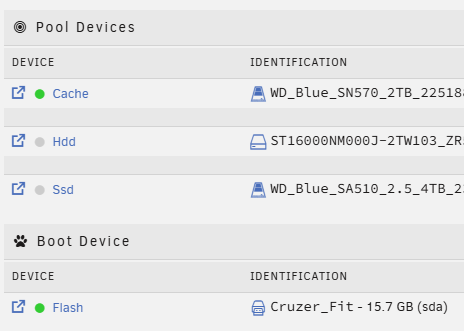
I have a similar problem, except that my disks all wake up once a day at the same time. I have no idea when it started for me and trying to narrow down the problem for days/weeks and it must be related to ZFS. Initially I tried to isolate the problem on my productive unraid server, but no chance, the disks all wake up once a day at the same time. In the LOG it looks like this: May 27 12:51:43 unraid emhttpd: read SMART /dev/sdb May 27 12:51:58 unraid emhttpd: read SMART /dev/sdc May 27 13:06:44 unraid emhttpd: spinning down /dev/sdb May 27 13:07:00 unraid emhttpd: spinning down /dev/sdcSince I couldn't get any further, I wiped the entire server and reinstalled unraid without much configuration. I only mounted the disks unformatted as before. Result: Even a freshly installed server wakes up the disks once a day. The disks started up again at the same time a day later, although nothing was configured in the system. Now I took a closer look at the disks and simply reformatted them all again. What can I say, the disks now start up every few minutes after formatting. During the last attempt I formatted one disk a little later than the other and this time difference can be seen in the LOGs. root@unraid:~# zpool history hdd (sdc) History for 'hdd': 2025-05-26.12:47:25 zpool create -f -o ashift=12 -O dnodesize=auto -O acltype=posixacl -O xattr=sa -O utf8only=on -m /mnt/hdd hdd /dev/sdc1 2025-05-26.12:47:25 zpool export -f hdd 2025-05-26.12:47:26 zpool import -f -m -N -o autoexpand=on -d /dev/sdc1 10996738503950216059 hdd 2025-05-26.12:47:26 zfs set -u mountpoint=/mnt/hdd hdd 2025-05-26.12:47:26 zpool set autotrim=off hdd 2025-05-26.12:47:26 zfs set compression=on hdd 2025-05-26.12:49:58 zpool export -f hdd 2025-05-26.12:51:32 zpool import -f -m -N -o autoexpand=on -d /dev/sdc1 10996738503950216059 hdd 2025-05-26.12:51:32 zfs set -u mountpoint=/mnt/hdd hdd 2025-05-26.12:51:32 zpool set autotrim=off hdd 2025-05-26.12:51:32 zfs set compression=on hdd 2025-05-27.15:23:41 zpool export -f hdd 2025-05-27.15:23:56 zpool import -f -m -N -o autoexpand=on -d /dev/sdc1 10996738503950216059 hdd 2025-05-27.15:23:57 zfs set -u mountpoint=/mnt/hdd hdd 2025-05-27.15:23:57 zpool set autotrim=off hdd 2025-05-27.15:23:57 zfs set compression=on hdd 2025-05-27.15:30:39 zpool export -f hdd 2025-05-27.15:32:10 zpool import -f -m -N -o autoexpand=on -d /dev/sdc1 10996738503950216059 hdd 2025-05-27.15:32:10 zfs set -u mountpoint=/mnt/hdd hdd 2025-05-27.15:32:10 zpool set autotrim=off hdd 2025-05-27.15:32:10 zfs set compression=on hdd root@unraid:~# zpool history ssd (sdb) History for 'ssd': 2025-05-27.15:24:29 zpool create -f -o ashift=12 -O dnodesize=auto -O acltype=posixacl -O xattr=sa -O utf8only=on -m /mnt/ssd ssd /dev/sdb1 2025-05-27.15:24:30 zpool export -f ssd 2025-05-27.15:24:30 zpool import -f -m -N -o autoexpand=on -d /dev/sdb1 5500916159231983332 ssd 2025-05-27.15:24:30 zfs set -u mountpoint=/mnt/ssd ssd 2025-05-27.15:24:30 zpool set autotrim=on ssd 2025-05-27.15:24:30 zfs set compression=on ssd 2025-05-27.15:30:39 zpool export -f ssd 2025-05-27.15:32:10 zpool import -f -m -N -o autoexpand=on -d /dev/sdb1 5500916159231983332 ssd 2025-05-27.15:32:10 zfs set -u mountpoint=/mnt/ssd ssd 2025-05-27.15:32:11 zpool set autotrim=on ssd 2025-05-27.15:32:11 zfs set compression=on ssdMay 28 12:51:55 unraid emhttpd: read SMART /dev/sdc May 28 13:06:57 unraid emhttpd: spinning down /dev/sdc May 28 15:32:21 unraid emhttpd: read SMART /dev/sdb May 28 15:47:22 unraid emhttpd: spinning down /dev/sdbYou can see from the history and the syslog that the disks always spin up a few minutes after formatting. Could this be a bug? Completely crazy, as if something in ZFS tests or monitors something on the disks every 24 hours. System ODROID-H4 Ultra 48 GB Crucial RAM Drives: Cache WD_Blue_SN570_2TB Hdd ST16000NM000J-2TW103 (sdc) Ssd WD_Blue_SA510_2.5_4TB (sdb) I would like to leave the sync or atime activated. So this is probably just a workaround.
-
Ich stand mit meinem MUFU gerade auch vor dem Problem, der nur SMB v1 unterstützt. Da ich nicht meine gesamten Shares wieder "downgraden" wollte, suchte ich nach einer Lösung über Docker und bin fündig geworden. Mit dem Docker Image https://github.com/dockur/samba funktioniert es super und so ist nur ein Share, der für das Scannen benötigt wird, per SMBv1 über einen separaten Port zugänglich.
-
Kurze Info, seitdem ich auf v7.1.0 bin treten die Synfloods nicht mehr auf. 😀
-
Danke dir, werde ich machen. 🙂 Ich check nochmal alles ohne Plugins und versuche es noch etwas einzugrenzen. Reproduzieren kann ich es leider nicht.
-
Hat niemand eine Idee, was das sein kann? Auch mit dem neusten Update kommt es immer wieder zu den Synfloods.
-
Mahlzeit zusammen, im Forum konnte ich zu diesem Fehler nicht wirklich viel finden und ich weiß auch nicht, ob es evtl. etwas mit unraid 7 oder tailscale zu tun hat, was ich noch nicht allzu lange nutze. Folgender Fehler tritt immer mal wieder im LOG auf und ich würde gerne verstehen, ob hier irgendwas bei mir falsch läuft oder ich den Fehler getrost ignorieren kann. Gefilterter LOG-Auszug von gestern und heute Feb 19 10:00:09 unraid kernel: TCP: request_sock_TCP: Possible SYN flooding on port 0.0.0.0:3702. Sending cookies. Feb 19 16:39:30 unraid kernel: TCP: request_sock_TCP: Possible SYN flooding on port 0.0.0.0:3702. Sending cookies. Feb 19 16:39:32 unraid kernel: TCP: request_sock_TCPv6: Possible SYN flooding on port [::]:3702. Sending cookies. Feb 19 16:39:32 unraid kernel: TCP: request_sock_TCP: Possible SYN flooding on port 0.0.0.0:3702. Sending cookies. Feb 19 21:47:05 unraid kernel: TCP: request_sock_TCP: Possible SYN flooding on port 0.0.0.0:3702. Sending cookies. Feb 19 21:49:24 unraid kernel: TCP: request_sock_TCPv6: Possible SYN flooding on port [::]:3702. Sending cookies. Feb 19 21:49:24 unraid kernel: TCP: request_sock_TCP: Possible SYN flooding on port 0.0.0.0:3702. Sending cookies. Feb 19 22:58:45 unraid kernel: TCP: request_sock_TCPv6: Possible SYN flooding on port [::]:3702. Sending cookies. Feb 19 22:58:45 unraid kernel: TCP: request_sock_TCP: Possible SYN flooding on port 0.0.0.0:3702. Sending cookies. Feb 19 22:58:47 unraid kernel: TCP: request_sock_TCPv6: Possible SYN flooding on port [::]:3702. Sending cookies. Feb 19 22:58:47 unraid kernel: TCP: request_sock_TCP: Possible SYN flooding on port 0.0.0.0:3702. Sending cookies. Feb 19 23:12:31 unraid kernel: TCP: request_sock_TCPv6: Possible SYN flooding on port [::]:3702. Sending cookies. Feb 19 23:12:31 unraid kernel: TCP: request_sock_TCP: Possible SYN flooding on port 0.0.0.0:3702. Sending cookies. Feb 19 23:22:58 unraid kernel: TCP: request_sock_TCP: Possible SYN flooding on port 0.0.0.0:3702. Sending cookies. Feb 19 23:22:58 unraid kernel: TCP: request_sock_TCPv6: Possible SYN flooding on port [::]:3702. Sending cookies. Feb 19 23:38:51 unraid kernel: TCP: request_sock_TCPv6: Possible SYN flooding on port [::]:3702. Sending cookies. Feb 19 23:38:51 unraid kernel: TCP: request_sock_TCP: Possible SYN flooding on port 0.0.0.0:3702. Sending cookies. Feb 19 23:38:55 unraid kernel: TCP: request_sock_TCP: Possible SYN flooding on port 0.0.0.0:3702. Sending cookies. Feb 19 23:38:55 unraid kernel: TCP: request_sock_TCPv6: Possible SYN flooding on port [::]:3702. Sending cookies. Feb 19 23:46:39 unraid kernel: TCP: request_sock_TCPv6: Possible SYN flooding on port [::]:3702. Sending cookies. Feb 19 23:46:43 unraid kernel: TCP: request_sock_TCP: Possible SYN flooding on port 0.0.0.0:3702. Sending cookies. Feb 19 23:54:41 unraid kernel: TCP: request_sock_TCPv6: Possible SYN flooding on port [::]:3702. Sending cookies. Feb 19 23:59:12 unraid kernel: TCP: request_sock_TCP: Possible SYN flooding on port 0.0.0.0:3702. Sending cookies. Feb 19 23:59:12 unraid kernel: TCP: request_sock_TCPv6: Possible SYN flooding on port [::]:3702. Sending cookies. Feb 20 00:07:07 unraid kernel: TCP: request_sock_TCP: Possible SYN flooding on port 0.0.0.0:3702. Sending cookies. Feb 20 00:07:07 unraid kernel: TCP: request_sock_TCPv6: Possible SYN flooding on port [::]:3702. Sending cookies. Feb 20 00:20:25 unraid kernel: TCP: request_sock_TCP: Possible SYN flooding on port 0.0.0.0:3702. Sending cookies. Feb 20 00:20:25 unraid kernel: TCP: request_sock_TCPv6: Possible SYN flooding on port [::]:3702. Sending cookies. Feb 20 00:33:39 unraid kernel: TCP: request_sock_TCPv6: Possible SYN flooding on port [::]:3702. Sending cookies. Feb 20 00:33:39 unraid kernel: TCP: request_sock_TCP: Possible SYN flooding on port 0.0.0.0:3702. Sending cookies. Feb 20 00:35:12 unraid kernel: TCP: request_sock_TCP: Possible SYN flooding on port [::]:8080. Sending cookies. Feb 20 14:48:52 unraid kernel: TCP: request_sock_TCP: Possible SYN flooding on port 0.0.0.0:3702. Sending cookies. Feb 20 14:48:52 unraid kernel: TCP: request_sock_TCPv6: Possible SYN flooding on port [::]:3702. Sending cookies. Feb 20 14:52:32 unraid kernel: TCP: request_sock_TCP: Possible SYN flooding on port 0.0.0.0:3702. Sending cookies. Eingrenzen konnte ich es schon auf den WSDD Dienst. root@unraid:~# netstat -tulpn | grep ':3702' tcp 0 0 0.0.0.0:3702 0.0.0.0:* LISTEN 8630/wsdd2 tcp 0 0 0.0.0.0:3702 0.0.0.0:* LISTEN 8630/wsdd2 tcp 0 0 0.0.0.0:3702 0.0.0.0:* LISTEN 8630/wsdd2 tcp 0 0 0.0.0.0:3702 0.0.0.0:* LISTEN 8630/wsdd2 tcp 0 0 0.0.0.0:3702 0.0.0.0:* LISTEN 8630/wsdd2 tcp 0 0 0.0.0.0:3702 0.0.0.0:* LISTEN 8630/wsdd2 tcp6 0 0 :::3702 :::* LISTEN 8630/wsdd2 tcp6 0 0 :::3702 :::* LISTEN 8630/wsdd2 tcp6 0 0 :::3702 :::* LISTEN 8630/wsdd2 tcp6 0 0 :::3702 :::* LISTEN 8630/wsdd2 tcp6 0 0 :::3702 :::* LISTEN 8630/wsdd2 tcp6 0 0 :::3702 :::* LISTEN 8630/wsdd2 udp 0 0 0.0.0.0:3702 0.0.0.0:* 8630/wsdd2 udp 0 0 0.0.0.0:3702 0.0.0.0:* 8630/wsdd2 udp 0 0 0.0.0.0:3702 0.0.0.0:* 8630/wsdd2 udp 0 0 0.0.0.0:3702 0.0.0.0:* 8630/wsdd2 udp 0 0 0.0.0.0:3702 0.0.0.0:* 8630/wsdd2 udp 0 0 0.0.0.0:3702 0.0.0.0:* 8630/wsdd2 udp6 0 0 :::3702 :::* 8630/wsdd2 udp6 0 0 :::3702 :::* 8630/wsdd2 udp6 0 0 :::3702 :::* 8630/wsdd2 udp6 0 0 :::3702 :::* 8630/wsdd2 udp6 0 0 :::3702 :::* 8630/wsdd2 udp6 0 0 :::3702 :::* 8630/wsdd2 Leider kann ich den Fehler weder provozieren noch in irgendeiner Weise nachstellen. Habt ihr vielleicht noch eine Idee? Diagnostics hängt mit dran. Grüße BiNiCKNiCH unraid-diagnostics-20250220-1518.zip

-
Ja, das kann man BIOS konfigurieren, das BIOS ist sehr umfangreich. Spulenfiepen habe ich gar nicht und mein Corsair SP120 Elite Lüfter dreht extrem selten, da muss es schon sehr warm und die Kiste gut ausgelastet sein. Zu den Karten kann ich nichts sagen. Das wird nicht funktionieren und würde auch keinerlei Vorteile bieten. Allein wegen der Lizenz, die über die GUID des Sticks läuft wird das nicht funktionieren.
-
Hab ich Ende Oktober gesagt? Ich glaube, ich meinte Ende Dezember. 🤣 Was soll ich sagen, der Kleine rennt und rennt und rennt. Hatte seit dem Aufsetzen keine nennenswerten Probleme, bzw. nichts, was mit dem ODROID zu tun hatte. Er läuft absolut stabil und die Performance ist für die kleine Büchse top. Auf den PCI-E Port von meinem vorherigen ASROCK N100DC-ITX Board kann ich getrost verzichten, insofern hab ich mit dem ODROID eigentlich nur Vorteile. Neben meinem Zimaboard und einem alten NUC gesellt sich dann wohl jetzt das ASROCK N100DC-ITX Board.🤭Dafür verrichtet mein Rockpi 4A noch gute Dienste als Backupserver. Bei Fragen, fragen! 😎
-
Leider wird Forward Auth noch nicht unterstützt, aber auf den ersten Blick sieht Zoraxy wirklich gut aus. https://github.com/tobychui/zoraxy/issues/33
-
Hi zusammen, ich habe es endlich geschafft, sind ja gerade mal 2,5 Monate vergangen 🤣, mit der aktuellen Unraid 7.0.0-beta.3 Version, meine komplettes Setup einmal neu aufzubauen. Ich wollte diesen Schritt machen, um einfach mal ein Desaster Recovery zu durchlaufen und zu gucken, ob auch wirklich alles von meinen ZFS-Replizierungen/Snapshots wiederhergestellt werden kann. Was soll ich sagen, es verlief alles reibungsloser als ich dachte. 😄 Aktuelle Hardware Config ODROID-H4 Ultra 1 TB NVME (WDC_WDS100T2B0C - Wird noch durch meine vorherige 2 TB getauscht) 4 TB SSD (WD_Blue_SA510_2.5) 16 TB (Seagate Exos X18) KFD 120W Netzteil 19V 6,32A Corsair SP120 Elite 120-mm-PWM-Hochleistungslüfter Alle Laufwerke in einem jeweils 1 Slot Pool. Da ich keine Parität nutze brauche ich kein Array. Software Unraid 7.0.0-beta.3 17 Docker Container (Datenbanken, Webserver, Paperless, Wiki.js, ...) 1 VM (Home Assistant, mittlerweile mit 40 GB vdisk) TLP für die P-State Settings und nicht zu viel umher gespielt Bisher läuft das System noch nicht allzu lange, aber der Stromverbrauch gefällt mir schon mal sehr. Anfangs hatte ich noch das Problem, dass nach dem Start der VM Das Ding nicht mehr in die C-States gegangen ist und der Verbrauch etwas höher war als jetzt, aber auch nur 2-3 W. Also habe ich erst die VM Umgebung neu aufgebaut und die libvirt.img neu erstellen lassen, vdisk erst mal die gleiche genommen. Aktuell läuft alles mit ca. 10,5W +/-0,5W im idle und die Kiste geht bis in C6. Ich glaube wegen vielleicht einem halben Watt, werde ich dahingehend keine weiteren Optimierungsversuche starten. Die Performance ist, wie zu erwarten war, nochmal besser als mit meinem vorherigen ASRock N100DC-ITX Board und das bei weniger Stromverbrauch. Jaaaa, ich weiß, wir reden hier auch nur von 3-5W, aber immerhin. Ende Oktober werde ich nochmal Meldung machen, wie stabil das Ganze läuft.
-
Wie hast du die ASPM Settings gesetzt? Ich musste hier die L1 Substates fest auf L1.1 setzen, sobald L1.2 mit drin war, brach die Übertragungsrate vom Netzwerk auf unter 250 MBit/s (30MB/s) ein. Ist wohl auch bekannt beim Intel I226-V Controller. Bezüglich Gehäusen könntest du dir das ODROID-H4 Mini-ITX Converter Kit holen. Da kannst du dann jedes Mini-IX Gehäuse nehmen, die es mitunter ja auch schon recht klein gibt. Ich habe mir dieses 19V/120W Netzteil geholt, was einen ganz guten Eindruck macht. Nur am Stecker muss ich nochmal ran, der ist vom Innendurchmesser her minimal zu groß. Bei dem Asus Netzteil passt alles vom Stecker her, ist aber nicht ganz so effizient wie das KFD.
-
Leider noch nicht. Ich wollte gleich mein komplettes Setup von meinem jetzige ASROCK N100 Server auf den ODROID switchen, um einen guten Vergleich zu haben. Das werde ich vermutlich alles frühestens nächste oder übernächste Woche schaffen.
-
Wo hast das was von 64 GB RAM Support bei der H4 Serie gelesen? Laut den Specs werden max. 48 GB unterstützt und laut einem Forum Beitrag bei odroid konnte ich bis jetzt keine wirklichen aussagekräftigen Infos dazu finden. Bezüglich ECC gab es ein BIOS Update, das IBECC Support hinzufügt. Thread dazu hier.
-
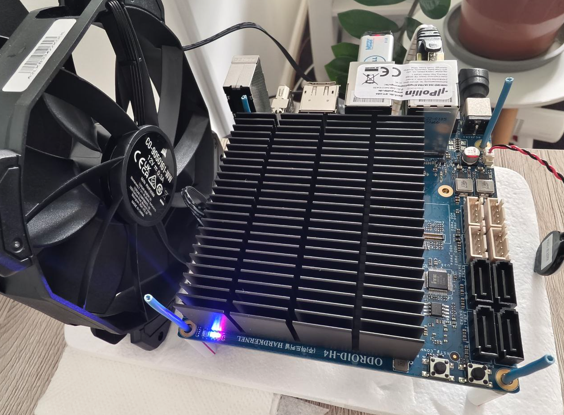
Nachdem ich endlich etwas Zeit gefunden habe konnte ich ein erstes Testsetup mit einer WD Blue 1TB NVME, 32 GB RAM und der neusten Unraid 7 Beta aufbauen. Der erste Eindruck ist durchaus positiv. Mit ein paar Settings im BIOS, gerade hinsichtlich ASPM, läuft der kleine ODROID-H4 Ultra im IDLE mit ca. 5W, mal mehr mal weniger. Zur Sicherheit habe ich gleich einen Lüfter mit angeklemmt da er mitunter, gerad bei den Temperaturen aktuell, doch sehr heiß wird. Noch nicht kritisch, aber es läuft aktuell auch noch nichts drauf. Im Idle ist der Lüfter aktuell so gut wie immer aus. Ich werde nach und nach weitere Tests durchführen und auch mal einen Dauerbetrieb testen. Bis dahin genießt alle die Sonne. 😎 Grüße BiNiCKNiCH
-
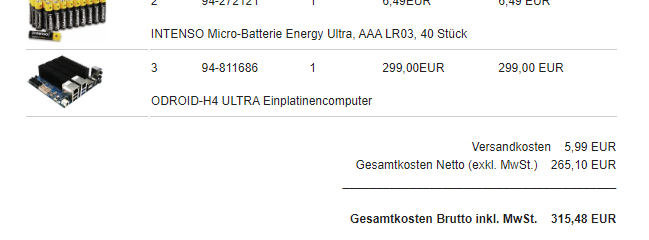
Ich finde den auch extrem gut. Preislich natürlich nicht gerade billig aber so ist das halt in dem SBC Bereich und den verbauten Komponenten. 😄 Ich schau mal, ob ich mir den hole. Edit: Ich konnte nicht widerstehen. Was kostet die Welt. 😄