





Caress
Members
-
Joined
-
Last visited
-
Updating my Unraid fixed it...wild sauce. It still shows orange like it needs an update is that normal?
-
Does corekeeper dedicated server require a GPU? Am I just lost here. Seeing a couple people posting about segmentation faults with running this server.
-
i5-13600k Asus Prime Z790M-Plus 64GB of RAM HBA Card with 6 drives, 1 parity 3 NVME drives for cache Sorry, glossed over that question. It's early here.
-
Unraid 7.0.1. Is that what's going on? Do I need to update for something specific?
-
Yeah, just deleted everything, the container, the template, appdata. Reinstalled from app store and didn't change a thing. Got this below. IPC function call IClientAppManager::GetUpdateInfo took too long: 59 msec Success! App '1963720' fully installed. Unloading Steam API...OK ---Prepare Server--- ---Checking for old display lock files--- ---Checking for old logfiles--- ---Server ready--- ---Starting Xvfb server--- ---Start Server--- /opt/scripts/start-server.sh: line 84: 145 Segmentation fault ${SERVER_DIR}/CoreKeeperServer -batchmode -logfile ${SERVER_DIR}/CoreKeeperServerLog.txt -world ${WORLD_INDEX} -worldname "${WORLD_NAME}" -datapath "${SERVER_DIR}/Save" ${GAME_PARAMS} 2 > /dev/null Terminated I appreciate you for even taking a look btw. Thank you.
-
I've removed the entire folder from appdata as well as steamcmd and it's still just bombing on me like that.
-
Working on getting your CoreKeeper template up and running and running into segmentation faults and all kind of errors. Posting my CoreKeeperServerLog. Willing to troubleshoot further just not really sure where to start, I've run the 7dtd server for many years with no issues, this one just won't boot for me, I see some errors in there but figured I'd reach out before making things worse. Any clues?CoreKeeperServerLog.txt
-
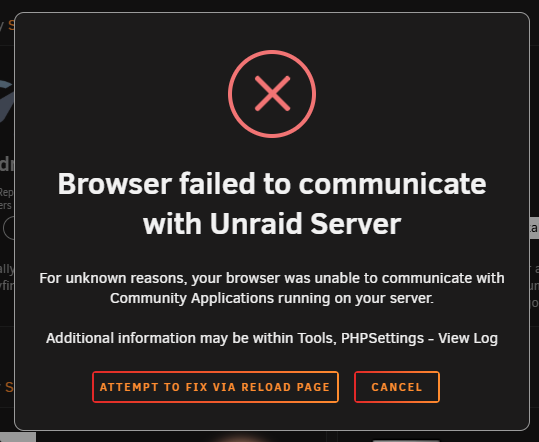
Receiving this error after updating my CA plugin. Anybody seen this? I performed a complete removal and reinstall of the plugin but it just did the same thing.

-
So we don't need to uninstall the current plugin? It'll receive an update to resolve this?


