





xrichnj
Members
-
Joined
-
Last visited
Everything posted by xrichnj
-
glad it worked for you! most containers are setup to be looking for certain paths and ports on the container side, and this cannot be (easily) changed. so unless you really know what youre doing: for ca app docker templates, only change the "host path" and "host port" fields in the template, leave the "container path" and "container port" alone. for compose files, its the same idea. for volumes and ports, set the left side of the " : " to the port and/or path you want to use on unraid, and leave the right side of the " : " alone.
-
i think you modified the wrong side of the : docker-compose syntax is host-path:container-path so the compose.yml is setup to bind-mount: ./cs2-data (on the host, unraid in this case) to /home/steam/cs2-dedicated (in the container) try setting your "volume" in the compose as follows: /mnt/user/appdata/cs2-dedicated:/home/steam/cs2-dedicated and see what you get.
-
if you read a couple of pages back, scolcipitato has abandoned the project, so there will be no "further development" or "fix" from them. follow instructions from VladoPortos to get on the new version of the plugin. my folderview was broken on 7.0.0 until i updated to VladoPortos. still on 7.0.0, so i cant speak to how it will work for you on 7.0.1
-
are you using the VladoPortos version or the scolcipitato version?
-
brief testing on the new update and seems to be working as it should. thanks @dlandon, appreciate you!
-
probably not. it's really nice to be able to see everything that has been deleted at a glance in the log without having to navigate to each individual recycle bin to make sure all the files are ok to remove permanently.
-
unraid-diagnostics-20250215-0837.zip
-
the logging on my recycle bin is broken. been using for years, updated to 7.0.0 shortly after release, been fine. i updated recycle bin recently and noticed that it isnt logging when i delete files. now when i delete a file thru smb, it moves the file to the recycle bin folder (as it should). but nothing shows in the log. when i go delete the file from the recycle bin folder (also thru smb), then it shows in the log. this was never the behavior before, it would show in the log immediately, then after the 5 min interval, would actually show in the recycle bin to be emptied. is this a known issue, or am i missing something? does using exclusive shares have anything to do with logging behavior? share exclusivity and updating recycle bin plugin are the only thing on my server that ive changed recently. thanks!
-
when below your minimum temp setting, the fans run at the fan speed minimum. once it hits above your minimum temperature, it starts applying the curve between your fan speed minimum and fan speed maximum depending on your temps for the settings you posted, your fan logic would be: -run the fans at 1.5% until the CPU hits 20 degrees. -between 20 degrees and 80 degrees, apply and set the fan speed/curve between 1.5% and 75% depending on where the temperature sits between 20 and 80. -any temp past 80, run the fans at 75% (the "fan speed maximum") these are bad settings because your CPU will never run below 20 degrees. my CPU idles in the mid-40 degree range, so I have my low temperature threshold set to 50, so the fans don't bounce around with minor temp changes at idle. it doesn't start applying the curve until it hits 50 degrees (my low temperature threshold), which means the CPU is actually doing something, so it starts ramping the fans up (at 50 degrees)
-
post your fan control page and what temps you're seeing
-
ah ok, that is the discrepancy then. i ditched the midplane and put the tower heatsinks in mine and i can get it to idle at 18% (or even lower if i wanted, really) and be pretty quiet and stay cool.
-
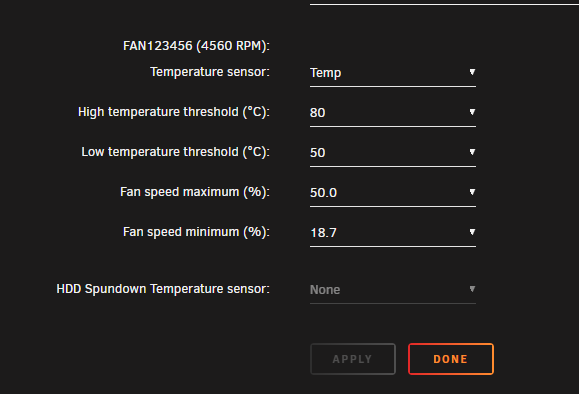
how how it is in the room where your server is? what is "idle" to you? these are my settings (r730xd with 2x 2680v4): my fans have been idle all day (at 18%) and my cpus are in the 44c-47c range. something seems off. do you have the flat, low profile heatsinks or the tower heatsinks?
-
it still polls at the time you set, but only posts to the log if it is actually making a change to the fans, as to not clog up the log with a bunch of redundant non-changes you were below your low temp threshold, so the fans were just running at minimum speed
-
when you are below your "low temperature threshold", your fans will run at the "fan speed minimum" which it appears to be in the log. what are your temps getting up to and its not increasing your fans?
-
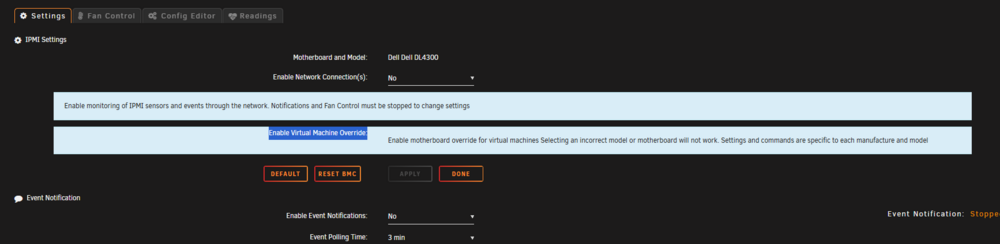
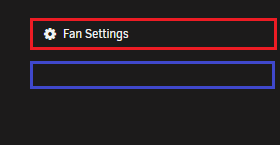
thanks, @SimonF & @spl147. updated to 26c without issue. fan control log looks much better. spundown override lockout working as well. the "Enable Virtual Machine Override:" helptext on the "settings" tabs formatting is kinda borked. it doesnt sit below the title of the field like the rest of the helptexts, it nests the title within the helptext popout. i highlighted it for visibility, its white text on light blue and is barely visible without the highlight. for the "fan settings" helptext, where its placed is not over the "fan settings" title. see attached, it doesnt show that it can be expanded when i hover over red, it does when i hover over blue.
-
still hasn't shown for me yet either. will report when it does and i install!
-
i think the options limiter and the inline text help will enhance the user-friendliness of the interface a lot.
-
for a pending future update? this is not the behavior I experience currently
-
yes that is what i was referring to. i think its a step in the right direction. taking it further, i think not having the "override" or "spundown" values even show (or at least grey-ing the options out) unless you have "hdd temperature" selected as your sensor would certainly have helped me when trying to set it up. if i'm not using hdd temp as the monitored temperature sensor, why give me modifiable options that wont have any effect on how the plugin functions? maybe they can "pop out" when you select an option that uses them, like in the appdata backup plugin when you go from "Use Compression":no to "Use Compression":yes, multicore, it pops out another option to select how many cores to use.
-
i think that would certainly be handy in a lot of use-cases. like discussed on the previous page, i think cleaning up the ui and getting everything properly labeled and documented to make the plugin easier and more intuitive to use for all users is more important than new actual features/functionality (even the ones i really need) at this point.
-
this has been driving me crazy. any fix in the works? been happening ever since i upgraded to 7.0.0 and the newest version of folderview along with it.
-
no this is the script: https://github.com/White-Raven/PowerEdge-shutup/blob/main/fancontrol.sh
-
thank you, i will check back tomorrow!
-
lol if only. i wouldn't even know where to begin.
-
this plugin is not where i need it to be yet. i will certainly be keeping an eye on its progress and development, but the script has served me well for years with basically infinite customizability and no issue. i dont know how, but it also keeps the fans quiet through restarts, which is REALLY useful for me, as a lot of the time i have to do server maintenance is when it is not being used is late at night. with the plugin, as soon as i hit restart the fans go to full blast, which on an r730xd are REALLY loud and would wake up every person (and cat) in my house. i (as well as others in this thread and different threads) would like to get the script working again. not looking to threadjack this plugins support thread, but the other threads were closed and its the only place ive found of people discussing ipmi fan control.


