





clowrym
Members
-
Joined
-
Last visited
Everything posted by clowrym
-
While I do run a couple server's, ive never run into any of these issues, Typically when I have had issue with starting servers, it was either user:group issues of the files within the mount points, or share mapping. Can you post your docker run command? Beyond any glaring issues there, you could also post an issue HERE
-
Did you change the admin password? Should be mc & password if i remember correctly.

-
looks like everything is up to date, but I did have a notification this monring about updating auto update, i guess i'll wait for the next jackett update and see what happens!! thanks for the response!!
-
Having a problem the last few days with Jacket & updates, For some reason after an update, it wont automatically restart. Tried toggling the automatic start button, but doesnt seem to make a difference.
-
I wonder if your issue is related to this? https://github.com/haugene/docker-transmission-openvpn/issues/764
-
I can Help you with setting up the Docker etc, but I've only created the templates, if your having issues that dont relate to docker template settings, you can post HERE. One thing to note, if you arent Using PIA for your provider, you need to change the entries in the "OPENVPN_CONFIG:" variable to suit your providers config file names, they can be found HERE in your providers folder.
-
Is your PUID & PGID set to 0 for a reason? I dont know if it will make a difference, but usually I keep my dockers at PUID=99 AND PGID=100.... thats the only thing that looks a little off to me
-
can you post a screenshot of your docker template settings?
-
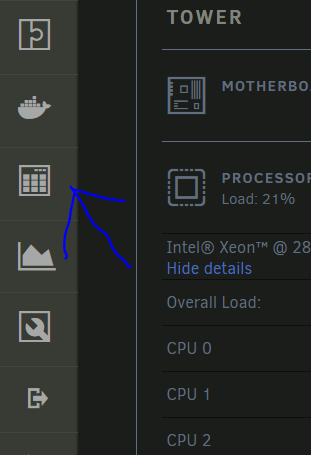
easiest way to to add it through community apps....
-
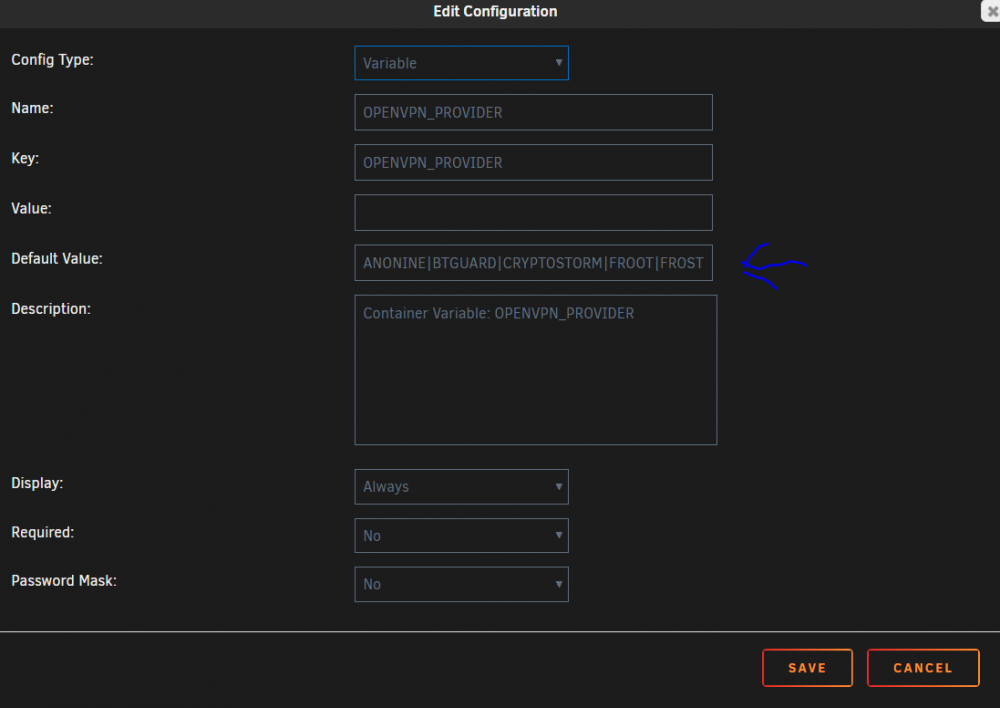
I just updated the template
-
When I set up the template I added all that were available at the time, you can add additional ones at any time here: When I get some time, I will try and add any new ones to the template.
-
just to confirm your trying to access the gui from a 192.168.1.XX ip address?
-
I dont imagine it will make much of a difference, this is an issue I've had since the plugin came out!!
-
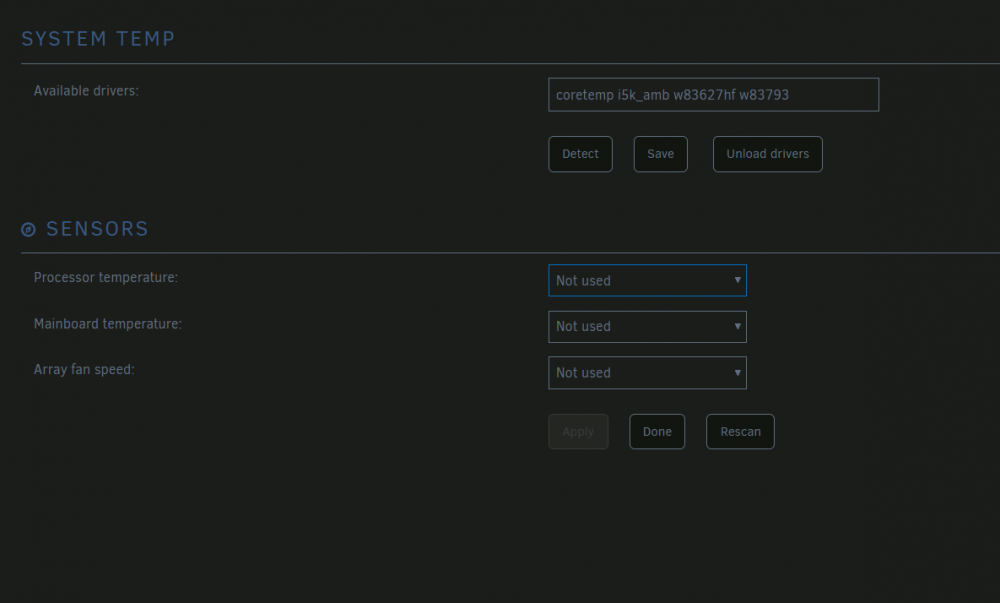
didn't work for me.....no sensors to select
-
I tried deleting both & reinstalling...but ended up still having the same issue
-
Tried manually running the sensors command and seeing what error it returns. I get the following: Error: File /etc/sensors.d/sensors.conf, line 2: Undeclared bus id referenced Error: File /etc/sensors.d/sensors.conf, line 4: Undeclared bus id referenced Error: File /etc/sensors.d/sensors.conf, line 14: Undeclared bus id referenced Error: File /etc/sensors.d/sensors.conf, line 16: Undeclared bus id referenced sensors_init: Can't parse bus name I removed the sensors.comf files and I can then reload the drivers and I can select the Temps I want to see, but as soon as I hit apply, The sensors drop down goes blank again & I get the same error as above if I run the command manually....
-
DId you add your local network properly? ie. 192.168.1.0/24 or whatever local network your using? Also, are you trying to access it from within your network? If not then you have to add whatever network's you want to access it from.
-
make sure "advanced view" is on for your docker template and add --dns 8.8.8.8 to the extra parameters
-
I've been trying to use this plugin for a while on one of my servers I always get the following: Jan 30 11:48:28 Tower kernel: i2c /dev entries driver Jan 30 11:48:33 Tower kernel: i2c i2c-0: found f75373 version: 20 Jan 30 11:48:33 Tower kernel: f75375 0-002d: hwmon_device_register() is deprecated. Please convert the driver to use hwmon_device_register_with_info(). Jan 30 11:48:33 Tower kernel: i5k_amb i5k_amb.0: hwmon_device_register() is deprecated. Please convert the driver to use hwmon_device_register_with_info(). Jan 30 11:48:33 Tower kernel: w83627hf: w83627hf: Found W83627HF chip at 0x290 Jan 30 11:48:33 Tower kernel: w83627hf w83627hf.656: hwmon_device_register() is deprecated. Please convert the driver to use hwmon_device_register_with_info(). Jan 30 11:48:33 Tower kernel: w83793 0-002f: hwmon_device_register() is deprecated. Please convert the driver to use hwmon_device_register_with_info(). Jan 30 11:48:33 Tower kernel: w83793 0-002f: Registered watchdog chardev major 10, minor: 130 If I go and manually try and run sensors I get this after the plugin has finished its detect: Error: File /etc/sensors.d/sensors.conf, line 2: Undeclared bus id referenced Error: File /etc/sensors.d/sensors.conf, line 4: Undeclared bus id referenced Error: File /etc/sensors.d/sensors.conf, line 14: Undeclared bus id referenced Error: File /etc/sensors.d/sensors.conf, line 16: Undeclared bus id referenced sensors_init: Can't parse bus name I have removed, tried commenting out the lines with issues and I can get sensors to work properly at command line, but not in the plugin... Any ideas?
-
no...... I wasn't sure if I removed petersm's plugin if it would affect the UI
-
Downloaded THIS, placed in the /boot/extra folder & added a script to run after start of array. #!/bin/bash cd /boot/extra installpkg openvpn-2.4.6-x86_64-2.txz I tried just adding it to the extra folder and rebooting, but it still installed the older version requiring me to do an installpkg after.....
-
I didint think of this... Done, installed, confirmed working & set up a script to re-install it after reboot.
-
Just upgraded to 6.7.0-rc1, for some reason I can't start my plugin anymore, the following is all the entries I see in the Logs Jan 22 11:19:01 Test ool www[18957]: /usr/local/emhttp/plugins/openvpnserver/scripts/rc.openvpnserver 'start' Jan 22 11:19:01 Test sudo: root : TTY=unknown ; PWD=/usr/local/emhttp ; USER=root ; COMMAND=/usr/sbin/openvpn --writepid /var/run/openvpnserver/openvpnserver.pid --config /mnt/cache/appdata/OpenVPN/openvpnserver.ovpn --script-security 2 --daemon Also found: openvpn: error while loading shared libraries: libcrypto.so.l: cannot open shared object file: No such file or directory
-
Interesting, not sure why those are there, my password is stored in the config file for transmission I didnt create the docker, only the template for unraid, you could post here: https://github.com/haugene/docker-transmission-openvpn
-
Sorry for the late reply.. its been a busy couple weeks at work!! There seems to be an issue with adding multiple local networks in the cell you have above, I tried the same originally when I first made this template. I ended up adding a script to user scripts plugin that runs on server boot & that I run if I force a restart/update on Transmission. I have listed it below.... I know its a work around, but I havent figured out how to allow multiple networks in the docker template..... I use the script below for access loutside of my local network thru the VPN I have set up for my work computer / phone when I am not on ly local network. adjust the ip addresses to suit your network setup!! #!/bin/bash echo adding 10.1.0.0/25 LAN_NETWORK docker exec Transmission_VPN /bin/sh -c "/sbin/ip r a 10.1.0.0/24 via 172.17.0.1 dev eth0" echo Netowrk added exit



