clowrym
Members
-
Joined
-
Last visited
Everything posted by clowrym
-
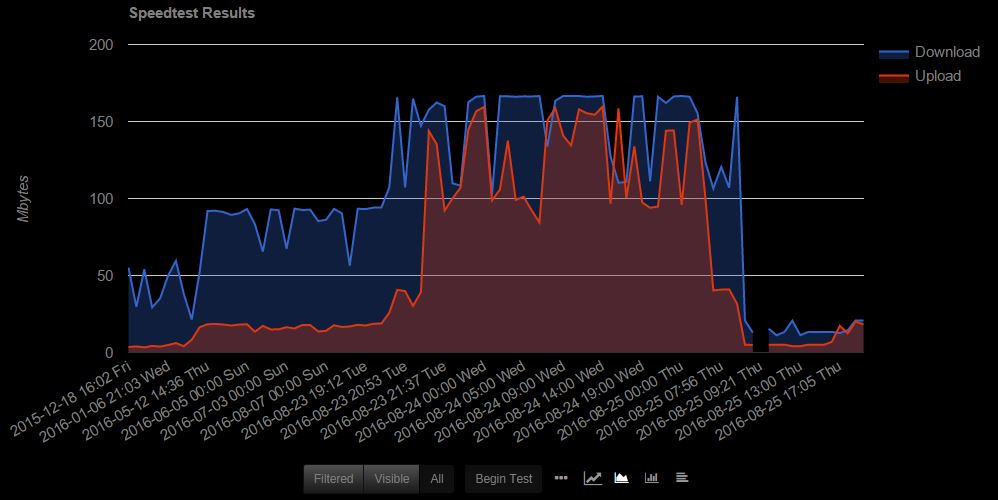
I updated the scripts. I added support for a different script also. The v1.0.2c is a completely different script. It doesn't give the speedtest image results though. Run some manual tests with the different versions and see if there's a difference. Did you upgrade unRAID at all? There was some network problems on previous versions. Also it might indicate a problem with your server's connection or load conditions. Seem to have another issue with 1.02c, I would be expection 150up/down.... I am 6.3.0-rc6 and I do see the speeds I would expect when i look at my transmission downloads
-
So I moved all my current Spigot servers over to MineOS-node, and everything os working. I had to change the PUID/PGID in terminal of all the files manuals before they were visible to MineOS to 1000:1000. I only tried this because looking at the docker log, one of the entries says setting default user mc (1000) & looking at my original MineOS install (none node) all the folders & files were owned by 1000:1000. everything seems to be working now! Seems to me the MineOS-node is a lot more responsive !!
-
Can I edit or change PUID/PGID? I tried adding these values to the Docker & restarting, but folders are generated as root:root still
-
My files are root:root. I get the same error with spigot builds, but I don't know anything about spigot. It all works with standard jars or even forge jars for me. All my current servers are Spigot servers, i'll have to try and figure out the issue!!
-
Just wondering who the ownership of the files created by mineOS should be? mine are root:root & during a spigot build, it never seems to finish?
-
Also something to note, the Docker always shows an update ready?
-
Well, I tried to set one up, but ended with the following error!! BuildTools jar compilation failed Error -17 (EEXIST): /var/games/minecraft/profiles/spigot_1.11.2
-
I am currently using MineOS and would like to switch to mineOS-node, is just as simple as adding mineOS-node & adding the same paths/ports I currently have for my servers to keep my current world's etc?
-
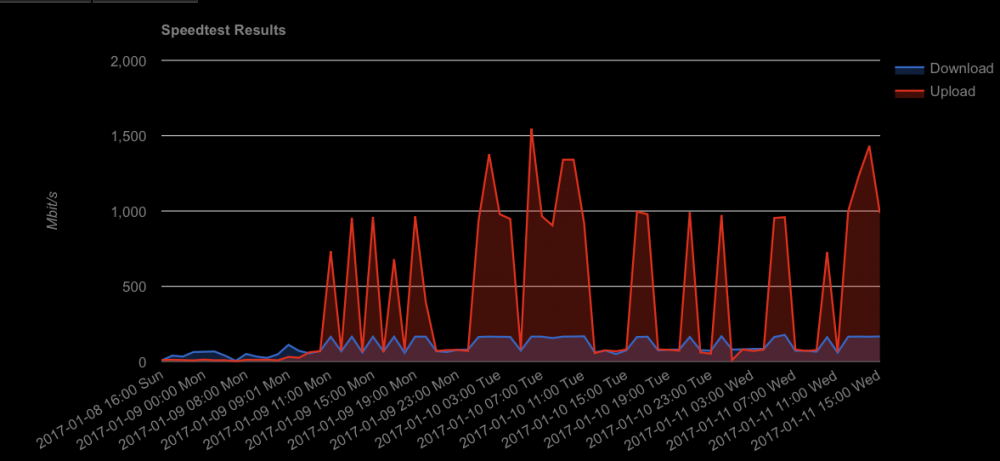
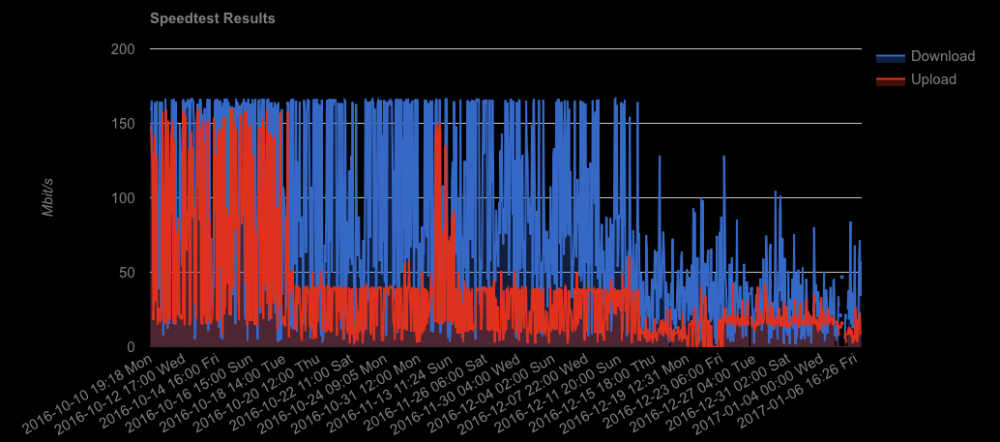
SO I've been testing speed on 2 of my servers for a couple months, results in the beginning were right where I would expect them. Since november though, there seems to be an issue. I have 150u/150d package & on other wired computers in the house I consistently get results I would expect. On my unpaid servers I get substantially less. Looking at the dates, I can't find any correlation between the dates results changed & any subtantial updates to unpaid, or plugins, so I can't seem to figure out what would be causing these results!! Any Idea's? Has anyone else been tracking thats noticed anything similar?
-
Update: I figured it out through Trial and error... Actually quite easy, I also updated my java as well! I'm having some issues with a very jumpy server & skipped Frames when getting a far distance away from the initial game spawn point & was wondering if there is a way to add additional java settings when starting the server? is this what the "Jarfile arguments" section is for when creating a profile? I was reading this post: http://www.minecraftforum.net/forums/archive/alpha/alpha-survival-multiplayer/823328-making-your-server-lag-less-by-tuning-java Which noted adding the following commands to utilize more processor Cores: -XX:+UseConcMarkSweepGC -XX:+UseParNewGC -XX:+CMSIncrementalPacing -XX:ParallelGCThreads=2 -XX:+AggressiveOpts Is it possible to update the Minecraft version? I see a few people have noted its fairly easy & one post says to create a new server, but is it possible to keep the Current world when creating a new server?
-
So an update on this, every couple days I get the same SYN flooding error in the syslog, at which point the OpenVPN plgin page becomes very slow, or unresponsive. Usually have to reboot the server to get any access. At which point openVPN plugin sometimes shows a wan IP, sometimes its blank.
-
logged in this morning using the Dynamic IP (75.*.*.*) OpenVPN showed the Dynamic IP, ran the commands you noted, it came back with my Static IP (205.*.*.*), after running the command's, refreshing the Page it now shows the proper Static Wan IP. I was also getting the following error in my syslog: Nov 5 21:20:14 Poweredge kernel: TCP: request_sock_TCP: Possible SYN flooding on port 1194. Sending cookies. Check SNMP counters. when I was having issues connecting last night, so I don't really know if the different wan IP showing in the openVPN page was really the problem. It seems to be working for now, I'll monitor and see what happens.
-
I have a Dual wan connection with one Static & one Dynamic IP. Currently the OpenVPN server is showing the Dynamic IP as the wan IP, I have tried to set the server to the static IP, but the wan ip shown on the server setting page never changes & i can't seem to connect on the static ip. Where can I change that Static IP, I have tried stoping & restarting the OpenVPN server, but the IP either shows as blank, or as the dynamic, i can't see to get the static one to show up.... Any Idea's?
-
I have a dual Wan connection with a Router set to load balance, I also have my speedtest plugin set to run a speedtest every hour. When looking at the history there is no indication which wan the speedtest is completed on. Is this something that can be added?
-
Local Appears when someone on your internal network uses an app like PHT to access your sevrer locally without being signed into the app. I believe the newer app's like OpenPHT or plex media player fix this issue by forcing sign-in before seeing local servers. Or at least they do in my set up.
-
The bridge was the issue, Once I shut down the VM & turned off the bridge, everything works as expected connecting to the test server.
-
Actually, that is one difference between my 2 servers, the test server does have bridging enabled for a VM I had set up. I'll turn it off & see if it makes a difference.
-
I have a bridge enabled as I have docker running on both. THere are 2 nic's on each server, but only 1 is used & bonding is turned off.
-
I did, not exactly sure what it said, I have multiple unraid servers, so I moved it to a different server & now have access to my full network. I'm not sure what is wrong with the networking on my test server, but as I use it for testing various things prior to adding them to my Main server, I could have made any number of changes that are interfering with the connection. Its odd, looking at the routing on Unraid & windows etc. it looks identical on both servers. I may have to start my test server from Scratch and then try again see if it fixes the issue.
-
Ive tried setting 192.168.0.0 & 10.8.0.0, neither make a difference. I am running 6.3.0-rc1
-
do you have the server IP set as default?
-
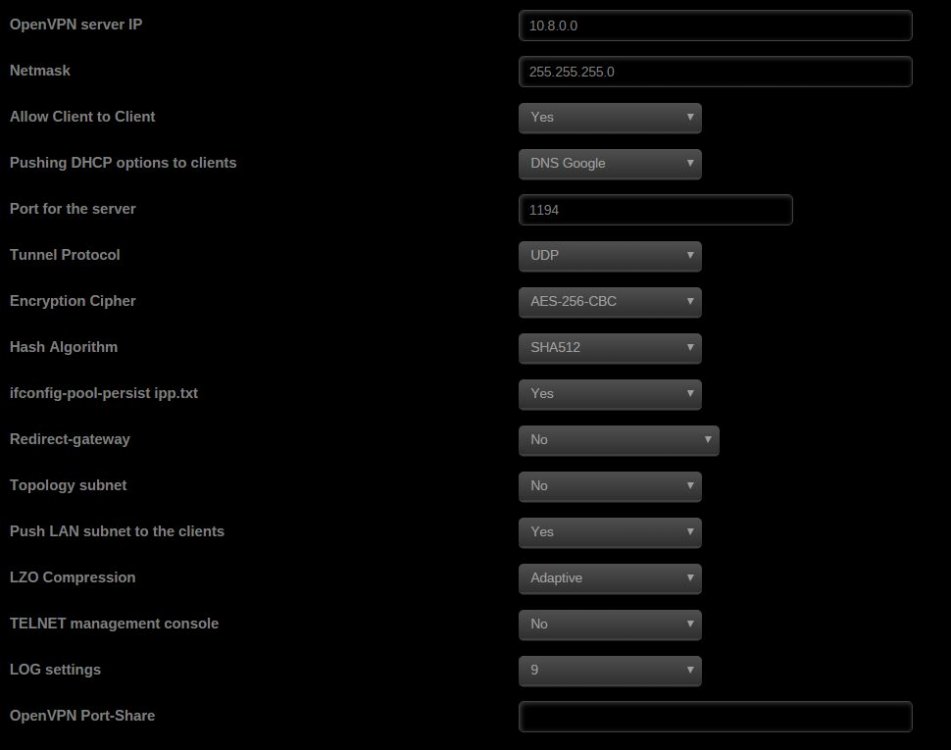
I started out with Default settings, Then tried a number of changes once I only had access to only the Machine running the VPN server... Current settings attached
-
Just setting up openVPN on my server for the first time (First time for any VPN for that Matter). Should I be able to see all of my home network once connected? Or only the server I'm connected to? Currently I can only see the Server & my printer IP when I scan using Angry scanner
-
seems to be back to normal all of the sudden!
-
You can see the difference below