





Android_18
Members
-
Joined
-
Last visited
Everything posted by Android_18
-
Thank you so much for this! Are containers that are set up with this able to advertise as exit nodes? This is a feature I would really like to use if possible.
-
It may be a bug but you can get around it by creating an xml template of your composes in this folder “/boot/config/plugins/dockerMan/templates-user”. Then just delete your compose and create the container again from your template. Just give ChatGPT an xml template for a container that already exists and give it your docker compose and tell it to create the template, unless you are comfortable creating your own xml template.
-
So I ended up getting this to work in a hacky way. I manually created an xml template in “/boot/config/plugins/dockerMan/templates-user” for any containers that I created via docker compose. Then in docker I selected “add container” and selected the template for my docker compose that I just created in the templates-user folder. I hit apply and it failed as it should, after it failed it forced dockerman to recognize the xml template as belonging to an active container. Once I went back into docker my container created via docker compose is now properly group with my other containers.
-
Are containers that are created via unraid docker compose supposed to be able to be grouped into folders? I have 1 container that I made via unraid docker compose and I assigned it to a folder and the folder shows the green button that it’s in that group but the container isn’t actually grouped.
-
I just updated to unraid 7.1.2 and was greeted by folderview not working. i came to this thread and installed beta and so far everything seems to be working. I haven't dived deep into it but at first glance i can launch my webui's now and edit folders. Will this be available in CA?
-
I am using Network UPS Tools (NUT) for UNRAID
-
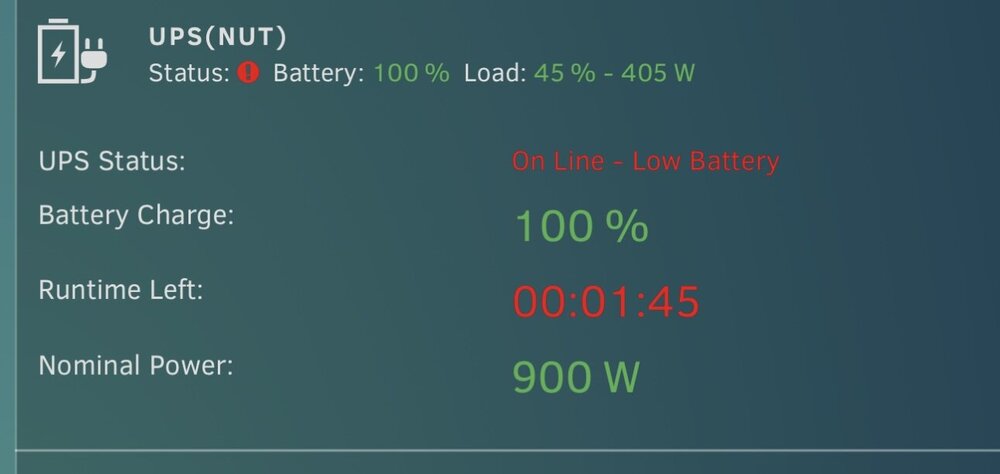
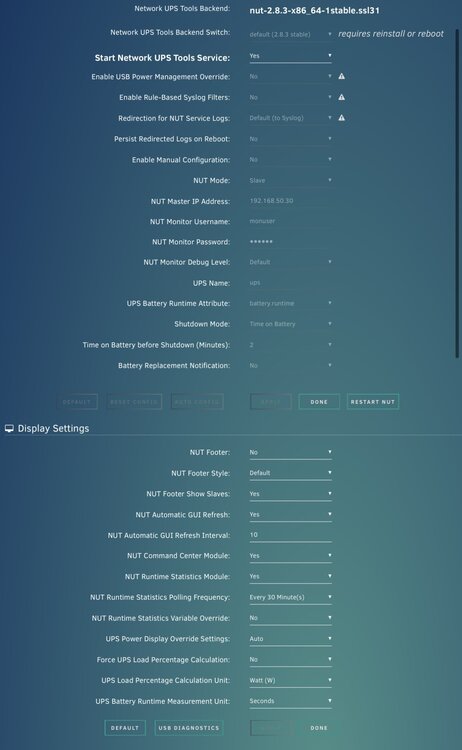
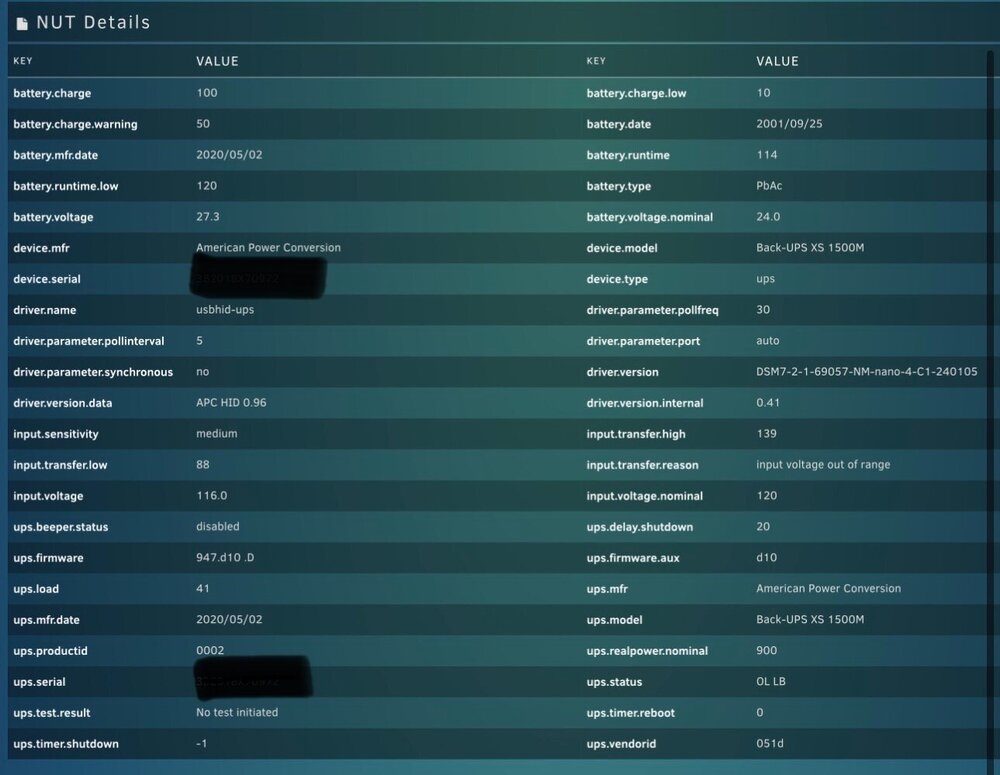
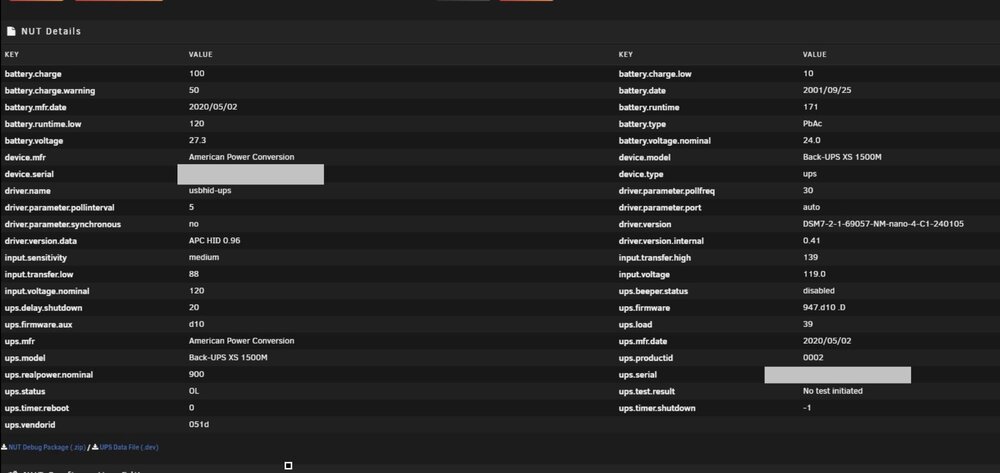
I have an APC UPS 1500VA connected to my synology nas properly, synology correctly reports the status of my UPS. I set the synology as the UPS server and added the ip of unraid to it and connected unraid to the UPS server. In unraid it does shows that’s its online and battery charge is 100% but incorrectly shows “low battery” and that there is only “1:45 min runtime left”.
-
ok I enabled syslog server and the issue happened again. I did not reboot but I did try to stop the container and got the same error that it couldn't be stopped. If you need me to force a reboot and post diagnostic again please let me know. unraid-r720xd-diagnostics-20250409-0010.zip
-
So this just happened again and I'm having to do another parity check. i noticed in the unraid logs a lot of "cifs: vfs: send error in write = -11" errors. i have a smb share to a local drive on my network that the docker client I have been having problems with is downloading to when this weird state on my server happens. I have attached another diagnostic file when this happened after i forced a restart with idrac. unraid-r720xd-diagnostics-20250407-0051.zip
-
I have an ups connected to my synology that acts as an ups server and I have unraid using it and unraid never reports correct battery info. The ups battery is only a few months old and completely full but unraid always reports it as running low for some reason while synology reports it as full. My docker torrent client doesn’t use Tailscale, I just have it setup to access my server remotely. there is nothing in the container logs that show any errors. Actually now that I look at it the only thing in the logs for the container are from when it initially starts and nothing after. Is that normal or is there a way to get it to log more? I have 2 torrent containers and the other one hasn’t ever had any issues at all, both running the same client and version. I should not that the problematic container has more activity than the other one. I’m not sure if “leaving promiscuous mode” is normal, I don’t not know what that even is unfortunately. I did update unraid to 7.0.1 since posting and the problem container has been running without errors since, can just be a coincidence but worth noting.
-
The past 2 weeks I have been experiencing a very worrisome issue where my qbitorrent container appears to be running but is stuck in a state where it actually isn't doing anything. I cannot stop, restart, kill, or remove the container. All attempts just say that the action cannot be performed. The other scarier issue is that when this 1 container acts up, I cannot stop or restart the array at all. Unraid gets into a loop where it constantly tries to unmount the array but cannot. I have to reboot the entire server and perform a parity check, I have had to do this at least 3 times in the past 2 weeks. When parity check completes I never have any errors that need to be corrected. I believe these 2 issues are linked together but I do not know how and why this is happening. I have attached my diagnostic file from when I was trying to stop the array but couldn't. If another diagnostic report is needed I can provide another. I would appreciate any help I could get, thank you! unraid-r720xd-diagnostics-20250405-1314.zip
-
I just wanted to share this since it's helped me and I thought others might find it useful. This script checks for when parity check is running and automatically sets the fan speed to 60% then automatically reverts back to automatic control when parity check ends. You can set the speed to whatever you want I just find 60% works well for my specific circumstances. This was made with chatgpt so please excuse if there is a better way of doing this, I'd appreciate any feedback if it could be improved. #!/bin/bash # Configuration IPMI_USER="enter username" # IPMI username IPMI_PASS='enter password' # IPMI password IPMI_IP="enter ip of server" # IPMI IP address FAN_SPEED=60 # Desired fan speed percentage (60%), only used to display fan speed % CHECK_INTERVAL=60 # Time (in seconds) between checks LOG_FILE="/mnt/user/appdata/scripts/fan_control.log" # Commands to enable manual fan control, set fan speed, and revert to automatic ENABLE_MANUAL_FAN_CMD="ipmitool -I lanplus -H $IPMI_IP -U $IPMI_USER -P $IPMI_PASS raw 0x30 0x30 0x01 0x00" SET_FAN_SPEED_CMD="ipmitool -I lanplus -H $IPMI_IP -U $IPMI_USER -P $IPMI_PASS raw 0x30 0x30 0x02 0xff 0x3C" SET_AUTO_FAN_CMD="ipmitool -I lanplus -H $IPMI_IP -U $IPMI_USER -P $IPMI_PASS raw 0x30 0x30 0x01 0x01" # Function to log events with a timestamp log_event() { echo "$(date '+%Y-%m-%d %H:%M:%S') - $1" >> $LOG_FILE } # Function to check if a parity check is running based on mdResync is_parity_check_running() { mdResync=$(mdcmd status | grep -oP 'mdResync=\K[0-9]+') if [[ "$mdResync" -gt 0 ]]; then return 0 # Parity check is running else return 1 # Parity check is not running fi } # Main script loop log_event "Starting IPMI Fan Control Script for Parity Check..." FAN_SPEED_SET=false MANUAL_CONTROL_ENABLED=false while true; do if is_parity_check_running; then # If a parity check is running if [ "$FAN_SPEED_SET" = false ]; then # Enable manual fan control only once when parity check starts if [ "$MANUAL_CONTROL_ENABLED" = false ]; then log_event "Enabling manual fan control..." eval $ENABLE_MANUAL_FAN_CMD MANUAL_CONTROL_ENABLED=true fi # Set fan speed to 60% once when parity check starts log_event "Parity check detected. Setting fan speed to ${FAN_SPEED}%. " eval $SET_FAN_SPEED_CMD FAN_SPEED_SET=true fi else # If no parity check is running if [ "$FAN_SPEED_SET" = true ]; then # Revert to automatic fan control after parity check completes log_event "Parity check completed. Reverting fan control to automatic." eval $SET_AUTO_FAN_CMD FAN_SPEED_SET=false MANUAL_CONTROL_ENABLED=false fi fi sleep $CHECK_INTERVAL done
-
I understand I am asking regarding plex but this is more about mounting a synology share to unraid and getting real time inotify regardless of using plex or any other application. So ignoring plex, is there any way of mounting a synology shared folder within unraid that allows for inotify?
-
I host plex on my unraid server but have most of my media on a synology server. I have added my synology folder via smb to unraid and plex is able to properly view it etc… The problem I am having is that when I update content on synology plex is not able to detect it even with the standard “scan my library automatically” and “run partial scan when changes are detected”. I have tried mounting synology via the following methods with no luck: smb nfs sshfs rclone ftp/sftp Is it just not possible to have plex detect real time changes on unraid when using a remotely mounted drive like synology?
-
I accidentally named a script with a % sign in the title and I am unable to edit or remove the script. How can I rename or remove it so I can add it again without the % sign? Edit: I was able to locate the scripts here: cd /boot/config/plugins/user.scripts/scripts/ I then deleted the problem folder and refreshed the user script plugin and everything works as normal now.
-
It’s just for some reason after unraid initially shuts down when it’s supposed to during a power outage, it’s like synology is continuing to send a shutdown signal to unraid that persists indefinitely until I shut off the synology ups server. When I shut down the ups server on synology then unraid can reboot and I can turn back on the ups server.
-
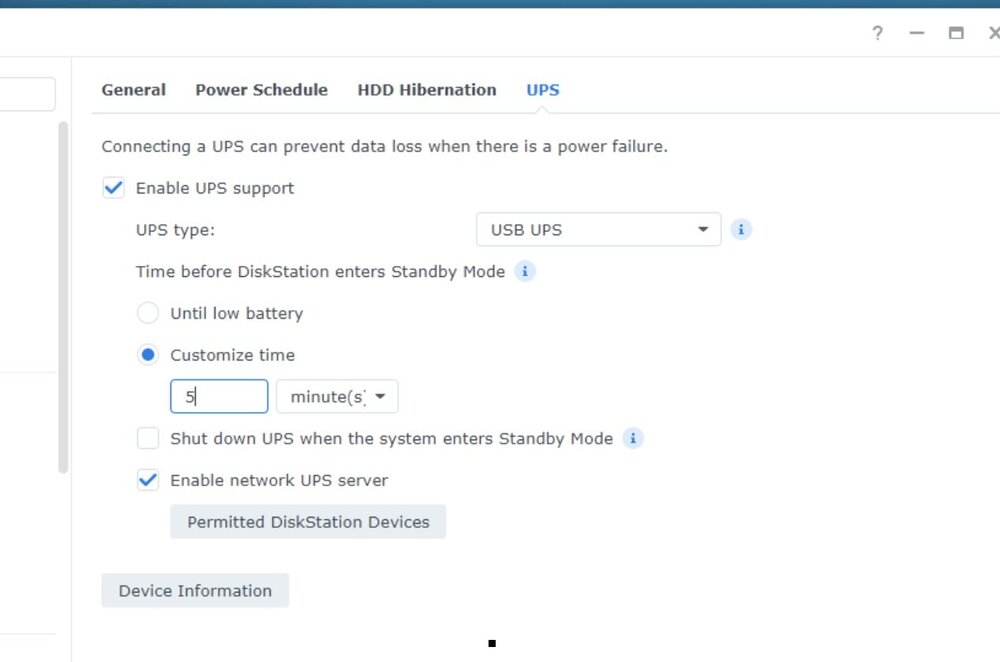
I added the unraid up to my synology devices in the ups section and have the setting applied below. Here is an image in unraid showing that it does see my synology ups and can read the information from the ups. So they are definitely linked.
-
The battery it fine, I don’t ever let it drain. I set unraid to shut down after 2 minutes of no power so it’s not a battery issue. From watch idrac on my server when it attempts to boot I recall seeing an entry right before the server shuts down about receiving a power down signal from synology even when power had been restored.
-
I have an apc 1500 ups that I have both my synology and unraid server plugged into. The usb/ethernet connection from the ups is to my synology and synology acts as the server. I have already connected unraid to my synology ups server and verified within unraid that it does see it and I can view all the information regarding my ups within unraid. I am having an issue where when there is a power outage and unraid shuts down after the set period of time I specified, when I boot unraid back up it shuts back down because it receives some type of flag from synology to shut down again. I have to disable the synology ups server then restart unraid for it to turn on. Is this expected behavior or have I configured something incorrectly?
-
I need to share my plex folder that I house on windows with unraid. I’ve read through the forums and it’s stated that the unassigned drives plugin can do this however I am not quite sure how to accomplish this. When I try to do a smb share in unraid I can see my pc listed in the available servers but when I search for shares for it nothing comes up. On windows for the specific plex folder I want to share I right clicked on the folder then clicked “give access to” and set my permissions but am unable to see this share anywhere. I would appreciate and guidance anyone could offer, thank you for your time!
-
I apologize I don't think I understood that part correctly, what is the M service that I should disable before changing the system share as well?
-
Thank you so much! I am running the mover right now, do I have to copy to docker image file to the cache as well or is it fine to keep it still on the array?
-
I currently have my appdata stored on my array and just installed 2 m.2 drives into a newly created cache pool. I want to transfer my current appdata to this cache pool so I can run all of my docker containers off of the m.2 cache pool. I can see in my appdata share that I can set "Primary storage (for new files and folders)" to cache but will this also apply to my current appdata folders for my current containers? If not, how can I move my existing docker folders inside appdata to my cache drive? I would appreciate any help and guidance I can get. Thank you!
-
I have successfully set up sonarr and gluetun and want sonarr(and other containers) to run through my gluetun container. When trying to set sonarr to use gluetun I do not see the "tun0" vpn interface under network type that was setup in gluetun. I viewed the gluetun log and see that it did connect to my specified vpn region so I know gluetun is working. I apologize if I am misunderstanding the correct process, how do I make sure sonarr(or any container) runs through gluetun while still allowing me to access my containers webui. Thank you for your help I really appreciate it.
-
My server has been running great for about over a year then all of a sudden when I logged onto my computer to access my shared folder it is being displayed as disconnected. I log into unraid via the web browser and my server and unraid appear to be running fine however in unraid my share is not listed. I restart my server and once it loads I can access my share on the network again. After an undetermined amount amount of time my shares disconnect again and I have to keep restarting my server. I have attached my diagnostic log as I am getting numerous error regarding being unable to mount my share. unraid-r720xd-diagnostics-20240902-1650.zip


