





Drew6274
Members
-
Joined
-
Last visited
-
Thank you so much for making this! This is tool is absolutely critical. I can't believe this isn't built in to Unraid. Let me know if there is anyway I can donate.
-
I believe the plan is for them to upgrade to kernel 6.12 (lts) once zfs supports it.
-
Hey. Looking for some advice/guidance on how to set the network settings on my Unraid server. Ideally, I would like for this to all be done on a single nic, but if not possible I can add additional to my server. My network is 192.168.1.0/24 I would like for my server to have the IP address 192.168.1.21 (this is already done though a dhcp exception) I would like for my each of my docker containers to have their own IP on the 192.168.1.0/24 network I would for each of my VMs to have their own IP on the 192.168.1.0/24 network So Server, VMs, and Docker containers all have their own IPs but on the same network For VMs I can just make eth0 a bridge and then use the br0 interface for the VMs I don't know how to do this for the docker containers and I also don't know if I can use the same nic I don't know if macvlan or ipvlan settings come into play with this either. Any help or advice would be greatly appreciated.
-
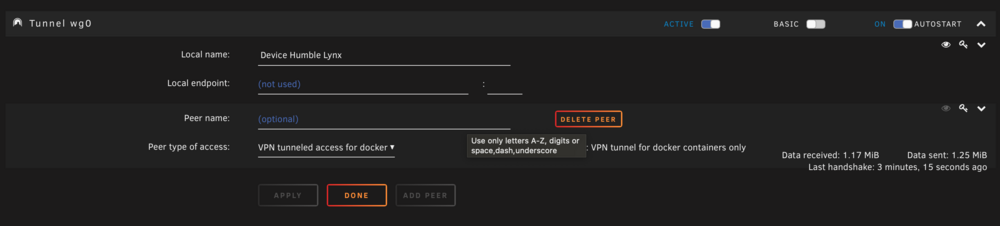
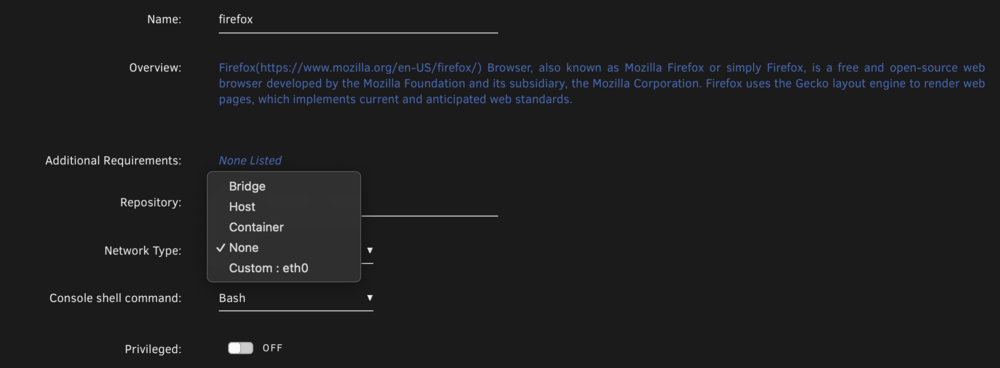
I recently upgraded to 7.0.0-beta.4. Before upgrading I was able to choose wg0 as the network for my docker containers but that option is no longer there. wg0 is still active and appears to be working. Any advice of where I may have gone wrong? I did delete all my containers and changer the storage driver to overlay2 since my cache is on zfs mirrors.
-
Hey, I just saw the update notes. Do you have more details on "Malicious content in SweetAlert2 package" ?
-
There is a mergerfs plugin for unraid.
-
Out of the box, no. Paragon makes software to allow you to read ext, xfs, and btrfs on Windows. I don't have any experience with it though so I can't really recommend it. You could mount them in Linux though to do your file transfer.
-
You should have no problem mounting the data drives on another OS as long as the "other OS" supports the filesystem used on the disks.
-
If you are purchasing all new matching sized drives I would not utilize the unraid array. I don't know too much about your needs the but the simplest solution would be to make a RAIDZ2 ZFS pool using all 8 drives. RAIDZ2 is the RAID6 equivalent in ZFS. Not only will this provide much better performance than what you would get on the unraid array it will also allow you to take full advantage of all of the ZFS features.
-
Ah, that makes sense, because this is what I was trying last time as well. I can work around this. Thanks!
-
I haven't personally had to this upgrade but this is the advice that was posted on reddit: UnRaid —UPDATE—DO THIS ALWAYS!!! make a full backup of the boot usb prior to performing the update by going to MAIN > Flash > Flash backup take a screenshot of the main page where it shows what drive is in what slot in the array and pools optionally do a appdata backup and backing up of your virtual machines using the appdata backup plugin and the vmbackup plugin install fix common problems plugin as well as fully update all plugins that are installed go to tools > upgrade assistant and run tests (stable branch) and address anything shown in red shut off all docker containers and then go to settings > docker and turn enable docker to no to effectively turning off docker shut off all virtual machines and then go to settings > vm manager and turn enable vms to no to effectively turning off vm service go to settings > disk settings and turn enable auto start to no to stop the array from auto turning on at start of unraid optional but suggest unless you know you need ipv6: go to settings > network settings and change network protocol to ipv4 only as 6.12 has been having problems with ipv6 for quite a few people stop the array on the main page near the bottom and confirm it says array stopped in the bottom taskbar perform the upgrade at tools > update os and reboot when it says to reboot, if you have any driver plugins wait like 5 minutes before rebooting after the upgrade finishes once it reboots, access unraid ui again optional but suggested: go to settings > global share settings and set permit exclusive shares to yes start the array on the main page near the bottom go to shares page and look over each shares settings to make sure they are set how you want them to be go to settings > docker and click advanced view, and change Docker custom network type to ipvlan from macvlan and apply the setting change or confirm it's already set to ipvlan in settings > docker turn enable docker to yes to effectively start docker service, then confirm on the docker page that dockers are booting up or wait until they all boot your choice go to settings > vm manager and turn enable vms to yes to effectively start the vm service, then confirm on the vms page that a vm can start (if you have vms that is) go to settings > disk settings and turn enable auto start back to yes so the array autostarts on boot (only if you wish this to be the case) enjoy the new version
-
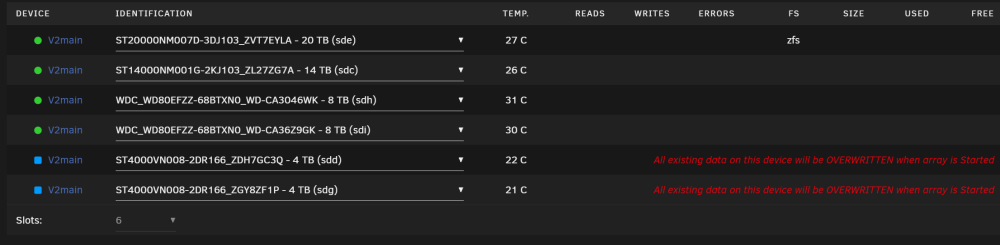
It will not let me start the array with the changes. With this setup in the screen shot when I try to start it, I get an error message that says "Wrong Pool State v2main - new device too small"
 I have used those external USB enclosures before on Windows with Drivepool to pool to make one combine disk. I had good results with them. It really all depends on the enclosure. Drivepool is very straightforward to use. It is well worth the money. If you are not interested in paying you can always use mergerfs on Linux. I think there is an app for it on Unraid but I don't have any experience with it.Do you want the 5 disks to just be individual disks that you back up to? If so, you should be able to use the unassigned device plugin to mount the disk(s) and then use a backup application or sync to transfer the data over to the drives.






